


New Kaspersky 2020 English available
- Thread starter Willians
- Start date
You are using an out of date browser. It may not display this or other websites correctly.
You should upgrade or use an alternative browser.
You should upgrade or use an alternative browser.

- Apr 28, 2015
- 9,386
- 1
- 84,789
- 8,389
This is final (online installer), but still not available for all country regions nor in the rest of languages:
Also KFA and KSCloud Free not available yet...
Also KFA and KSCloud Free not available yet...
English please
This is final (online installer), but still not available for all country regions nor in the rest of languages:
Thank you

- Apr 28, 2015
- 9,386
- 1
- 84,789
- 8,389
A trick to install KFA2020 from KTS2020 full installer in Russian, similar to the trick for KFA2019 last year:
Как установить Антивирус Kaspersky Free 2020 уже сейчас (Russian)
Как установить Антивирус Kaspersky Free 2020 уже сейчас (Russian)

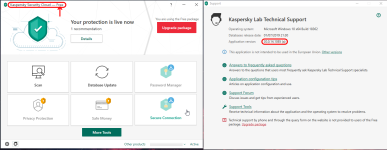
I installed the SAAS package over my previous KSC Free installation and it still calls itself "Kaspersky Security Cloud - Free".This is final (online installer), but still not available for all country regions nor in the rest of languages:
Also KFA and KSCloud Free not available yet...
Last edited:

Still in negotiations with Kaspersky support regarding the inability to install Firefox extensions.
"
Dear customer,
We would like to thank you for the information you have submitted and for your continuous cooperation.
We have forwarded the data you have provided us to our experts in Moscow HQ.
Your request is now being processed. Please wait for our reply. "
Turned out to be more complicated that I thought it would be.
"
Dear customer,
We would like to thank you for the information you have submitted and for your continuous cooperation.
We have forwarded the data you have provided us to our experts in Moscow HQ.
Your request is now being processed. Please wait for our reply. "
Turned out to be more complicated that I thought it would be.
I found this version of Kaspersky internet security 2020 in several languages gives you the choice to choose between them this es-mx

Kis 2020 version seems to have, up lifted advanced version of hardware virtualization.
It straightly said H. V is not supported by my PC and I ignored it.
Though, HV feature do exist a new option below says to use advanced features of H.V under additional (KSN) settings.
W 8,8.1,10 are supported by this feature!
It straightly said H. V is not supported by my PC and I ignored it.
Though, HV feature do exist a new option below says to use advanced features of H.V under additional (KSN) settings.
W 8,8.1,10 are supported by this feature!


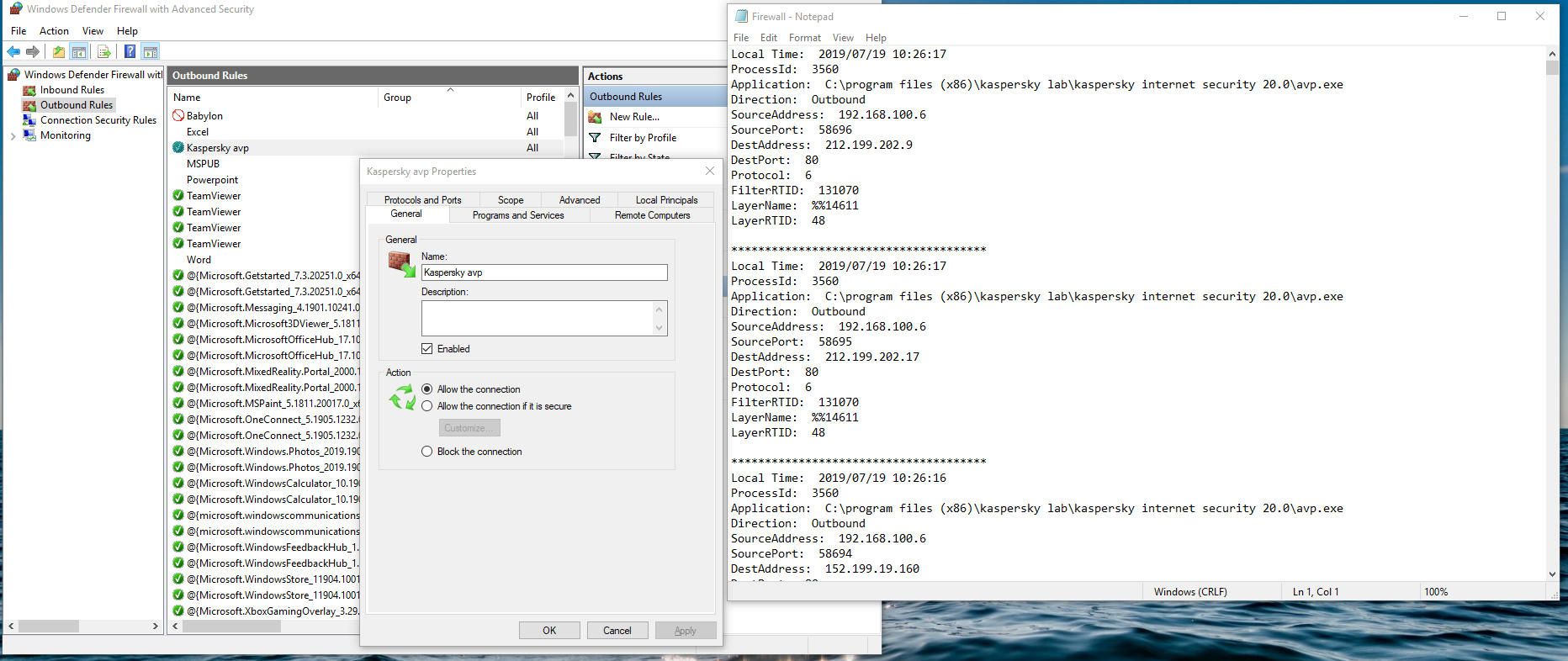
Windows firewall is blocking KFA. I made an exception but it is still blocked. See screenshot. The log on the right is from @Andy Ful FirewallHardening tool. AFAIK this tool takes data from Windows Event logs.

Gandalf_The_Grey
Level 85
Verified
Honorary Member
Top Poster
Content Creator
Well-known
Forum Veteran
I saw the same blocks when using KFA or KSC Free.Windows firewall is blocking KFA. I made an exception but it is still blocked. See screenshot. The log on the right is from @Andy Ful FirewallHardening tool. AFAIK this tool takes data from Windows Event logs.
View attachment 217095
Posted it in the Hard Configurator topic, but it was no block caused by Hard Configurator or FirewallHardening.
Don't know what to do about it.
Right. It is Windows firewall that does it. However, after trying a few times, I see that it is only blocked for a second or two, right after system startup. KSN seems to work, and updating seems to work. So maybe it's no big deal? @harlan4096 what is your take on the issue?it was no block caused by Hard Configurator or FirewallHardening
- Apr 28, 2015
- 9,386
- 1
- 84,789
- 8,389
I have no chance now to check the issue with any KFA, now not in my desktop + my VMs, and in this lap I'm testing KTS2021 beta...
I don't know the cause, but maybe something related to this:

I don't know the cause, but maybe something related to this:
- Apr 18, 2016
- 3,676
- 28,872
- 4,599
I contacted Kaspersky supporter via email and a real Kaspersky expert (a real person, not a bot) replied my and asked for a full GSI
I submitted to him and he said Kaspersky would address the problem I had
The problem was so serious that I was unable to open Kaspersky GUI (avpui.exe) with .net framework-related error => Kaspersky 2020 is completely unusable in my PC
the problem doesn't exist in 2019 patch F but my browser was super super laggy on patch F. Immediately uninstalled
I submitted to him and he said Kaspersky would address the problem I had
The problem was so serious that I was unable to open Kaspersky GUI (avpui.exe) with .net framework-related error => Kaspersky 2020 is completely unusable in my PC
the problem doesn't exist in 2019 patch F but my browser was super super laggy on patch F. Immediately uninstalled


Stupid to ask, but did you disable script injection on browser + ''limit bandwith for data savings''I contacted Kaspersky supporter via email and a real Kaspersky expert (a real person, not a bot) replied my and asked for a full GSI
I submitted to him and he said Kaspersky would address the problem I had
The problem was so serious that I was unable to open Kaspersky GUI (avpui.exe) with .net framework-related error => Kaspersky 2020 is completely unusable in my PC
the problem doesn't exist in 2019 patch F but my browser was super super laggy on patch F. Immediately uninstalled
- Apr 18, 2016
- 3,676
- 28,872
- 4,599
I did everything I can but still very laggyStupid to ask, but did you disable script injection on browser + ''limit bandwith for data savings''
I tried all options in web antivirus and network except disabling https scanning
I didn't have this issue priod to patch f, on my old HDD. Now I have SSD, it's very noticeable
when I opened a link in a new tab, browser paused for 2-5 seconds before I could interact with it
Yeah i thought you have already tried pretty much everything...for me there is no any difference in browsing speed, but im living with suberb pc/internetI did everything I can but still very laggy
I tried all options in web antivirus and network except disabling https scanning
I didn't have this issue priod to patch f, on my old HDD. Now I have SSD, it's very noticeable
when I opened a link in a new tab, browser paused for 2-5 seconds before I could interact with it
Atleast kaspersky wont inject palemoon, if you want to keep using kaspersky i dont think it will affect that at all, what i have been using palemoon as secondary browser for a time with kaspersky
KFA 20 is very nervous about internet connections. I get repeated prompts asking me if MS Outlook should be allowed to connect. And when I was trying to troubleshoot a connectivity issue, the prompts were so constant that I couldn't work.
Back to tweaked Windows Defender.
Back to tweaked Windows Defender.
Doesnt sound very promisingKFA 20 is very nervous about internet connections. I get repeated prompts asking me if MS Outlook should be allowed to connect. And when I was trying to troubleshoot a connectivity issue, the prompts were so constant that I couldn't work.
Back to tweaked Windows Defender.
 I just hate the injection on browsers that every antivirus does, and still they push the web extension as bloat after all that
I guess were in same boat now, time for uninstall and windows defender + configuredefender+ OSA for me
I always tend to clean install after i swap antivirus, but now i really cba :emoji_disappointed:
I was talking about something else, not the injection into browsers, that is standard for 3rd party AVs. I was talking about what seems to me a new feature, at least I haven't encountered it yet. It monitors network connections quite closely. I like the idea in theory, except that in practice, it drove me crazy.Doesnt sound very promising
I guess were in same boat now, time for uninstall and windows defender + configuredefender+ OSA for me
I always tend to clean install after i swap antivirus, but now i really cba :emoji_disappointed:
You may also like...
-

-
-
 New Update Microsoft Finally Releases the November Week D Preview Update for Windows 11
- Started by Gandalf_The_Grey
- Replies: 1
-
New Update Thunderbird Pro and Thundermail announced: what you need to know
- Started by Gandalf_The_Grey
- Replies: 7
