@128BPM, do you have the Intel Rapid Storage running on your system?
Hi AtlBo,
Yes i have it. Then, it's an FP?


Open MalwareTips from your Home Screen or desktop. Follow discussions, find answers and pick up where you left off.
If you cannot find an install option, update your browser or use its bookmark option to keep MalwareTips close.
After installation, open the app and sign in. Enable push notifications in Preferences if you want alerts. On iPhone and iPad, push requires a Home Screen web app and iOS or iPadOS 16.4 or later.
Sign in to manage notificationsInstallation is optional. Your notification settings stay under your control.
@128BPM, do you have the Intel Rapid Storage running on your system?


However I searched the .tmp file on the disk and it does not exist, do you know why?

I can confirm this (fwiw, no alert w/Firefox)False positive with the latest version and Sticky Password.
@128BPM...here is an example of the kind of exploit that can use this same combination chain csc.exe->cvtres.exe in case you are interested to know a little bit more...
.NET Framework zero day Vulnerability (CVE-2017-8759) - Sequretek


FP's with IDM not fixed and there's a problem with notification on multiple alerts at the same time only one notification alert appears, the rest alerts can only be seen in log file.All reported FPs should be fixed.
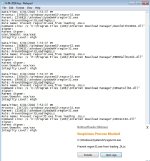
FP's with IDM not fixed and there's a problem with notification on multiple alerts at the same time only one notification alert appears, the rest alerts can only be seen in log file.
View attachment 185109
I thought it could be whitelisted internally, anyway I excluded all four alerts but problem with multiple alerts at the same time should be fixed.In Advanced > Attack Mitigation Rules :
Did you ticked "prevent regserver32.exe from loading dlls"? seems yes (based on your log) , so don't wonder why... (it is not an FP, it is expected behavior).
You have to create an exception rule if you want to keep the mitigation rule enabled.
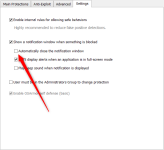
You can exclude item on notification alert, look at my screenshot above on #952Hi how do we unblock an item when it catches something right away ?
Hi how do we unblock an item when it catches something right away ?
exact, just click "exclude" and follow up.You can exclude item on notification alert, look at my screenshot above on #952
open the log, add the blocked process to the exclusionsI was not fast enough so it closed and I see 1 process blocked ,where do I go for that to unblock?Thks
I was not fast enough so it closed
Members who viewed this thread in the last 5 minutes


