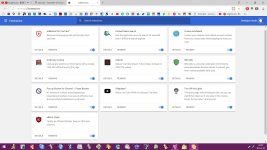
Advice Request Number of browser extensions you have

Please provide comments and solutions that are helpful to the author of this topic.
Status
Not open for further replies.
That would be 5 (five):

  • HTTPS Everywhere: force https on sites
  • LastPass: password manager
  • Canvas Defender: block canvas fingerprinting
  • Malwarebytes Browser Extension: malware and general security blocking
  • AdGuard (PC app but let's count it as extension for the injection): tracking and ads
 
extensionsz.png

Bitwarden: password management

decantraleyes: Only seen it replacing google hosted libraries on few sites, useful if you dont have scriptsafe. Scriptsafe can take over and block google domains, wich makes decentraleyes useless

Malwarebytes: pup/pua/phishing protection

Privacy possum: leftovers from ublock

Scriptsafe: makes sites more pleasant to read with, works well together with ublock origin, can block domains and annoying scripts, fingerprint protection. Can work as user-agent ( i think it wont work tho)

Ublock origin : blocking ads/trackers
 
Last edited:
1: uMatrix = shows you all remote connections, whitelist/blacklist all kinds of requests from domains to cookies, CSS, images, plugins, scripts, XHR, frames and others. No reliance of curated blacklists. You can blacklist by default globally and whitelist when needed.

2: Smart HTTPS = no reliance on lists. Assumes every website supports HTTPS. If an error occurs it reverts the website back to HTTP.

3: Claire = the icon shows up orange when connecting to a site that uses Cloudflare. All it does really.
 
6 right now on Firefox:

ublock origin to block ads
IDM integration
Lastpass password manager
S3 translator to translate pages
Tampermonkey script manager
Enhancer for youtube to improve youtube experience.

Edit: added Malwarebytes browser extension so 7 extensions now.
 
Last edited:
My primary browser is Google Chrome.
I have 6 extensions installed:
AdGuard: adblocker
Kaspersky Protection: part of KFA, blocks malicious or spam urls.
Comodo Online Security: will probably part of Comodo Firewall, blocks malicious or spam urls.
Windows Defender Browser Protection: blocks malicious or spam urls.
Go Back With Backspace: re-enables the backspace key as a back navigation button (except when writing text).
LastPass: free Password Manager

My secondary browser is Microsoft Edge.
I have 3 extensions installed:
AdGuard: adblocker
LastPass: free Password Manager
Translator For Microsoft Edge: translate webpages
 
Checker Plus for Gmail™
Font Rendering Enhancer
Google translator
h264ify
HTTPS Everywhere
LastPass
Magic Actions for YouTube
Malwarebytes Browser Extension
ViewImage
Privacy Badger
Reddit Enhancement Suite
uBlock Origin
 
  • Like
Reactions: harlan4096
Status
Not open for further replies.