New Update Proton VPN for Windows

What timing...I was just trying to update it from the app, starting and restarting it to see if it would update. I downloaded it from the website and did a overlay (on top of) update.
I do like the new look and right side settings icons :)

View attachment 287979

I do too! It's very clean and well thought-out. You can't minimize the map part anymore, but I think this UI is much better.
 
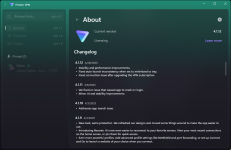
I just opened proton vpn & it says 3.5.3 is up to date. Not been obvious to me in past, can I just open it and expect it to see update or do I need to connect vpn for it to see update??
Just open and click on "About" , no need to connect.
 
Version 4.1.10, more information published on GitHub:
  • New look, same protection. We refreshed our designs and moved some things around to make the app easier to use.
  • Introducing Recents. It's now even easier to reconnect to your favorite servers. View your most recent connections on the home screen, or pin them for quick access.
  • Even more powerful profiles. Add advanced profile settings like NetShield and port forwarding, or set up Connect and Go to launch a website of your choice when you connect.
 
next day, now Saturday 16h30 utc -- just connected again, my app said "checking for updates" 3.5.3 up to date. I can wait. (new interfaces scare me) & I have a paid business proton account. Been a user since beginning when you had to be invited and wait... I guess proton wants to make sure it is working before they give it to me...:ROFLMAO:
 
Last edited:
Come on, you know you want to install new version over top to check it out.:p

I gave in, I find the new version faster to open and connect.
I agree your last comment, same thing I found.

When I did the install on top of the current version, I thought it may give me a pop up of that I already had a version installed, and that it would ask to uninstall it for the newer version, or some other pop up notification. It didn't, but just did its thing.
 
ProtonVPN updated to version 4.1.12.
 

Attachments

  • Screenshot 2025-04-29 101239.png
    Screenshot 2025-04-29 101239.png
    447.7 KB · Views: 70
... but I still have 4.1.10 so 2 behind :cry: and not seeing a button to check for updates...? o_O
On this notebook I'm still on the same version as you, and unfortunately there is no manual update option that I know of, only auto updates.... whenever that happens, right? We may need to uninstall it and go to their website and download the newer version. (not sure of installing, overlaying a 2 build difference successfully).

proton update.png
 
Last edited:

You may also like...