Question Question on Trusted RMM and its execution capacity

Kaspersky
15 Replies 1,961 Views
Help answer the author's question with clear explanations and useful steps.

Studynxx

Level 9
Verified
Well-known
I'm using Action1 as my RMM/Patch Management solution. The Action1 Agent is automatically TRUSTED by KSN. However I've noticed that the scripts I push onto the endpoints, as they're not signed, they are always High Restricted by default.

I'm surprised since the agent is TRUSTED. So does this mean I'm going to have to create an exception for the agent, ie have its child processes bypass all KTS limits and the likes?

Thanks
 
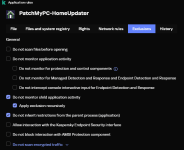
Yes, you're correct. Even though the Action1 Agent is trusted, the scripts it pushes are not automatically trusted. You'll need to create an exception for the agent in Kaspersky's settings to bypass restrictions for its child processes. This will allow the scripts to run without being blocked or restricted by Kaspersky.
 
Try this for Your tool:

1741589789425.png
 
I'm using Action1 as my RMM/Patch Management solution. The Action1 Agent is automatically TRUSTED by KSN. However I've noticed that the scripts I push onto the endpoints, as they're not signed, they are always High Restricted by default.

I'm surprised since the agent is TRUSTED. So does this mean I'm going to have to create an exception for the agent, ie have its child processes bypass all KTS limits and the likes?

Thanks
Using a RMM to push and run scripts - there is no secure way to do it. If you want to use RMM, then you have to accept the security risks.

Again, the problem are not the scripts themselves. The problem is the interpreter(s) that execute the scripts. Having interpreters enabled by default on your system creates one of the greatest security risks.

The Action1 is Trusted, so Kaspersky is already allowing it to execute without restrictions. KSN is limiting the execution of scripts by file prevalence and reputation. Scripts are not a child process. It is the interpreter that is the child process of the Action1 client. By default, KSN treats all Windows interpreters as Trusted. But for script files, those are monitored and restricted for execution. Kaspersky treats them as child processes but they are not child processes; they are (script) files.

Ah okay, thanks, so I take it that the RMM doesn't have to have full-on exclusions in Kaspersky?
Action1 is Trusted so it is already running without restriction.
 
Using a RMM to push and run scripts - there is no secure way to do it. If you want to use RMM, then you have to accept the security risks.

Again, the problem are not the scripts themselves. The problem is the interpreter(s) that execute the scripts. Having interpreters enabled by default on your system creates one of the greatest security risks.

The Action1 is Trusted, so Kaspersky is already allowing it to execute without restrictions. KSN is limiting the execution of scripts by file prevalence and reputation. Scripts are not a child process. It is the interpreter that is the child process of the Action1 client. By default, KSN treats all Windows interpreters as Trusted. But for script files, those are monitored and restricted for execution. Kaspersky treats them as child processes but they are not child processes; they are (script) files.


Action1 is Trusted so it is already running without restriction.
Oh okay, I was actually going to go with what Harlan suggested lol. So if that doesn't work, then what do you suggest I do? Because it's a nuisance having to unblock all unsigned scripts I write, on the endpoints
 
Using a RMM to push and run scripts - there is no secure way to do it. If you want to use RMM, then you have to accept the security risks.

Again, the problem are not the scripts themselves. The problem is the interpreter(s) that execute the scripts. Having interpreters enabled by default on your system creates one of the greatest security risks.

The Action1 is Trusted, so Kaspersky is already allowing it to execute without restrictions. KSN is limiting the execution of scripts by file prevalence and reputation. Scripts are not a child process. It is the interpreter that is the child process of the Action1 client. By default, KSN treats all Windows interpreters as Trusted. But for script files, those are monitored and restricted for execution. Kaspersky treats them as child processes but they are not child processes; they are (script) files.


Action1 is Trusted so it is already running without restriction.
Okay, you ended up being right. How do I solve this issue?
 
Okay, you ended up being right. How do I solve this issue?
You whitelist the script(s).

1. Give the scripts a complex name (e.g. <software_update_script>.xx); and then
2. Move each script you use to Trusted.

If the scripts change over time, then ¯\_(ツ)_/¯ . You will have to whitelist them every single time.

Open a case with Kaspersky support and ask them how to solve the issue.

You might have to do a combination of the following - digitally sign the scripts, then move them to a particular directory and launch them from there. Then there will be a Kaspersky configuration that permits it all to work together. For example, exclude the directory from which the scripts execute from Kaspersky monitoring.

Alternatively you can reach out to Action1 support and ask them how to solve the problem.
 
You whitelist the script(s).

1. Give the scripts a complex name (e.g. <software_update_script>.xx); and then
2. Move each script you use to Trusted.

If the scripts change over time, then ¯\_(ツ)_/¯ . You will have to whitelist them every single time.

Open a case with Kaspersky support and ask them how to solve the issue.

You might have to do a combination of the following - digitally sign the scripts, then move them to a particular directory and launch them from there. Then there will be a Kaspersky configuration that permits it all to work together. For example, exclude the directory from which the scripts execute from Kaspersky monitoring.

Alternatively you can reach out to Action1 support and ask them how to solve the problem.
Good ideas, thanks, I like them, i'll try them out shortly, definitely. Do I reach out to both Kaspersky and Action1 tho? Whose... "jurisdiction" is this?
 
Good ideas, thanks, I like them, i'll try them out shortly, definitely. Do I reach out to both Kaspersky and Action1 tho? Whose... "jurisdiction" is this?
I would contact both, but since it is Kaspersky that is blocking the scripts, it is then the primary vendor for the case.

You need to find out from Action1 what child processes are involved, if the script content changes over time, in which directories they will execute. Kaspersky might need these infos.

You will only get good support from paid Action1 and paid Kaspersky. Even then do not get your hopes up.
 
I would contact both, but since it is Kaspersky that is blocking the scripts, it is then the primary vendor for the case.

You need to find out from Action1 what child processes are involved, if the script content changes over time, in which directories they will execute. Kaspersky might need these infos.

You will only get good support from paid Action1 and paid Kaspersky. Even then do not get your hopes up.
Well Action1 is unpaid, KTS is paid-for. I like KTS, and I like their default-deny approach, it's definitely real in the pro IT World (Zero Trust comes to mind) but still... sometimes it bites me in the backside
 
Well Action1 is unpaid, KTS is paid-for. I like KTS, and I like their default-deny approach, it's definitely real in the pro IT World (Zero Trust comes to mind) but still... sometimes it bites me in the backside
The support you will get is directly proportional to the knowledge and experience of the support representative.

For consumer Kaspersky, you get entry level support. For business, you need a business-licensed version of Kaspersky.

The only thing you can do is to request escalation. I recommend that you take screenshot video of whatever it is that you are doing and provide it to support. Otherwise you will not get the support that is needed. The representative is going to make you run through a support "script" and do tasks that are not even relevant to what you are attempting to solve.

You can try telling them you are a one-person business and a solution is needed. Although I would not expect a good result from that. Support is tied to the license type.

Zero Trust requires work. A lot of work to do it properly. Most companies out there saying they enforce Zero Trust are not doing it or they are doing it partially. There is no such thing as eternally effective "Set and forget" default deny. The underlying OS, software, and other factors change frequently enough that rules today do not work tomorrow. The most effective security is the type that would prevent you from running any scripts using Windows interpreters. You would need to find a way to do what you need to do using Go or Rust or some other high-level programming language.

The best thing you can do is enable interpreters when you execute them, and then when done disable them. Then repeat when you need to execute additional scripts.

It is not about usability or convenience. It is about what your priorities are. Either security is the top priority or it is not. If productivity and convenience is more important, the highest priority, then you weaken your system and accept all the associated risks.

Security is not software. It is a process.
 
Last edited by a moderator:

Recently browsing

Members who viewed this thread in the last 5 minutes

Back
Top