Removing User Admin Rights Mitigates 94% of All Critical Microsoft Vulnerabilities

  • D Thread starter Deleted member 178
  • Start date Start date
  • 80 Replies
  • 19,299 Views

Do you use a Standard User Account for daily usage?


  • Total voters
    61
Problem is this: there might be malware lurking in the background, just waiting for admin permission to come along. So if you type in the admin password in your SUA, you just granted permission to that lurking malware.
But if you switch to your admin account, that is not where the malware is running in the first place. So it won't receive permission.
Sorry, if i don't make any sense. Here's what i am thinking, the malware is lurking in the SUA because user ran it in the first place, which he will do in the admin account also if wishes to. So what's the difference for an average user?
 
Sorry, if i don't make any sense. Here's what i am thinking, the malware is lurking in the SUA because user ran it in the first place, which he will do in the admin account also if wishes to. So what's the difference for an average user?
The idea is that you use your SUA for your regular computing needs. You only switch to admin when you need to do something special, and you will remember to be especially careful at that time. Yes, you could shoot yourself in the foot when you are in the admin account, but you probably won't.
 
The idea is that you use your SUA for your regular computing needs. You only switch to admin when you need to do something special, and you will remember to be especially careful at that time. Yes, you could shoot yourself in the foot when you are in the admin account, but you probably won't.
Here's my point, if I shot my foot in SUA i.e. trying to install a shady software, then there's a very high possibility that I will do that again in Admin account.
Edit: I do get your point that Admin account should be treated like a very powerful weapon.
 
My understanding:

The difference is that in one case, it's an escalation inside the same account, and on the other case we are talking about two different accounts.

So, in the first case, the malware is running on the same account and is lurking for the escalation.
On the second case, the malware is running on account A, it waits for the escalation, but you use account B for admin tasks, so it cannot use the escalation.

But, for sure, if you install the malware while beeing on the account B, you're screwed, but because you are not using the account B often, and only for specific tasks, it's diminushing the risk...
 
When I rebuilt my PC a month or so ago I switched to a SUA account. I had been using an admin account all the time up to that point which is ironic because I *knew* I should be using an SUA after all my research but I didn't because I thought it was a hassle. But with Windows 10 using an SUA account with UAC set to the max has never been easier.

What I do is set a really strong password on my admin account and then enable a PIN as well. So when I am logged into my SUA account and get UAC prompted I just have to enter my admin PIN. Very easy and convenient! Now if I can just get into the habbit of logging out of SUA account and into the admin account when making changes...

Also, I am pleasantly surprised how little UAC prompts I get. For day to day normal use I get none...seriously.
 
Here's my point, if I shot my foot in SUA i.e. trying to install a shady software, then there's a very high possibility that I will do that again in Admin account.
Remember SUA + UAC is to deny UNWANTED elevation , not protect you 100% from malware.

So, in the first case, the malware is running on the same account and is lurking for the escalation.
On the second case, the malware is running on account A, it waits for the escalation, but you use account B for admin tasks, so it cannot use the escalation.
But, for sure, if you install the malware while beeing on the account B, you're screwed, but because you are not using the account B often, and only for specific tasks, it's diminushing the risk...
Exact.

Also, I am pleasantly surprised how little UAC prompts I get. For day to day normal use I get none...seriously.
Of course, it is why don't believe those users who said they are "annoyed" by UAC (except some special case of "not-so-well-coded-softwares") , they don't know how to use Windows or they spend all days running admin tools...
 
Of course, it is why don't believe those users who said they are "annoyed" by UAC (except some special case of "not-so-well-coded-softwares") , they don't know how to use Windows or they spend all days running admin tools...

I think the reason I was so hesitant to use UAC was due to my past experiences with UAC in WIndow 7 (and 8.x I think). I remember getting so annoyed with the prompts that I eventually went back to using an admin account for day to day tasks.

So I can say without any hesitation that using UAC now...even set to it's max setting...is not inconvenient or a pain in Windows 10. I would add that using a PIN makes elevation with UAC super simple.

I honestly can't image going back to an admin account again considering the security benefits you get when using an SUA!
 
Thanks for explaining that @Umbra @lab34 @shmu26 , I think I somewhat got the concept of using a SUA (As I am not from the same field, sometimes it's hard for me to understand the concept of it, I do apologise for asking same things again & again).
I have a question, I am currently using an Admin account, so if I create a SUA will all my programs be available to me, or do i have to install them again? Or reinstall the whole Win10 again?
 
Thanks for explaining that @Umbra @lab34 @shmu26 , I think I somewhat got the concept of using a SUA (As I am not from the same field, sometimes it's hard for me to understand the concept of it, I do apologise for asking same things again & again).
I have a question, I am currently using an Admin account, so if I create a SUA will all my programs be available to me, or do i have to install them again? Or reinstall the whole Windows 10 again?
Your programs will be there, unless you specifically chose, when installing that particular program, that it should be available only in one user account. (There are some programs that ask you.)
 
Thanks for explaining that @Umbra @lab34 @shmu26 , I think I somewhat got the concept of using a SUA (As I am not from the same field, sometimes it's hard for me to understand the concept of it, I do apologise for asking same things again & again).
I have a question, I am currently using an Admin account, so if I create a SUA will all my programs be available to me, or do i have to install them again? Or reinstall the whole Windows 10 again?

What I did after reading this thread, is:

1) I've created a new admin account
2) I've downgrade my current account from admin to sua.

I'm still using the "old" account. Now, when my actions needs an admin account, the UAC popup (like before) and ask me the password of the existing admin account, I enter it, and that's all.
 
I have a question, I am currently using an Admin account, so if I create a SUA will all my programs be available to me, or do i have to install them again? Or reinstall the whole Windows 10 again?
Note than some softwares may not work properly on SUA because the devs didn't coded it to be used on SUA (like NVT ERP) , so some misbehavior may occurs ( like the tray icon that don't load at boot, etc...)
 
What I did after reading this thread, is:

1) I've created a new admin account
2) I've downgrade my current account from admin to sua.

I'm still using the "old" account. Now, when my actions needs an admin account, the UAC popup (like before) and ask me the password of the existing admin account, I enter it, and that's all.
Great tip.

Note than some softwares may not work properly on SUA because the devs didn't coded it to be used on SUA (like NVT ERP) , so some misbehavior may occurs ( like the tray icon that don't load at boot, etc...)
Working good now. Only issue is that CCleaner does not open without running it as admin (no uac popup otherwise).
 
Great tip.


Working good now. Only issue is that CCleaner does not open without running it as admin (no uac popup otherwise).
You can use CCleaner portable, it runs in SUA.

I'm still using the "old" account. Now, when my actions needs an admin account, the UAC popup (like before) and ask me the password of the existing admin account, I enter it, and that's all.
If you do that, you are back to the split token issue, as discussed above.
 
Last edited:
Then you may as well stick with admin account because you're not really achieving anything the way you're doing it.
I don't know why, but it seems to be more secure.

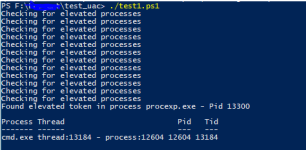
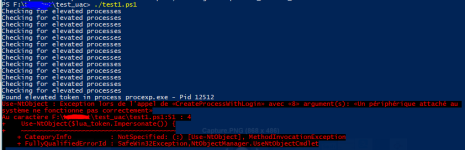
I've just did the test, like @Andy Ful in the post #46:

With Admin account it succeeds:
Capture_admin.PNG
With SUA it fails:
Capture_sua.PNG

I'm using procexp to generate the escalation.

I need to re-read the article. :confused:

(edit:grammar)
 
Last edited:
So I can say without any hesitation that using UAC now...even set to it's max setting...is not inconvenient or a pain in Windows 10. I would add that using a PIN makes elevation with UAC super simple.
I've put a pin to my admin account, but the uac is not remembering my previous choice: answering with a pin.

So, I need to click "other choice" plus "pin code" every time.

Is there a way to make UAC asking for the pin by default ?

EDIT: ok, it needs an MS Account to ask pin by default...
 
Last edited:

Recently browsing

Members who viewed this thread in the last 5 minutes

Back
Top