
Run by Smartscreen utility

Hi I was testing RBS v4.0.0.1 using adwcleaner.exe on my desktop running Win 11 Pro.
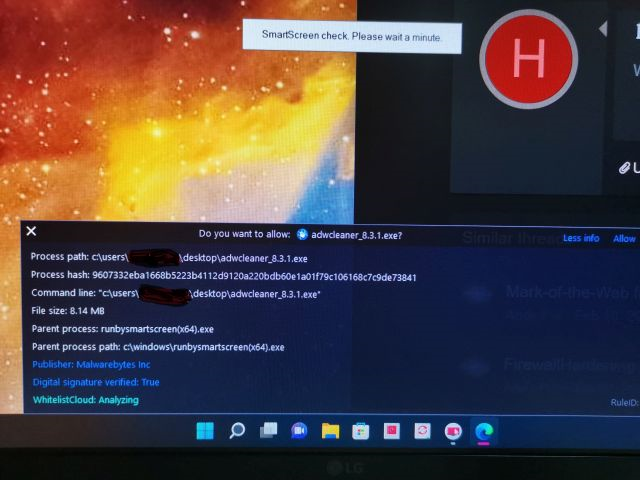
1648392945208.png


When I RBS, Smartscreen kicks in and the file is being analyzed in the WhitelistCloud. If I just leave it the analyzing seems infinitely ongoing and after a certain time the 2 screens just faded off without activating adwcleaner. Is this normal? Or should it be that after the Whitelisting is completed, the adwcleaner.exe file should open?

Another app, OOAPB.exe, also the same.
 
Last edited:
Hi I was testing RBS v4.0.0.1 using adwcleaner.exe on my desktop running Win 11 Pro.
...
When I RBS, Smartscreen kicks in and the file is being analyzed in the WhitelistCloud. If I just leave it the analyzing seems infinitely ongoing and after a certain time the 2 screens just faded off without activating adwcleaner. Is this normal? Or should it be that after the Whitelisting is completed, the adwcleaner.exe file should open?

The WhitelistCloud feature prevents RunBySmartscreen from running the adwcleaner.
It can be also that WhitelistCloud blocks just adwcleaner - you can check it by running adwcleaner without RunBySmartscreen.
 
Last edited:
The WhitelistCloud feature prevents RunBySmartscreen from running the adwcleaner.
It can be also that WhitelistCloud blocks just adwcleaner - you can check it by running adwcleaner without RunBySmartscreen.
Yes, I can run adwcleaner without RBS. So there's some sort of incompatibility between RBS and WhitelistCloud?

One question. Can RBS be automated to detect the downloads from the net rather than as on-demand?

Thanks
 
Last edited:
I use H_C with "Install by Smartscreen", what are the difference between the 2?
There are several differences - they are explained in the help for the option <Forced SmartScreen>.
The main differences are as follows:
  • "Install By SmartScreen" is used only for EXE and MSI files. Depending on SRP settings it can run EXE/MSI files with standard or high privileges to safely bypass SRP restrictions. Other unsafe file types are blocked by SRP.
  • "Run By Smartscreen" works independently of SRP. It can be considered an "on-demand" file checking for unknown files. The EXE/MSI/SCR/COM files are checked by SmartScreen and automatically executed if recognized as safe. Other files with unsafe extensions (over 250 file types) are not executed and the alert is shown.
    Safe files like media files, photos, videos, etc. are opened without checking and alerts.
 
There are several differences - they are explained in the help for the option <Forced SmartScreen>.
The main differences are as follows:
  • "Install By SmartScreen" is used only for EXE and MSI files. Depending on SRP settings it can run EXE/MSI files with standard or high privileges to safely bypass SRP restrictions. Other unsafe file types are blocked by SRP.
  • "Run By Smartscreen" works independently of SRP. It can be considered an "on-demand" file checking for unknown files. The EXE/MSI/SCR/COM files are checked by SmartScreen and automatically executed if recognized as safe. Other files with unsafe extensions (over 250 file types) are not executed and the alert is shown.
    Safe files like media files, photos, videos, etc. are opened without checking and alerts.

Interesting. Why is not Run by implemented in H_C instead of Install by?
 
Last edited:
  • Like
Reactions: Kongo
Would be appreciated if you could update your first post in this thread with the updated version of Run By SmartScreen :) @Andy Ful
Thanks. I have rewritten and shortened the OP. The idea of RunBySmartscreen is very simple and I think that it is now properly reflected in the OP. The details are included on GitHub.:)(y)