
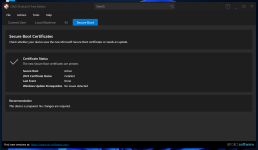
With the latest "O&O ShutUp10" release, you can now determine the secure boot status. 


Open MalwareTips from your Home Screen or desktop. Follow discussions, find answers and pick up where you left off.
If you cannot find an install option, update your browser or use its bookmark option to keep MalwareTips close.
After installation, open the app and sign in. Enable push notifications in Preferences if you want alerts. On iPhone and iPad, push requires a Home Screen web app and iOS or iPadOS 16.4 or later.
Sign in to manage notificationsInstallation is optional. Your notification settings stay under your control.

...and Parkinsond was never heard from again. @Parkinsond this is a little above my pay-grade so proceed with caution.I have to go now, good luck.


Read more:The clock is ticking for Windows and Linux users to update cryptographic keys that protect their systems against firmware-based UEFI infections, a pernicious form of malware that loads before operating system and anti-malware protections start.
Beginning June 24, three certificates that cryptographically verify that each piece of firmware and software that loads during system boot will expire. The Microsoft-signed certificates are the linchpins of Secure Boot, a Microsoft-designed chain of trust. Secure Boot checks the digital signatures of all firmware that loads during system startup to ensure it originates from a trusted provider, such as the manufacturer of the motherboard the system runs on.
Secure Boot is designed to thwart UEFI bootkits, a form of malware that alters the Unified Extensible Firmware Interface, the successor to the BIOS, both of which begin the initial boot sequence. Because these bootkits load before the OS and most other code, they can be difficult to detect. Once installed, they typically load malware onto the OS that steals credentials, backdoors the system, or performs other malicious actions. Even when the OS is disinfected, the bootkit can reinfect the system. Bootkits survive OS reinstallations as well.
 arstechnica.com

This is worth paying attention to, but the practical takeaway for most people is simple: keep your OS and firmware fully updated and avoid “manual key” changes unless your device/vendor specifically instructs it.Read more:
Windows and Linux users: The deadline to update Secure Boot keys is near
What you need to know about the expiration of keys securing your machine's boot sequence.
Members who viewed this thread in the last 5 minutes


