Security Center turned Off. Bitdefender services are loading now. please wait

here is the log file after running combofix.

and for the BIS log file, its in xml format and i can't attach it here.
i don't know which is the best software to open it up.
i try to open using notepad and its look quite complicated for me but it might be not for you i think so.

i attach the notepad for you and i hope it good for you.

thank
 

Attachments

I think your Bitdefender gone crazy. It is removing legitimate entries.

Can I get fresh FRST and FSS report. Also tell me how is your computer now?
 
attach are the log file for rescanning back my sytem.

My computer still in good condition
only for security center still been turned off.
normally this notification keep telling me and keep remind me if there are something wrong.
because of this function disabled. i feel unsecured.

how about i reformat back my laptop to original factory setting. the problem can be solved right.
 

Attachments

We can still try to fix this, reformat should be your last option.


51a46ae42d560-malwarebytes_anti_malware.png
Scan with Malwarebytes' Anti-Malware

Please download Malwarebytes Anti-Malware and save it to your desktop.
  • Install the progam and select update.
  • Once updated, click the Settings tab, in the left panel choose Detctions & protection and tick Scan for rootkits.
  • Click the Scan tab, choose Threat Scan is checked and click Scan Now.
  • If threats are detected, click the Apply Actions button. You will now be prompted to reboot. Click Yes.
  • Upon completion of the scan (or after the reboot), click the History tab.
  • Click Application Logs and double-click the Scan Log.
  • At the bottom click Export and choose Text file.
Save the file to your desktop and include its content in your next reply.


Next I would like you to run this:

http://www.sevenforums.com/tutorials/1538-sfc-scannow-command-system-file-checker.html
 
i run malwarebytes and there is no threat found. log as per attached.

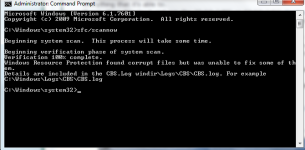
currently running with sfc scannow.. window resource protection found corrupt file but was unable to fix it.

so i run it a few time, as for now i run it on 3rd time.

i attached here the picture of result during 1st and 2nd run. the same error happen.

after this, i will follow the other instruction to download system update readiness. once finish will update to you.]
 

Attachments

  • malwarebytes scan log.txt
    malwarebytes scan log.txt
    1.1 KB · Views: 98
  • scannow1st.png
    scannow1st.png
    32.4 KB · Views: 66
  • scannow2nd.png
    scannow2nd.png
    36.5 KB · Views: 63
i running sfcscannow 4th time and all have the same answers.

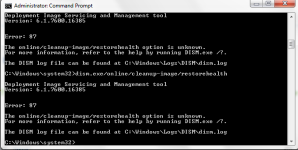
i run cmd and as what you just said and this error come out. as per attached.
 

Attachments

  • dismexe error.png
    dismexe error.png
    26.5 KB · Views: 72
and also i cannot run my bitcomet anymore.
it run and will notify need to close due o not responding after a few minutes.
 
There seems to be multiple issues with your system. I think you should load factory settings now, because it seems impossible to fix this.
 
i just download system update readiness. i try this first tomorrow. need to sleep now.
if still the same error after scannow i will load actory setting.
btw, thank for your guidance since yesterday until now.

really appreciate that you willing to help me solve the problem

thank you so much.. ;-)
 
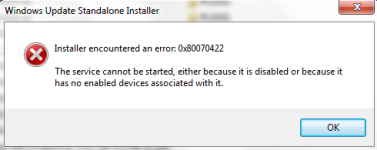
i can't run that system update due some error as per attached.

will reload all back to original setting... :-(
that the only choice i have now..
 

Attachments

  • error.png
    error.png
    20.2 KB · Views: 65
I think this is the best option, because you have some important services damaged and some system files too. Let me know if everything works ok later.
 
i hv done reload back to factory setting by using backup on 2011.
image can't be use anymore. luckily there are backup during purchasing this laptop.

now all running as a virgin laptop. need lot of time to install others app to be used.

until now, i don't know previous problem due to a malware attack or else. how about your opinion.
system damage due to??

thank
 
I cannot tell to be 100% sure, although I have a reason to suspect Bitdefender got his fingers in all this mess. Anyway it is good that machine is running well again :)
 
  • Like
Reactions: Thunderbold