


@henrypp Why do i get notifications for applications that are already in the allowed or blocked list? Only way to stop them is disabling notifications for them but why it's happening?
Here:@henrypp Why do i get notifications for applications that are already in the allowed or blocked list? Only way to stop them is disabling notifications for them but why it's happening?
It makes no sense to notify me when i have a rule to block but i see what you are saying. I should have an option in gui that is saying don't notify me for blocked apps. Anw now that i know i only have to do it for blocked apps i put them all in don't notify and we will see if i get notifications again.Here:
Allowed apps, no notifications at all > "Disabled notifications" unchecked.
Blocked apps, no notifications at all > "Disabled notifications" checked.
For the latter, I get the rationale behind as: a blocked program trying to connect outbound should be notified to the user as many times as it attempts to, for many reasons, unless the user not wants to. Just like me, hehe.
Well there's a tray notification when a program is attempting outbound connections:It makes no sense to notify me when i have a rule to block but i see what you are saying. I should have an option in gui that is saying don't notify me for blocked apps. Anw now that i know i only have to do it for blocked apps i put them all in don't notify and we will see if i get notifications again.
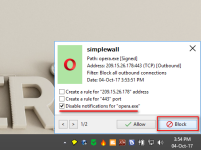
Yeah but that's per application. Will do for now and it solves the issue assuming you are right and only blocked applications have this issue.Well there's a tray notification when a program is attempting outbound connections:
View attachment 168953
simplewall process notifications for all blocked apps and displays only without "Disable notifications" flag (whatewer checked app in list or not).@henrypp Why do i get notifications for applications that are already in the allowed or blocked list? Only way to stop them is disabling notifications for them but why it's happening?

I don't have blocklist enabled i assume neither have any custom rules so it's a bug? Disable notification seems to work but if it should be fixed because the average user will not bother figuring out the issue when it's spammed by alerts and will uninstall.simplewall process notifications for all blocked apps and displays only without "Disable notifications" flag (whatewer checked app in list or not).
It may happen because of app trying to connect to ip contained in blocklist when blocklist are enabled. Same with custom rules.
At this time no way to do not show notifications except "Disable notifications" flag and disable entire notifications in settings.

It's a firewall how would it do that and lets say it did it and you uninstall there would no longer be any wfp filtering so it wouldn't keep creating an issue? Most probably your problem is in some other place.I have very bad luck.
After a clean installation, I configured my programs and finally I installed Simplewall and at the time of applying the filters my computer has been blocked. now it is very slow and with a high CPU consumption. I have managed to uninstall it, but I think I have to reformat it. Any ideas?
Yes, thanks for replyingI
It's a firewall how would it do that and lets say it did it and you uninstall there would no longer be any wfp filtering so it wouldn't keep creating an issue? Most probably your problem is in some other place.
Did you check what is using cpu?
 , after three reboots it seems to go better. I searched with Everything and there seems to be no trace on my computer. I do not know the reason, but when the computer was blocked the consumption was 100%, in the following restarts it has gone down to usual dimensions.
That was one scary issue. Glad its solved!Yes, thanks for replying
It was hung on the step informing about disable windows firewall installing filters
Then disable the firewall on your own before you run simplewall and see if that helps.Yes, thanks for replying
It was hung on the step informing about disable windows firewall installing filters
Tomorrow I'll try it, today I do not want any more scaresThen disable the firewall on your own before you run simplewall and see if that helps.

- make current settings backup before import
- changed default listview font
- fixed settings listview groups does not changed immediately
- fixed notification window display at startup
- fixed uninstaller do not removed some files
- fixed internal rules configuration saving
Maybe trying with installing Rollback RX beforehand would be better.Tomorrow I'll try it, today I do not want any more scares
No. simplewall does not change any configuration and do not hang out system, uses less than 15MB memory and 0.01% CPU.I have very bad luck.
After a clean installation, I configured my programs and finally I installed Simplewall and at the time of applying the filters my computer has been blocked. now it is very slow and with a high CPU consumption. I have managed to uninstall it, but I think I have to reformat it. Any ideas?
Tell me all. What notifications says is filter name? Any special rules applied? Let me see screenshots of notification window and main. Prefer PM.I don't have blocklist enabled i assume neither have any custom rules so it's a bug? Disable notification seems to work but if it should be fixed because the average user will not bother figuring out the issue when it's spammed by alerts and will uninstall.
Notifications are still broken
If you hover tray icon and notifications window showed there are NOTHING is broken. You need to do something with apps in notifications, press allow or block button and apps wiil let go and nothing will be displayed. Thats all.i hovered above the simplewall gui it showed the notification windows

But we have the notification timeout so after 10 seconds it should no longer show anything. So you just hide the notification when 10 sec pass and i still have to take action? The way it should work is that if i don't reply in 10 seconds it blocks it and i have to go in settings to allow it.If you hover tray icon and notifications window showed there are NOTHING is broken. You need to do something with apps in notifications, press allow or block button and apps wiil let go and nothing will be displayed. Thats all.
Can you enable the option "Allow inbound connections for all" and see if the store apps work. Not permanently ofcourse, just for testing. I had issues too with new version and went back to 1.6.5.When you use this applications windows 10 store app and most default store applications stop functioning. Anything that can be done?


