New Update Smart App Control - Windows 11 22H2 feature promises significant protection from malware

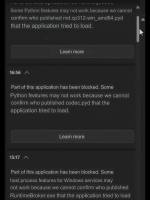
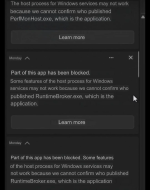
I encountered a "partial" block of Chromium and what I found was interesting. Windows was blocking access to any Chromium webpage, either official or 3rd party site. This seems to indicate that SAC does more than what is documented by MS. 🤔 I wonder if any members have ideas or info regarding this phenomenon.
I asked Bing's AI about SAC, and it replied as follows:
Smart App Control (SAC) primarily blocks untrusted or potentially harmful applications from running on Windows devices. It is designed to prevent malicious software and potentially unwanted applications (PUAs) from executing before they are verified as safe. While it can block certain websites and applications, it is not limited to just blocking apps; it also acts as a security layer against malware and PUAs by evaluating applications based on their reputation and digital signatures.
But I couldn't find any evidence about website blocking.
 
I encountered a "partial" block of Chromium and what I found was interesting. Windows was blocking access to any Chromium webpage, either official or 3rd party site. This seems to indicate that SAC does more than what is documented by MS. 🤔 I wonder if any members have ideas or info regarding this phenomenon.

A clean install or reset would be needed to re-enable SAC.
Bumping these two posts to @Andy Ful.

I assume the web blocking I encountered was due to Smartscreen but it wasn't the usual SS block page, just black (failure to load). So SS and SAC work together but it's not obvious to the average user what the interaction (or relationship) is. However, it's quite clear to me that the SAC block and web page blocks were related, at least in terms of timing.


It seems a reset of the PC is still required to turn SAC back on after disabling it in spite of the new settings in the SAC UI. Microsoft has not changed its documentation to indicate otherwise.
 
Last edited:
  • +Reputation
Reactions: simmerskool