
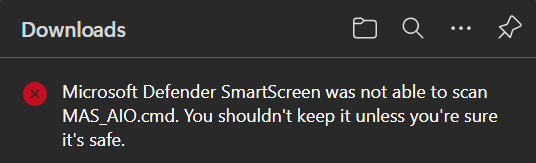
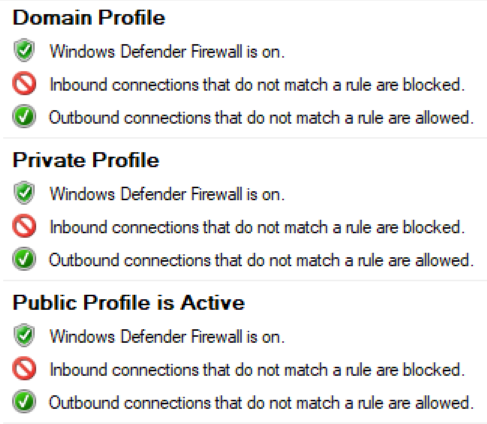
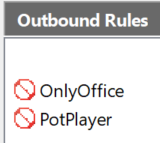
SS fails to scan downloaded files by Edge, without any firewall restrictions!


Open MalwareTips from your Home Screen or desktop. Follow discussions, find answers and pick up where you left off.
If you cannot find an install option, update your browser or use its bookmark option to keep MalwareTips close.
After installation, open the app and sign in. Enable push notifications in Preferences if you want alerts. On iPhone and iPad, push requires a Home Screen web app and iOS or iPadOS 16.4 or later.
Sign in to manage notificationsInstallation is optional. Your notification settings stay under your control.

Hello Parkinsond,SS fails to scan downloaded files by Edge, without any firewall restrictions!
View attachment 291517View attachment 291518View attachment 291519

SS fails to scan downloaded files by Edge, without any firewall restrictions!
View attachment 291517
Thank you, Andy; do you recommend replacing NextDNS?I had a similar issue some time ago. It was related to NextDNS.

I no longer do as it's becoming abandonware of a sort.Thank you, Andy; do you recommend replacing NextDNS?
Actually NextDNS is very useful for blocking malicious websites, especially phishing ones.I no longer do as it appears to becoming abandonware of a sort.
I managed to solve the issue and still use NextDNS.Thank you, Andy; do you recommend replacing NextDNS?
Tried to disable SS in both Edge and WS; no luck.I managed to solve the issue and still use NextDNS.
Not abandoned, they recently added their "Bypass Age Verification" which is a neat feature. I would say just a bit more conservative with new features, or less publicity when releasing new features.I no longer do as it's becoming abandonware of a sort.
Tried to disable SS in both Edge and WS; no luck.
Tried PC restart; no luck.
I even noticed SAC did not stop MAS cmd from launching into full language; disabled and applied WDAC, WDAC applied constricted language mode.
Edge is downloading files with motw; when I check properties, I see "unblock" option.If you see this alert in Edge, your Edge downloads files without MotW. So, SAC will not block scripts.
Does the non-Edge web browser download files with MotW?
Edge is downloading files with motw; when I check properties, I see "unblock" option.
It is blocking shortcuts of mp4 files and letting cmd activator to launch!If so, that is OK. SAC will block scripts downloaded by Edge.
You can test it by downloading any EXE by Edge and creating a shortcut to this file. The shortcut should be blocked by SAC.
It is blocking shortcuts of mp4 files and letting cmd activator to launch!
Tried it on one copy with motw and one without; both launched.Does the .cmd file have MotW?
Tried it on one copy with motw and one without; both launched.
Of course; its download link:Can you share this .cmd file. I can check it.
I suspect SAC has faced malfunction with SS; a while ago, I had the same results (the cmd file being blocked by SAC).Tested as follows:
The above has also been done for the copy of MAS_AIO.cmd with the same result.
- File downloaded by Edge from the URL:
- Explorer opened on the Downloads folder, checked that the file MAS_AIO.cmd has MotW.
- Tried to run the MAS_AIO.cmd, and it was blocked by SAC.
- Checked if the file still has MotW. Yes, it has.
Could you delete MAS_AIO.cmd from your Downloads folder and repeat my test?
Members who viewed this thread in the last 5 minutes


