Troubleshooting Toshiba Satellite touchpad doesn't work at startup

Fiona

New Member
Verified
Describe the problem
touchpad features don't work
What have you tried?
Looked under the startup items and the ELAN touchpad is suppose to start at startup. Yesterday I turned it off but after turning it back on, it still doesn't work unless I manually go to the mouse settings
Other than that, mouse works fine with moving and clicking
 
Try this. Turn computer off. Remove all attachments and the battery. Press power button for 15 seconds. Replace power connection and battery. Start Computer and press F2 at the Toshiba splash screen to get into Setup. Press F9 to reset defaults. Press F10 to save changes and exit and answer yes to complete. Computer will restart.
 
Upvote 0
what changes does this make?
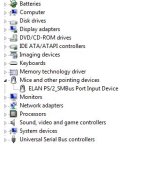
Try it @frogboy won't lead you astray. Then open Device manager and see if you have any yellow marks.
Capture48.JPG
 
Upvote 0
No you can't skip that part the PC needs to be dead no power at all. So your device manger checked out ok then? Did you double click on each group to expand the driver groups? You are looking for yellow warning symbols hope you do not have any.
 
Upvote 0
Thanks for making this a team effort my Aussie friend. The old hard reset works many times. I have used it on several occasions to discharge the capacitors. The old PC is like me. It gets a brain fart and needs to power down and start over.:):):) Some times just rebooting will fix a lot of problems.
Good job @Fiona
 
Upvote 0
I also use a USB mouse, as I don't always trust the built-in touch-pad. I love the touch-pad, as I actually bought a USB one a long time ago, but now the laptops come with one built-in, which is very cool. Just a few thought about touch-pads and external mice. :)

And I do have a Toshiba Satellite, and particularly like the thing. Yes, it can be frustrating at times, but what computer isn't... ;) ;)
 
Upvote 0
I have a ELAN based mouse (as all of the computers in the world) the scrolling feature is controled by an app called "ETD control center" please make sure that files is runing in background also check that entry in the registry /of startup/, also make sure that the files exist under this folder "C:\Program Files\Elantech" ... finally some times reinstalling the driver may not work what you need to do is to uninstall the driver via device manager and the via control panel... hope this may work for you... it worked for me several times when elantech was still developing a driver for windows 8 (i was using a win 7 driver with windows 8 RC)
 
Upvote 0

Recently browsing

Members who viewed this thread in the last 5 minutes

Back
Top