Battle Trend micro or Mcafee ?

Compare list
Trend Micro or Mcafee
agreed, but during install and shortly afterwards, mcafee actively pushed give me access to your email account(s). IIRC they even said or used words to the effect of I want your personal data, ergo to me it seemed they were (are) going over the top in this regard, but believe you, older folks notice this, younger folks perhaps not so much... I've decided not to worry about it. :rolleyes:
I also remember a similar warning when installing McAfee. It was a bit off-putting for me, especially since I'm part of the older generation. ;)
 
Over the past few days, I've switched back and forth between McAfee, Trend Micro, and Emsisoft several times. I feel Trend Micro offers the best compromise between modern security technology, low system footprint, and ease of use (even though PayGuard still doesn't open automatically). Trend Micro now works on all three of my PCs.
I would like to thank all MalwareTips members, especially Trident, for their informative posts here in the forum, which helped me make my decision.
 
So far, TM IS has been working very quietly and silently in the background, I don't even know it's there. I've been online here and there, YouTube videos etc. for about 6 hours after install, without a hitch. As some of other members have mentioned, there are no nag screens or pop ups trying to sell me to the next level (which even F-Secure started doing with IS, with ghost panels promoting Total's features that were missing).

Just some specs from my end.
system.jpg

task manager TM.jpg


I won't be enabling Email Defender in my case for Gmail, as my spam settings and knowing what to look for have been enough over the years. Maybe for a family member who may need that extra security, hand holding it's okay, but I'm not willing for that information be sent to TM. I'm not wrong on that, am I, did anyone else here enable it?
email defender.jpg
 
So far, TM IS has been working very quietly and silently in the background, I don't even know it's there. I've been online here and there, YouTube videos etc. for about 6 hours after install, without a hitch. As some of other members have mentioned, there are no nag screens or pop ups trying to sell me to the next level (which even F-Secure started doing with IS, with ghost panels promoting Total's features that were missing).

Just some specs from my end.
View attachment 291454
View attachment 291455

I won't be enabling Email Defender in my case for Gmail, as my spam settings and knowing what to look for have been enough over the years. Maybe for a family member who may need that extra security, hand holding it's okay, but I'm not willing for that information be sent to TM. I'm not wrong on that, am I, did anyone else here enable it?
View attachment 291457
I’ve used Email Defender, it was recently updated with a local model. Nevertheless, Trend Micro as a leading cloud-based security provider (they pioneered the cloud-based AVs) may collect more information than some other solutions. The email defender works only in browsers where the extension is installed and does not do anything more than displaying a banner (doesn’t move to folders, etc).
 
So far, TM IS has been working very quietly and silently in the background, I don't even know it's there. I've been online here and there, YouTube videos etc. for about 6 hours after install, without a hitch. As some of other members have mentioned, there are no nag screens or pop ups trying to sell me to the next level (which even F-Secure started doing with IS, with ghost panels promoting Total's features that were missing).

Just some specs from my end.
View attachment 291454
View attachment 291455

I won't be enabling Email Defender in my case for Gmail, as my spam settings and knowing what to look for have been enough over the years. Maybe for a family member who may need that extra security, hand holding it's okay, but I'm not willing for that information be sent to TM. I'm not wrong on that, am I, did anyone else here enable it?
View attachment 291457
Glad you like it and the licenses are so cheap, so basically to install TM is a no brainer.
I have enabled the Email Defender on my Spam Gmail account. I hardly use webmail, i use Outlook with my iCloud and Outlook mail configured.
Welcome to the Trend Micro Club!
 
I’ve used Email Defender, it was recently updated with a local model. Nevertheless, Trend Micro as a leading cloud-based security provider (they pioneered the cloud-based AVs) may collect more information than some other solutions. The email defender works only in browsers where the extension is installed and does not do anything more than displaying a banner (doesn’t move to folders, etc).
I didn't realize that, I thought that it may have been Panda. As always with you, very informative and helpful. Thank you :)
 
I’ve used Email Defender, it was recently updated with a local model. Nevertheless, Trend Micro as a leading cloud-based security provider (they pioneered the cloud-based AVs) may collect more information than some other solutions. The email defender works only in browsers where the extension is installed and does not do anything more than displaying a banner (doesn’t move to folders, etc).
TM cloud powered by Smart Protection Network.
 
re TM iOS scam / spam blocker, it appears to have activated for text messages along with Robokiller which was already installed, buit for incoming calls activating TM appears to have deactivated Robokiller. so is this like AV on desktop, ie, only run one :unsure:
 
re TM iOS scam / spam blocker, it appears to have activated for text messages along with Robokiller which was already installed, buit for incoming calls activating TM appears to have deactivated Robokiller. so is this like AV on desktop, ie, only run one :unsure:
Does TM do a good job , catching the Spamcalls ?
 
  • Like
Reactions: vonvon and Sorrento
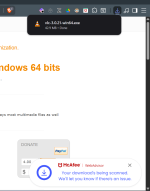
Even though real time protection and on-demand will scan a downloaded file, I do like seeing this visual confirmation in Brave of a download being scanned by McAfee which TM doesn't do. And I know Brave will alert me if a file is dangerous and block it or ask to keep it, but for everyday use, I like it.

Screenshot 2025-10-04 084040.png
 
Even though real time protection and on-demand will scan a downloaded file, I do like seeing this visual confirmation in Brave of a download being scanned by McAfee which TM doesn't do. And I know Brave will alert me if a file is dangerous and block it or ask to keep it, but for everyday use, I like it.

View attachment 291552
TM also show these kind of messages