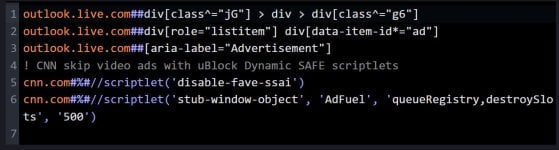
It’s certainly more efficient this way with UD.
But there’s a problem with some websites: you have to repeat the operation because the system seems to freeze, and a pop-up appears at the top pointing this out and asking you to try again.
I think you know what I’m talking about.
Repeating the operation doesn’t always work, so you have to keep trying.
I have no idea if this behavior is due to the fact that I have a policy that doesn’t save browsing history in Brave.
When you finally succeed, you’ll find that this system,at least on a slow computer like mine.shows a longer delay (ad-flicker) after closing and reopening the browser, during which both the age verification prompt and the cookie consent pop-up appear and then, of course, disappear.
This delay (ad-flicker) is certainly longer than on other websites where the long rule works correctly.
So you can imagine that I use these rules on a few particularly challenging websites, which make up only a small fraction of all websites.
But there’s a problem with some websites: you have to repeat the operation because the system seems to freeze, and a pop-up appears at the top pointing this out and asking you to try again.
I think you know what I’m talking about.
Repeating the operation doesn’t always work, so you have to keep trying.
I have no idea if this behavior is due to the fact that I have a policy that doesn’t save browsing history in Brave.
When you finally succeed, you’ll find that this system,at least on a slow computer like mine.shows a longer delay (ad-flicker) after closing and reopening the browser, during which both the age verification prompt and the cookie consent pop-up appear and then, of course, disappear.
This delay (ad-flicker) is certainly longer than on other websites where the long rule works correctly.
So you can imagine that I use these rules on a few particularly challenging websites, which make up only a small fraction of all websites.

 )
)