Hot Take uBlock Stripped - Dynamic Filtering is available on the webstore

@Morro,

With these rules buienradar.nl seems fully functional
View attachment 299913


@Morro @oldschool @Jan Willy

uMatrix had recipes in the past. A place where users could share rules (blocking 3P with allow rules). When I make the export function also search box aware, it would be easy to share recipes for websites (like JW did to strip buienradar.nl for Morro)

I could open a new Github Repo and allow users with a Github account to post recipes. I could add folders per generic TLD and country code.

What do you think of that community driven model, we could try it out on Malware Tips first (creating a thread called UBS Custom Rules Recipes.

Thank you very much, LinuxFan58.
 
AdGuard and Easylist has them. fo you have any experience with either of them?`

N.B. niche nick name, I would not dare to say

AdGuard and Easylist has them. fo you have any experience with either of them?`

N.B. niche nick name, I would not dare to say NO
:)
" N.B. niche nick name, I would not dare to say " --- i got my nick name like that because i watched the movie that named Sopranos and i love it....and i got no experience at all with them both Adguard and Easylist ... thanks alot Mr.Kees
 
@Capiche

Have you tried blocking them with Cosmetic Element Picker?
1789203344670.png


It is really easy to do when have done it a few times.


Use popup menu or right click context menu
uBlock Stripped - Dynamic Filtering > Cosmetic element picker
Read the popup explanation - click understood

Select the screen items you want to block (get a red ovelay as shown on the picture)

A popup appears in the below right corner, click on More (left below)

The Cosmetic element picker by default selects the part you marked on the screen (the red overlay), but most advertisements use randomized names for them, so when you choose to hide this one, next time a different name is generated by the ad server, so it is better to look for a deeper level (deeper level is lower in the list)

look for something with ad banner, ad slot and choose the HTML items which have wrapper, place holder, overlay or layer in their name. When you click on something between dots (e.g. ¨.style-scope." you select or deselect it).

Click preview to check whether this indeed hides the advertisement or ad-placeholder and choose create when you are happy with the result.
 
Last edited:
ABP rules.

I imported them from AG MV3 Chrome extension, and uBS highlighted in red the following line and kept the Save button greyed out until I deleted it:
##div#iframedazn:has([id^="aniplayer_"]):has(x-script[src*="stoic-media.com/api/adserver/spt"])##div#iframedazn
This rule was made by MalwareTips Bot some months ago.
FWIW, AG extension never complained or rejected that rule.
 
This is fun when Vibe Coding, 40 year old programming instincts (I was an IT-er before I became a sales in IT) beat AI logic :)
(discussion code optimization to enhance the performance of uBS)

1789232304429.png


Currently Worry-free safe surfing drops Speedometer 3.1 benchmark with 0.1 point on my PC. The goal is to make uBS default as fast as uBO-lite cheating and uBS worry-free as fast as uBO-lite not cheating (UBO-filters disabled). For details see this post Poll - How many extensions have you installed in your browsers, but above all, how many are usually enabled?
 
Last edited:
ABP rules.

I imported them from AG MV3 Chrome extension, and uBS highlighted in red the following line and kept the Save button greyed out until I deleted it:

This rule was made by MalwareTips Bot some months ago.
FWIW, AG extension never complained or rejected that rule.
I added some safety limitations which were adviced to me by experts (my former neigbour is a security specialist working for Dutch Digital National Security Agency). They did a full security audit on uBlock Stripped and I implemented their recomendations blindly.

I will try to find out why this was rejected. Give me some time.
 
Pushed 9.4.9 and 9.5.0 to webstore

Changes
9.4.9 - performance optimizations

9.5.0 - different disclaimer and changed distribution to 5 Eyes and Extended EU+ zone, because a guy got mad it was only for 5eyes and EU+

---- changed disclaimer

UBOL-STRIPPED — SMART AND LEAN ADVERTISING & TRACKERS BLOCKER

WARNING: THIS EXTENSION OFFERS EXTRA SECURITY & PRIVACY PROTECTION AND HAS SOME UNIQUE FEATURES (WORRY-FREE SAFE SURFING, COOKIE CONSENT CLICKER, DYNAMIC DNR FILTER AND PRIVACY INSPECTOR), DUE TO TECHNICAL REASONS I HAD TO LIMIT THE SCOPE OF THE FILTERS TO 5EYES COUNTRIES AND EXTENDED EU-ZONE.

FOR PEOPLE LIVING OUTSIDE THIS REGION I HAVE DEVELOPED ADSHIELD EXTRA (WHICH CAN BE USED ALONGSIDE ANY ADBLOCKER TO USE THE ABOVE EXTRA POWER TOOLS): GitHub - Kees1958/AdShield-Extra-Power-Tools
 
Found some 3 more optimalizations, not affecting functionality or usability
V9.5.2 now available in CWS

V9.5.3 pushed to CWS = also small optimization, should gain (reduce) 0,1 ms at every page load :cry: I am sure everyone will notice this HUGE improvement
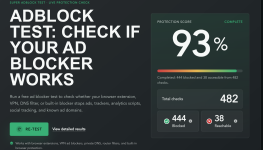
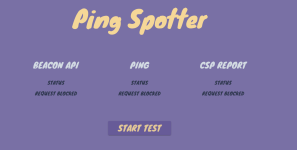
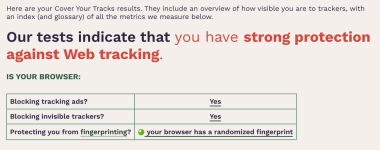
As posted, done with the Chrome extensions. Pitty AdShield Extra takes so long to become available in CWS.

Now investigating on how to make AdShield Extra available for Firefox. Will wait with publishing to implement first user feedback after AdShield Extra (for Chrome) is in CWS
 
Really nice improvement since few versions back (own ABP rules integrated), still on brave-origin on debian 13.7 without brave shields and safe browsing but with NextDNS, just must have whitelisted my searxng welcome page otherwise at startup blank page, but with whitelisting is ok.
And i 'am still hesitate between 3P-Matrix-Lite and APIVoid Script Stop @Sampei.Nihira ???

3.png4.png5.png
 
Last edited:
Really nice improvement since few versions back (own ABP rules integrated), still on brave-origin on debian 13.7 without brave shields and safe browsing but with NextDNS, just must have whitelisted my searxng welcome page otherwise at startup blank page, but with whitelisting is ok.
And i 'am still hesitate between 3P-Matrix-Lite and APIVoid Script Stop @Sampei.Nihira ???

View attachment 299985View attachment 299986View attachment 299987

Some a day i think i will fall in love :oops::);)(y)
Well idea behind uBlock Stripped is that you don´t need all the road maps of the world when you are just doing a city trip in your own country. At least when I am going to Amsterdam I don't need all the maps of the world.

So uBlock Stripped will always score lower in AdBlock test which are directed at "how many sity maps and country maps do you have with you all the time". uBlock Stripped allows you to completely strip a website you visit often using Cookie consent clicker, Dynamic DNR filtering and Privacy Inspector.

For casual surfing uBS trades in the maps of cities you don´t visit at that time (e.g. wondering around in Poland it has no use taking city maps with you of Spain), for enhanced security would you occasionally wander outside the safe-regions zone (Belarus is next to Poland and I would like to have all the Security & privacy protections on board when visiting websites in Belarus). That is what Worry-free safe surfing is designed for. As extra Worry-free does not need maps, it tries to recognise the Cookie Wall Systems which are used on that website and tries to auto decline.

uBS is a completely different mind-set on looking at advertising & tracking protection.


PS: Sampei-san is from Italy and ApiVoid Script Stop is Italian also, so expect an Italian connection when evaluating ScriptStop with 3PM, capiche :cool:
 
V 9.5.4 in the webstore available

Found a discrepancy between Chrome DNR and Firefox DNR (while playing with AdShield for FF), in Chrome there rules are siliently accepted as is and in Firefox they generate an error. So in this case Firefox is the better browser.

AdGuard accepts wildcard TLD's in the $domain parameter (e.g.$domain=sample.*). AdGuard replaces the * with 174 TLD's. So I was not aware of these rules not correctly being processes by Chrome. Thanks to FF uBS now handles wildcards in cosmetic rules correctly. I applied the same fix as for scritptlets: replacing the * with 34 common TLD's and Country codes of EU+ and 5eyes, check whether that now specific domain is in the top 1 million most visited websites, when not it drops, when existing (e.f. read.amazon.com checks whether amazon.com is in the top 1 million) it adds it to DNR (either initiator domain or request domain depending the rule).

So what is changed is explained above.
 
V 9.5.4 in the webstore available

Found a discrepancy between Chrome DNR and Firefox DNR (while playing with AdShield for FF), in Chrome there rules are siliently accepted as is and in Firefox they generate an error. So in this case Firefox is the better browser.

AdGuard accepts wildcard TLD's in the $domain parameter (e.g.$domain=sample.*). AdGuard replaces the * with 174 TLD's. So I was not aware of these rules not correctly being processes by Chrome. Thanks to FF uBS now handles wildcards in cosmetic rules correctly. I applied the same fix as for scritptlets: replacing the * with 34 common TLD's and Country codes of EU+ and 5eyes, check whether that now specific domain is in the top 1 million most visited websites, when not it drops, when existing (e.f. read.amazon.com checks whether amazon.com is in the top 1 million) it adds it to DNR (either initiator domain or request domain depending the rule).

So what is changed is explained above.

See, now you, too, understand better what,if you recall,I wrote to you some time ago when you asked me why I have Firefox in my Security setup.
By using Firefox, you gain a better understanding and, as a result, improve performance in Chromium-based browsers.;)

P.S.

It's very difficult to keep up with all the changes Amazon keeps making.
Just today, I added 3 rules to my NextDNS whitelist to successfully complete my zero-euro credit card sign-up for Amazon Prime.
If I remember correctly, I didn't have this problem just a short while ago.
 
Last edited:
  • Like
Reactions: Jan Willy