Hot Take uBlock Stripped - Dynamic Filtering is available on the webstore

Web Extensions
390 Replies 33,548 Views
Thread details
Remember I used to switch from 1 profile to 2 profiles in Chrome (or better in Brave) and used to switch between uBOL and AG Mv3.

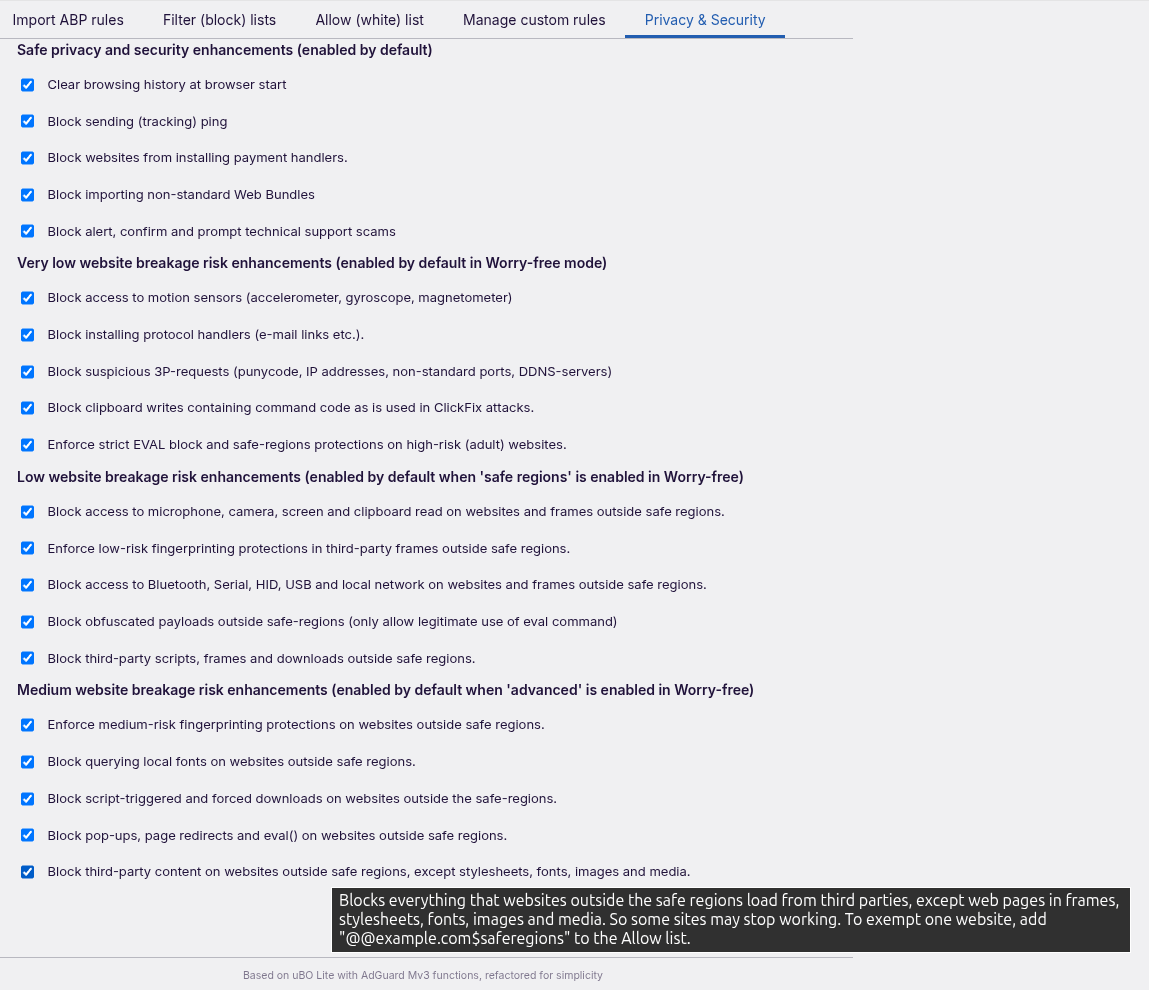
Today I (think) I finished uBlock Stripped, the Privacy & Security tab now has 4 groups of 5 protections (a whopping total of 20).

You may think WTF why 20 and why worry-free. Well the answer is simple: without worry-free this is my old work profile and with worry free this mimics my surfing profile. What is nice about uBS is that I wrote scriptlets when for instance a Sandbox Policy was to blunt and I could make it sharper (less website breakage) by blocking only a few API's. Also by combining the safe-regions paradigm the extra protection (even the medium risk) will in practice never run into problems (website breakage).

... and when you do you can use the @@website.com$saferegions in the ABP-import to except website from the safe regions protctions.

uBlock Stripped is my idea of perfecting security (and privacy) with a less is more approach in mind (without language filters 100.000+ raw filter lines translate to 10.000+ rules, which is well below the allotment an extension gets (30.000 guaranteed and 300.000 max for all extensions). I used to have both uBOL (for its excellent element picker, now uBS Cosmetic element picker) and AdGuard (for its excellent logger and rule creation, now Dynamic DNR filtering) loaded and used to jump up and forth between uBOL and AG Mv3. I also used to have JShelter with a subset of their safe fingerprint protections (now Privacy Inspector) and used to take cookie prompts for granted, because Ghostery never consent used to break some work websites and Click-O-Matic allowed everything (which is also not what I wanted). Now with Worry free trying to decline cookie prompts and Cookie Consent clicker (as a life saver for Worry-free auto decline misses and the websites you want to login), uBlock Stripped is the ideal combination of my favourite extensions all condensed in one extension (and it is still as fast as uBOL).
1790879173314.png


AI said to me that safe-regions should have be labelled known-regions because there is also malware distributed to on signed com websites. BUMMER AI is right, so safe-regions is over pretentious, it should have been called known-regions. I am going to watch soccer, so 10.0.1 might have change safe-regions to known-regions.
Although the equation still applies with the Top Level Domains and teh Country Codes in the safe-rgions you can access 80% of the websites in the world (95-99% of the websites in 'western' world) but you also block 60% of the malware in the world.
 
Last edited:
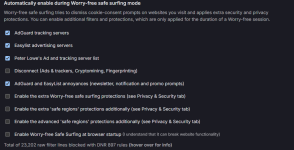
@LinuxFan58 - Are these extra filter lists enabled if worry-free mode is not enabled?
View attachment 300406
No you need to enable worry-free, with your settings you can enable worry-free at startup. It only applies "Try decline cookies" and the extra filters you have enabled.

______

You have disabled all protections. When I run Speedometers they are all enabled and when 10.0.1 is available in the Chrome Webstore the 5 worry-free protections should not give any problems (I moved the only allow legitimate use of EVAL to safe-regions, that was the only one which could interfere in the past).
1790922951535.png

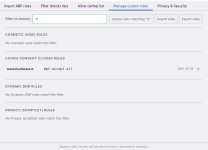
You can exclude websites by entering @@example.tld$worryfree in allow list (excluded a website fro the extra filters and extra protections).
When you enter @@example.tld$saferegions the safe-regions and advanced protections are skipped (not the extra filters).
 
Last edited:
The safe-regions is intended to prevent users not bothering into using 3P-matrix-lite.

When you add an extension focssed on URL malware protection (e.g. MalwareBytes Browser Guard, Osprey browser protection, symantec browser guard) you protect youself (additionally when safe browsing enabled) against first-party threats. But even without additional first-party URL protection, ChatGPT's assessment of closing 3P-risk is something to consider, see table.

1790926723918.png


Most protections are directed to making the build-in Chrome mechanisms stronger OUTSIDE the safe-regions. This adds 3P-protection without hassle (and because it is using ¨normal" DNR, CSP and scriptlet mechanism it does not hurt performance.


TIP for people preferring 3P-Matrix-lite for 3P-exposure management, disable ONLY 2 below 3P-protection (in the Privacy & Security tab),
but .... enable all protections in Worry-free safe browsing (in the Filter block list tab).

1790935412271.png


Speedometer Benchmark with 3PM using tighter/smaller TLD-allow list and uBS with disabled 3Pscript/frame -protection.
When I recall right, uBS has 52 TLD's whitelisted (16 generic and country codes from 5eyes and EU+) while I have only 10 whitelisted in 3P-M (by the way I run with all protections enabled, when there is no noticeable difference between 10.000 DNR rules and 40.000 rules in Chrome, those 2 DNR 3P block rules from uBS do not impact performance).
1790934071874.png

1790935181111.png

1790927608805.png
 
Last edited:
Question to uBS users, should I change safe-regions to common-regions? I think AI has a point (it is not safe, it is common and restricting your 3P-exposure to common-regions is safer, not safe). Come to think of it safer-regions could also apply and a smaller change.

So the question is: shall I change it to safer-regions or common-regions?

I am opting for safer-regions. After all a subset of all TLD's focussing on two regions (north America and Western Europe) leaving out much abused generic TLD's and country TLD's is always safeR than allowing ALL

I keep the $saferegion parameter, also when a person exempts a website using the @@website.tld$saferegion he/she arguably declares that a safe-region
 
Last edited:
So is it safer with common regions or not safer? Or does it increase the 3P exposure? If common increases it somehow, it might not be a good idea?
 
So is it safer with common regions or not safer? Or does it increase the 3P exposure? If common increases it somehow, it might not be a good idea?
I opted to call it "safer regions" (old name was safe regions).When you limit the 3P-exposure to the 52 build in TLD's of safer-regions (16 generic and the 5eyes + EU+ zone), you probably reduce the risk exposure by 60% percent on average (according Chat GPT when I fed it with the code and the latest much abused TLD lists). So it is safer to use the SAFER REGIONS protections in uBS

The old name safe-regions, which is strictly spoken not true, although much less common, there are also HTTPS websites with TLD = COM or TLD = NL spreading malware. Fun thing about SAFE is that SAFER is worse than SAFE (opposite to good-better-best :-) ), so I called it safer regions in 10.0.1

But when you have a look at URL HAUSE latest malware URL's you can see how rare they are, so with the additional security measures of the Privacy & Security the attack surface is easily reduced by 80% while the wide "western world" range of allowed TLD's using the safer-regions protections, will cause minimal website breakage.

uBS does not warn you when you land on a malicious website (use MBAM browser guard, Osprey ot Symantec for URL protection), but the previous post showed the safer regions Sandbox Content Policies and custom scriptlets also considerably reduce the risks.


TLDR:
1. Yes safer regions increases security with little to no website breakage
2. It is very effective to reduce 3P exposure, but also strengthens security would your URL extension (MBAM browser guard, Osprey, Symantec, Google safe browsing) miss an malicious website and you land on a malicious website (making it first-party). Even when your URL protection misses an URL, safer regions reduces the first party risk.
 
Last edited:
I keep the $saferegion parameter, also when a person exempts a website using the @@website.tld$saferegion he/she arguably declares that a safe-region
For me a discussion about terms such as common, safe or saver or perhaps less risky is irrelevant. I think we all know what is meant. But IMO somehow it looks a strange feature in uBlock Stripped, illustrated by quoted whitelist setting. I wouldn't call it worryfree. At this point uBlock Stripped misses the simplicity of 3P-M's matrix to control third party requests.
 
For me a discussion about terms such as common, safe or saver or perhaps less risky is irrelevant. I think we all know what is meant. But IMO somehow it looks a strange feature in uBlock Stripped, illustrated by quoted whitelist setting. I wouldn't call it worryfree. At this point uBlock Stripped misses the simplicity of 3P-M's matrix to control third party requests.
Agree about the naming, but AI raised it, that is why I addressed it.

It surprises me that you call it a strange feature, when you implement 3P blocking with ABP rules in both uBO and AG :-)

Worry-free is worry-free for people living in the safer regions and it is not intended to control 3P-requests, so that is intended design, it is set and forget.

And using 3PM in combination with uBS or any other adblocker* also works well, freedom of choice.

*) except I would not use Ghostery which uses an eval bridge between restricted world and main world and uBlock Origin which uses unsafe scriptlets.
 
Last edited:
It surprises me that you call it a strange feature, when you implement 3P blocking with ABP rules in both uBO and AG
uBO and AG have log files where all 3P control comes together, from dynamic rules, filter rules. and custom rules. That makes the difference.

PS: For uBO I didn't need to make custom rules. I just used and still use its superb 3P dynamic rules.
 
Last edited:
And using 3PM in combination with uBS or any other adblocker* also works well, freedom of choice.

*) except I would not use ..... uBlock Origin which uses unsafe scriptlets.
It also depends on the browser one uses, f.i. Firefox. uBO keeps doing an excellent job, regardless the risky scriptlets which can be deactivated.
 
uBO and AG have log files where all 3P control comes together, from dynamic rules, filter rules. and custom rules. That makes the difference.

PS: For uBO I didn't need to make custom rules. I just used and still use its superb 3P dynamic rules.
That is the point, you don´t need to look at log files, with worry-free ;)
 
Last edited:
Change of plans: I am preparing uBlock Stripped to drop the 5eyes and EU+ limitation.

And also talked to an UX-expert. Conclusion was, drop the DNR based 3P-script and frame protection, it is set wide to prevent breakage (5eyes & EU+) you will never match that low breakage for general use, on top of that you have got 3P-Matrix-lie for that. So only the outside safer regions scripttlet and Sandbox Content Policies survived (download protection was also dropped because Download Sentinel covers that adequately).

So no overlap between uBS - 3P-matrix-lite and Download Sentinel and uBS got an option to align whitelisted TLD's for Content Sandbox Policies.
1791041510827.png


Also the pop up simplifed (because uPS also has context menu)
1791041953630.png


End lastly name changed to AdShield Evolution - Dynamic Filteriing

Reason
1,. When you drop the scope strip keeping stripped in the name makes no sense
2. It offers many power tools, so it is so much more uBOL stripped
 
Last edited:
Adopted the default setup for the TLD whitelist in V10.0.3
It now uses the continent (not the browser) setup of 3PM level 3 (not the browser).

FYI
3PM browser levels adds whitelist TLD's based on the language(s) you have enabled in the browser (that is the default level of 3PM)

Because AdShield Evolution (ASE) is intended for a wider audience and the scriptlet and Content Sandbox Policies are more directed to landing on a (first-party) website and third-party frames (and automatically scripts in those 3p-frames) it uses the wider continent level of 3P-M.

This means when you have Slovak language the language you can read (Tsjech) are automatically enabled (same when in Norway you can read Danish and Swedish and Denmark and Sweden are added to the whitelist).

I used a scientific standard for it, which has some one directional language intelligibility, e.g. Portugese speakers can easily read Spanish, but not the other way around. This is also applicable for some languages spoken on the Balkan area. It is easier to remove a country (e.g in Luxembourg, Austria and Switserland they also speak German and in Belgium, Switserland they also speak French) than to miss out a language.

Above explains the wider (same langauge spoken and read-inelligibility on the) CONTINENT mechanisme in ASE (while 3PM uses the more narrow BROWSER default).

These are all preliminary steps to drop 5eyes & EU+ restrictions. Ultimately ASE will be continent optimized, with cross-sections for Arabic and Western world (the current 5eyes & EU+), so the idea of optimizing performance is kept, only made variable/dynamic per region.

I explained it often, people live in digital bubbles. In real life you are not taking along roadmaps of all the countries in the world when you are planning a city trip (a website) in your country (your bookmarked websites). This is the same logic of using a subset (selection) of country codes in the websites. Although Chrome is crazingly efficient when it comes to DNR based rules, this does not apply on cosmetic, procedural and scriptlet rules. So that is the gain of "stripped" applied on regions (continents) in ultimtely. This explains the AdGuard way of organizing and storing it (large chunk) and uBO's way of applying it (small chunks).

V10.0.3 will probably reviewed (and available in CWS) when workweek starts again (manual review).

EDIT: Name change rejected by Google (I already changed it once), so uBS it is for now
:)
 
Last edited:
Today I tried UBS again,kudos to the developer; it’s really very fast.
With this extension and uBo disabled, my Speedometer 3.1 test reaches speeds it’s never reached before.

I’d also like to suggest that the developer include at least a basic list for the “consent-cookie” feature,even a small one (e.g., uBlock filters – Cookie Notices),which could address the various websites that aren’t recognized by the built-in “consent-cookie” functionality.

Yes, I know that we know how to add rules to work around this, but how many other potential users of the extension will know how to do that?

I’ll mention just one very simple website where the built-in “consent-cookie” feature isn’t recognized, but the list of filters I included above,just as an example,could prevent the banner from appearing.
Of course, you should try it out for yourself ;):

IlSoftware.it - Il Sito Italiano sul Software
 
Last edited:
Today I tried UBS again,kudos to the developer; it’s really very fast.
With this extension and uBo disabled, my Speedometer 3.1 test reaches speeds it’s never reached before.

I’d also like to suggest that the developer include at least a basic list for the “consent-cookie” feature,even a small one (e.g., uBlock filters – Cookie Notices),which could address the various websites that aren’t recognized by the built-in “consent-cookie” functionality.

Yes, I know that we know how to add rules to work around this, but how many other potential users of the extension will know how to do that?

I’ll mention just one very simple website where the built-in “consent-cookie” feature isn’t recognized, but the list of filters I included above,just as an example,could prevent the banner from appearing.
Of course, you should try it out for yourself ;):

IlSoftware.it - Il Sito Italiano sul Software
Not going to happen, for below reasons:
  1. uBlock Stripped has an easy to use point and click Cookie consent clicker to automate your cookie choices (see attachment).
  2. uBS is intended for advanced users who
    a) like the benefits of 2 browser profiles without the hassle of switching profiles (on-demand worry-free mode for casual safe surfing)
    b) like to have more control over websites they visit often without the hassle of writing custom rules (using the point and click power tools of uBS)
    c) prefer security over adblocking
  3. most of the cookie blocks in the filterlist are generic (could cause website breakage) or require trust (which is unacceptable for security reasons)
    as an example you won't find ilsoftware.it in AdGuards Annoyances/coockie/specific subfilter (so that cookie prompt is blocked with generic rule or scriptlet)

    So I am sorry to say my friend, although you are very advanced user, but you use uBO without disabling scriptlets requiring trust, so you don´t qualify as an uBS user (you don´t prefer security over adblocking) :ROFLMAO: ;)


    Food for thought: IS OPEN SOURCE REALLY A GUARANTEE THAT SOFTWARE IS WELL DESIGNED?
    Only when deep diving into the code I found out about Ghostery's eval-bridge between restricted and main world and the hacking capabilities of json-edit scriptlet family of uBO/uBOL, how many more hidden treasures for black hatters can be found in popular extensions (with user script permissions)?
 

Attachments

  • 1791193133996.png
    1791193133996.png
    53.5 KB · Views: 41
Last edited:
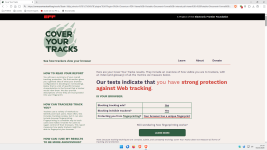
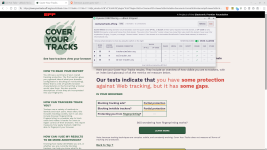
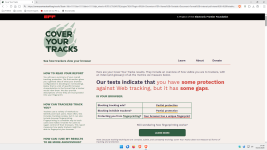
It is a bit of a non-test, They test some well known and some exotic trackers covered by Privacy Badger. It is like a butcher checking out his own meat.
Many extensions react by adding those trackers (and other questionable tests) to their build-in lists (e.g. eviltracker.net).


Besides their (EFF) disclaimer says it all
1791203660349.png
 

Attachments

  • 1791204387870.png
    1791204387870.png
    315.4 KB · Views: 23
Last edited:
It is a bit of a non-test, They test some well known and some exotic trackers covered by Privacy Badger. It is like a butcher checking out his own meat.
Many extensions react by adding those trackers (and other questionable tests) to their build-in lists (e.g. eviltracker.net).
View attachment 300494

Besides their (EFF) disclaimer says it all
View attachment 300493

uBo disabled + API Void SS disabled:

2.png

:cool:
 

Recently browsing

Members who viewed this thread in the last 5 minutes

Back
Top