Troubleshoot Unable to Install Windows Vista on Old Computer

DJ Panda

Level 30
Thread author
Verified
Top Poster
Well-known
Forum Veteran
Aug 30, 2015
1,928
9,463
2,870
Wisconsin
Hey guys! How do I get passed the "Windows is unable to find a system volume that meets its criteria for installation." error This computer doesn't have the power to run Win 7 so I am using stock Win Vista. Thanks!
 
  • Like
Reactions: Cats-4_Owners-2
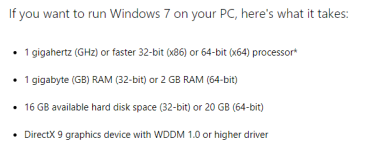
If your computer runs Windows Vista it should run Windows 7 as well. They have pretty much the same system requirements.

Screenshot_1.png Screenshot_2.png
 
Upvote 0
This information on Microsoft help page:

When you try to install Windows Vista, you may receive the following error message:
Windows is unable to find a system volume which meets its criteria for installation.
You experience this symptom if the following conditions are true:
  • In the BIOS, a universal serial bus (USB) removable device is set as the start device, or the USB removable device is set to a higher priority than the first hard disk drive in the start order.
  • You attach a non-bootable USB device to a USB port before you start the computer.

Check settings in your BIOS
 
Upvote 0
USB doesn't seem to work then. I am trying DVD and I get "Media test failure , check cable."


If your computer runs Windows Vista it should run Windows 7 as well. They have pretty much the same system requirements.

View attachment 163288 View attachment 163289

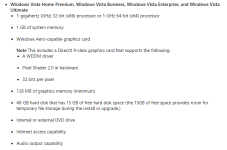
The computer in question runs Home Basic and only has the bare minimum requirements.

  • 800-megahertz (MHz) 32-bit (x86) processor or 800-MHz 64-bit (x64) processor
  • 512 megabytes (MB) of system memory
    Note On system configurations that use system memory as graphics memory, at least 448 MB of system memory must be available to the operating system after some memory is allocated for graphics.
  • DirectX 9-class graphics card
  • 32 MB of graphics memory
  • 20-gigabyte (GB) hard disk that has 15 GB of free hard disk space
  • Internal or external DVD drive
  • Internet access capability
  • Audio output capability
 
Upvote 0
The computer in question runs Home Basic and only has the bare minimum requirements.

  • 800-megahertz (MHz) 32-bit (x86) processor or 800-MHz 64-bit (x64) processor
  • 512 megabytes (MB) of system memory
    Note On system configurations that use system memory as graphics memory, at least 448 MB of system memory must be available to the operating system after some memory is allocated for graphics.
  • DirectX 9-class graphics card
  • 32 MB of graphics memory
  • 20-gigabyte (GB) hard disk that has 15 GB of free hard disk space
  • Internal or external DVD drive
  • Internet access capability
  • Audio output capability
Is Vista Home Basic working good on your PC with 512 MB RAM? I had PC with 512 MB RAM and when I put Vista Home Basic it was really slow. Nothing comes to my mind what to put on that PC besides Windows XP which is unsupported. However, you can still make Windows XP safe but lack of software could be problem. :(
 
Upvote 0
Is Vista Home Basic working good on your PC with 512 MB RAM? I had PC with 512 MB RAM and when I put Vista Home Basic it was really slow. Nothing comes to my mind what to put on that PC besides Windows XP which is unsupported. :(

It worked okay when I had it. The computer itself is like 13-14 years old so not peak. I had wanted to format and remove all the junk it had but when I formatted it before I did the Vista setup the problem I have been having just started.

Do you think the computer is pretty much dead? I get the error , "Media test failure , check cable." so it seems like I can't use DVDs then either.
 
Upvote 0
Is Vista Home Basic working good on your PC with 512 MB RAM? I had PC with 512 MB RAM and when I put Vista Home Basic it was really slow. Nothing comes to my mind what to put on that PC besides Windows XP which is unsupported. However, you can still make Windows XP safe but lack of software could be problem. :(

Some of the lightweight linux distros?
 
  • Like
Reactions: Cats-4_Owners-2
Upvote 0
You have listed the minimum system requirements needed to run Vista. Vista will run so slowly on a system with such a slow processor and so little RAM, it will basically be unusable.

What are specs of your computer?
 
Upvote 0
You can try this, set your boot order to boot from hard disk first. When your start the machine, use the boot menu to select the usb/cd rom and start the installation. It seems that sometimes the old PC have a nasty bugs which prevent them to find the hard disk if change the boot order to something else (like cd-rom or usb devices) which i got from my old PC.
 
  • Like
Reactions: Cats-4_Owners-2
Upvote 0
You can try this, set your boot order to boot from hard disk first. When your start the machine, use the boot menu to select the usb/cd rom and start the installation. It seems that sometimes the old PC have a nasty bugs which prevent them to find the hard disk if change the boot order to something else (like cd-rom or usb devices) which i got from my old PC.

Yeah I tried booting the CD or HDD (There is nothing installed on the HDD) it gave me "Media test failure , check cable." Then right after "exiting PXE ROM." When I booted through USB it would give me "Windows is unable to find a system volume that meets its criteria for installation. Attempting to install Ubuntu says there is no OS on the USB.
 
Upvote 0
Would it be possible for me to install Windows Vista onto my Passport 1tb HD then connect it into my old PC. Boot into that then copy the files over to the Vista computer?
 
  • Like
Reactions: Cats-4_Owners-2
Upvote 0
Yes it is possible but not from external hard disk as I already done it before (Swaping windows xp hard disk with similar system configuration). But in windows vista/7 it is different as it required some tweak. Easiest way is to install vista on your other pc (backup before proceed) after finish the vista installation backup the hard disk (you can use acronis/aomei/macrium) and create a bootable media. Then you can restore the vista backup file using acronis/aomei universal restore or macrium redeploy. You can search more on how to do this. Let me know if it work for you.
 
Upvote 0
Try Windows 7. Based on experience, I have a netbook that shipped with Win XP as its OS. I tried Win 7 and it works. There are no driver support for Win 7 but I used the Vista version and installed them in XP compatibility mode.
 
Upvote 0
Try Windows 7. Based on experience, I have a netbook that shipped with Win XP as its OS. I tried Win 7 and it works. There are no driver support for Win 7 but I used the Vista version and installed them in XP compatibility mode.

I would love to use Windows 7 on the machine but it doesn't meet any of the requirements so it would run slow if not at all.
 
  • Like
Reactions: roger_m
Upvote 0
I would love to use Windows 7 on the machine but it doesn't meet any of the requirements so it would run slow if not at all.

For new users:
- The OS is booting from the drive.
- @J Gamez065 can't install it.

You should check your BIOS! That's the first point! The hardware isn't the problem but the settings in the BIOS 100%!
So what should you do...?
Search in the BIOS for the settings for your hard drive. There you can check IDE or AHCI. Start from the Windows ISO with the IDE mode and once with the AHCI mode. Then you will see what mode is working!
 
  • Like
Reactions: Cats-4_Owners-2
Upvote 0
For new users:
- The OS is booting from the drive.
- @J Gamez065 can't install it.

You should check your BIOS! That's the first point! The hardware isn't the problem but the settings in the BIOS 100%!
So what should you do...?
Search in the BIOS for the settings for your hard drive. There you can check IDE or AHCI. Start from the Windows ISO with the IDE mode and once with the AHCI mode. Then you will see what mode is working!

The BIOS menu only allows me to change the boot order from what I see. The OS is NOT booting from the drive because the drive is fully wiped. There is no data at all on it.
 
Upvote 0