New Update Vivaldi Desktop Releases

Vivaldi 6.0.2979.23 only for users on macOS
This update fixes issues with video and audio sites that use Digital Rights Management (DRM), such as Netflix and Disney+, for users on macOS. Only the macOS packages have been upgraded.

The following improvements were made since the third 6.0 minor update:
  • [macOS][Widevine] DRM’d videos from Netflix, Disney+, etc. will not play (VB-97598)
 
12 ways to make Vivaldi your custom browser
Customizing Vivaldi is not only a fun way to create a more personal experience, but it can also boost your productivity and help you speed through the web. Here are some ways Vivaldi lets you make the browser feel like home.
 
The latest version of Vivaldi on desktop masquerades as competitors to benefit its users, adds more functionality to Workspaces and Tabs.

Today, we launch the new version, Vivaldi 6.1, on desktop and notebooks. It is now ready for download on Windows, Linux, and macOS.


Vivaldi sends a clear hint to Microsoft Bing Chat​


Vivaldi is built on top of the Chromium open-source project. It’s the same core used in Microsoft Edge and Google Chrome. Websites that work in one Chromium browser should work in others.

Many websites worked perfectly in Vivaldi but were blocked when not included on the site’s allowed list of leading browsers. To combat this, back in 2019, Vivaldi was forced to change its User-Agent strings. These strings contain the web browser’s name, the name of the operating system, and other technical information.

Vivaldi began masquerading as Google Chrome for better site compatibility.

Vivaldi would like to proudly announce itself as Vivaldi, but the current state of the web makes this difficult.

Fast forward to 2023: The new Client Hints standard is intended to replace the legacy User-Agent. Vivaldi is now getting reports that websites block Vivaldi based on its Client Hints. History is repeating itself.

Vivaldi developer, Yngve Pettersen explains User-Agent discrimination:

It’s not only websites that discriminate based on your name. Vivaldi now masquerades as Google Chrome for graphic card drivers, which unlocks graphic card driver optimizations made specifically for Chrome.

By pretending to be Chrome, the GPU user uses less memory and resources. It improves battery life, reduces crashes, and improves system stability.

There are people who would like to try Bing Chat but have been unable to do so as they would need to use Microsoft Edge for that. Now, we have taken additional steps to ensure that you get to use Bing Chat.

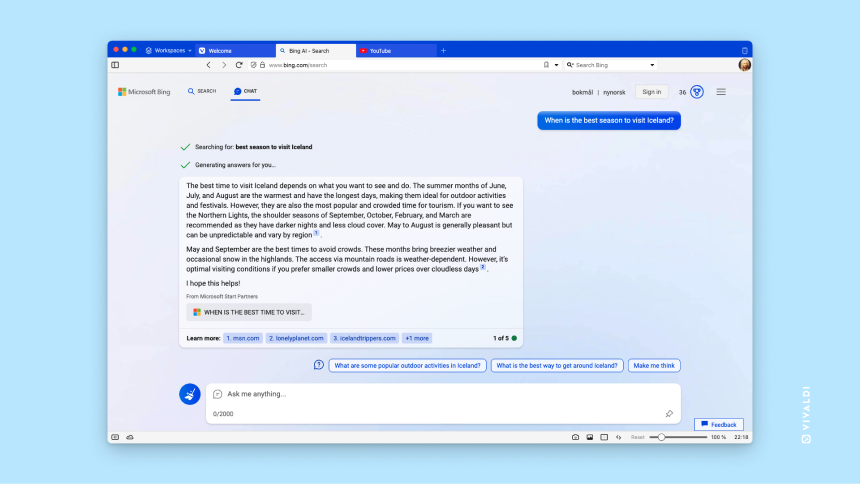
Vivaldi masquerades as Microsoft Edge when visiting Bing. This means that you can access Bing Chat using Vivaldi.


Bing Chat open in Vivaldi browser.

Vivaldi users can use Bing Chat on desktop without downloading Edge.​

Changelog from 6.0 to 6.1​

  • [New][Client Hints] Bing chat only works if you manually identify as Edge (VB-96016)
  • [New][Client Hints] Make Google Chrome the default Client Hints Brand (VB-96837)
  • [New][Workspaces][Tab bar] Add ability to re-arrange Workspaces (VB-96725)
  • [New][Workspaces] Add a scrollbar for long workspace list (VB-97675)
  • [New][Performance] Increase speed by hiding process identity (VB-96068)
  • [New][Bookmarks] Simplify UI for Add Bookmark (VB-91681)
  • [New][Calendar] Event invitation dialog refresh (VB-95463)
  • [Tabs][Menus] Copy Links from selected tabs or Tab Stacks (VB-96011)
  • [Address bar] Down arrow triggers a search for a URL (VB-96611)
  • [Address bar][Settings] Add setting to disable domain autocomplete (VB-97497)
  • [Address bar][Settings] With native windows and tabs not on top the Vivaldi menu button is overlapped (VB-97898)
  • [Bookmarks] Description overwritten when selecting next item (VB-96869)
  • [Bookmarks] Dialog height and overflow is wrong (VB-97181)
  • [Bookmarks] On adding, the title and description may be wrong (VB-97001)
  • [Bookmarks] Reenable autocomplete in Bookmark editor (VB-95418)
  • [Clock] Add button to remove all past timers (VB-73261)
  • [Clock] Can’t set an alarm for 0:00 (VB-72634)
  • [Clock] Display alarm name in clock button (VB-66062)
  • [Clock] Dropdown progress display issues (VB-96667)
  • [Clock] In countdown mode it displays both progress and clock hands (VB-96666)
  • [Clock] Japanese AM/PM info in Alarm setting is cut off (VB-86596)
  • [Clock] Unable to set arbitrary alarm time (VB-68724)
  • [Clock] “Start” alarm button should be named “Set” (VB-89240)
  • [Crash] On fedex.com (VB-97476)
  • [Crash] On startup (VB-97192)
  • [Crash] When opening a warning dialog for external app URL (e.g windows feedback) (VB-97125)
  • [Crash][Developer Tools] Crash when closing tab after undocking (VB-97557)
  • [Crash][Developer Tools] When closing recently undocked dev tools window (VB-97822)
  • [Crash][Extensions] My browser crashes when I try to open a tab with an extension (VB-97546)
  • [Crash][Extensions] iCloud Passwords extension cannot be deleted (VB-97170)
  • [Crash][macOS] Adding Google account in system settings causes crash (VB-95984)
  • [Crash][macOS] When screen locked / revived from hibernate (VB-95776)
  • [Developer tools] Opened as background of Startpage (VB-97133)
  • [Downloads] Display ‘save to’ location in dialog (VB-97806)
  • [Downloads] Panel should not open when it is removed (VB-96883)
  • [Extensions] Popup is displayed incorrectly when placed in the status bar (VB-96761)
  • [Extensions][Keyboard] Shortcuts don’t work (VB-14668)
  • [History] Column headers of History month view unstable when searching (VB-96479)
  • [Icons] The New Note and Screenshot button icons are too similar (VB-92823)
  • [macOS] Fullscreen incorrectly restored after restart (VB-93085)
  • [macOS] Navigation buttons overflow the toolbar with a high UI zoom (VB-96552)
  • [Panels] Address field’s dropdown in panel shows incorrectly (VB-96292)
  • [Panels] Window Panel audio icon broken (VB-84092)
  • [Performance] More responsive list views (VB-97641)
  • [Periodic reload] “Disable All” periodic reloads should only apply to the active workspace tabs or web panel tabs (VB-96383)
  • [Popout Video] PiP indicator uses the chromecast icon instead (VB-96898)
  • [Profiles] Avatar window for new profiles has empty space (VB-97665)
  • [Profiles] Center align buttons in Profile dialog (VB-97661)
  • [Quick Commands] Focus is not set correctly after executing quick command
  • [Quick Commands] Scroll bar on Quick Commands is not working (VB-97176)
  • [Quick Commands] Use correct search term when filtering history (VB-69148)
  • [Quick Commands] ‘Show close tabs’ does nothing when the trash can icon is disabled (VB-97350)
  • [Quick Commands][Extensions] Triggering hidden extensions from gets a weird position (VB-97669)
  • [Reader Mode] Styling not always applied (VB-96954)
  • [Search] Remove Neeva as an included search engine (VB-97712)
  • [Search] Suggestions don’t go over the whole width when Address bar is a Pop-Up (VB-90423)
  • [Settings] Content blocker settings should scroll to focus (VB-79063)
  • [Settings] “About Vivaldi” entry has the chrome icon (VB-97214)
  • [Speed dial] Context menu doesn’t work within folder (VB-96788)
  • [Sync][Profiles] Not possible to Sign In to Sync from Profile switcher (VB-97382)
  • [Sync][Speed dial][Bookmarks] Custom thumbnails lost and can not be set permanently (VB-97562)
  • [Tab Bar] Drag to search in a stacks’ tab tab should open the tab inside the stack (VB-97801)
  • [Tab Bar] Dragging a tab which plays sound from inside a tab stack to outside of it keeps the audio icon playing (VB-97784)
  • [Tab bar] Dragging and dropping text to the new tab button to search doesn’t work (VB-96951)
  • [Tabs] Reduce initial tab bar animation (VB-97075)
  • [Tabs] Untile Tabs missing from Tab’s context menu (VB-96526)
  • [Themes] Add border between Navigation and Tab bar (VB-96438)
  • [Themes] Various high contrast mode fixes (VB-96360)
  • [Toolbars] Editor needs a label for the default toolbar (VB-95850)
  • [UI Zoom][Address bar] Glitch on OS buttons when address bar is hidden (VB-96873)
  • [UI] White flash on browser start (VB-92622)
  • [Update notifier] Button and dialog update (VB-97352)
  • [Vivaldia] Game is blurry (VB-77929)
  • [Welcome] Add favicon to the Welcome Page (VB-97104)
  • [Windows Panel] Window/Workspace root level reports wrong number of tabs (VB-96966)
  • [Windows Panel][Workspaces] SVG icons missing (VB-97872)
  • [Windows][Installer] On upgrade task bar icons are broken (VB-97113)
  • [Windows][Installer][Keyboard] Focus issue – opens Privacy Policy instead of “Accept and Install” (VB-97561)
  • [Windows][Settings] Empty space on top of address bar if Native Window and Tab Bar at left (VB-97830)
  • [Windows][Settings] Remove tab spacing in maximized window does not work (VB-97013)
  • [Workspaces] Can become empty (VB-96594)
  • [Workspaces] Change “Copy Address” to “Copy Link” (VB-96550)
  • [Workspaces] Context menu open in another workspace not working properly (VB-96622)
  • [Workspaces] Deleting a workspace creates an empty restored workspace (VB-97833)
  • [Workspaces] List items have a darker background on dark themes (VB-97950)
  • [Workspaces] Open the active page’s workspace on start (VB-96702)
  • [Workspaces] Switch workspaces with a single click (VB-97084)
  • [Workspaces] Tabs can end up duplicated in invisible workspaces (VB-97549)
  • [Workspaces] Unable to move Tab to Separate Window from within Tab Stack when using the new Workspaces Feature (VB-97355)
  • [Workspaces] Workspace names should not be translated (VB-96937)
  • [Workspaces][Popout Video] Back to tab from PiP opens in wrong workspace (VB-95084)
  • [Workspaces][Settings] Disable and Warn users with options other than “Startup with Last Session” (VB-95507)
  • [Chromium] Upgraded to 114.0.5735.118
 
This update contains fixes some issues with translations on the welcome page and a freeze related to profiles.

The following improvements were made since the initial 6.1 stable release:
  • [Profiles] Removing a user profile freezes the browser (VB-97948)
  • [Search] Update search URL for Bing (VB-97856)
  • [UI][Onboarding] Update translations: particularly for the Welcome page
  • [Onboarding] Stable stream builds do not show the welcome in full UI mode because what’s new loads in a new tab (VB-97983)
 
They finally fixed this:
  • [Tab bar] Dragging and dropping text to the new tab button to search doesn’t work (VB-96951)
I know it was a little bug, but still. Now, if they fix drag and drop files from the download window like any other major browser, it will be great!
 
New Version: Vivaldi 6.1.3035.84
This update includes security fixes from the Chromium project and fixes a couple of common crashes.

The following improvements were made since the first 6.1 minor update:
  • [Chromium] Upgraded to 114.0.5735.137
  • [Crash] On sleep or network connection change (VB-98009)
  • [Crash] While window.open (VB-98040)
  • [Mail] Missing toolbar in new window (VB-97725)
  • [Mail][oAuth] Cannot setup Yahoo account (VB-97852)
 
Vivaldi 6.1.3035.100
This update includes fixes for common crashers and a focus issue on macOS.

The following improvements were made since the second 6.1 minor update:
  • [Crash] If a shortcut is created to a website with a bad SSL certificate (VB-98287)
  • [Crash] When clicking on mailto links; also fixes a window.open crash (VB-97676)
  • [Mail] Fix sorting into filtering groups to prevent incorrect filtering (VB-97136)
  • [Welcome] Link to themes.vivaldi.net front page instead of /featured (VB-98289)
  • [macOS] Opening a new Window there is no focus on this window (VB-97912)
 
Vivaldi 6.1.3035.111
This update includes security fixes from the Chromium project and resolves a couple of issues with bookmarks and mail.

The following improvements were made since the third 6.1 minor update:
  • [Chromium] Upgraded to 114.0.5735.204
  • [Bookmarks] URLs overwritten by nearby entries when holding arrow down (VB-98408)
  • [Mail] New window with error dialog appears when reopening closed mail tab (VB-98130)
 
Vivaldi 6.1.3035.204
This update includes security fixes from the Chromium project and resolves a couple of other issues.

The following improvements were made since the fourth 6.1 minor update:
  • [Chromium] Upgraded to 114.0.5735.245
  • [Crash][Keyboard] Large PDFs Crash when using “Ctrl+F” (VB-98394)
  • [Window Management] Pop-up windows with unnecessary toolbars (VB-81539)
 
Vivaldi Technologies announced the minor update for Vivaldi 6.1 on the official company blog. There, the company notes that the update fixes a critical security issue in the browser. Additional information is not disclosed at this point, but Vivaldi Technologies promises to offer more details on the issue at a later point in time.

While not mentioned, it could mean that the security issue is specific to the Vivaldi web browser and not an issue that is affecting all Chromium-based web browsers.

Critical is the highest available rating and users of the browser should take the issue serious. Most may want to update the web browser as soon as possible to protect it against potential attacks targeting the issue.
 
I don't see Vivaldi getting much love here on the forum. Anyone have recent experience with it? :unsure:
It is my main Chrome based browser (I also use FF a lot), and for geeky users - though presumably not for others - it is terrific!

Among the features I find most useful: (a) multiple workspaces and (b) tab stacks - both extremely useful features for users who want to conveniently manage a lot of open websites; (c) the option to hibernate all background tabs, which saves a lot of memory.
 
Massive code refactoring brings speed to Vivaldi 6.2
Over the years, some of you have reported that the opening of new windows was not fast enough. But not anymore!

Our new version on desktop – Vivaldi 6.2 – is now faster, especially when you open a new window. By rendering browser windows through React portals, we’ve unlocked new possibilities, reduced memory usage, and significantly improved overall performance.

Upgrade to Vivaldi 6.2 today on your desktop and notebooks, and enjoy faster and more efficient window creation.

We’ve also rolled out a new version on Android, today.
 
Vivaldi 6.2 speeds up performance and adds this unique feature
Vivaldi 6.2 is the newest version of Vivaldi Technologies web browser. The new version marks a major milestone for the project, as it speeds up the opening of new browser windows significantly in many cases. Also new is the ability to customize the address field output when you type by selecting the sources Vivaldi pulls information from.

Vivaldi Technologies notes that it is now rendering browser windows through React portals. The effect of the code refactoring is that the browser opens windows faster now and that it uses less memory for browser windows.

The company explains that the JavaScript Framework Portal Windows derives from React. Vivaldi engineers worked on the project for several years to implement the feature in the browser. The main goal was to reduce memory and CPU usage, and also introduce improvements that would not have been possible otherwise.

Vivaldi Technologies ran benchmarks to compare the before and after performance. Vivaldi's window opening speed improved by 37% after the changes were implemented claims the company. The benchmarks were run on a low-end Intel 2GHz Core i3 processor. Compared to an older version of the browser from 2018, windows opened 64% faster, according to Vivaldi Technologies.

Vivaldi 6.2: Address Field customizations​


Vivaldi 6.2 ships with several new features and improvements. One of the most interesting ones is the ability to change the priority of address field items that the browser displays when users type in the address bar.

All modern web browsers use several sources they pull data from: from search, the user's bookmarks, the browsing history, or pages visited frequently.

Vivaldi users may control the output of the browser in Vivaldi 6.2 by changing priorities and removing entire sources from the list of sources Vivaldi uses. It is possible to turn off search entirely to only get local results, or to keep search and bookmarks, but disable the browsing history.

You can change the the priority and data sources of the output in the following way in Vivaldi 6.2:
  1. Select the Vivaldi Menu and then Settings.
  2. Switch to Address Bar in the sidebar of the Settings window that opens.
  3. Scroll down to Drop-Down Menu Priority.
  4. There, you may uncheck any of the available sources:
    • Autocomplete Results.
    • Search.
    • Bookmarks.
    • Search Suggestions.
    • Nicknames.
    • Frequently Visited Pages.
    • Typed History.
    • Browser History.
  5. Most of the options may also be moved. Select them and use drag & drop, or the up/down icons in the lower right corner of the interface.
    • Note that the first two options, Autocomplete Result and Search, can't be moved at this time.
There is a handy Reset Priority button to restore the original configuration at any time.

vivaldi address field customize
 
Last edited:
Vivaldi 6.2.3105.45
This update contains fixes a common crash.

The following improvements were made since the initial 6.2 stable release:
  • [Crash] On accessing site specific settings (VB-99587)
  • [Onboarding][Mail] Update tips to reflect changes to View Filters (VB-99451)
  • [Toolbars] Editor is narrower and not centered (VB-99394)
  • [Panels] Not resizable if set to Separate Width (VB-99428)
 
Vivaldi 6.2.3105.47
This update includes security improvements from the Chromium project and some key fixes from our side.

The following improvements were made since the first 6.2 minor update:
  • [Address bar][Settings] Autocomplete doesn’t work when disabling search category (VB-99798)
  • [Chromium] Upgraded to 116.0.5845.184
  • [Mail] Index failure key already exists (VB-99027)
  • [Profiles] Delete of current profile causes freezes (VB-99565)
  • [Search][Settings] Enabling suggestions for Ecosia does not work (VB-99742)
  • [Tabs] Bottom of low letters is truncated in tab bar (VB-99619)
  • [Tabs] Tab dragging detachment may fail (VB-99691)
 

You may also like...