


The MalwareTips app
Your community, one tap away.
Open MalwareTips from your Home Screen or desktop. Follow discussions, find answers and pick up where you left off.
- Home Screen access
- Optional push alerts
- Your community
You're ready to explore.Explore what's new
Installation instructions
iPhone & iPad
- Open MalwareTips in Safari and tap Share. You may need to open the Page Menu first.
- Choose Add to Home Screen. If it is not listed, use Edit Actions to add it.
- Keep Open as Web App enabled if shown, then tap Add.
Android
- Open MalwareTips in Chrome or another browser that supports app installation.
- Open the browser menu and look for Install app, Install and create shortcut, or Add to Home screen.
- Choose Install and confirm. Wording varies by browser.
Desktop
- Chrome: use the install icon in the address bar, or the menu under Cast, save and share.
- Edge: open the menu, then More tools, Apps and Install this site as an app.
- Safari on Mac: choose Share or File, then Add to Dock. Firefox on Windows: look for the web apps button in the address bar.
If you cannot find an install option, update your browser or use its bookmark option to keep MalwareTips close.
Keep up with your conversations
After installation, open the app and sign in. Enable push notifications in Preferences if you want alerts. On iPhone and iPad, push requires a Home Screen web app and iOS or iPadOS 16.4 or later.
Sign in to manage notificationsInstallation is optional. Your notification settings stay under your control.
You are using an out of date browser. It may not display this or other websites correctly.
You should upgrade or use an alternative browser.
You should upgrade or use an alternative browser.
VoodooShield discussion
- Thread starter Evjl's Rain
- Start date
VoodooShield
1,594 Replies
436,186 Views
- Status
- Not open for further replies.

Cool, thank you, we can all talk about this and figure out what to do on this together. For now, the web apps settings will get us by as it is.@danb, errrr, about preconfigured web appsI remember we sort of agreed over on That Other Site that really the only apps of any consequence are browsers, simply because they offer the most opportunities for network interaction. OTOH, where are we on IRC etc?
The biggest problem I can see with preconfigured web apps is the sheer number of titleswhere we're going back to enumerating badness. IMHO, VS should look to see what is running at any moment and ask if that is to be monitored as a web app. That way, things like MS Word probably won't count as all they really do is go searching for that truly-vital-cos-the-document-won't-work-without-it macro. Which will most likely be pinged by VS anyway

It would be difficult to prompt the user every time there is an app with web traffic... there would be way too many prompts. The good news is that the vast majority of users use the same web apps, and most users who use alternatives quickly realize that VS does not toggle with their web app unless they add it.
This is how I have always viewed this...It's true that MS Word is not much of a threat, as far as connecting to the web is concerned. But downloaded docs are indeed a threat, for various reasons.
When VS turns on, due to a web app, you are getting stronger protection, so it makes sense to manually add MS Word, Excel and Powerpoint to the web apps list.
I assume Dan didn't do that by default because it will make VS turn on too often, and the extra prompts might drive a noob user past his frustration point.
But it is a good tweak for an advanced user with a higher frustration point. So it seems to me, at least.
If a user starts their computer and opens Word to write a letter, there is not a chance they are going to become infected, simply because they are not browsing the internet or checking email. It is only when the user browses the web or checks their email, that they are truly at risk. Basically, weaponized documents do not originate from Microsoft Office, they originate from web apps.
The important thing here that we hardly ever discuss is this... we have to consider where malware originates from.
VS still protects from these types of attacks, even when it is "OFF", but the computer should only be fully locked when it is doing something dangerous.
Great idea, thank you! And if the shutdown slowdown disappears, please post what new processes were recently whitelisted as a result of the shutdown. It will help narrow down why this is happening on some systems.If shutdown is slow, try this, it might help:
1 put VS in training mode
2 Shutdown
3 Restart
4 Take VS out of training mode
That is extremely odd... the next time this happens, can you please send me your DeveloperLog.log file, right after this happens? Please email it to support at voodooshield.com. Are you running an English version of Windows / Regional settings?No, that is checked.
I just experienced this issue with thunderbird.exe. I launched the program repeatedly and each time I got a notification (which I allowed but had no effect since thunderbird.exe was whitelisted by snapshot). Coincidentally, the user log did not record any of these launches.
In the end, I deleted the snapshot whitelist entry/launched thunderbird.exe and "allowed" the program. After doing so, I received no further notifications with subsequent thunderbird.exe launches.
I'm not sure whether this program was whitelisted by the basic or advanced snapshot, but either way, its whitelist entry was ineffective.
Yeah, in a couple of weeks I plan to create a lot of videos. Hopefully soon I will be able to go full time with VS, and hopefully I will have help as well. Once this happens, things will not be so crazy@danb
when everything is stable
Would be great to see a YouTube video with the new v4, like the old one did for v3
.
English version/Win8.1-64/boots to Desktop w/o login.That is extremely odd... the next time this happens, can you please send me your DeveloperLog.log file, right after this happens? Please email it to support at voodooshield.com. Are you running an English version of Windows / Regional settings?
Attached is Developer Log since my last db delete (Tbird logs only). As you can see, the snapshot whitelist entry was working yesterday (10/2), but not today. I don't see anything notable.
In the Service Log, the last Tbird entry was yesterday (10/2). No entries are shown today.
FWIW, I put my PC to sleep overnight and woke it today before launching Tbird. Maybe the service doesn't like napping :X3:
Attachments
Cool, thank you, I see what is wrong now... your Program Files(x86) folder is on your D drive.English version/Win8.1-64/boots to Desktop w/o login.
Attached is Developer Log since my last db delete (Tbird logs only). As you can see, the snapshot whitelist entry was working yesterday (10/2), but not today. I don't see anything notable.
In the Service Log, the last Tbird entry was yesterday (10/2). No entries are shown today.
FWIW, I put my PC to sleep overnight and woke it today before launching Tbird. Maybe the service doesn't like napping :X3:
VS is hardwired to use the C drive for these folders, but I can change this to an environmental variable, so that VS will recognize it either way.
I will make this change right now, thank you!
Hey Dan... I try to keep "C-drive" dedicated to the OS — and for programs that refuse alternate partitions (you wouldn't happen to know any of those miscreants, would you).Cool, thank you, I see what is wrong now... your Program Files(x86) folder is on your D drive.
Nearly all of my programs reside on "D drive". So Program Files and Program Files (x86) exist on both C & D partitions.
Maybe that explains issues I've had w/WinRAR, 7Zip, etc.
Why yes... yes, that would explain this bugHey Dan... I try to keep "C-drive" dedicated to the OS — and for programs that refuse alternate partitions (you wouldn't happen to know any of those miscreants, would you).
Nearly all of my programs reside on "D drive". So Program Files and Program Files (x86) exist on both C & D partitions.
Maybe that explains issues I've had w/WinRAR, 7Zip, etc.
. The odd thing is that this has be hardwired since VS 2.0, so I am unsure why it is an issue now.Either way, it should be fixed now. If I have time to setup a VM and change the program files folders to the D drive and test before the next release, I certainly will. Otherwise, it should work great, and if you have any problems with VS 4.06, please let me know. Thank you!
Dan, I'll wait until 4.06. I'm unable to set up the VM efficiently here.Either way, it should be fixed now. If I have time to setup a VM and change the program files folders to the D drive and test before the next release, I certainly will. Otherwise, it should work great, and if you have any problems with VS 4.06, please let me know. Thank you!
But coincidentally I just had a series of notifications of "inet.cpl" after closing Internet Explorer (probably the first time this has run on my 4.05 install).
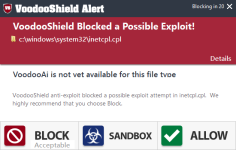
I've attached the Developer Log history for this. Why so many notifications? Is this normal? I don't see this entry in my whitelist or in my user log.
Attachments
Cool, thank you, I see what is wrong now... your Program Files(x86) folder is on your D drive.
VS is hardwired to use the C drive for these folders, but I can change this to an environmental variable, so that VS will recognize it either way.
I will make this change right now, thank you!
Good - that will help. I always run my programs from different drives. I thought we discussed this years ago on the other side and it was changed. Probably explains why I cannot get ver 4 to run properly (pop ups that don't stick) and have been running 3.59.

If you have the licensed version, you could enable "custom folders" and configure your own program folders the same way as the default program folders are configured.Good - that will help. I always run my programs from different drives. I thought we discussed this years ago on the other side and it was changed. Probably explains why I cannot get ver 4 to run properly (pop ups that don't stick) and have been running 3.59.
If you enable "custom folders", and you then take a peek at the default program folders, you will see.
As far as I remember, program folders are not ticked. Whether VS is toggled "ON" or "OFF", it is the same. But check it out, to make sure.
That sounded good on the surface, but when I went to do this I got this notification.If you have the licensed version, you could enable "custom folders" and configure your own program folders the same way as the default program folders are configured.

Does that mean I will now be notified for a plethora of Windows-related files? I'm not really understanding "Custom Folders". I thought that was additional protection.
EDIT1: OK I did this and unchecked Program Files and Program Files (x86) on my "D drive". Leaving all else as is.
Last edited:

@danb ... why do I have to reduce (Maximum to Typical) my daily rider router Security to reach Cuckoo. Um, does VoodooShield need Typical for other VS functions.
Last edited:
An anomaly... I use Screenpresso for screen captures. When I launch it manually I always get a notification even though it is in the whitelist (user allowed). So I deleted it from the whitelist and relaunched. Here is the initial notification:
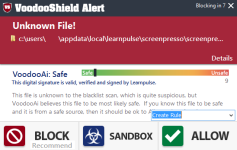
OK... that seems normal. I select "Allow" and the program is added to the whitelist.
Next, I exit the program and relaunch. Uh-oh. A notification:
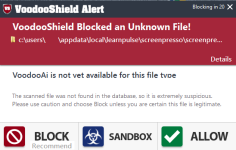
Now, this is odd. Not only did this notification appear, but it says...
Voodoo AI is not yet available for this file type
But that's not what happened on the initial launch (SEE FIRST THUMBNAIL)
I get this notification with each subsequent launch even though it resides in the whitelist.
OK... that seems normal. I select "Allow" and the program is added to the whitelist.
Next, I exit the program and relaunch. Uh-oh. A notification:
Now, this is odd. Not only did this notification appear, but it says...
Voodoo AI is not yet available for this file type
But that's not what happened on the initial launch (SEE FIRST THUMBNAIL)
I get this notification with each subsequent launch even though it resides in the whitelist.
I'm not sure... are there descriptions for each of your router levels? If so, if you post them I can look and see if there is a clue in there somewhere.@danb ... why do I have to reduce (Maximum to Typical) my daily rider router Security to reach Cuckoo. Um, does VoodooShield need Typical for other VS functions.
Here is a quick update... I have been having all kinds of "fun" trying to figure out the regional conversion issues. I am absolutely terrible with troubleshooting these types of issues, so if I cannot figure it out soon, Alex will help me figure it out... he is great with that kind of stuff.
Once this is finished, there are 4-5 other bugs I need to finish fixing, then we should be good to go.
Also, please keep in mind that VS 4.0 will temporarily have a few more blocks then 3.59... but over the next 2-3 weeks I will be refining the code, and the blocks will disappear soon. See, when redoing a lot of the code for VS, I tightened our locking mechanism even more, and now we have to find ways to safely allow items that should not be blocked. Here is one example... remember when I was talking about how VS 4.0 now also compares the parent process when checking the whitelist? That tightens the lock even more, but it will also temporarily produce a few more blocks, until I get a chance to refine the code. It is a little bit of a tedious process, but it will be worth it in the end.
VS has always been about creating the absolute tightest and strongest lock possible, while still remaining user friendly... as demonstrated earlier this year in test videos.
BTW, I also added logging for all of the blocks that users are experiencing. On one occasion I had an odd series of blocks with VS 4.0... but other than that, VS 4.0 has been quiet as a church mouse and has had zero bugs / exceptions. But anyway, once I see what is being blocked, it will be super easy to fix. I would bet that there are probably 2-3 bugs that are causing the blocks for users.
Also, a few people have asked about the blacklist scan... VS 3.59 scanned the file with the blacklist and VoodooAi, then stored the results in the VoodooAi cloud database. This is because the VoodooAi results will never change until the machines are retrained... which is a good thing.
VS 4.0 does the same thing, but now it also checks the current blacklist results each time to see if they have changed, and if so, updates the results. So basically, now the blacklist scan will always contain the most current results.
Thank you guys! I really hope we can wrap everything up in the next few days!!!
Last edited:
Only have same screenshot as already posted. (ISP rented router)I'm not sure... are there descriptions for each of your router levels? If so, if you post them I can look and see if there is a clue in there somewhere.
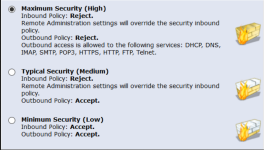
If you have the licensed version, you could enable "custom folders" and configure your own program folders the same way as the default program folders are configured.
If you enable "custom folders", and you then take a peek at the default program folders, you will see.
As far as I remember, program folders are not ticked. Whether VS is toggled "ON" or "OFF", it is the same. But check it out, to make sure.
Thanks - I forgot about that.

Dan, good job! Can you release the final version on the website when you finished?
- Status
- Not open for further replies.
Recently browsing
Members who viewed this thread in the last 5 minutes
You may also like...
-

-

-
 New Update F-Secure v26.4 Public Release
 -

-
 Serious Discussion STAY FAR AWAY FROM AVIRA