VoodooShield discussion

Status
Not open for further replies.
Issues with VPN is back. I have Mullvad and VS keeps giving a popup saying anti-exploit detected "c/windows/syswow64/route.exe". I click allow and it pops right back up and never remembers the choice. After clicking allow 10 times in 10 seconds I shut down VS.
Blocked: c:\windows\syswow64\route.exe | route delete 8000::/1 ::0 if 1 | c:\program files (x86)\mullvad\mullvad.exe
Process blocked by initial AntiExploit stage: c:\windows\syswow64\route.exe
[11-22-2017 09:54:50] [DEBUG] - DriverCommunicationService::Connect 10 threads
[11-22-2017 09:54:50] [DEBUG] - ->DriverCommunication.ctor
[11-22-2017 09:54:50] [DEBUG] - DriverCommunicationService::Enter main loop
[11-23-2017 07:04:45] [DEBUG] - DriverCommunicationService::Client disconnected
[11-23-2017 07:04:45] [DEBUG] - DriverCommunicationService::Disconnect
[11-23-2017 07:04:45] [DEBUG] - Thread 0 Failed to stop
[11-23-2017 07:04:45] [DEBUG] - Thread 1 Failed to stop
[11-23-2017 07:04:45] [DEBUG] - Thread 2 Failed to stop
[11-23-2017 07:04:46] [DEBUG] - Thread 3 Failed to stop
[11-23-2017 07:04:46] [DEBUG] - Thread 4 Failed to stop
[11-23-2017 07:04:46] [DEBUG] - Thread 5 Failed to stop
[11-23-2017 07:04:46] [DEBUG] - Thread 6 Failed to stop
[11-23-2017 07:04:46] [DEBUG] - Thread 7 Failed to stop
[11-23-2017 07:04:47] [DEBUG] - Thread 8 Failed to stop
[11-23-2017 07:04:57] [DEBUG] - DriverCommunicationService::Connect 10 threads
[11-23-2017 07:04:57] [DEBUG] - ->DriverCommunication.ctor
[11-23-2017 07:04:57] [DEBUG] - DriverCommunicationService::Enter main loop
[11-23-2017 07:10:10] [DEBUG] - DriverCommunicationService::Disconnect
[11-23-2017 07:10:10] [DEBUG] - DriverCommunicationService::Exit main loop
[11-23-2017 07:10:10] [DEBUG] - DriverCommunicationService::Disconnected
[11-23-2017 07:10:10] [DEBUG] - DriverCommunicationService::Client disconnected
Never mind, fixed it. Anti-exploit is for webapps and I had Mullvad added as a webapp. Removed it and now no issues.
 
Last edited:
  • Like
Reactions: hamo
Issues with VPN is back. I have Mullvad and VS keeps giving a popup saying anti-exploit detected "c/windows/syswow64/route.exe". I click allow and it pops right back up and never remembers the choice. After clicking allow 10 times in 10 seconds I shut down VS.
Blocked: c:\windows\syswow64\route.exe | route delete 8000::/1 ::0 if 1 | c:\program files (x86)\mullvad\mullvad.exe
Process blocked by initial AntiExploit stage: c:\windows\syswow64\route.exe
[11-22-2017 09:54:50] [DEBUG] - DriverCommunicationService::Connect 10 threads
[11-22-2017 09:54:50] [DEBUG] - ->DriverCommunication.ctor
[11-22-2017 09:54:50] [DEBUG] - DriverCommunicationService::Enter main loop
[11-23-2017 07:04:45] [DEBUG] - DriverCommunicationService::Client disconnected
[11-23-2017 07:04:45] [DEBUG] - DriverCommunicationService::Disconnect
[11-23-2017 07:04:45] [DEBUG] - Thread 0 Failed to stop
[11-23-2017 07:04:45] [DEBUG] - Thread 1 Failed to stop
[11-23-2017 07:04:45] [DEBUG] - Thread 2 Failed to stop
[11-23-2017 07:04:46] [DEBUG] - Thread 3 Failed to stop
[11-23-2017 07:04:46] [DEBUG] - Thread 4 Failed to stop
[11-23-2017 07:04:46] [DEBUG] - Thread 5 Failed to stop
[11-23-2017 07:04:46] [DEBUG] - Thread 6 Failed to stop
[11-23-2017 07:04:46] [DEBUG] - Thread 7 Failed to stop
[11-23-2017 07:04:47] [DEBUG] - Thread 8 Failed to stop
[11-23-2017 07:04:57] [DEBUG] - DriverCommunicationService::Connect 10 threads
[11-23-2017 07:04:57] [DEBUG] - ->DriverCommunication.ctor
[11-23-2017 07:04:57] [DEBUG] - DriverCommunicationService::Enter main loop
[11-23-2017 07:10:10] [DEBUG] - DriverCommunicationService::Disconnect
[11-23-2017 07:10:10] [DEBUG] - DriverCommunicationService::Exit main loop
[11-23-2017 07:10:10] [DEBUG] - DriverCommunicationService::Disconnected
[11-23-2017 07:10:10] [DEBUG] - DriverCommunicationService::Client disconnected

Same here.
 
  • Like
Reactions: _CyberGhosT_
Do not add your VPN client or OpenVPN to the list of web apps. Web apps has anti-exploit protection by default. Any web app that changes your network or routes and ports is correctly flagged as a threat.
 
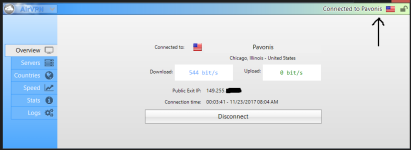
No issues here with AirVPN:
AVPN_Thanksgiving.png
 
Another crash.
[11-23-2017 10:11:51] [DEBUG] - DriverCommunicationService::Disconnect
[11-23-2017 10:11:51] [DEBUG] - DriverCommunicationService::Exit main loop
[11-23-2017 10:11:51] [ERROR] - Wait For response error 0x00000000
[11-23-2017 10:11:51] [ERROR] - Wait For response error 0x00000000
[11-23-2017 10:11:51] [DEBUG] - Thread 8 Failed to stop
[11-23-2017 10:11:51] [DEBUG] - DriverCommunicationService::Disconnected
[11-23-2017 10:11:51] [DEBUG] - DriverCommunicationService::Client disconnected
[11-23-2017 15:51:43] [DEBUG] - DriverCommunicationService::Connect 10 threads
[11-23-2017 15:51:43] [DEBUG] - ->DriverCommunication.ctor
[11-23-2017 15:51:43] [DEBUG] - DriverCommunicationService::Enter main loop
[11-24-2017 04:12:25] [DEBUG] - DriverCommunicationService::Client disconnected
[11-24-2017 04:12:25] [DEBUG] - DriverCommunicationService::Disconnect
[11-24-2017 04:12:25] [DEBUG] - Thread 0 Failed to stop
[11-24-2017 04:12:25] [DEBUG] - Thread 1 Failed to stop
[11-24-2017 04:12:25] [DEBUG] - Thread 2 Failed to stop
[11-24-2017 04:12:26] [DEBUG] - Thread 3 Failed to stop
[11-24-2017 04:12:26] [DEBUG] - Thread 4 Failed to stop
[11-24-2017 04:12:26] [DEBUG] - Thread 5 Failed to stop
[11-24-2017 04:12:26] [DEBUG] - Thread 6 Failed to stop
[11-24-2017 04:12:26] [DEBUG] - Thread 7 Failed to stop
[11-24-2017 04:12:27] [DEBUG] - Thread 8 Failed to stop
 
Another crash.
[11-23-2017 10:11:51] [DEBUG] - DriverCommunicationService: Disconnect
...
Maybe post your VS logs for this program/time interval.

Any Event Viewer notifications (Critical/Error/Warning)?
 
The event viewer had DHCP errors related to Mullvad. I already deleted all the logs & clean installed VS. If it occurs again I will post more details.
 
This morning after updating to the latest insider build and rebooting, VS crashed. All I had to do is restart it but my firewall log looked strange. Showed 6 connections for VS.

ScreenHunter_83 Nov. 24 08.33.jpg
ScreenHunter_84 Nov. 24 08.37.jpg
 
Sorry I have been away ;). I am still reviewing what bugs are left in our error reporting system, and it looks like we are getting close... and I truly appreciate your guys help working through the beta with me... now that was not so bad was it ;).

The next few weeks, I am going to be busy with business stuff, but I will also be fixing any remaining bugs in 4.0... so I probably will not be able to post much for 3-4 weeks.

Hopefully soon every device will automatically lock when it is at risk ;).

Thank you guys, talk to you soon!
 
In the last few hours there is a recurence of a problem that I had with previous builds of version 4. Currently I am running 4.12b.
The problem is that one program, Directory Opus, freezes and I have to exit Voodooshield in order to make it work again. This was solved at some point after I installed a later beta.
The particular program is shown in the Whitelist both as a Snapshot and as Auto Allowed.
 
In the last few hours there is a recurence of a problem that I had with previous builds of version 4. Currently I am running 4.12b.
The problem is that one program, Directory Opus, freezes and I have to exit Voodooshield in order to make it work again. This was solved at some point after I installed a later beta.
The particular program is shown in the Whitelist both as a Snapshot and as Auto Allowed.
Hmmm, odd... what is the path of Directory Opus?
 
Hmmm, odd... what is the path of Directory Opus?
The paths shown in the Whitelist are "C:\Program Files\GPSoftware\Directory Opus\dopusrt.exe" and "C:\Program Files\GPSoftware\Directory Opus\dopus.exe"

To add to my previous observation, if I recall the problem was solved at the other time after you fixed something on your server. May be a coincidence?

EDIT: I last reported the problem solved in September, in this posting in VoodooShield discussion
 
Last edited:
  • Like
Reactions: Gandalf_The_Grey
The paths shown in the Whitelist are "C:\Program Files\GPSoftware\Directory Opus\dopusrt.exe" and "C:\Program Files\GPSoftware\Directory Opus\dopus.exe"

To add to my previous observation, if I recall the problem was solved at the other time after you fixed something on your server. May be a coincidence?
It's hard to say... can you please post a link so I can download Opus, and any instructions that might help to reproduce the error? Thank you!
 
The download page is here. I have the pro edition.

EDIT: The error occurs after I use DOPUS, switch to my browser (Firefox) and then return to DOPUS. It's possible that it could happen with other programs or sequences, but the one I described is definite and recurring. I guess one may have to find out what happened after version 4.05b when it was resolved, and of course why it has suddenly reappeared. It may be worth noting that I haven't installed anything (unless it was done in the background) before the reappearance of the issue..
 
Last edited:
Dan, I am still having the problem talked about in post #1501. I am now running v. 4.12b. I will continue to do so with the hope the problem will be seen by you. That problem now has something to do with TypeInitialization. I understand you will be gone for awhile so I will hang in there.
 
Status
Not open for further replies.
