Advanced Plus Security wat0114 security config 2021

CSC Archive
107 Replies 29,001 Views
Last updated
Jun 12, 2021
Main use of this computer
For home and private use
Operating system
macOS 15 Sequoia
OS version and support details
MX-21
On-device encryption
Device sign-in security
    • Windows Hello PIN or biometric sign-in (face / fingerprint / Touch ID)
Security updates
Check for updates and Notify
User Account Control (UAC)
Always notify
Smart App Control
Network firewall
Real-time protection
Windows Defender, OSArmor
Device firewall
Microsoft Defender Firewall
Custom security settings
Malwarebytes Firewall Interface for Windows Defender Firewall, Added all but Adobe Reader Firewall Hardening measures in Hard_Configurartor, several Group Policy settings enabled.
SRP - Default-deny
-Hard_Configurator_6_latest: High setting
-Full BitLocker encrypted system partition.
-BIOS: passworded, Memory Protection, Intel Virtualization & Intel VT-d- enabled
-Hyper-V enabled
Periodic malware scanners
VirusTotal
Malware sample testing
I do not participate in malware testing
Browsers and extensions
Firefox latest (primary), MS Edge

-uBlockO
-CSS Exfil
-LocalCDN
Secure DNS
Cloudflare
Quad9
Desktop VPN
None
Password and passkey manager
Lastpass and Browser's built-in

Keepass free
Maintenance tools
Occasional system images using IFW (Image for Windows) and Disk cleanup using built-in Disk cleaner
File and photo backups
-Separate, encrypted partition
-USB Drive
System recovery
IFW (Image for Windows)
Usage and exposure
    • Visiting familiar websites
    • Visiting unknown or untrusted websites
    • Opening email attachments
    • Streaming audio/video content from trusted sites or paid subscriptions
    • Streaming from untrusted sites
Computer specs
Device name Lenovo-E580
Processor Intel(R) Core(TM) i5-7200U CPU @ 2.50GHz 2.70 GHz
Installed RAM 8.00 GB (7.86 GB usable)
System type 64-bit operating system, x64-based processor
Feedback preference

Detailed suggestions and alternatives welcome

Just thought to ask how do you feel about securing your browsers more? There seem to be enough security on your computer but sometimes little bit more is never enough :p
Using Edge in windows defender application sandbox and say firefox with ReHIPS free? Probably bizarre sounding idea, but i run it awhile and worked alright.
Right, and do you use Windows Defender sandboxed, the AV itself?
 
Last edited:
Hey wat do you encrypt the usb drive you use for your personal files & photos backup?
I have an encrypted usb drive and an encrypted partition on my h/drive for backing up sensitive data.

After I write to or read anything from my my h/drive's encrypted partition, I re-lock it by running an elevated batch file: manage-bde -lock R:
 
Last edited:
Firefox lack support for real Sandbox/ Isolation. Adding security with third party software doesn't work.

Just to inform users of Firefox and to avoid further misinformation,

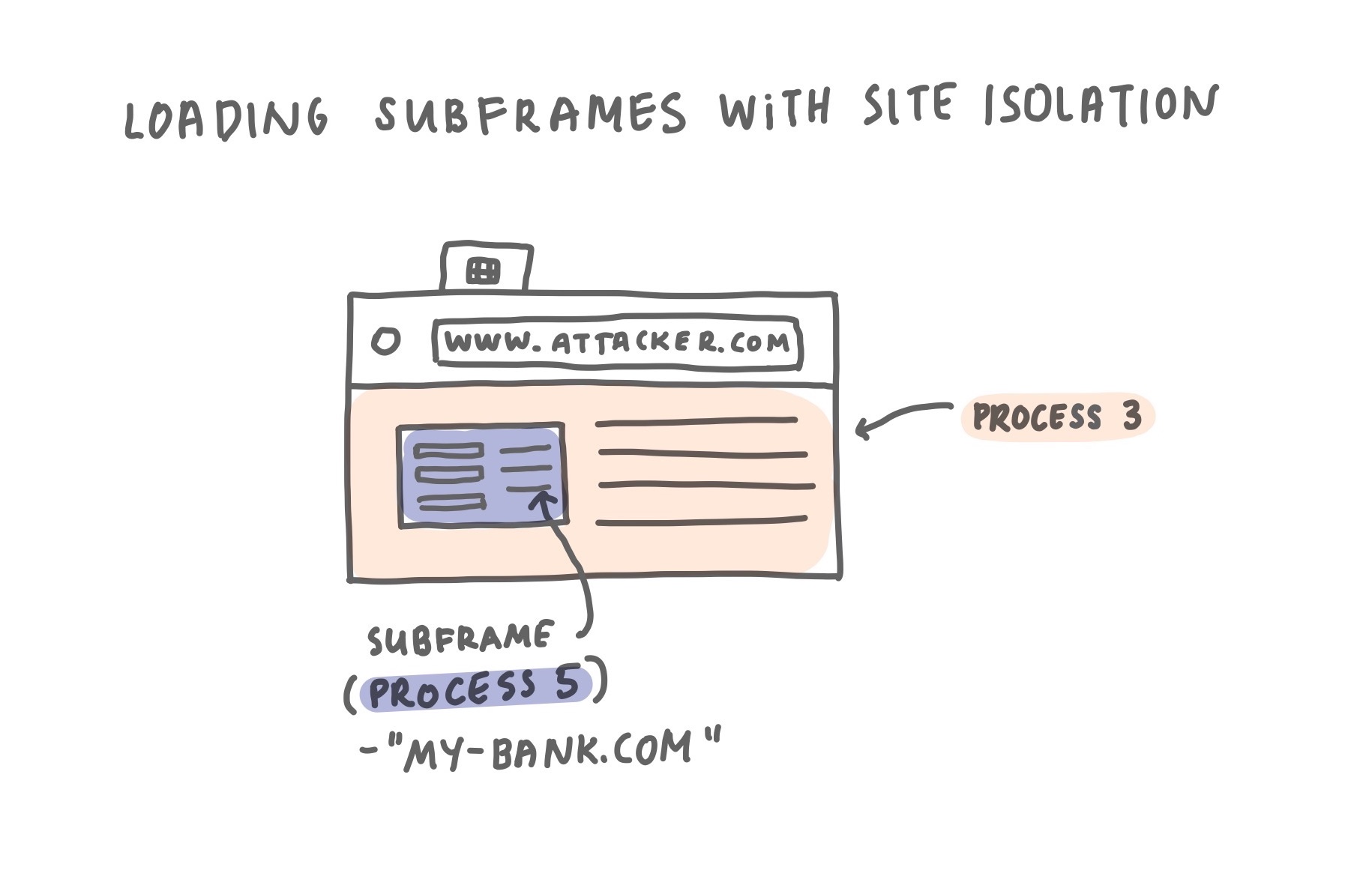
1st: Mozilla has been introduced recently "Site-Isolation" in Firefox:

2nd: Sandboxing is almost the same tech compared to Chromium:
 
Just to inform users of Firefox and to avoid further misinformation,

1st: Mozilla has been introduced recently "Site-Isolation" in Firefox:
they work already years on that, without finalizing it. Chromium provides it since 2018.

2nd: Sandboxing is almost the same tech compared to Chromium:
They use a bad one. See Firefox and Chromium | Madaidan's Insecurities
Anyway, Firefox isn't the topic here so i guess we should stop this discussion :emoji_beer:
 
Let's agree that for now, the Firefox sandbox is not as strong as the Chrome sandbox.

We are excited to announce that Firefox’s new Site Isolation architecture is coming together. This fundamental redesign of Firefox’s Security architecture extends current security mechanisms by creating operating system process-level boundaries for all sites loaded in Firefox for Desktop. Isolating each site into a separate operating system process makes it even harder for malicious sites to read another site’s secret or private data.

We are currently finalizing Firefox’s Site Isolation feature by allowing a subset of users to benefit from this new security architecture on our Nightly and Beta channels and plan a roll out to more of our users later this year.


I think that most of the issues mentioned in Firefox and Chromium | Madaidan's Insecurities were probably true, but we cannot be sure if they are currently true (in the Nightly versions).
It is also true that Chrome Sandbox is more mature. Anyway, it is hard to be sure that using Firefox is much less secure than using Chrome. Firefox has more privacy features and it is not as frequently attacked as Chrome.
As always, the attackers will have the last word.(y)
 
FWIW, I've no issues with Firefox being discussed in this thread, as browser security forms an important part of my setup. I think no matter how secure a browser is by its own merits, there are many ways to harden them, either directly or externally with a myriad security configs. In Linux I do so directly with settings and extenions, and externally via Apparmor.
 
FWIW, I've no issues with Firefox being discussed in this thread, as browser security forms an important part of my setup. I think no matter how secure a browser is by its own merits, there are many ways to harden them, either directly or externally with a myriad security configs. In Linux I do so directly with settings and extenions, and externally via Apparmor.
Do you still use NoScript on Firefox or did you drop it?
 
I use it in Firefox with XSS protection only enabled, and Restrictions disabled globally. ublockO is for website filtering in Medium mode.
Ok I just wondering because I know you used to be a heavy NoScript user and didn't know if you still used it.
 
Last edited:

Recently browsing

Members who viewed this thread in the last 5 minutes

Back
Top