Serious Discussion What do you tell the "common" man (or person) about their PC security choice. Simplified Version.

In most daily tasks, Microsoft Defender free on default settings has decent performance. But, on some computers, there can be slowdowns when doing tasks with many files, opening folders with many executables, or after applying some advanced settings (like Network Protection or high cloud protection level). Some users can feel it annoying.
 
On my work I have folders with hundreds of subfolders and some subfolders have hundreds of files... I noticed a significant slowdown when using Defender.
I'm kinda in the same situation as you. One account alone has 227 folders, averaging 15-35 MB each with multiple large patient 4000x3000 inter-oral photos. With Defender, it was agonizingly slow (okay, maybe a bit dramatic :) ) in populating that accounts folder, let alone the whole Dropbox folder. With F-Secure there is no real delay, it's pretty instantaneous.

Doesn't Windows, Defender, have some sort caching system, like most of the 3rd party AV's have? Maybe for normal use Defender is good enough in that regard, though.
 
Last edited:
In most daily tasks, Microsoft Defender free on default settings has decent performance. But, on some computers, there can be slowdowns when doing tasks with many files, opening folders with many executables, or after applying some advanced settings (like Network Protection or high cloud protection level). Some users can feel it annoying.
I find that Microsoft Defender has the fastest web experience. Other tasks don't bother me.
 
Doesn't Windows, Defender, have some sort caching system, like most of the 3rd party AV's have? Maybe for normal use Defender is good enough in that regard, though.

It has, but that cache is refreshed after Windows restart. So, when you open the particular folder the first time on the new Windows session, the files in that folder are cached and this can cause a slowdown.
 
I find that Microsoft Defender has the fastest web experience. Other tasks don't bother me.
So it is good for your particular case. It doesn't mean it's the better solution for everyone. The choice of antimalware software depends on the particular scenario that user will be facing... For instance if your computer will be offline but still receives files from clients you should choose something with strong local signatures like Bitdefender, ESET or Avast, a strong cloud solution will be useless for you.

There is no perfect solution that can work in all situations.
 
So it is good for your particular case. It doesn't mean it's the better solution for everyone. The choice of antimalware software depends on the particular scenario that user will be facing... For instance if your computer will be offline but still receives files from clients you should choose something with strong local signatures like Bitdefender, ESET or Avast, a strong cloud solution will be useless for you.

There is no perfect solution that can work in all situations.

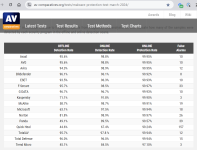
Maybe as in this example?

2024-09-12_17-17-11.png
 
Last edited:
So it is good for your particular case. It doesn't mean it's the better solution for everyone. The choice of antimalware software depends on the particular scenario that user will be facing... For instance if your computer will be offline but still receives files from clients you should choose something with strong local signatures like Bitdefender, ESET or Avast, a strong cloud solution will be useless for you.

There is no perfect solution that can work in all situations.
Exactly, it fits my needs and works for me, but I will not use it for my family members, why? Because for example, my sister used to get infected even when she used ESET, so I can't tell her to use MS Defender.
 
I think your advice is really useful, especially for those who don’t want to bother with complex setups. The only thing I would add is that you shouldn’t rely solely on antivirus software. Even if you have the most powerful program, it’s still important to practice basic internet hygiene: avoid suspicious websites, don’t download unknown files, and always keep your system updated.
Also, for those who want more control over their security, the built-in Windows Defender has improved a lot in recent years and could be enough for most tasks. For people with higher demands, your list of top solutions is absolutely relevant.
 
I think there is no such thing as a "common man" nowadays. The term was probably coined in the late 18th or early 19th century where there are very few social grounds and social groups. Nowadays, there is an abundance of outlets for people to align to in terms of interests. And thus what we all do in our private lives are different.

Different occupations have different views of groupings. A policeman will have his/her views of societal groups: gangsters, mafia, ... shared among his/her peers. Whereas a pharma researcher will have his/her groupings related to their work.

We IT security workers should develop our own groupings. I suggest: computer-noobs, sys admins, security analysts, security-forensics for starters.
 

Recently browsing

Members who viewed this thread in the last 5 minutes

Back
Top