

The MalwareTips app
Your community, one tap away.
Open MalwareTips from your Home Screen or desktop. Follow discussions, find answers and pick up where you left off.
- Home Screen access
- Optional push alerts
- Your community
You're ready to explore.Explore what's new
Installation instructions
iPhone & iPad
- Open MalwareTips in Safari and tap Share. You may need to open the Page Menu first.
- Choose Add to Home Screen. If it is not listed, use Edit Actions to add it.
- Keep Open as Web App enabled if shown, then tap Add.
Android
- Open MalwareTips in Chrome or another browser that supports app installation.
- Open the browser menu and look for Install app, Install and create shortcut, or Add to Home screen.
- Choose Install and confirm. Wording varies by browser.
Desktop
- Chrome: use the install icon in the address bar, or the menu under Cast, save and share.
- Edge: open the menu, then More tools, Apps and Install this site as an app.
- Safari on Mac: choose Share or File, then Add to Dock. Firefox on Windows: look for the web apps button in the address bar.
If you cannot find an install option, update your browser or use its bookmark option to keep MalwareTips close.
Keep up with your conversations
After installation, open the app and sign in. Enable push notifications in Preferences if you want alerts. On iPhone and iPad, push requires a Home Screen web app and iOS or iPadOS 16.4 or later.
Sign in to manage notificationsInstallation is optional. Your notification settings stay under your control.
You are using an out of date browser. It may not display this or other websites correctly.
You should upgrade or use an alternative browser.
You should upgrade or use an alternative browser.
What exactly is my MBAM detecting?
-
 Thread starter
Gib
Thread starter
Gib
- Start date
- 23 Replies
- 4,249 Views
- Status
- Not open for further replies.

Hello, Welcome to MalwareTips.
I'm nasdaq and will be helping you.
If you can please print this topic it will make it easier for you to follow the instructions and complete all of the necessary steps in the order listed.
===
First your AVAST antivirus is presently disabled, please enable it for your sucurity.
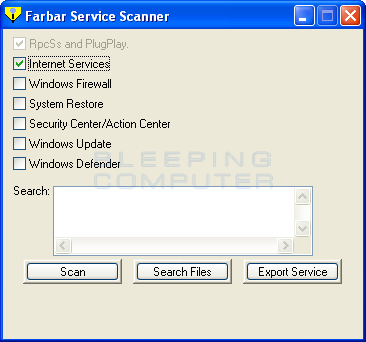
The FSS.EXE belongs to the Farbar Service Scanner program.
 www.bleepingcomputer.com
No trace found in your logs. You must have used it sometime ago and there are still some remnant items in the registry.
Clean it with Malwarebytes and restart the computer.
Let me know if the problem is solved.
I'm nasdaq and will be helping you.
If you can please print this topic it will make it easier for you to follow the instructions and complete all of the necessary steps in the order listed.
===
First your AVAST antivirus is presently disabled, please enable it for your sucurity.
The FSS.EXE belongs to the Farbar Service Scanner program.
Download Farbar Service Scanner
Farbar Service Scanner allows you to diagnose network connectivity issues due to corrupted or missing Windows services.
No trace found in your logs. You must have used it sometime ago and there are still some remnant items in the registry.
Clean it with Malwarebytes and restart the computer.
Let me know if the problem is solved.
HI,
Quarnatine the file i not already done.
Then clean the quarantined folder of all file.
How to Delete/Restore quarantined files.

 support.malwarebytes.com
Follow the directives on the page to delete all the files.
<<<>>>
Quarnatine the file i not already done.
Then clean the quarantined folder of all file.
How to Delete/Restore quarantined files.
Restore or delete quarantined items in Malwarebytes for Windows
When Malwarebytes for Windows executes on-demand scans, scheduled scans, and Real-Time Protection events, some files may be categorized as threats. These files get removed from the disk location wh...
Follow the directives on the page to delete all the files.
<<<>>>

Hi,
The file was not found.
There is no malware on this computer.
Just to make sure I suggest you download and ru this program.
Sophos Virus Removal Tool
Please download Sophos Virus Removal Tool and save it to your computer's Desktop.
Windows Vista and above:
C:\ProgramData\Sophos\Sophos Virus Removal Tool\Logs\SophosVirusRemovalTool.log
Please post the contents of the log in your next reply and note any errors encountered.
===
The file was not found.
There is no malware on this computer.
Just to make sure I suggest you download and ru this program.
Sophos Virus Removal Tool
Please download Sophos Virus Removal Tool and save it to your computer's Desktop.
- Right-click the icon and select Run as administrator.[/*]
- Click Yes to accept any security warnings that may appear.[/*]
- Click the Next button.[/*]
- Select 'I accept the terms in the license agreement', then click Next twice.[/*]
- Click the Install button and wait until the installation is complete.[/*]
- Click the Finish button. The tool created a shortcut icon on the Desktop of your computer.[/*]
- Now, double-click the Sophos Virus Removal Tool shortcut icon to run the tool.[/*]
- Click Yes to accept any security warnings that may appear.[/*]
- After it updates and a "Start Scanning" button appears in the lower right:
- Disconnect from the Internet or physically unplug your Internet cable connection.[/*]
- Close all open programs, scheduling/updating tasks and background processes that might activate during the scan including the screensaver.[/*]
- Temporarily disable your anti-virus and real-time anti-spyware protection.[/*]
- Click the "Start Scanning" button in the lower right to start the scan.[/*]
- After starting the scan, do not use the computer until the scan has completed.[/*]
- When finished, if it detected anything there will be a "Start Clean-up" button, click it and allow it to finish.[/*]
- When finished, re-enable your anti-virus/anti-malware (or reboot) and then you can reconnect to the Internet.[/*]
- If any threats are found click Details, then View Log file (bottom left-hand corner).[/*]
- Copy and paste its contents in your next reply and note any errors encountered.[/*]
- Close the Notepad document, close the Threat Details screen, then click Start cleanup.[/*]
- Click Exit to close the program.[/*]
- If no threats were found, please confirm that result.[/*]
Windows Vista and above:
C:\ProgramData\Sophos\Sophos Virus Removal Tool\Logs\SophosVirusRemovalTool.log
Please post the contents of the log in your next reply and note any errors encountered.
===
Hi,
I sugges you delete all the cookies identified by Sophos Virus Removal Tool.
Then:
Download the file host.zip in bold from this site.
Download: hosts.zip
Extract the file using the instructions on this page.
Restart the computer normally when done.
Hope it helps.
I sugges you delete all the cookies identified by Sophos Virus Removal Tool.
Then:
Download the file host.zip in bold from this site.
Blocking Unwanted Connections with a Hosts File
This article provides details on blocking Ads, Banners, Parasites, and Hijackers, web bugs, possibly unwanted programs etc. with a custom HOSTS file
winhelp2002.mvps.org
Download: hosts.zip
Extract the file using the instructions on this page.
How To: Download and Extract the HOSTS file
This article provides details on How To: Download and Extract the MVPS HOSTS file
winhelp2002.mvps.org
Restart the computer normally when done.
Hope it helps.
Hi,
How to deal with adware and PUAs in quarantine folder.
Follow the directives in on this page.
 docs.sophos.com
How to deal with adware and PUAs in quarantine folder.
Follow the directives in on this page.
Deal with adware and PUAs in quarantine
On the Home page, under Anti-virus and HIPS , click Manage quarantine items . For information about the Home page, see About the Home page . In the Show list, click Adware or PUAs . Information about ...
docs.sophos.com
Hi,
Use the Start/search button in the bottom left or the Task bar.
Type Command Prompt and press OK.
at the cursor type:
ipconfig /flushdns <-- (A space between g and / is needed) hit the enter key
Repeat with
ipconfig /release hit enter
repeat with
ipconfig /renew
Then hit Enter, type Exit , hit the Enter key to return to the Operating system.
Restart the computer normally.
Do you now have a connection?
If no connection and you still have a copy of the Farbar Program run it in normal mode or Safe mode if you need and post the logs for my review.
Use the Start/search button in the bottom left or the Task bar.
Type Command Prompt and press OK.
at the cursor type:
ipconfig /flushdns <-- (A space between g and / is needed) hit the enter key
Repeat with
ipconfig /release hit enter
repeat with
ipconfig /renew
Then hit Enter, type Exit , hit the Enter key to return to the Operating system.
Restart the computer normally.
Do you now have a connection?
If no connection and you still have a copy of the Farbar Program run it in normal mode or Safe mode if you need and post the logs for my review.
No, I have an internet connection, but if I disable my connection, then I can't run Sophos.
You initially wanted me to disable Avast AV, disable my connection and close all applications, but after the closing of the connection, how do I get Sophos to run?
You initially wanted me to disable Avast AV, disable my connection and close all applications, but after the closing of the connection, how do I get Sophos to run?
Hi,
Sophos need connection to scan your computer.
You should not be using it as your main Antivirus. protection program. It's should only be used as an additional check in cases where your antivirus program does not find anything.
To use it again go back to Sophos Virus Removal Tool - Free Download with an internet connection download the lates definition file. then as I explained in my post no 10
When the scan is completed re enable your Avast program and get the latest updates.
Sophos need connection to scan your computer.
You should not be using it as your main Antivirus. protection program. It's should only be used as an additional check in cases where your antivirus program does not find anything.
To use it again go back to Sophos Virus Removal Tool - Free Download with an internet connection download the lates definition file. then as I explained in my post no 10
After it updates and a "Start Scanning" button appears in the lower right:
- Disconnect from the Internet or physically unplug your Internet cable connection.[/*]
- Close all open programs, scheduling/updating tasks and background processes that might activate during the scan including the screensaver.[/*]
- Temporarily disable your anti-virus and real-time anti-spyware protection.
When the scan is completed re enable your Avast program and get the latest updates.
- Status
- Not open for further replies.
Recently browsing
Members who viewed this thread in the last 5 minutes
You may also like...
- T
-

-
 Serious Discussion Did Microsoft Defender change the way it responds to file downloads?
 -

-
