Advice Request What's the best way to configure NextDNS?

  • Thread starter Thread starter ForgottenSeer 94633
  • Start date Start date
VPN and DNS
22 Replies 7,715 Views
Share practical recommendations that address the author's needs.
F

ForgottenSeer 94633

Hi

I've had NextDNS installed for several days.

In fact, I didn't change anything about it. But when I enter the settings, it can be configured in individual tabs.
I am particularly concerned with the security and privacy tabs.
Should everything be turned on in the security tab and in the privacy tab what is the best to add the blocked lists
 
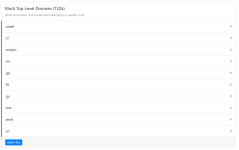
In the security tab I personally have everything enabled + blocking of some TLDs

Screenshot 2022-03-28 184602.png

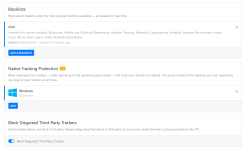
In the privacy tab it's a little harder. I always recommend enabling oisd blocklist and I am pretty sure that you won't face any issues. Depending on which device you are using your NextDNS you can also enable Native Tracking Protection like I did. So if you are using NextDNS on a Windows system you can enable the Windows option:

Screenshot 2022-03-28 184621.png
 
In the security tab I personally have everything enabled + blocking of some TLDs

View attachment 265303

In the privacy tab it's a little harder. I always recommend enabling oisd blocklist and I am pretty sure that you won't face any issues. Depending on which device you are using your NextDNS you can also enable Native Tracking Protection like I did. So if you are using NextDNS on a Windows system you can enable the Windows option:

View attachment 265304
I've always ran into issues using OISD. Gets sorted eventually but it's the only list I've ever had issues with
 
What @SecureKongo said. It's DarkReader. Really does a great job on that site. I completely forget that I'm browsing with DarkReader most of the time. lol
I still wonder why they need so much time to create a dark mode for their community. I don't think that it's too much to ask for...

 
I have 3 different NextDNS setups: Windows (in 2 different browsers), Android and TV. My TV setup 'Analytics' and Android show number of queries and blocked queries but my 'Windows' setup is now showing 0 queries, zero, nada, zilch. I tested it in Edge on some ad blocker test sites and I believe NextDNS is blocking queries but not reporting them in my account. This zero queries results started after switching to another DNS provider for testing and then switching back again. Anyone have ideas on what might be happening here? :unsure:
 
I have 3 different NextDNS setups: Windows (in 2 different browsers), Android and TV. My TV setup 'Analytics' and Android show number of queries and blocked queries but my 'Windows' setup is now showing 0 queries, zero, nada, zilch. I tested it in Edge on some ad blocker test sites and I believe NextDNS is blocking queries but not reporting them in my account. This zero queries results started after switching to another DNS provider for testing and then switching back again. Anyone have ideas on what might be happening here? :unsure:
Tried to create a new setup and delete the old one?
 
Blocking New Domains less than a month old might be the most effective setting against phishing as most sites are up for up to a few days and they rotate constantly before becoming known to malware databases.
 

Recently browsing

Members who viewed this thread in the last 5 minutes

Back
Top