Question Which AV are you using and why did you choose this one ??

Please provide comments and solutions that are helpful to the author of this topic.
BD free here too :)
And now that I see what it offers on that desktop PC, I'm going to install it on one of my laptops. Of all the on and off years in using BD, I truly never used the free version. Excellent device security, and online protection, why not install it on a laptop I use daily ;) :)
 
SmartScreen enabled plus ASR rule "Block executable files from running unless they meet a prevalence, age, or trusted list criterion" to extend the SmartScreen to executables without motw.
I'm not interested in SmartScreen. It's too privacy invasive for my taste.
All free solutions collect data; they are provided free for a reason.
So... paid solutions aren't collecting any data, right? Because last AV Comparatives Data transmission test shows otherwise.

I LOVE hearing "free products are free because you're paying with your data". Reality? The payment method doesn't matter; all companies collect all kinds of data. The only thing that differs are the ways they do it.
If you're still not convinced, you don't have to look far. Just look at Microsoft, Google or any other tech products. You pay for Windows, you pay for Office, yet data leaves your computer anyway. Same goes for various VPNs too.

On the other hand, you have free and open source software that in most of cases, doesn't collect any data. Weird how it works.
They exist because sophisticated malware is being created every day.
I never said they abandoned the business they started or that they don't have any job. In fact, that's one of the profitable businesses. Back in time Windows had no antivirus software and 3rd party software was the only way to protect your PC. When Windows 10 came and capable Defender with it, the number of 3rd party antivirus users decreased. Only stubborn stayed. And no matter how capable Defender became, stubborn remembered it was long time ago garbage and will never switch to it.

With decrease in number of users, antivirus companies had to find a way to keep doing business and be profitable. How they achieved that? Easy. Just scare your users with everything, lie to them and include bunch of unnecessary tools in the name of security. And that's exactly what they did. This is exact reason why antivirus is everything but antivirus tool these days. From simple antivirus software you got Windows toolbox with everything that you don't need. Starting from (not-at-all private) VPN, "secure" browser (that probably has more vulnerabilities than the actual web browser), system cleaner (because why not), driver updater (why keep everything working normally when we can create a mess) and such.
If that were the only factor, Windows 11 wouldn't have any bugs—and yet, it's one of the worst operating systems ever made. So, the famous "Microsoft guarantee" is quite questionable.
Have you ever wondered why is Windows so damn problematic while macOS isn't? It's not because it's garbage piece of software. Yes, it could do a complete rewritte. But the most of the issues come from various types of hardware configurations and users creating problems.

If you ever tried to run Linux, you'd see that not everything is working correctly on all PCs. If you ever tried to create Hackintosh PC, you'd see that it works only on specific hardware, otherwise macOS would run like sh!t. Now you have Windows which is the most used desktop operating system in the world with billion of possible hardware combinations; it's simply impossible to make it all work together without any issues on every single configuration.

Not just that. In A LOT of cases, there's nothing wrong with the Windows itself. It's users that create problems by modifying settings and install software they really shouldn't. If Linux was on the spot of Windows, we'd have much worse issues because the operating system is even more unrestricted than Windows.

So... I wouldn't call Windows garbage. It's actually incredible that it works on astonishing number of hardware combinations. Unlike macOS which works only on one type of hardware, created by Apple.
 
In my opinion, Windows 11 Pro works perfectly for me, I really don't get why people have issues? I really don't, & that's since 3.1 - I did a reinstall back in March first time for 3+ years & its been trouble free, it was OK before the reinstall but I felt it was ready - if time & effort is taken at the initial install things can be trouble free, I do rotate every few months from K to McAfee for really no good except I want to, which is why I use a 3rd party AV, because I want to - I feel Windows is fine it does seem that's its fingers that mess Windows up not the OS itself?
 
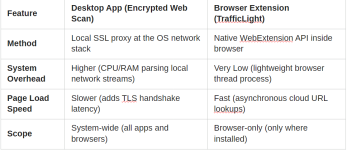
Does anyone know how to improve webpage loading while using BD Free, without disabling Encrypted web scan? With F-Secure, browsing, web page loading was quick, "normal". On the PC I had AV Plus installed, I hardly ever used it, so I'm not noticing this until now on this laptop. It's the same browser(s) with the same extensions installed.
 
I never clarified why i chose BD Free like the post wants lol my bad. I chose it because i'm not the biggest fan of huge congolomerates like what Gen Digital is anymore
I've notice slipping in their products as well.

I am a fan of MD but with all the modifications ive got I noticed i started to have blockages of certain things due to using DefenderUI on high
I dont get such blocks with BD Free, it has great protection, but i can never use just a AV even if it has great sig's or behavioral detection. I always either want a
dedicated BB, HIPS or Anti-exe on the backend .
 
Does anyone know how to improve webpage loading while using BD Free, without disabling Encrypted web scan? With F-Secure, browsing, web page loading was quick, "normal". On the PC I had AV Plus installed, I hardly ever used it, so I'm not noticing this until now on this laptop. It's the same browser(s) with the same extensions installed.
The only option is to disable Encrypted Web scan and using BDTL instead.
 
It is peer to download insight of Symantec, cybercapture of Avast, and Kaspersky security network.
Sorry, I'm not sure what you mean. 🙃
I feel Windows is fine it does seem that's its fingers that mess Windows up not the OS itself?
Your feeling is right! 😉

First, all of these anti-telemetry tools are known to cause a lot of issues and simply reversing what they did would not only fix issue, but also speed up the OS itself.
Second, stop messing around with drivers. While I do see appeal of having latest and greatest drivers, most of the time the new doesn't mean better. If driver works correctly, and you don't have any specific issues regarding it, for the love of God, leave it alone!
Third, people tend to like being guinea pigs so they install those preview updates which are in fact test updates. Then, when something stops working, everyone is to blame except them.

So if you don't want any issues with Windows, follow following three steps and you'll be fine;

1. Don't use anti-telemetry tools; disable telemetry in Group Policy Editor instead (if you want it completely off, switch to Enterprise or Education version).
2. Don't touch drivers unless you're having a specific issue (graphics drivers are fine)
3. Don't touch Windows Updates EVER. Windows will install updates automatically whenever it's confirmed update won't cause issues on your configuration.
Thanks, that's what I was thinking, too.
The only solution is to disable the option/feature. It slows down surfing because Bitdefender needs to decrypt the certificate, read the request and then encrypt it back.

In fact, I do recommend everyone to disable HTTPS scanning or whatever the option is called in their antivirus software. It's a massive security risk and it, of course, slows down surfing the web. Instead you could use some kind of browser extension which doesn't need to break encryption since it already has access to all made requests. Much more secure approach then man-in-the-middle attack created by the antivirus software.
 
Last edited:
All those products has a similar reputation check (with individual differences of course) to SmartScreen, and all of them collect data.
They do, but the important thing is not every solution is developed with privacy in mind.

For example, SmartScreen collects full URLs of visited websites to Microsoft. Google Safe Browsing (Standard mode) checks domains locally on device and if you stumble upon malicious website, sends Google domain in hashed format so Google won't know what you visited. Much more private way than what SmartScreen does.
I think Emsisoft Browsing Security works in the same way. Osprey just sends domain without additional metadata.
 
Last edited: