Question Which AV are you using and why did you choose this one ??

Please provide comments and solutions that are helpful to the author of this topic.
No matter which AV u use EDR killers are a big threat!
Esentire tracking a new EDR killer using a #BYOVD driver that isn't in Microsoft's block lists / #LOLDrivers and enumerates 140+ security products, including: Crowdstrike, SentinelOne, Microsoft Defender / Sentinel, Carbon Black, Cybereason, Cylance, Symantec, Sophos, FortiEDR, Elastic, Kaspersky, ESET, Avast / AVG, Bitdefender, McAfee / Trellix, Malwarebytes, Webroot, Trend Micro, Avira, Dr. Web, F-Protect / F-Secure, G-Data, Panda Security, and more.
It only activates if the payload being loaded contains ScreenConnect-related strings, uses IOCTL control code 0x2205c0, and passes each security product PID to terminate via input buffer to the driver via DeviceIOControl, which terminates the specified PID via ZwTerminateProcess.
 
Last edited by a moderator:
Why would you change AV all the time? The efficacy of most of them is similar, some are almost the same bar for the GUI? I feel find a decent solution whatever that be & use it, that is now my MO, chopping & changing unless you revert to a golden image will always leave some junk behind, & little if anything will be gained.
I understand him though. As I said, I was the same. I kept reading those articles in media how new scary malware was found or how hackers stole a billion dollars from a company. I'm not afraid to admit how dumb I was. Along typical antivirus software, I also had installed 3rd party firewall, various 3rd party anti-exploit, anti-malware tools. You should have seen startup list on my PC. If PC had 50 program installed, at least half of them was related to security in some kind of way.

This all changed when I grew older. When I learned that all those articles aren't false, but written to get as much as clicks as possible, because what sells better than the fear. I realized that chances of me getting the new scary malware were equal as chances of me winning Eurojackpot and that all these security programs were there just sitting, using up resources doing nothing. Then I started to remove them one-by-one and eventually did a clean installation with one security solution and one anti-malware scanner for on-demand scanning. Not only did my Windows became way faster than it used to be, but I didn't need to reinstall Windows on a yearly basis.

For that reason, I can only recommend sticking with Defender, adjusting its settings as you wish, using some kind of ad blocking DNS system-wide, ad blocker in the browser and some kind of extension for blocking malicious sites—that is it. Antivirus software on your PC is last line of defense either way and the goal is to stop malware before it reaches your antivirus software.
AV's dig deep into your system its a likely cause of instability when drivers are left behind, that based on my personal empirical evidence not conjecture, maybe thats why my systems are stable, who knows??
This is what I've been trying to tell everyone. I'm not defending Microsoft nor Defender. All I'm saying 3rd party antiviruses aren't really necessary and may not provide better protection than what Defender offers. It's stuck with people Defender bad, 3rd party good because the situation was like this ever since they started using PCs. Times change and sometimes for the better, sometimes for worse. This is a case where times changed for the better as you finally don't have to spend money in order to be properly protected. Before anyone stars throwing pitchforks again "it's free because it collects data". With commercial antivirus software, you pay for it and it still collects data. So at least this way, I never paid them to spy on me. 😅

If Microsoft's product works okay, doesn't cause me any issues and does all I want it to do, I have no reason to use anything else and I stick to that. If Microsoft products isn't working great, is causing me issues or generally doesn't do everything I want it to do, then I'll find an alternative.

So... yeah, you don't have issues because you're not messing around with 3rd party software much, you don't install preview updates and you're not using various 3rd party tools to modify system settings. I also don't do any of those thing and I never have any issues with my PC as well. Ironic, considering before I used to have problems all the times. In a lot of cases, the less is actually the better.

Btw Bot doesn't understand allegory and sarcasm. 😂
In my experience, it is possible to remove all the leftovers from antiviruses, if you use an installer which monitors the changes made when installing it, so it has a record of every file and registry key it needs to delete. However, if you're just using an uninstaller, without having records of this, then it won't find and remove every leftover. As you've noted, even the official uninstall tools provided by antivirus vendors sometimes don't remove every leftover.

This is a good reason to stick with Windows Defender, rather than using third party antiviruses. Although, as I've mentioned before I don't use it myself.
Unfortunately, even with Revo, I found many leftovers. Revo only searches registry entries by name of the software as well as %appdata% and %programdata%;, it doesn't touch drivers, scheduled tasks and etc.

There were times when I thoroughly went in hunt for leftovers because it was annoying for me that every software warned me some 3rd party antivirus software was installed despite being removed 6 months ago. Even after deleting everything I could, it still somehow found what software I had installed before. Then clean installation became my only solution.
 
Last edited:
Unfortunately, even with Revo, I found many leftovers. Revo only searches registry entries by name of the software as well as %appdata% and %programdata%;, it doesn't touch drivers, scheduled tasks and etc.
It will if you it use it in the standard way, of just letting it scan for leftovers after uninstalling apps, where it does its best to find file and registry keys that belong to that app. But what I was talking about was using the snapshot mode, which is offered in the Pro version of Revo, as well as some other uninstallers, including the free HiBit Uninstaller. When installing an app, they take before and after snapshots, so they they have a record of very file and registry key that was added or changed during the install. Then they have a record of exactly what needs to deleted after uninstalling an app, rather than making educated guesses. However, by creating before and after snapshots, they have a record of every single change that happened when installing the app, rather than just the changes made when installing that app. Personally I use Install Monitor, which automatically monitors any changes made when installing apps, without requiring any user action.
 
Last edited:
There were times when I thoroughly went in hunt for leftovers because it was annoying for me that every software warned me some 3rd party antivirus software was installed despite being removed 6 months ago. Even after deleting everything I could, it still somehow found what software I had installed before. Then clean installation became my only solution.

As someone who used registry cleaners to check my system out of curiosity, I always found entries related to antivirus software that had previously been installed. However, after using "FRST" for the first time, I made the decision to use it instead of registry cleaners for my regular cleaning tasks. Here is a helpful post about using it.
 
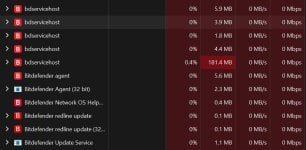
Uninstalled Avast then installed Bitdefender; its RAM usage improved very much compared to the last time I have used.

View attachment 299622

Also check it out in about 3-4 days and see where you're at...hopefully the same? I've personally never had it that low on my end. But, most of my experience has been with AV Plus and Total, where the main bdservicehost was anywhere between 275-375, and on occasions higher. And yes, it has improved :)
 
Also check it out in about 3-4 days and see where you're at...hopefully the same? I've personally never had it that low on my end. But, most of my experience has been with AV Plus and Total, where the main bdservicehost was anywhere between 275-375, and on occasions higher. And yes, it has improved :)
The last was approximately two years ago.

It was using 300-450 MB of RAM, and full scan was throwing some bizzare detections of notepad.exe and windows components.
This time full scan was okay.

Also the time between clicking taskbar icon and opening is shorter; still longer than that of Kaspersky and Avast, but it is getting better.
 
OK so true confession.

I just didn't believe you guys, about Bitdefender lightening up on someone's PC after a few days.

But I bit the bullet and installed Bitdefender's best product (as this would be the heaviest, or at least that is my assumption)

I did 2 full system scans a week apart, and it has been on my PC for 2-3 weeks. And I have to admit you were right.

It's not as fast as Panda, K-7 or Kaspersky, but it's pretty darn fast now. I would say up there with avast. avg, emsisoft, or f secure.

I would love Kaspersky though, just because it's my favorite.
 
Uninstalled Avast then installed Bitdefender; its RAM usage improved very much compared to the last time I have used.

View attachment 299622
I have noticed the total RAM usage is higher than what it has been while using Avast, and is not matching RAM usage by Bitdefender in task manager.

So I used resource monitor, which revealed the real RAM usage by Bitdefender.

1787596996487.png
 
I have noticed the total RAM usage is higher than what it has been while using Avast, and is not matching RAM usage by Bitdefender in task manager.

So I used resource monitor, which revealed the real RAM usage by Bitdefender.

View attachment 299623

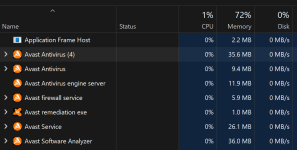
As compared to Avast, on my laptop.

Screenshot 2026-08-24 135136.png
Screenshot 2026-08-24 140337.png
 
Last edited:
Due to the ongoing situation with our 'friends' to the east & as I'm in the UK I've after some thought I've removed Kaspersky & wont use it again or until the situation changes?? At the same time I've removed HiBit for the same reason - I think better safe than sorry?? I'll be using ESET Internet Security from now on which on a personal basis cannot fault, after using it for a couple of weeks it does eludes me why I ever stopped using it in the first place :oops:
 
Last edited:
  • Like
Reactions: Parkinsond
Didn't run the conversion numbers, only to know that however you slice it, Avast even with the additional modules enabled, is going to out perform BD.
Agree; even MD will do that; Kaspersky will outperform all of them too.

Considering the rest of apps are the same, I will rely on the total RAM usage for evaluating Bitdefender, rather its shown processes.
 
  • Like
Reactions: Jonny Quest