Poll Which VPN service would you recommend? Why?

  • Thread starter Thread starter ForgottenSeer 55474
  • Start date Start date

Which VPN would you recommend?

  • CyberGhost VPN

    Votes: 23 6.2%
  • Nord VPN

    Votes: 65 17.5%
  • F-Secure Freedome VPN

    Votes: 27 7.3%
  • ExpressVPN

    Votes: 49 13.2%
  • OkayFreedom VPN

    Votes: 4 1.1%
  • Hide My Ass VPN

    Votes: 5 1.3%
  • PureVPN

    Votes: 9 2.4%
  • TorGuard VPN

    Votes: 10 2.7%
  • IPVanish VPN

    Votes: 3 0.8%
  • Other (Specify in thread)

    Votes: 153 41.1%
  • Proton VPN

    Votes: 8 2.2%
  • Mullvad VPN

    Votes: 10 2.7%
  • Azire VPN

    Votes: 0 0.0%
  • PIA VPN

    Votes: 0 0.0%
  • AirVPN

    Votes: 0 0.0%
  • Windscribe

    Votes: 2 0.5%
  • AdGuard,

    Votes: 0 0.0%
  • SurfShark

    Votes: 2 0.5%
  • TunnelBear

    Votes: 2 0.5%

  • Total voters
    372
Yeah, where is the privacy policy? :sneaky: Looks promising.
It's in their Terms of Service:
CactusVPN have a guaranteed no-logs policy for our service. That means that we will not store any data relating to your activities while using any of our privacy solutions, and will not record, monitor, log or store any of your information. CactusVPN also guarantees that none of your information will be passed on to a third party. We do not store any IP addresses, traffic logs, connection timestamps, used bandwidth or session duration information that could be traced to a single person.
 
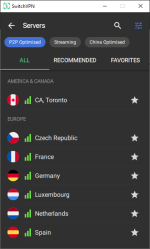
I would recommend SwitchVPN , the service has been very reliable and importantly the customer support has been proven very helpful when needed. Currently using switchvpn and the reason i would recommend is because it offers no log vpn and p2p port forwarding ability and with their software i can easily filter our p2p servers and can see which server has best network at a glance. It also has night mode which is a great addition
1574276197895.png.
 
The Best VPN Service by Wirecutter here (8 Nov 2019)


Tunnelbear VPN although highly recommended by Wirecutter but it is NOT RECOMMENDED by restoreprivacy.com below

 
Last edited:
Mullvad VPN recent (4 Jan 2020) updated review here. Pretty detailed review.


A concern though

Quote

3. “Bridge” connections (Shadowsocks)

All of Mullvad apps support the use of Shadowsocks technology. This technology allows a device to connect to one VPN server while another one is visible at the output. The user can choose both input and output servers. This technology works a bit like Double VPN which NordVPN and Surfshark have but doesn’t launch another VPN channel on top of the first one but connects the servers sequentially. This doesn’t affect the connection speed as much as Double VPN does. At the same time, such a method doesn’t create double encryption and therefore, is weaker than double VPN if you need some “paranoid” security measures.

Unquote

And the android side still not developed yet. Some cons are
  • No kill switch. However, your IP address isn’t leaked at a reconnection. The only time a leak is possible is when you consciously disconnect from the VPN. A simple change of location doesn’t make you lose your protection.
  • No Bridge mode.
  • No OpenVPN protocol (but to my mind, it’s actually an advantage).
So for now I guess it is not possible to use in China

Note that review did not mention of Mullvad supports using VPN (Mullvad) over TOR feature. The other VPN provider offering this feature is AirVPN


I wish Mullvad could have done this much easier for user to use
 
Last edited:
@HarborFront , this review is weird, very detailed and mostly correct but some areas are totally wrong or ignored...

So, some erroneous statement in this article:

1- You have a client on Linux. Same as Windows with wireguard implemented.
I use it Loooool.

2- On Android you can use both openvpn and wireguard, just not using a dedicated mullvad client but the one of the protocol. You can even use bridge mode (relaying via 2 servers).

No Netflix, who cares. I don't buy a VPN for pirating contents but for privacy/anonymity.


Conclusion, don't blindly trust reviews, try by yourself first.
 
Last edited by a moderator:
@HarborFront , this review is weird, very detailed and mostly correct but some areas are totally wrong or ignored...

So, some erroneous statement in this article:

1- You have a client on Linux. Same as Windows with wireguard implemented.
I use it Loooool.

2- On Android you can use both openvpn and wireguard, just not using a dedicated mullvad client but the one of the protocol. You can even use bridge mode (relaying via 2 servers).

No Netflix, who cares. I don't buy a VPN for pirating contents but for privacy/anonymity.


Conclusion, don't blindly trust reviews, try by yourself first.

Yes, I know you are using Mullvad VPN. Just waiting for your inputs. If you can write to the author of the review I believe he can update with your inputs
 
I believe when it comes to VPNs, like security softs, there isn't a "best" VPNs. You have to choose one that fit your requirements and expectations. Some want a VPN just to bypass geo-restrictions and be good at torrenting, others want one emphasizing privacy/anonymity above all.
 
@Umbra

I have a few questions on Mullvad VPN for android which I hope you can help me to answer. I'm referring to the beta android app

1) does it comes with a dedicated Kill Switch or I need to use the default android OS Kill Switch?

2) does it comes with bridge mode? Can I choose the servers or are they pre-selected pairs? If pre-selected pairs how many pairs are there?

3) can run Mullvad over TOR in android using its app? I'm thinking of running ExpressVPN => TOR => Mullvad (might not work). FI, sometimes I'm running ExpressVPN/VyprVPN => TOR browser

Thanks and appreciate if you can furnish the answers
 
Last edited:
@Umbra

I have a few questions on Mullvad VPN for android which I hope you can help me to answer. I'm referring to the beta android app

1) does it comes with a dedicated Kill Switch or I need to use the default android OS Kill Switch?
I dont see any dedicated button, but there is "blocking internet" banner like the Windows client that usually appears when the killswitch is enabled.
I will tell you honestly, the Mullvad Android beta client is quite "dysfunctional" on my end, i prefer Wireguard Client where i import any Mullvad config file i want (bridged or not).

2) does it comes with bridge mode? Can I choose the servers or are they pre-selected pairs? If pre-selected pairs how many pairs are there?

- No bridge mode on the beta Mullvad client, you need to use the Wireguard Client for that and a config file where you choose your 2 servers from the quite big list.

3) can run Mullvad over TOR in android using its app? I'm thinking of running ExpressVPN => TOR => Mullvad (might not work). FI, sometimes I'm running ExpressVPN/VyprVPN => TOR browser
not with Orbot, because Android (not rooted) allow only one VPN. Orbot on android is one VPN, Mullvad or OpenVPN or Wireguard is another. However you can use Tor Browser Android app on top of Mullvad (via Wireguard client or OpenVPN client); it is what i do.
 
I dont see any dedicated button, but there is "blocking internet" banner like the Windows client that usually appears when the killswitch is enabled.
I will tell you honestly, the Mullvad Android beta client is quite "dysfunctional" on my end, i prefer Wireguard Client where i import any Mullvad config file i want (bridged or not).


- No bridge mode on the beta Mullvad client, you need to use the Wireguard Client for that and a config file where you choose your 2 servers from the quite big list.


not with Orbot, because Android (not rooted) allow only one VPN. Orbot on android is one VPN, Mullvad or OpenVPN or Wireguard is another. However you can use Tor Browser Android app on top of Mullvad (via Wireguard client or OpenVPN client); it is what i do.
Thanks for the replies.

Regarding the last reply are you saying connecting

1) Mullvad VPN => TOR browser (which is not useful since I'm connecting using ExpressVPN/VyprVPN => TOR browser)

or

2) TOR browser => Mullvad VPN? How to do the connection here?
 
Thanks for the replies.

Regarding the last reply are you saying connecting

1) Mullvad VPN => TOR browser (which is not useful since I'm connecting using ExpressVPN/VyprVPN => TOR browser)

or

TOR browser => Mullvad VPN?
On my Androids devices, Mullvad (bridged via Wireguard) is running permanently. Then if i need i use Tor Browser Android app which exit via a Tor exit node.
So when i'm only on Mullvad my IP and DNS (based on Browserleaks test) is from Mullvad server, but once i run Tor Browser, they change to the Tor exit node.
 
On my Androids devices, Mullvad (bridged via Wireguard) is running permanently. Then if i need i use Tor Browser Android app which exit via a Tor exit node.
So when i'm only on Mullvad my IP and DNS (based on Browserleaks test) is from Mullvad server, but once i run Tor Browser, they change to the Tor exit node.
So you are running

Mullvad => TOR browser

Thanks again