Advice Request Windows 10 Mail app or Thunderbird?

Please provide comments and solutions that are helpful to the author of this topic.

Windows 10 Mail app or Thunderbird?

  • Windows 10 Mail app

    Votes: 19 29.7%
  • Thunderbird

    Votes: 27 42.2%
  • Other program (Please comment)

    Votes: 18 28.1%

  • Total voters
    64
I use Mail (Windows app). There is a bug in this app: obsolete emails addresses are still offered in auto-complete. On forums, people began talking about this bug in 2016....Microsoft hasn't corrected that one....
 
For privacy, definitely yes.

Also the minimal windows app doesn't support enigmail add-on / gpg itself

And the windows app can't send mail in plaintext and also just add unneeded useragent info
Could you send to configuredefender@outlook.com some examples of emails that could be problematic in Windows Mail? I would like to test Windows Mail a little more. Normally I do not use email clients, but I test Windows Mail for two weeks and did not notice any issues.
Do you think that the lack of the above features can be important for the average users?:)(y)
 
  • Like
Reactions: harlan4096
Could you send to configuredefender@outlook.com some examples of emails that could be problematic in Windows Mail? I would like to test Windows Mail a little more. Normally I do not use email clients, but I test Windows Mail for two weeks and did not notice any issues.
Do you think that the lack of the above features can be important for the average users?:)(y)
Done. (y)

I guess average user's doesn't need GPG or plaintext mail, but are we average user's here? ;)

As i wrote in the mail, i can make a useragent comparison to Thunderbird if you answer the mail.
 
Done. (y)

I guess average user's doesn't need GPG or plaintext mail, but are we average user's here? ;)

As i wrote in the mail, i can make a useragent comparison to Thunderbird if you answer the mail.
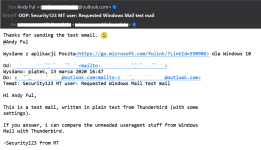
Here is what I can see in Windows Mail:

testmail.png


I have also sent the answering email.:)(y)
 
Here is what I can see in Windows Mail:

View attachment 234829

I have also sent the answering email.:)(y)
And here is what i see from Thunderbird:
mail.png

But now the full header data in comparison to a mail i send from Thunderbird:
ARC-Seal: i=1; a=rsa-sha256; s=arcselector9901; d=microsoft.com; cv=none;
b=G7vLIb+fjdjgpbJCOr9qU5FqarBy5BkYr1QhvNBN8l7RPEbHODfl3WGHL15PuLlyyjpg4Jc9OxJHrKUv/ozu7fZXxYVK69NNa/rpF6qeBrmc/tftWNlFsrFzmH7P5hDYsB1hVsoYU0SpKjwx/fGADzAwIgTlXD3tnkdgXW14aqa2E9LYtkczJP02lXUaVGm9TJcBiSu6sLhHSKHjxUOihAznFyFXzJTg+6w+S5wzK7n7CkX3COZFYTmUZvp1egeMvLTFaSHqzGqD+WRFAW5lifrXa0YQX+8jlXheehg6NO0Z4nwPwFDj/ZIOYPVeOdE2CpM5SsAJE0qIQco/rLbpyw==
ARC-Message-Signature: i=1; a=rsa-sha256; c=relaxed/relaxed; d=microsoft.com;
s=arcselector9901;
h=From:Date:Subject:Message-ID:Content-Type:MIME-Version:X-MS-Exchange-SenderADCheck;
bh=5C5t0imtuHdZKzRmtq1TWjice6ShjPrDC77Eg0SCJTQ=;
b=diQDW6cGlcMnKbbd8S38Er9zQsvgvLLAXo/Qxao787Y4yiEONwuD/Hz5xKyh5455fiIICKPqvGT0iPtBXglmDRiHtpmI6oz7kzkyZGkUj6WvUJNM/ssTJr633eNTdVv021KHJT/fqrXGwF5Q9L2XZKUF+qATYR8N/vU1peMEEePTf45thKyvo/aW+1dTEydCBmV2APnNnJ/P6TjBNWlvL7IUOmkQXlLSCmiZNcYg4Lkh5Yx/8rhCe9Wp1q1NVOnmU29+ED6ODWNi8I9BojuqERJQNIDeuIcUJwoBfpO3zJpfNzY2vyk9WBJXu8itz2I5iBzys52OCe0TDVX5VPlQmg==
ARC-Authentication-Results: i=1; mx.microsoft.com 1; spf=none; dmarc=none;
dkim=none; arc=none
Thread-Topic: Security123 MT user: Requested Windows Mail test mail
Thread-Index: AQHV+U65hhfgfeYTQEenjNOJSR2LF6hG7GHe
References: <90d7d5f2-9d30-8d99-9152-ac9d51813cc9@I REMOVED THAT>
In-Reply-To: <90d7d5f2-9d30-8d99-9152-ac9d51813cc9@I REMOVED THAT>
Accept-Language: en-GB, en-US
Content-Language: pl-PL
X-MS-Has-Attach:
X-MS-TNEF-Correlator:
x-incomingtopheadermarker:
OriginalChecksum:AA651BD575C5121E717C79E8E2395C42F79594DFC8F3D6D4C5E491092D1842F2;UpperCasedChecksum:64EFBFDD01880F92C9C37A8062678BCD40D6EE1071565035A3F572A5397BD54A;SizeAsReceived:6846;Count:44
x-tmn: [IyQVy7SjfBGYjKp78ycYB41uoNO5bJdx]
x-ms-publictraffictype: Email
x-incomingheadercount: 44
x-eopattributedmessage: 0
x-ms-office365-filtering-correlation-id: 227a3339-c6d0-46f7-e4d3-08d7c786e06e
x-ms-traffictypediagnostic: BN8NAM12HT249:
x-microsoft-antispam: BCL:0;
x-microsoft-antispam-message-info:
1wplX2HjrAl2mz6IMfZJharzw2hKKFOgDMK5YrUrwhKbDO8X+gLo69w5Svl1FiCEiANs8N3ReDqSLmjVWoiBCE3YbOogH1HkIILZes2Ybtb/p+jgvrgRqeDqCIBc71LpMM3iejj/Ife+cYpX6ZjUPSPalnESdaWwlYB+B+5eaj9yWPEW0yUvabxWIr3dhEQDgWtZmvuBvpYyr+9GTx4iGkAwwc0iuYLHB3KODUUKeYA=
x-ms-exchange-antispam-messagedata:
UvmMG+MIdPPnj+8ppuY4w/0vty8hBTxnyI0UuZAuZNVH0A2/qLCwL3O/z16WfjTcKIPyrYp/+c8YO9AdFiAmp7kd8+CFV4sv8bUQcTHBgH8tnuKLBF+UksHUVvDXDC2HtB7rsLo37YoAckIW8da/Pw==
x-ms-exchange-transport-forked: True
X-OriginatorOrg: outlook.com
X-MS-Exchange-CrossTenant-RMS-PersistedConsumerOrg: 00000000-0000-0000-0000-000000000000
X-MS-Exchange-CrossTenant-Network-Message-Id: 227a3339-c6d0-46f7-e4d3-08d7c786e06e
X-MS-Exchange-CrossTenant-rms-persistedconsumerorg: 00000000-0000-0000-0000-000000000000
X-MS-Exchange-CrossTenant-originalarrivaltime: 13 Mar 2020 19:44:00.0763
(UTC)
X-MS-Exchange-CrossTenant-fromentityheader: Internet
X-MS-Exchange-CrossTenant-id: 84df9e7f-e9f6-40af-b435-aaaaaaaaaaaa
X-MS-Exchange-Transport-CrossTenantHeadersStamped: BN8NAM12HT249


In my opinion, these are a lot of unnecessary transmitted data.
 
And here is what i see from Thunderbird:
View attachment 234830

But now the full header data in comparison to a mail i send from Thunderbird:


In my opinion, these are a lot of unnecessary transmitted data.
I can see the same about your mail when I use <More> <View Source> in Thunderbird.
But, there is no such feature in Windows Mail.
 
Last edited:
I prefer mailbird but between the 2 you mentioned I would use thunderbird.
Didn't know about it but looks pretty good.
I was a long term Thunderbird user, but about 1/2 years ago I switched to web Gmail, basically because of problems with large attachments on Thunderbird. I tried Outlook included on 365 and didn't like it either.
About Mailspring, is there a way that on inbox just important messages are displayed? Just as normal Gmail does I mean
Thanks!