

The MalwareTips app
Your community, one tap away.
Open MalwareTips from your Home Screen or desktop. Follow discussions, find answers and pick up where you left off.
- Home Screen access
- Optional push alerts
- Your community
You're ready to explore.Explore what's new
Installation instructions
iPhone & iPad
- Open MalwareTips in Safari and tap Share. You may need to open the Page Menu first.
- Choose Add to Home Screen. If it is not listed, use Edit Actions to add it.
- Keep Open as Web App enabled if shown, then tap Add.
Android
- Open MalwareTips in Chrome or another browser that supports app installation.
- Open the browser menu and look for Install app, Install and create shortcut, or Add to Home screen.
- Choose Install and confirm. Wording varies by browser.
Desktop
- Chrome: use the install icon in the address bar, or the menu under Cast, save and share.
- Edge: open the menu, then More tools, Apps and Install this site as an app.
- Safari on Mac: choose Share or File, then Add to Dock. Firefox on Windows: look for the web apps button in the address bar.
If you cannot find an install option, update your browser or use its bookmark option to keep MalwareTips close.
Keep up with your conversations
After installation, open the app and sign in. Enable push notifications in Preferences if you want alerts. On iPhone and iPad, push requires a Home Screen web app and iOS or iPadOS 16.4 or later.
Sign in to manage notificationsInstallation is optional. Your notification settings stay under your control.
You are using an out of date browser. It may not display this or other websites correctly.
You should upgrade or use an alternative browser.
You should upgrade or use an alternative browser.
Troubleshooting Windows 10 update error 0x800f0990
-
 Thread starter
peter1111
Thread starter
peter1111
- Start date
- 28 Replies
- 10,009 Views


Go in to service turn off windows update then proceed to folder windows in there scroll down to SoftwareDistribution look for a folder in there name download delete everything in that folder, go back in service restart windows update and you should be good to go.
Upvote
0

Have you tried restarting your PC?
Restarted serval times, and tried these fixes but not working.Go in to service turn off windows update then proceed to folder windows in there scroll down to SoftwareDistribution look for a folder in there name download delete everything in that folder, go back in service restart windows update and you should be good to go.
Upvote
0

no it just get the error when trying to install the updateYou have any software as WPD, O&Oshutup, etc that block Windows Updates?
Upvote
0
F
ForgottenSeer 85179
first try a clean restart: How to perform a clean boot in Windows
Then try an InPlace upgrade which install Windows over your Windows without cleaning any data.
If that doesn’t work, your Windows is somehow corrupt and clean install is needed
Then try an InPlace upgrade which install Windows over your Windows without cleaning any data.
If that doesn’t work, your Windows is somehow corrupt and clean install is needed
Upvote
0
Or try CHKDSK is a Windows utility that can check the integrity of your hard disk and can fix various file system errors.
To run it from Command Prompt, here are the instructions:
Log into Windows 10
Press the Windows key to open the Start Menu
Select Search
Type-in cmd
Right-click on Command Prompt from the search results list
Click Run as administrator
Log in as an Administrator
When Command Prompt launches, type the command: chkdsk C: /f /r /x
The parameters for this command are: /f option will attempt to fix any found errors /r option will locate for bad sectors and recovery any readable information /x option will force the volume you’re about to check to be dismounted before the utility begins a scan If the C: drive is in use, type Y to run a scan at your PC’s next restart. If so, exit Command Prompt and restart the computer.
To run it from Command Prompt, here are the instructions:
Log into Windows 10
Press the Windows key to open the Start Menu
Select Search
Type-in cmd
Right-click on Command Prompt from the search results list
Click Run as administrator
Log in as an Administrator
When Command Prompt launches, type the command: chkdsk C: /f /r /x
The parameters for this command are: /f option will attempt to fix any found errors /r option will locate for bad sectors and recovery any readable information /x option will force the volume you’re about to check to be dismounted before the utility begins a scan If the C: drive is in use, type Y to run a scan at your PC’s next restart. If so, exit Command Prompt and restart the computer.
Upvote
0
tried that , but sadly still not workingOr try CHKDSK is a Windows utility that can check the integrity of your hard disk and can fix various file system errors.
To run it from Command Prompt, here are the instructions:
Log into Windows 10
Press the Windows key to open the Start Menu
Select Search
Type-in cmd
Right-click on Command Prompt from the search results list
Click Run as administrator
Log in as an Administrator
When Command Prompt launches, type the command: chkdsk C: /f /r /x
The parameters for this command are: /f option will attempt to fix any found errors /r option will locate for bad sectors and recovery any readable information /x option will force the volume you’re about to check to be dismounted before the utility begins a scan If the C: drive is in use, type Y to run a scan at your PC’s next restart. If so, exit Command Prompt and restart the computer.
Upvote
0

Go to Tweaking.com download Windows Repair install it . open Windows Repair click jump to Repair
select Repair windows updates . run . reboot done ..
select Repair windows updates . run . reboot done ..
Upvote
0

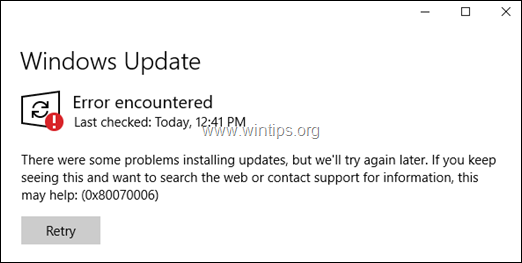
Just fallow the tutorial in this page, create the txt file and substitute the reg file mentioned "Win10UpdateFix.reg". It's the only solution that work for me after a Trojan dissemble my Windows update and have the exact same error that you have:
 www.wintips.org
FIX: Windows 10 Update Service is Missing (Solved) - wintips.org - Windows Tips & How-tos
Step by step instructions to resolve the following issue in Windows 10: The Windows Update Service is missing from the Services list (services.msc).
www.wintips.org
Upvote
0
um site not working?Just fallow the tutorial in this page, create the txt file and substitute the reg file mentioned "Win10UpdateFix.reg". It's the only solution that work for me after a Trojan dissemble my Windows update and have the exact same error that you have:
FIX: Windows 10 Update Service is Missing (Solved) - wintips.org - Windows Tips & How-tos
Step by step instructions to resolve the following issue in Windows 10: The Windows Update Service is missing from the Services list (services.msc).
Upvote
0

Working here.um site not working?
View attachment 259861
Can you also see this
:max_bytes(150000):strip_icc()/windowsupdatefailed-5f81258a632b459ba58e31d768459605.jpg)
Windows 10 Update Failed? Here's How to Fix That
Windows 10 updates can fail for many reasons, like a lack of drive space and corrupt files. Here’s how to fix Windows 10 update that keeps failing.
Upvote
0
I have suggested it and it seems that it is not well received. But it has gotten me out of some trouble.Go to Tweaking.com download Windows Repair install it . open Windows Repair click jump to Repair
select Repair windows updates . run . reboot done ..
Upvote
0

F
ForgottenSeer 85179
You shouldn’t trust an infected/ compromised system."Win10UpdateFix.reg". It's the only solution that work for me after a Trojan dissemble my Windows update and have the exact same error that you have:
Upvote
0
F
ForgottenSeer 85179
This is what I mean with InPlace upgradeUse the media creation tool to "upgrade" your OS
Upgrading the OS that way will replace your current one with a new one while keeping all your files and programs intact
The media creation tool will always pass a command to make the windows setup download the latest update before upgrading the system

Upvote
0
You shouldn’t trust an infected/ compromised system.
An infected system is not a lost system, you certainly don't need to format a system or reinstall a SO to get rid of a malware that is a solution that I never recommend and that is offered in any vulgar forum, I always hate that solution for everything, uninstall and reinstall....
Upvote
0
yes, if it is still fixable why just reinstall os? It is not good for the hard drives, and your time.An infected system is not a lost system, you certainly don't need to format a system or reinstall a SO to get rid of a malware that is a solution that I never recommend and that is offered in any vulgar forum, I always hate that solution for everything, uninstall and reinstall....
Upvote
0
Recently browsing
Members who viewed this thread in the last 5 minutes
You may also like...
-

-

-

-
B
Advice Request Microsoft update problem
-
