Troubleshooting [Windows 8.1] - Voice reads time every hour! [help needed]

sk3llgamerZDay

Level 2
Verified
Describe the problem
- time read aloud by robotic voice every hour
What have you tried?
- none
Does anybody know how to disable a robotic voice that reads the time every hour? It says "The time is 6:00 pm" aloud in a weird robotic voice. There is no option as far as I'm concered and I checked the task scheduler can somebody please help and respond for a fix? If anyone knows please post a comment also, I'm back! GG P.S Thank god it's not Microsoft SAM anyway. :D
 
Does anybody know how to disable a robotic voice that reads the time every hour? It says "The time is 6:00 pm" aloud in a weird robotic voice. There is no option as far as I'm concered and I checked the task scheduler can somebody please help and respond for a fix? If anyone knows please post a comment also, I'm back! GG P.S Thank god it's not Microsoft SAM anyway. :D
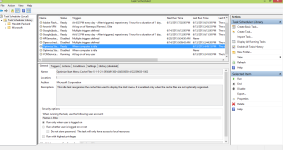
Open task scheduler and post a screenshot please!;)
 
Upvote 0
Apperntly it was a dock program I had. I think it's gone....I'll report back tommorow if it's solved. ty for help anyway. but heres a pic
 

Attachments

  • scheudletasks.png
    scheudletasks.png
    65.2 KB · Views: 605
Upvote 0
Have you turn on narrator? Try to double check it by searching on control panel or type which will check for relevant result.

Usually some computers are enabled by default.
 
Upvote 0

Recently browsing

Members who viewed this thread in the last 5 minutes

Back
Top