Troubleshoot [Windows 8.1] - Voice reads time every hour! [help needed]

sk3llgamerZDay

Level 2
Thread author
Verified
Jan 15, 2014
94
77
64
Flamestopia's Main Central Sqaure
Briefly explain your current issue(s)
- time read aloud by robotic voice every hour
Steps taken to resolve, but have been unsuccessful
- none
Does anybody know how to disable a robotic voice that reads the time every hour? It says "The time is 6:00 pm" aloud in a weird robotic voice. There is no option as far as I'm concered and I checked the task scheduler can somebody please help and respond for a fix? If anyone knows please post a comment also, I'm back! GG P.S Thank god it's not Microsoft SAM anyway. :D
 
Does anybody know how to disable a robotic voice that reads the time every hour? It says "The time is 6:00 pm" aloud in a weird robotic voice. There is no option as far as I'm concered and I checked the task scheduler can somebody please help and respond for a fix? If anyone knows please post a comment also, I'm back! GG P.S Thank god it's not Microsoft SAM anyway. :D
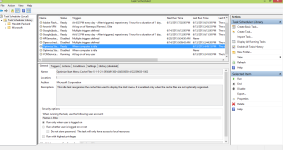
Open task scheduler and post a screenshot please!;)
 
Upvote 0
Apperntly it was a dock program I had. I think it's gone....I'll report back tommorow if it's solved. ty for help anyway. but heres a pic
 

Attachments

  • scheudletasks.png
    scheudletasks.png
    65.2 KB · Views: 540
  • Like
Reactions: Venustus
Upvote 0
Have you turn on narrator? Try to double check it by searching on control panel or type which will check for relevant result.

Usually some computers are enabled by default.
 
  • Like
Reactions: Ink
Upvote 0