Unmaintained WiseVector Free AI Driven Security

Sorry with user data I meant "collecting data of programs executing on the users PC's." An artificial intelligence engine needs data to determine a program looks like good or bad. WiseVector probably sends these program data points (characteristics) to the cloud. I was not referring to 'personal information' like IP-address et cetera as you mentioned in your privacy policy when users agree to send threat statistics.
Hi,
Our AI engine is based on Local, so no data will be sent to the cloud.;)
 
Thank you for your feedback.
I have sent a message to you.Please check.
I've replied there, will reply here to set the record straight. As I've said, the issues appeared with Acronis Drive Monitor and Adobe Reader. In both cases, installation had failed.

I did ask the fellow whose laptop I've been working with to give me a remote session to try again. Installed StopX and re-tried installations. This time they both succeeded. The only change this time is that a lot of Windows 7 past-SP1 hotfixes/updates took place. Not sure if that caused the issue at first.
 
I've replied there, will reply here to set the record straight. As I've said, the issues appeared with Acronis Drive Monitor and Adobe Reader. In both cases, installation had failed.

I did ask the fellow whose laptop I've been working with to give me a remote session to try again. Installed StopX and re-tried installations. This time they both succeeded. The only change this time is that a lot of Windows 7 past-SP1 hotfixes/updates took place. Not sure if that caused the issue at first.
Hi,

Thank you.:)
Please feel free to contact us if there is any problem.

Regards,
WiseVector
 
Hi,

Yes, you can.;)

Regards,
WiseVector
I love when devs engage with users. I'd recommend you only for that :)

1583996501324.png

Could you just change the tab that says "Advance" to "Advanced" please :D
Also, everywhere you see "setting" should be "settings".
Also, when I pressed F1 to learn what "Advanced Detection" is, I ended up on this page:
You might consider switching to online help.
 
Last edited by a moderator:
I love when devs engage with users. I'd recommend you only for that :)

View attachment 234775
Could you just change the tab that says "Advance" to "Advanced" please :D
Also, everywhere you see "setting" should be "settings".
Also, when I pressed F1 to learn what "Advanced Detection" is, I ended up on this page:
You might consider switching to online help.
Thank you very much for your advice.
We would like to change the tab you mentioned in our next version.:D
 
@WiseVector - I'm using StopX version 2.53 on Standard User Account, Windows 10 1909. When I manually run the application for the first time (on PC start), the GUI opens/flashes/crashes briefly and then appears in the system tray. Has this instant/momentary crash been reported previously?

Otherwise it is running well. (y)Thanks.
 
Last edited:
Can one disable windows defender permanently, to have wisevector remain as the only AV?

Permanently? You need to hack the system. Otherwise you may use

 
Permanently? You need to hack the system. Otherwise you may use

Thanks, this is an extremely underpowered system. Running WD alone is already straining a lot.
 
@WiseVector - I'm using StopX version 2.53 on Standard User Account, Windows 10 1909. When I manually run the application for the first time (on PC start), the GUI opens/flashes/crashes briefly and then appears in the system tray. Has this instant/momentary crash been reported previously?

Otherwise it is running well. (y)Thanks.
Can you/have you monitored the CPU usage? Last time I checked it was using CPU even when my system was idle. How is it running on your system and are you running it with or without WD?
 
@WiseVector - I'm using StopX version 2.53 on Standard User Account, Windows 10 1909. When I manually run the application for the first time (on PC start), the GUI opens/flashes/crashes briefly and then appears in the system tray. Has this instant/momentary crash been reported previously?

Otherwise it is running well. (y)Thanks.
Hi,

Sorry for the inconvience. WiseVector StopX doesn't support Standard User Account temporarily.

Regards,
WiseVector
 
Can you/have you monitored the CPU usage? Last time I checked it was using CPU even when my system was idle. How is it running on your system and are you running it with or without WD?

It's OK. Running with Windows Defender.
 
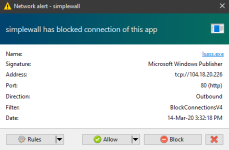
WiseVector After installing WiseVector, lsass.exe asked for internet connection. Does WiseVector require lsass.exe for any communication?
View attachment 234846
Hi,

Of course, not. If an application utilizes Isass.exe for internet connection, it must be malware...

Since the communication is not encrypted (http 80 from your screenshot). You can use WireShark to capture the traffic between your computer and the remote IP.
The network packets are plain texts, you can easily inspect what caused this behavior.
 
Can you/have you monitored the CPU usage? Last time I checked it was using CPU even when my system was idle. How is it running on your system and are you running it with or without WD?
Hi,

Can you please tell me what is the CPU usage usually when your system is idle?
WiseVector StopX scans the new files added in your computer, so it uses CPU when your system is updating or something else may cause new file added.