
idk just asked not that i would have used it but since they might go to the enterprise market i was wonderingWhat for? preventing infenctions of windows machines in the network?


Open MalwareTips from your Home Screen or desktop. Follow discussions, find answers and pick up where you left off.
If you cannot find an install option, update your browser or use its bookmark option to keep MalwareTips close.
After installation, open the app and sign in. Enable push notifications in Preferences if you want alerts. On iPhone and iPad, push requires a Home Screen web app and iOS or iPadOS 16.4 or later.
Sign in to manage notificationsInstallation is optional. Your notification settings stay under your control.
idk just asked not that i would have used it but since they might go to the enterprise market i was wonderingWhat for? preventing infenctions of windows machines in the network?

no commentWhat for? preventing infenctions of windows machines in the network?


 MT giveaway) and all is good.

SecureAgePlus AV@Behold Eck What is SAP?

Hi,any plans for linux product ?
Shame it can't do so for Avast as Avast Free (hardened) + WVSX would have been a really solid combo!From it`s first incarnation I have really liked WVSX`s ability to slide in alongside other security programs seamlessly.
AKA SA+SecureAgePlus AV
That would indeed be a solid combo.Shame it can't do so for Avast as Avast Free (hardened) + WVSX would have been a really solid combo!

Probably even overkillAvast Free (hardened) + WVSX would have been a really solid combo!
Solid enough with default Avast or any half decent AV.Probably even overkill
Haven't bothered to be honest WVSX have been quite specific that Avast/AVG are incompatible unless you disable certain Avast core shields ~ web & behaviour if I remember rightly ~ which makes it bit of a waste of time as you'd be crippling Avast just to run a second, possibly overkill security layer.Have you have tried a different order of install which sometimes can be a work around ?
It`s a pity because the web and behavior shields are the ones you would want running with WVSX...bummer.Haven't bothered to be honest WVSX have been quite specific that Avast/AVG are incompatible unless you disable certain Avast core shields ~ web & behaviour if I remember rightly ~ which makes it bit of a waste of time as you'd be crippling Avast just to run a second, possibly overkill security layer.
I already did that. It’s why I said I can’t add a folderGo to Settings -> Advanced -> and enable Document Protection + SetUp
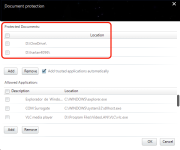
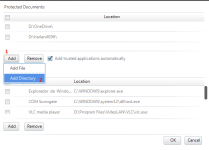
Thanks for your feedback. This issue is confirmed. We will get it fixed in our next release.Okay, I think I discovered what the issue is.
In a standard user account, the directory option doesn’t work properly. It works similar to the “add file” option. So the user can’t add any folder.
This can be resolved by “Exit” WiseVector and then relaunching it with admin rights.
Hi,Seem Kaspersky Internet Security and WiseVector 3.0.3 hung on reboot. I have narrow it dow to system watcher. Disabling the system watcher, I can have both program running. Is there anyway get both KIS ans WSX to work with system wtacher enable?
Members who viewed this thread in the last 5 minutes
