miguelang611
Level 2
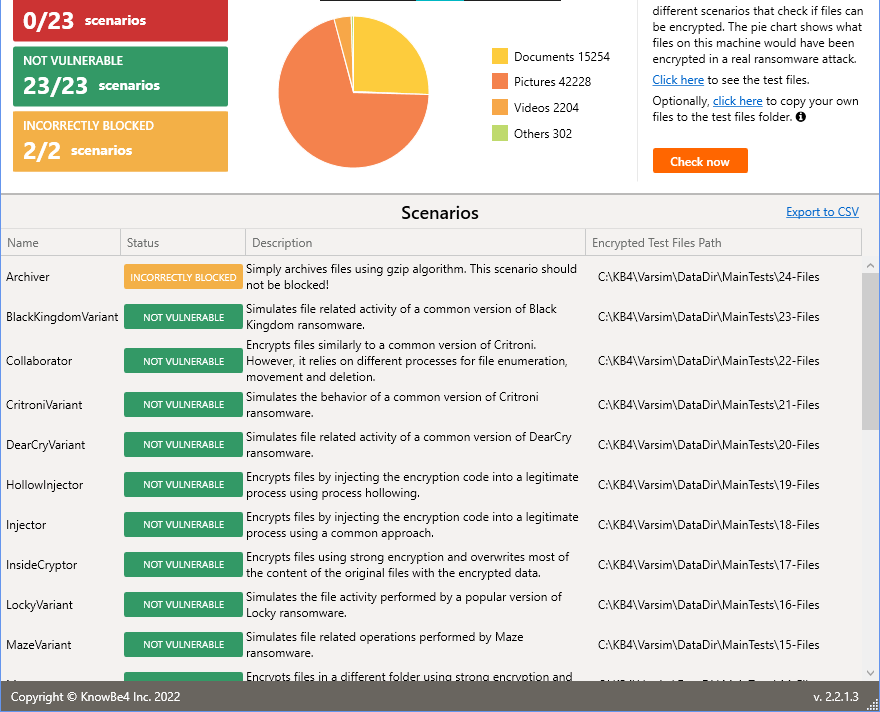
Oh, by the way. About 5 days ago I tried KnowBe4 and WV could only fight .exe attacks (which are 3 out of 23 of the KnowBe4 test). I just repeated it and it has already learned to fight the non exe!!! Amazing!!


Open MalwareTips from your Home Screen or desktop. Follow discussions, find answers and pick up where you left off.
If you cannot find an install option, update your browser or use its bookmark option to keep MalwareTips close.
After installation, open the app and sign in. Enable push notifications in Preferences if you want alerts. On iPhone and iPad, push requires a Home Screen web app and iOS or iPadOS 16.4 or later.
Sign in to manage notificationsInstallation is optional. Your notification settings stay under your control.

Hi,So well, I decided to copy those test folders to my own documents folder to manually add them... Result? WiseVector triggered as ransomware behaviour!!
Yes, it's possible. You can manually add the extensions that you want to rollback.About ransomware rollback, wouldn't it be possible to incude every extension?
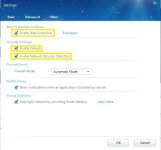
HIPS and firewall are two different features working respectively. Here is the introduction.Regarding performance/detection, I guess machine learning setting is pretty much same as HIPS and firewall level? If they are same category, right now they look to be different.
How did you set the rule? There should be no popup again.Also, regarding pop-ups I have 2 suggestions: first, when you create a rule if it is for a program or/and target and there is a 2nd/3rd popup with those same things, and you click on remember rule, they shouldn't appear since you already "fixed" it with the created rule.
Good suggestion. We will consider to add this button.Also, a "close-all" notifications button would be nice to have. For example, when I install programs and they try to connect to Internet, I don't like it to connect bcs I know it is an offline installer, so the easiest option is to ignore popups so it blocks them, but then I want to close them all. A similar approach would be to have something like "block for 10 minutes".

Please don't exit WVSX at once when this issue occur.Running Win11x64 with YogaDNS configured for NextDNS and with NordVPN running wireguard with no DNS changes. I have had this configuration running for over 6mths flawlessly. Upon launching WiseVector 3.03 my DNS is changed instantly to NordVPN's ISP. Exit WiseVector from the tray and instantly my DNS returns to NextDNS. I can reproduce this every single time. I notice the DNS change and restored a backup that I knew worked flawlessly. I then kept NextDNS open in a browser window and repeated all the changes I had made until it was 100% reproducible. I uninstalled WiseVector and am letting others know. If I was a betting man my money would have been on NordVPN overriding my settings and changing the DNS anyway. I would have lost. I don't understand the conflict, only that it is there and reproducible.
Yes! I made the KB4 test afterwards and nothing was triggered. I guess first time I hit Ctrl+X instead of Ctrl+C!Hi,
Only manually delete or modify those test folders, WVSX will trigger as ransomware behaviour. Copy them is OK, we didn't reproduce the issue you have encountered.
Yes, it's possible. You can manually add the extensions that you want to rollback.
HIPS and firewall are two different features working respectively. Here is the introduction.
How did you set the rule? There should be no popup again.
Good suggestion. We will consider to add this button.
Thanks for your test and positive feedback! We will keep WVSX improving.
For saving resources, WVSX is not designed to rollback all files in default.About extensions, I mean just a tick box which allows to get any file, not manually add them (will probably forget to do it hehe).
ML plays an important role in the features. Sorry, I can't tell you the technical details.I know HIPS and firewall are different features, but what is machine learning related to? That is my question.
Can you please show me the screenshot of the popup? Thanks.The rule was set on a pop-up. It always happens. For example the program tries to connect to IP1 and then IP2. Popup for IP1 triggers, I click on allow and remember program path. Then second popup of IP2 appears, but the rule just created "resolve" the issue, it has already been allowed.
I just mean having an option. I did increase limit to 9999 MB. I guess WV will stop earlier... But if a random tries to encrypt my documents, it is much more than 10 GB...For saving resources, WVSX is not designed to rollback all files in default.
I just meant if it is just as Malware and Firewall, because if so, the level of protection should also be shown up as Malware/HIPS and firewall do when you right click on taskbar. So, I just meant if it is protection related or just for improving WV!! Not technical details! For having the 3 on taskbar: ML, HIPS and firewall levels all together!ML plays an important role in the features. Sorry, I can't tell you the technical details.
You can reproduce with any prompt of a program trying to connect to Internet if set up to maximum on firewall. It will try 2 times to connect, u allow it on first popup, the second will appear also although redundant. Once I am with the PC I will try to record it!Can you please show me the screenshot of the popup? Thanks.

Introduction of the Machine Learning levels: Generally, setting on Aggressive, WVSX can detect more suspicious files during static scanning, but there might be more false positives. Setting on Normal or High is appropriate for most users. The settings will be effective when you perform static scanning only.I just meant if it is just as Malware and Firewall, because if so, the level of protection should also be shown up as Malware/HIPS and firewall do when you right click on taskbar. So, I just meant if it is protection related or just for improving WV!! Not technical details! For having the 3 on taskbar: ML, HIPS and firewall levels all together!
Not every single of the 10GB files being encrypted are important for the users, therefore we are inclined to rollback the important ones first to save the resources.I just mean having an option. I did increase limit to 9999 MB. I guess WV will stop earlier... But if a random tries to encrypt my documents, it is much more than 10 GB...
Yes, we tested in this way, but not reproduced.You can reproduce with any prompt of a program trying to connect to Internet if set up to maximum on firewall. It will try 2 times to connect, u allow it on first popup, the second will appear also although redundant.
This issue is very strange, since WVSX doesn't have the ability to modify DNS...I unchecked every box in settings, one by one, until I had completely disabled all protection. No firewall, no HIPS, no ransomware, no self defense, nothing. It still overrides my DNS settings and as proof of concept as soon as I exit WiseVector from the tray it returns to normal. I will leave it installed for now but not running to help trouble shoot things.

Unfortunately no. I still have issue with Kaspersky and WiseVector running together for reboot and shutdown. It hang with the circle progress runningDoes WiseVector StopX ver 3.06 fixe the restart and shutting down problem for windows 11 ?
It does have the ability to override YogaDNS which acts as a network filter for all DNS traffic. WiseVector installs a network filter, correct? How else can it monitor or filter web traffic? Since this issue happens whether any active protection is enabled or not simply by launching the .exe, then one can conclude that the way WiseVector ties into network traffic overrides the way YogaDNS overrides network traffic.This issue is very strange, since WVSX doesn't have the ability to modify DNS...

WiseVector StopX V3.06
WiseVector StopX Release History
April 13, 2022
1. Improved Shellcode detection. WiseVector StopX can monitor the Shellcode’s full life cycle. Malware writers often use well-known customized Shellcode (e.g. Meterpreter and CobaltStrike) to execute malicious instructions to avoid static detection. WiseVector StopX can detect this type of Shellcode nearly 100%, therefore it can stop malware at the early stage.
2. Improved ransomware detection. Added multiple modules to detect ransomware.
3. Improved Behaviour Detection to detect modern injection techniques.
4. Fixed other bugs.
Please download via: https://update2.wisevector.com/WiseVector_StopX_V306.exe
It can be installed by overwriting. Online update is not available now.
What version of Kaspersky you have installed? When exiting Kaspersky, will the issue still occur?I still have issue with Kaspersky and WiseVector running together for reboot and shutdown. It hang with the circle progress running
We didn't reproduce the issue, so can't find the reason for the problem.Does WiseVector StopX ver 3.06 fixe the restart and shutting down problem for windows 11 ?
Hi,It does have the ability to override YogaDNS which acts as a network filter for all DNS traffic. WiseVector installs a network filter, correct? How else can it monitor or filter web traffic? Since this issue happens whether any active protection is enabled or not simply by launching the .exe, then one can conclude that the way WiseVector ties into network traffic overrides the way YogaDNS overrides network traffic.
Members who viewed this thread in the last 5 minutes
