


Nice! Gonna test it nowThe website is now back online.

Nice! Gonna test it nowThe website is now back online.


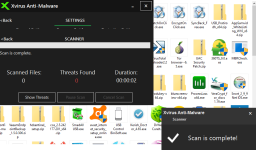
Nice, that works!For this The entry in context menu of Windows Exp says 'Xvirus Personal Guard' instead of 'Anti malware'. please check post 46 and my questions Info Post 45


Not a bug, it's a feature. I'll check thatI saw some strange behavior today after the initial scan, the popup to the right showing suspicious files just continued to climb up the screen and disappeared?
I was pretty hard to keep up and hit that moving target, hehe!
/W
Was it password protected? and maybe @Dani Santos didn't add archive scanning yet, not sureWhen I scan a ZIP file via the context menu, Xvirus scans it but shows '0' files scanned, as seen in the pic below
@Dani Santos hello mate!
I gave Xvirus AM a spin. Looks great. Strong heuristics.
I've a few issues to let you know about
I've a suggestion, why not avoid showing 'Scan is complete' popup if the scan window is open
- When I scan a PDF file (or docx..) via context menu of Windows Explorer, it won't show up or scan the file
- When I scan a ZIP file via the context menu, Xvirus scans it but shows '0' files scanned, as seen in the pic below
- The UI has some text glitches as seen in the pic below
View attachment 140749
- When I close the quick can results window (instead of pressing back), the next time I open XVirus, it shows result from previous scan instead of the main window. It will be better if it shows the main window since I 'closed' the scan result window last time.
- The entry in context menu of Windows Exp says 'Xvirus Personal Guard' instead of 'Anti malware'.
A single file (pdf, doc, zip) in each case.How many files did you select for the first 2 to happen? I'll take a look at the 3rd and 4th reported issue
Simple pdf and doc files. The zip was also not password-protected.Was it password protected? and maybe @Dani Santos didn't add archive scanning yet, not sure
Like a bossNot a bug, it's a feature.
Xvirus isn't a legally registered company. So it's not a company, but project with commercial useI'm big supporter of the small companies, because they can compete with a big companies thats why i used Xvirus Firewall for supporting. I can pay later for it.
It's always worked fine for me during testing (sometimes I could have it installed for over a month for testing purposes). I think it's just a bug which you are experiencing, I've yet to see others mention an issue like this; strange that it occurs in both the host and VM machine though.Dani, another thing is that it fails to load at startup from time to time.
Tested this with same results both in VM Win 7 Pro and host Windows 10 Pro.
/W
Dani, another thing is that it fails to load at startup from time to time.
Tested this with same results both in VM Win 7 Pro and host Windows 10 Pro.
/W
He uses the .NET Framework from within Visual Studio, and his project is neither developed in C++. He uses VB.NET.What software do you use to design your GUIs and how do you integrate the GUI in your C++ application?
Thank you so much for the clarification @Wave. And by the way I love your tutorialsHe uses the .NET Framework from within Visual Studio, and his project is neither developed in C++. He uses VB.NET.
It's always worked fine for me during testing (sometimes I could have it installed for over a month for testing purposes). I think it's just a bug which you are experiencing, I've yet to see others mention an issue like this; strange that it occurs in both the host and VM machine though.
Try disabling the start-up and then re-enabling it, see if that resolves the issue. Out of interest, do you have any additional security software installed on the host/VM machine?
I checked every alert code and it should work well. Can you say what the alert was saying or send a screenshot?I saw some strange behavior today after the initial scan, the popup to the right showing suspicious files just continued to climb up the screen and disappeared?
I was pretty hard to keep up and hit that moving target, hehe!
/W


