

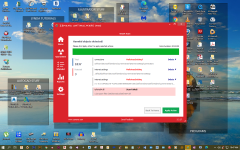
Every day I run Zemana anti malware and its comes up with these 3 files it says to delete apply action yet once the computer is rebooted the files come up again. Is there a way of permanently deleting them. enclosed is screen shot of files.as a further note google is affected if I don't run Zemana
Assigned Zemana -- Can these files be permanently deleted?
- Thread starter ccronin45
- Start date
You are using an out of date browser. It may not display this or other websites correctly.
You should upgrade or use an alternative browser.
You should upgrade or use an alternative browser.
This thread is being handled by a member of the staff.
- Status
- Not open for further replies.

What do you mean Google is affected?
You may have adware, if your default search redirects to elsewhere.
If you think you may be affected, create a new thread in Windows Malware Removal Help & Support
You may have adware, if your default search redirects to elsewhere.
If you think you may be affected, create a new thread in Windows Malware Removal Help & Support

The best way of dealing with reoccuring malware is reinstalling your browser without syncing, and if that doesnt work, flushing the DNS or resetting the hosts file.
I also see uTorrent on your desktop, most likely what infected you in the first place.
I also see uTorrent on your desktop, most likely what infected you in the first place.
IMO, Users are more likely to download warez via the Web Browser (ie. cracks, patches).I also see uTorrent on your desktop, most likely what infected you in the first place.
I do agree, but you cant rule out the possibility that its due to torrents.IMO, Users are more likely to download warez via the Web Browser (ie. cracks, patches).

If you need to reset / repair your internet connection settings, you can try NetAdapter Repair, which can:
- Repair Buttons and Additional Tools
- Advanced Repair (WinSock/TCP IP Repair, Clear all Proxy/VPN Settings, Windows Firewall Repair)
- Release and Renew DHCP Address
- Clear Host File
- Clear Static IP Settings (enable DHCP)
- Change to Google DNS
- Flush DNS Cache
- Clear ARP/Route Table
- NetBIOS Reload and Release
- Internet Options Clear SSL State
- Enable LAN Adapters
- Enable Wireless Adapters
- Reset Internet Options Security/Privacy
- Set Network Windows Services Default
Every day I run Zemana anti malware and its comes up with these 3 files it says to delete apply action yet once the computer is rebooted the files come up again. Is there a way of permanently deleting them. enclosed is screen shot of files.as a further note google is affected if I don't run Zemana
Zemana is not reliable. Get a second opinion from MBAM and Kaspersky virus removal tool. If malware, remove wtih them.

Gandalf_The_Grey
Level 85
Verified
Honorary Member
Top Poster
Content Creator
Well-known
Forum Veteran
That's not okay.thanks everyone T use "malwarebytes antimalware " as well as zemana
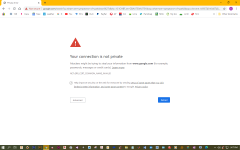
I have uploaded the error message I get from google after using zemana it goes away and i can google for the rest of the day till next reboot
Please follow @Spawn 's advice and create a new thread in Windows Malware Removal Help & Support
- Status
- Not open for further replies.
You may also like...
-
 Serious Discussion Orion Malware Cleaner (OMC) - By Trident
- Started by Trident
- Replies: 23
-

-
SOpera One R3 arrives with new AI, Google integrations, and more
- Started by Santiago Benavides García
- Replies: 0
-
 Serious Discussion Block Common Attacks: A Beginner's Guide to Windows Firewall
- Started by Divergent
- Replies: 18
-