


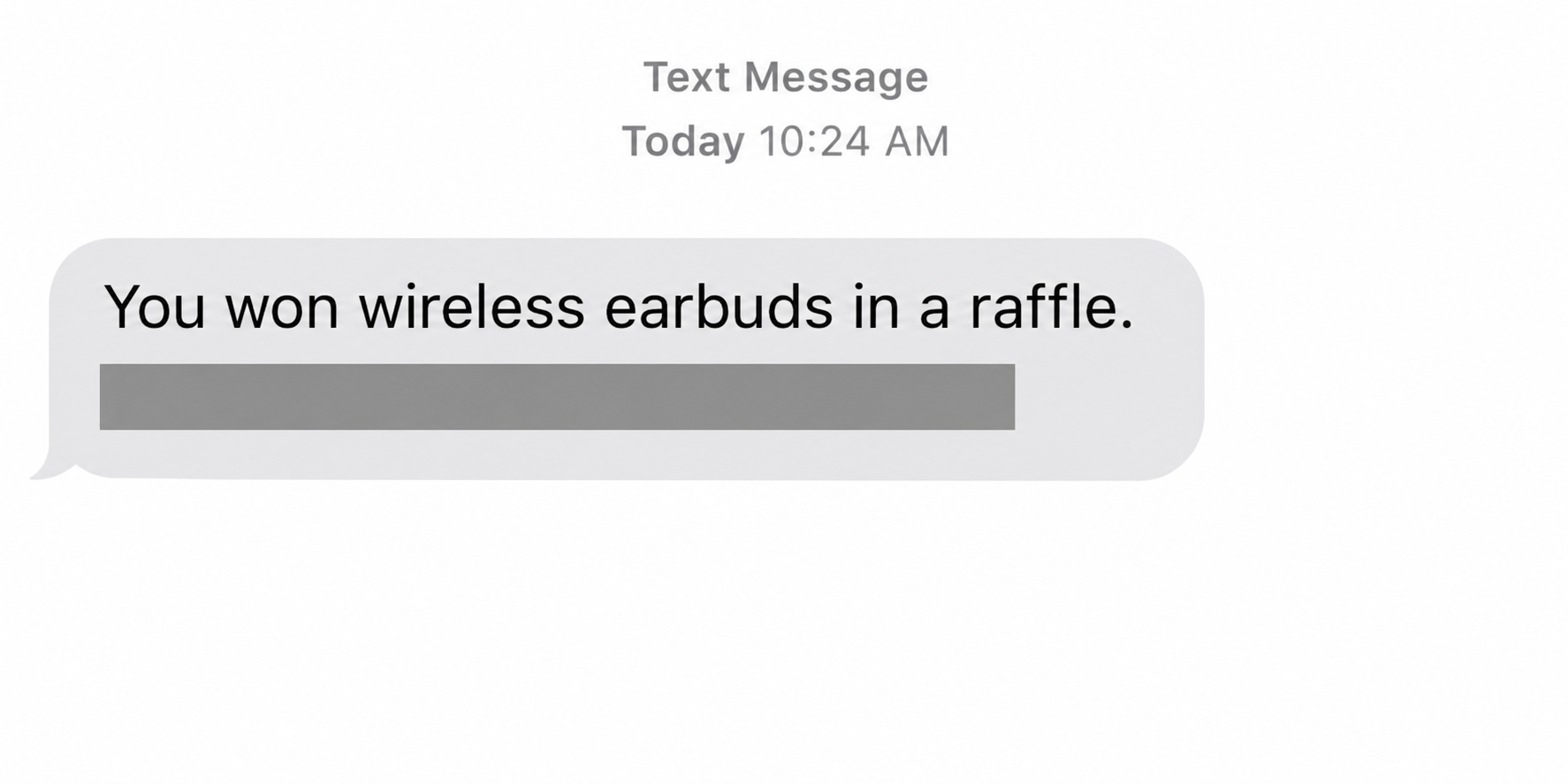
A text says you finished near the top of an Amazon raffle and won a pair of AirPods. It offers one link to arrange delivery.
The message may use your name and describe a prize worth having. It leaves out the record that would show you entered the raffle.
Overview
The prize pitch is documented, not an Amazon promotion
The Georgia Attorney General’s office reported complaints in 2021 about texts claiming recipients won AirPods in an Amazon raffle. The messages directed recipients to a separate destination.
That warning establishes the impersonation pattern. It doesn’t mean Amazon or Apple sent the text, or that any historic destination is still in use today.
The Amazon AirPods raffle text scam differs from a balance or credit message. It claims you won a physical item and asks you to start a new delivery process.
A prize and a new order leave different records
A genuine promotion should have a named sponsor, entry terms and a way to confirm the contact independently. A survey that suddenly asks for a payment isn’t that record.
Even if a page shows a pair of headphones, check what it actually wants. Giving away a password, paying postage, and authorizing a subscription are separate risks.
You don’t need to open the link to verify the prize
- If you never entered the claimed promotion, don’t use the text to claim anything.
- If you remember entering, compare the message with rules you reached through the known sponsor.
- If you already paid or entered a password, protect the payment or account that was exposed.
What the Original AirPods Warning Tells You
The Georgia consumer protection office described a specific lure: a text using Amazon’s name offers a pair of AirPods and asks the recipient to click for details.
Authorities warned that a destination could ask for shopping credentials or involve a risky download. That is a warning about possible outcomes, not evidence that every recipient was infected.
The FTC’s Amazon impersonation spotlight links similar prize texts to shipping-fee requests and unexpected later charges. Neither alert requires you to recognize a specific sending number.
In some historical examples the recipient allegedly finished second or third. The rank makes the notification sound like the outcome of an event rather than a random coupon.
You may see the prize described as earbuds, a watch or another device. A changed item doesn’t tell you whether a genuine promotion or that particular seller exists.
Don’t label every message mentioning AirPods as fraudulent. The warning concerns the unsolicited award that uses Amazon’s name to send you into an unverifiable claim process.
Amazon’s own text message guidance includes a bogus prize example and says it doesn’t ask by text for personal information, payment details, gift card codes or a call.
That leaves a clear choice even when you can’t explain why you got the message. You can verify the offer without contacting whoever sent it.
How the Amazon AirPods Raffle Text Scam Works
Step 1: The text makes the award sound settled
The sender says you’ve already won, often without naming an entry date or showing any rules. Setting up delivery sounds like the only remaining action.
Someone may use your first name or a product that seems relevant to you. The fact that a message knows something about you doesn’t establish where that information came from.
Being an Amazon shopper isn’t the same as entering a promotion. Think about what you actually signed up for, not what you might have clicked months ago.
Step 2: The claim page changes what you have to do
A prize can turn into eligibility questions, a survey, or a request to sign in. The page might repeat the Amazon name without belonging to Amazon.
If you were already declared a winner, ask why a new form is needed to qualify. The text’s promise and the destination’s request may not agree.
A page might change the item it shows or mention a deadline that starts when you open it. Neither change proves the sponsor exists or that your prize was reserved.
Do not fill out the first few questions to see what comes next. A harmless-looking first screen can be followed by a request for sensitive data.
Step 3: A free prize becomes a request for something valuable
The destination may ask for a login, a verified address, or card details for purported handling and shipping. Those requests are where the potential harm becomes specific.
The FTC’s prize scam guidance warns against paying fees to collect a prize. The label doesn’t change the risk just because the charge is described as postage or processing.
Some unrelated prize funnels also try to enroll people in trials or paid services. Read your actual charge and any terms you saw rather than assuming every message produces renewals.
Stop if the text asks for gift cards or gift card codes. That payment doesn’t establish that the person has a prize to send.
How to Verify an Actual Promotion Without the Claim Link
Start with whether you recognize the sponsor and remember entering. Look for the dated entry receipt or rules associated with the event you actually joined.
If the message names Amazon as sponsor, reach its customer service independently. Don’t use a support contact taken from the prize message.
If a third party ran the giveaway, confirm it through that sponsor. Offering a product from Amazon or Apple doesn’t make either company responsible for the promotion.
Check the official rules for the prize, dates, eligible entries and notification method. A surprise award without a known entry is not a reason to send your card.
A lack of evidence in your Amazon account isn’t the only test. A separate genuine sponsor might not post its notifications there, which is why the organizer matters.
Don’t answer by sending your purchase history or personal documents to the sender. The sponsor’s independent support channel can say whether the prize notification belongs to it.
Compare the request to the promotion you verified. If the official rules don’t include payment for the prize, don’t pay a newly announced fee to make it work.
Someone who changes the prize or wants you to occupy a paid spot is proposing a new transaction. You can decline even if the original giveaway was genuine.
Separate a Prize Claim From a Purchase, Trial or Existing Credit
A purchase has a total: An ordinary listing for headphones should show the seller and the full price you will pay before you authorize the order.
If the supposed claim ends in an unrelated checkout, you’re considering a purchase from that merchant. Treat the cost, shipment and return terms as part of that new transaction.
A trial may have future charges: A low amount on the first screen may not be the only cost. Check what billing authorization the checkout actually requests.
Don’t agree to a trial to see whether a prize ships afterward. If there is a real promotion, the verified rules should explain how a winner receives it.
If you already agreed to a subscription, contact the verified provider for cancellation and save the confirmation. Dispute unauthorized charges separately with the provider that processed them.
An account credit has a different record: An Amazon bonus credit text claims existing value or a discount. Check the actual balance or terms instead of following a prize link.
The AirPods lure asks you to take delivery of merchandise. Even when the prize is supposedly free, the page may request a shipping address, login or card.
If the actual request has nothing to do with sending a parcel, don’t try to reconcile it with the prize. Leave before you accept a new purchase.
If the message says to buy gift cards first, keep them and do not share the numbers. If you already shared them, contact the gift card issuer immediately.
For a legitimate winner notification, a sponsor may need information to deliver a prize. Verify the organizer first and use its documented process instead of a random reply.
You are not obliged to continue because you spent time answering a survey. Stop when the offer changes or you cannot identify the sponsor and the terms.
Keep the Text, the Website and the Charge Separate
A screenshot of the message shows what reached your phone. It does not establish that a link was opened or that a specific website collected your data.
If you opened a link, record what you remember without visiting again. A request to provide your password is different from downloading a file or accepting a device permission.
If you submitted card details for a small fee, check the actual merchant and currency with the issuer. The prize description may not appear on the statement.
Tell the issuer if you later see an additional merchant or charge you didn’t agree to. Neither a small initial amount nor a different descriptor proves what authorization was given.
For a login entered elsewhere, check orders, payment methods and account contact details through Amazon itself. Someone may have used the account even if the prize page simply failed.
If the same password protected your email or another service, change those credentials through each real service. A password isn’t confined to one account when it has been reused.
What to Do If You Got the Text or Tried to Claim the Prize
- Save what was sent: Keep the message and its timestamp for reporting, but don’t publish a usable destination or any personal information it contains.
- Report the impersonation directly: Use Amazon’s report-a-scam guidance and your messaging service’s junk-reporting controls, rather than communicating with the sender.
- Protect any account credentials you entered: Open Amazon through your own route, review changes and contact support if access or any purchase looks wrong.
- Contact your card issuer if you shared payment information: Explain the purported fee, amount and any other activity, then follow the issuer’s instructions.
- Preserve your records and refuse recovery fees: Save receipts and report the scam at ReportFraud.ftc.gov if you are in the United States.
If you entered nothing and downloaded nothing, the immediate task is usually reporting and blocking the message. You don’t need to pay anybody to inspect the text for you.
For software installed or access granted during a follow-up, use a separate trusted device to contact the affected services. Resolve the device exposure before signing in there again.
If you approved a one-time code or bank prompt, explain which action it mentioned. That detail helps support identify the request rather than starting with a general prize complaint.
If you entered your address but no credentials or payment information, be particularly careful of follow-up mail or texts. An address disclosure isn’t evidence that a card was charged.
Keep an eye on which company contacts you after the first message. An unsolicited delivery fee or support call might be a different request and should be checked independently.
If a cleanup company claims it can erase the charge or retrieve a prize, verify its identity and don’t pay for a promised recovery. Your issuer can explain actual options.
Report the original message as soon as you’ve preserved it. A recipient can report the lure even when they did not pay or follow the link.
If Amazon reports a purchase you do not recognize, handle that order separately. It is possible to have a real account problem after receiving an unrelated fake prize.
Your card statement, order record and screenshots each answer different questions. Keep them together for an investigation, but don’t take the prize message as evidence of any particular charge.
Frequently Asked Questions
Does Amazon give away AirPods by unsolicited text?
The unsolicited text described by Georgia authorities was a fake prize hook. Verify any separate promotion through the actual sponsor and the rules that governed your entry.
Can the text be fake even if it knows my name?
Yes, a name doesn’t confirm a prize or establish whose system sent the message. The official entry and notification process are stronger evidence.
Should I pay a small postage charge for the free earbuds?
No, don’t pay a fee to collect an unsolicited award. Verify the promotion independently and tell your issuer if you already entered payment details on the claim page.
What if the claim page asks for an Amazon login?
Close the page and use Amazon directly. If you already typed a password or approved access, use official recovery and review your account for unfamiliar activity.
Does the Amazon name in the text prove anything?
It tells you which brand the message claims to represent. Check the offer through a route you control, not through a sender label or familiar-looking image.
Is this the same as an Amazon bonus credit text?
The messages use similar impersonation, but this pitch claims you won a physical prize. An apparent account credit should be checked against the relevant account record instead.
The Bottom Line
Don’t open the claim link or pay postage for an unexpected Amazon AirPods raffle prize. Confirm any genuine entry through the sponsor you know and leave the text untouched.
If you already entered a password or card details, deal with that exposure now. Report through Amazon or your issuer without returning to the supposed prize page.

Join the discussion
0 commentsShare your experience or ask a question about this article.
Community experiences
Did this happen to you?
Your experience could help someone recognize the same scam. Submit a private report for our team to review.
I experienced this tooReports are reviewed before publication. Sharing publicly is always your choice.
Discussion
Start the conversation
Have a question or something useful to share? Add the first comment.