


Any message about a disputed charge gets your attention when you’re waiting for the bank to finish its review. This one sounds like the wait is over.
The subject doesn’t say how the dispute ended. It asks you to take one more step, and that deserves a closer look.
Overview
A notice says your dispute has been resolved
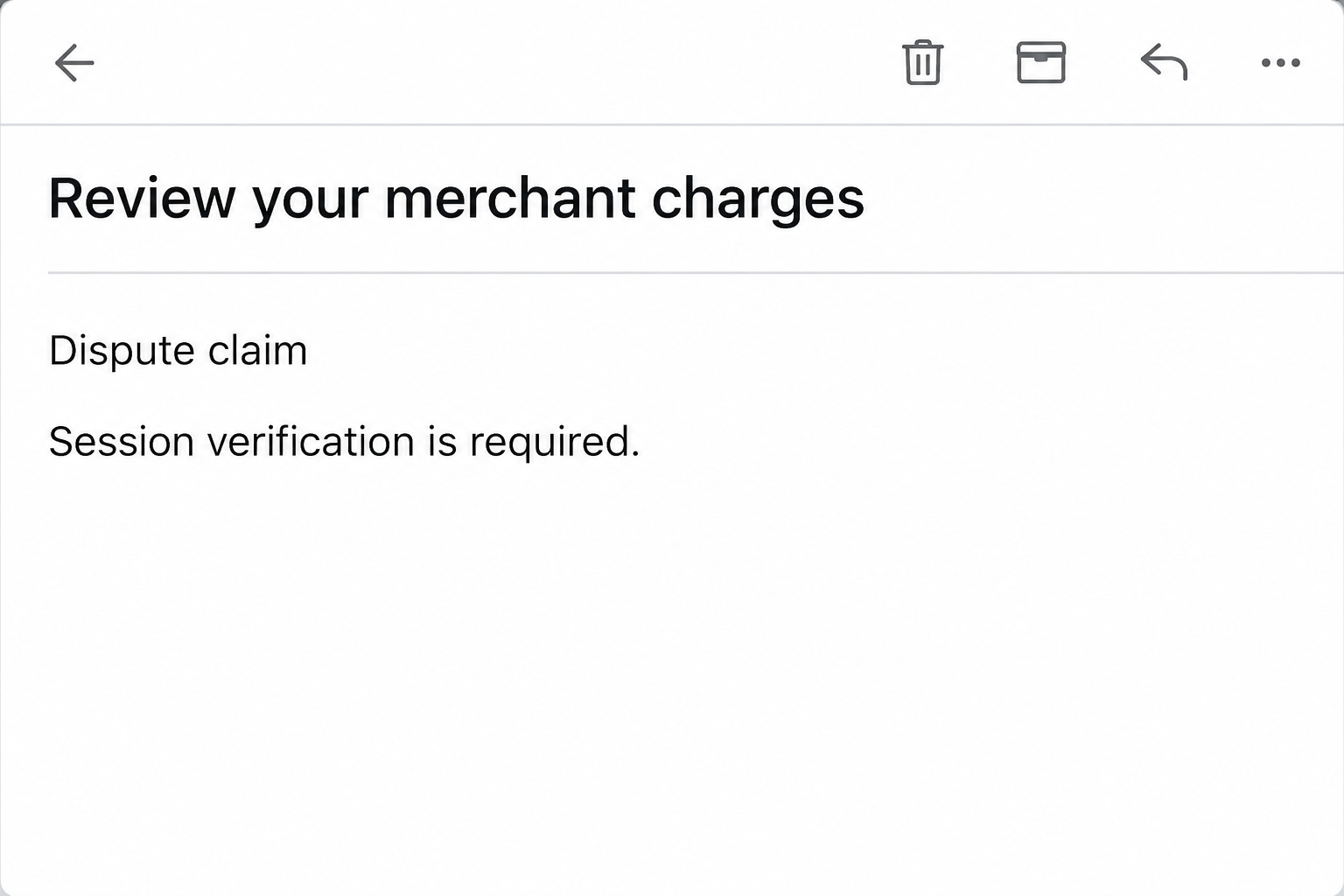
The Bank of America dispute claim email scam uses the subject “Review your merchant charges.” It says the bank completed its investigation and adjusted the disputed transactions.
Instead of showing the outcome, the message points to a “View Dispute Status” button. It also says a session verification is required before the result can be viewed.
Those details suggest a real banking workflow, but the notice isn’t a claim record from your signed-in account. Bank of America is the brand impersonated in this email.
Don’t decide that a dispute is closed, won, or paid out because this message arrived. The case status and any credit need to be confirmed through the bank.
The details that identify the reported email
The wording is useful if you’re comparing it to a message you received, especially when the button or layout looks a little different.
- The subject asks you to review merchant charges.
- The body says an investigation has already finished.
- It refers to adjusted transactions without showing a verified result.
- “View Dispute Status” is the next step the sender proposes.
- The note about session verification makes the sign-in request sound expected.
The specimen also displayed a date and time. A timestamp has little value as authentication when it’s simply printed inside a message you didn’t verify.
What was reported and what remains uncertain
The link in the documented specimen was no longer active when examined. There is no verified form from that link that can tell us exactly which fields it requested.
The message is a phishing lure that uses a dispute as its pretext. A lookalike bank sign-in is the likely objective, not an established page behavior for this specimen.
The email does not establish that any account was entered or funds moved. Whether your own account is affected depends on what you did and what the bank finds.
If you already disputed a charge, this email can seem particularly timely. You don’t have to decide whether the timing was luck or targeting before taking the safer route.
How the Bank of America Dispute Claim Email Scam Works
Step 1: The email picks up where a real dispute would leave off
A cardholder who filed a dispute may spend days checking for an update. A subject referring to merchant charges fits right into that moment.
The message says review work has been completed, shifting attention from whether the message is genuine to whether the result is favorable. That is an easy shift to miss.
People who never filed a dispute may still click out of concern that one was opened without them. There is a safer way to investigate that possibility.
Open the bank account independently and start with the actual charge or dispute record. That’s useful whether you expected an update or had no reason to receive one.
Step 2: The notice suggests an adjustment without showing what changed
The promise of an adjustment sounds specific but doesn’t settle important questions. It does not show which transaction changed or whether an adjustment is temporary or final.
A suspicious message could also exploit the difference between a refund from a merchant and a credit connected to a dispute. They don’t mean the same thing.
Your statement and claim status give you a clearer picture. Use those records together rather than translating the email’s vague wording into a specific financial outcome.
Keep the real amount and merchant name handy if you need to call the bank. The rep can use records you already have without relying on the suspicious link.
Step 3: “Session verification” makes another sign-in seem routine
Bank apps often check who is signing in. This email relies on that familiar requirement to make a login away from your normal route feel unremarkable.
In a legitimate session the bank controls the check. A message you didn’t verify cannot establish that the destination belongs to the bank, regardless of how professional it looks.
Start a fresh session with the regular app or a bookmark you already trust. A genuine case won’t require you to go back through the disputed email first.
On a shared computer, use your own device for banking if possible. Checking an official record is more useful than inspecting where an unsafe link lands.
If you’re shown a password field, card request, or prompt for a code after using the link, stop. You don’t need to finish verification to report it.
Step 4: A credential disclosure can become a separate banking incident
If a phishing page receives a working sign-in, an intruder may try to access account information or trigger new prompts. That is a possibility, not an observed outcome here.
An unexpected code arriving after you opened the email deserves special attention. Check what action the code describes, and don’t share it with anyone who contacts you.
The original dispute, the fake message, and a new transaction you discover should be reported as separate facts. This gives the bank a useful timeline.
If you didn’t share anything and no money moved, don’t let the email pressure you into making a rushed transfer to supposedly protect your balance.
How to Check an Actual Bank of America Dispute
Start with the bank’s instructions for checking your dispute status. Reach the Mobile Banking app or Online Banking through your normal route rather than using the email.
For eligible claims in the mobile app, the bank points to Inbox, then Status Tracker. In Online Banking, it points to Status Tracker in the Communications Inbox.
Look for a record of the dispute you opened. If you manage several cards, make sure the case and activity belong to the affected account.
The bank notes limits on which claims appear, including business-account claims. If an expected case isn’t listed, don’t assume it closed. Reach the bank directly to check.
Compare the merchant and transaction amount with your own records. Report any unfamiliar adjustment or new charge rather than assuming the message explains why it appeared.
Seeing a credit on the account doesn’t always mean the dispute is finished. Ask the bank whether the credit is temporary or final.
If you didn’t file a dispute, ask the bank whether a case exists. Don’t open a duplicate simply because the email claims there is one.
If a merchant tells you one thing and your bank account shows another, keep copies of both. Let the bank explain how those records relate to your existing claim.
Keep the merchant refund and bank case separate
A merchant can promise a refund that hasn’t posted yet. Ask for its expected amount and confirmation through the merchant’s original order records, not through an unsolicited bank email.
If you received a temporary credit, ask whether it can change before the dispute is finished. A message saying transactions were adjusted doesn’t answer that question.
Watch for duplicates on the actual statement. A merchant refund and a bank credit can look similar when you only read the amounts rather than the descriptions.
If you need to share documents, use the channel the bank confirms. Put your real claim number on your notes, without putting full card details in ordinary email.
Record what the bank actually tells you
Keep the date of the verified call or message and the next action it gave you. That way, an unexpected update won’t replace the timeline you’ve already confirmed.
If the bank requests more information, ask where to send it and how to recognize receipt. You don’t need to supply a password or code in a reply.
For a joint card, confirm whether another authorized person opened a real dispute. Share any update through your usual private channel, not by forwarding the suspicious message.
What to Do if You Have Fallen Victim to This Scam
-
Leave the message closed if you haven’t followed the link.
Use the phishing report control in your mailbox if available. To check an existing dispute, open the bank’s app and find your own record instead.
Save the email details if the bank requests them. Don’t forward the working link to relatives or coworkers to see if they believe it.
-
If you opened the page but did not enter anything, break contact.
Don’t retry a page that failed to load. Note the approximate time and whether you received any prompt or notice outside the browser afterward.
Check your bank account through a route you already use. If you aren’t sure a field was filled or submitted, describe the uncertainty to the bank when you call.
-
If you disclosed banking credentials, call the bank promptly.
Use the contact shown in the app or on the back of your card. Explain which account and sign-in details were exposed, without reading your active password aloud.
Follow the bank’s instructions for restoring secure access. Use a trusted device and change reused credentials on other services through each service separately.
-
Tell the bank if you shared a code or approved a request.
Explain what the prompt said, when it arrived, and whether you approved it. This may help the bank identify activity you weren’t expecting.
Ask the bank to check for changes to devices, contact details, or recipients. Don’t approve a second request to reverse the first one.
-
Report actual unauthorized activity separately from the fake email.
If money moved, give the date, amount, merchant or recipient, and any confirmation reference. Ask whether steps are available to stop, investigate, or dispute it.
Keep the actual statement and any reference the bank gives you. Report promptly rather than waiting for someone in the suspicious thread to respond.
-
Keep track of what is genuinely pending.
Write down the official status of any existing dispute and the next contact or due date the bank confirms. That helps distinguish it from later fake progress messages.
If someone calls claiming to handle the same case, end the call and return to the authorized route. Knowing a merchant name or case detail isn’t proof.
If you are uncertain what happened, say what you did rather than guessing at the outcome. The bank can help interpret your account activity and recommend the next action.
Frequently Asked Questions
Is “Review your merchant charges” an actual decision on my dispute?
The subject alone is not a decision. The reported email uses that wording to draw you to a button rather than proving what the bank decided.
Look up the real claim through your banking account. If you need clarification, call the bank independently and use the transaction details in your own records.
Does “session verification” make the button safe to use?
The phrase describes what the email wants you to believe. It does not show that the page behind the button is a bank-controlled sign-in screen.
Use a new session in your regular banking app instead. If the claim is real, the bank can help you find it without the email.
What if the email arrived right after I disputed a card charge?
Timing is not enough to authenticate it. A scam may arrive by chance when an actual banking process happens to be on your mind.
Check your case in the normal way and preserve the suspicious notice separately. Avoid assuming someone has access to your claim unless the bank finds evidence of it.
What if the link is now broken?
A broken link doesn’t make the message genuine. The documented destination was unavailable, and there is no reason to keep testing whether it comes back.
If you didn’t submit any information, tell the bank that when you report the message. If you already entered something, explain what the page collected if you can remember.
Can my dispute be closed by someone who has my password?
An exposed sign-in creates account risk. Whether any dispute changed is a separate question for the bank to investigate.
If you believe an intruder got in, report the credential exposure and any case change that you didn’t request. Let the bank confirm what actions occurred.
If you’re tracking a case jointly with someone else, give both people the verified update. That avoids reopening the question when the scam resurfaces.
Does a credit in my account prove this message was genuine?
A legitimate adjustment can exist independently of the scam. Compare it with the actual case record and ask whether the credit reflects a final outcome.
Don’t use a real credit as a reason to return to the email. You can finish checking the case through the same banking route where you found it.
The Bottom Line
Leave the email’s dispute status button alone. Verify the actual claim through the Bank of America app or an independently established support number.
If you gave the page bank credentials or a code, report that exposure now. Keep it separate from the original merchant dispute so the bank can address both.

Join the discussion
0 commentsShare your experience or ask a question about this article.
Community experiences
Did this happen to you?
Your experience could help someone recognize the same scam. Submit a private report for our team to review.
I experienced this tooReports are reviewed before publication. Sharing publicly is always your choice.
Discussion
Start the conversation
Have a question or something useful to share? Add the first comment.