


An email about deliverability may catch your eye if a customer has stopped replying. It sounds like a technical explanation for something you already wondered about.
This notice is worth checking before anybody changes how your mail is sent.
Overview
A report that never names a delivery failure
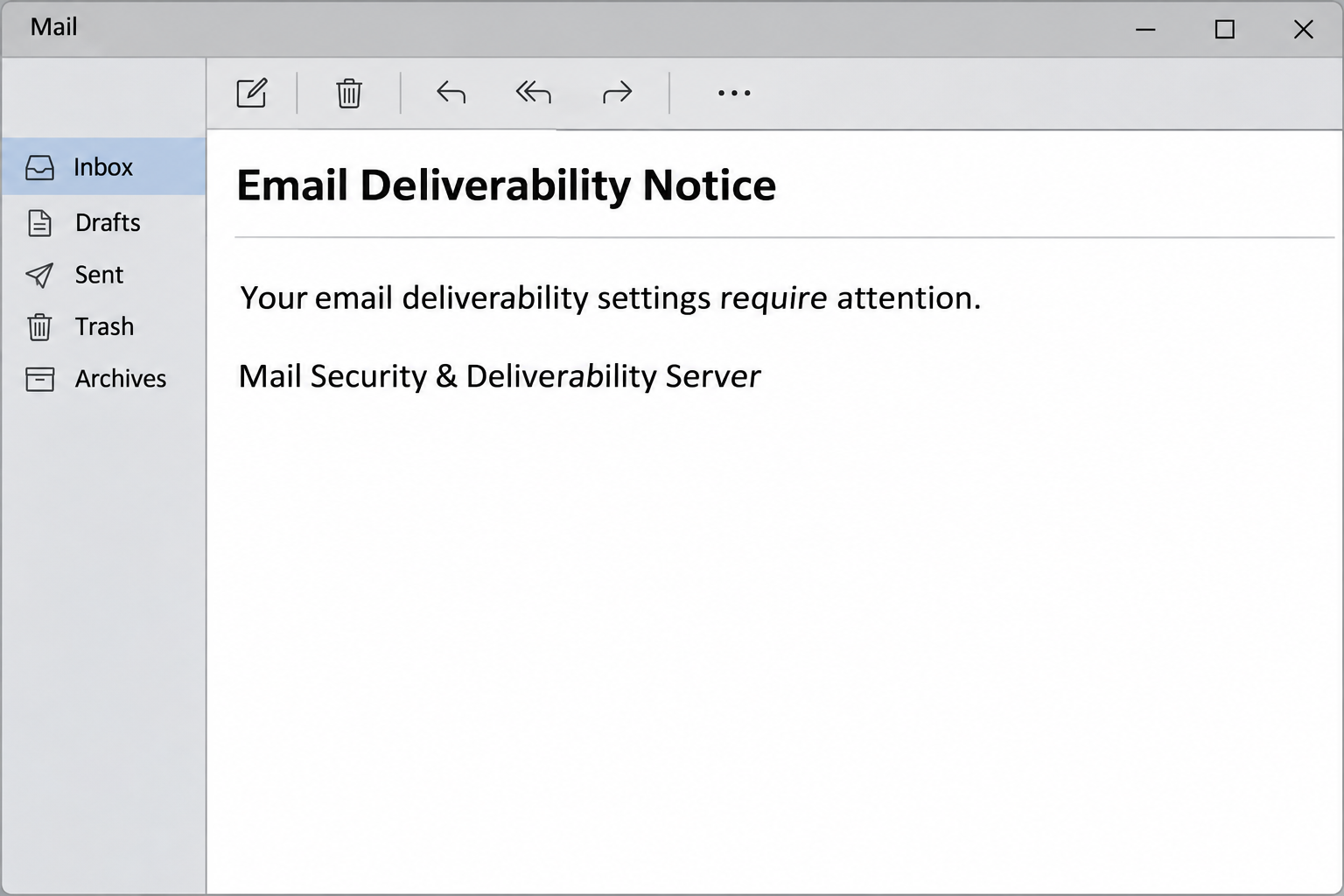
The Email Deliverability Notice scam says that your settings need attention. The message tells you to review the configuration so mail will keep reaching inboxes.
It calls itself an automatic notification from a mail security and deliverability server. A footer uses the name Mail Infrastructure Services, but that label does not identify your actual provider.
The image recreates those elements without a working button or recipient details. The notice itself supplies no trustworthy delivery record to tie the claim to your account.
A real delivery problem can exist whether or not the email arrived. You can investigate one without using the route the message proposes.
A fake settings review points away from the account
The email invites you to review settings through a link. The report associates that route with credential phishing, but the destination was unavailable when examined.
That means nobody should infer an exact form field, copied brand or completed account compromise from this case. The action is unsafe because the message cannot establish the destination’s authority.
A person responsible for a business domain may already have a place to check mail authentication. A user with no control over the domain should talk to their real administrator.
If you need to locate your legitimate panel, open it from your host or a bookmark you already use. Do not use the email to find a settings page.
Deliverability is not the same as being able to read your inbox
Deliverability often concerns whether mail reaches recipients and whether their providers accept or filter it. It is not simply another word for signing in to your mailbox.
For example, a recipient might see your message in spam while your own mailbox works normally. Another message might never be accepted at all and generate a rejection.
- Start with a particular message, sender, recipient and approximate time.
- Ask whether it was rejected, delayed or delivered somewhere other than the inbox.
- Check real domain authentication only through an authorized admin or provider.
- Handle a submitted password as a separate problem from the delivery symptoms.
cPanel’s real Email Deliverability documentation shows that some legitimate panels offer dedicated tools for domain mail authentication. It does not make this an actual cPanel message.
How the Email Deliverability Notice Scam Works
Step 1: A broad concern is made to sound account-specific
The message does not claim that a particular customer failed to receive an invoice. It says mail settings require attention without identifying the specific failed delivery.
That lets the wording fit many situations. A small business owner might think of a sales email that went unanswered, while someone else remembers a delayed password reset.
Start with what you already know. A message you can identify and a report from your actual host are better evidence than a broad worry about settings.
If you only use an address and do not manage how its domain sends mail, the fix is probably not yours to make. Ask the person responsible for that service.
Step 2: Automated branding suggests that no human needs to explain the warning
A real system can send automatic notices, and some of them ask recipients not to reply. The copied style borrows the appearance of ordinary back-office mail.
Read the footer as a label, then check your records for the provider you actually use. A generic description of mail infrastructure cannot replace a genuine support relationship.
Someone who manages multiple domains should ask which one is allegedly affected. A fault on one sender domain would not necessarily apply to every mailbox in a company.
No confirmation of the sender is hidden behind the button. Reach a known host or administrator before taking up any unfamiliar configuration task.
Step 3: A review button promises diagnosis without showing the fault
The email’s single action is framed as a settings review. The word “review” can feel harmless because it does not sound like a request to share a password.
The reported link did not provide an accessible diagnostic page. Its actual form was not confirmed, and it is unnecessary to return there to find out.
When a similar page asks you to sign in, the most useful question is whether you arrived through your established provider. A familiar screen is not sufficient.
Ask your host where you can inspect the relevant settings legitimately. That route continues to work even after you close the email.
Step 4: A real password on an untrusted page can become a new incident
If somebody enters a current password on an unverified page, the password may be exposed regardless of what the page shows next.
Somebody with mailbox access may read correspondence, send messages or change forwarding. That can create real problems for customers even though the original warning was fabricated.
Mail reputation and account control can then become linked for a different reason. If an intruder sends from a genuine account, providers may react to the new activity.
Those consequences are possible, not established by merely receiving this notice. Check what was entered and what appears in the genuine service’s records before deciding the scope.
Step 5: The real diagnosis starts with a test you can describe
Ask one recipient to check whether the message arrived, whether it went to spam or whether it triggered a rejection. Use a contact you know independently.
For managed mail, give the administrator relevant delivery records or a bounce notice. Include the time and originating address rather than copying lines from the phish.
If the issue affects one mailing platform but not mail from the normal office inbox, mention that distinction. More than one service can send under a company domain.
Do not change DNS records merely because a stranger says there is a problem. Updating records used by several applications can create a real outage if done without context.
What to Do if You Have Fallen Victim to This Scam
-
Close the page and work from your existing provider.
If you read the email but provided nothing, do not click again for a better look. Open the host or mail service through your established route.
Tell your help desk if you followed the link. Record the time and any action you took, keeping passwords and codes out of the report itself.
If you got a browser download or permission prompt, mention it separately. A claim about delivery does not explain what happened on your device.
-
Replace credentials submitted through the unfamiliar page.
Use the real provider to change an exposed password. If you used the same password on other services, update those accounts from their own sites.
Ask about recent logins, active sessions and any changes to recovery methods. Tell the provider if you approved a sign-in or granted an unfamiliar app access.
For a managed inbox, contact your administrator from an unaffected channel. The person who controls domain settings may not be the person who resets mail passwords.
-
Check whether your mailbox sent anything unexpected.
Review outgoing mail and ask your provider about forwarding and rules. An account can be misused without the whole inbox appearing empty or inaccessible.
Ask whether contacts received strange messages, but reach them without forwarding the suspicious link. Focus on the addresses and times that match the suspected exposure.
If unauthorized payment instructions went out, talk to your finance team and affected contacts promptly. Confirm beneficiary details through records you already trust.
-
Reconstruct the delivery issue from real evidence.
Identify one message you know was sent and ask the recipient what they actually saw. Save any non-delivery report your provider generated.
If you manage a business domain, give the provider the correct sending service and time. Separate email from your regular app and email sent by a newsletter tool.
A recipient’s spam folder and a rejection at delivery are different results. The person helping you will need to know which event you can confirm.
-
Review domain settings only if you are responsible for them.
Use the panel identified by your own provider. Ask what record or service needs attention and who authorized a change.
Before editing mail authentication, confirm which platforms send for the domain. A change aimed at one platform may affect another service used by staff.
If someone else runs your DNS, let them check the provider’s official instructions. Avoid sending them a copied configuration from an email that has not been verified.
-
Tell staff where legitimate notices can be checked.
Report the phishing message through your normal mail or security channel. Describe the subject and button label without inviting colleagues to try it.
Keep a record of the genuine host or administrator for each affected service. A known starting point makes it easier to respond to a genuine deliverability issue.
Share the outcome when the mail issue is resolved. Do not claim the fake email diagnosed it unless your provider establishes a connection, which the notice itself cannot do.
If Customers Say Your Messages Go to Spam
Start with a message you can trace. Ask whether everybody missed it or just people at one company, because one recipient domain may handle messages differently.
The administrator may inspect authentication or delivery logs, depending on which system sends the mail. Do not assume every issue is a password problem.
One app on your domain may send receipts, while another sends appointment reminders. Give support the correct application as well as an example message.
A functioning mail login cannot prove delivery works everywhere. Conversely, a rejected newsletter does not mean an email urging you to sign in is authentic.
When sending is handled by a vendor, check both the mail provider and the vendor’s authorized support. Keep those conversations separate from a suspected password disclosure.
If a recipient reports an actual strange message from your domain, preserve their record. It could help your team distinguish a false notice from an account being actively misused.
What your administrator may ask for
Have one genuine copy of a delayed or rejected message on hand. Provide the sending address, recipient, time and any error your own service returned.
An administrator may ask which tool sent it. If an invoicing service sent the message, say so instead of describing the company mailbox as the source.
When multiple senders use the domain, ask who owns each change. A website vendor can control a form without managing the mail settings for your whole organization.
Do not paste a password or security code into a delivery ticket. A recipient address and verifiable sending details are enough to start a diagnosis.
If your host points to authentication records, ask which platform manages them and whether recent changes are expected. A responsible owner can document the fix instead of guessing.
Frequently Asked Questions
Is the Email Deliverability Notice real?
The version claiming to come from a mail security and deliverability server is a phishing notice. Do not treat the footer as proof it came from your mail host.
Check your regular provider’s dashboard or call its verified support. The content of the reported outside page was not available for confirmation.
What is email deliverability in plain English?
It concerns whether mail gets accepted and reaches the place where recipients can see it. A message in a spam folder and one rejected by a server are different outcomes.
That is why a genuine investigation needs a specific message or delivery record. A generic email urging a configuration review supplies neither.
Is this the same as an IMAP or POP settings error?
The claims concern different parts of mail. IMAP and POP relate to how a client retrieves messages, while deliverability frequently concerns sending and receiving providers.
If the issue appears in only one app, start with the app and the actual host. Never use the email to settle a technical diagnosis.
Can I check my own domain’s authentication?
If you are authorized to manage the domain, use your real host’s instructions and established panel. Ask which records are involved before making changes.
If a company administrator owns that work, send them a description of what you observed. Do not forward a link as if it were an approved repair.
What if I entered a password but mail works normally?
Treat the password as exposed anyway and contact the provider. Working mail does not confirm that every active session and account rule belongs to you.
Ask about sign-ins, apps and forwarding before declaring the issue resolved. Keep the question of mail delivery separate from that review.
Is an unsubscribe link safer than the review button?
An unsubscribe label is still part of the untrusted message. There is no reason to use it to test an email that impersonates your mail provider.
Use your mail provider’s reporting control instead, after preserving evidence if your workplace requires it. Check genuine subscription settings directly with the relevant service.
The Bottom Line
Do not use this email to review or repair deliverability settings. It provides no reliable diagnosis and sends you away from the provider that actually manages your mail.
Verify real delivery issues through a specific message and your known host. If you submitted a password, secure the account and ask the provider to review access.

Join the discussion
0 commentsShare your experience or ask a question about this article.
Community experiences
Did this happen to you?
Your experience could help someone recognize the same scam. Submit a private report for our team to review.
I experienced this tooReports are reviewed before publication. Sharing publicly is always your choice.
Discussion
Start the conversation
Have a question or something useful to share? Add the first comment.