


A merchant credit is good news when you have been waiting for money back. The subject of this email sounds almost excited to tell you it arrived.
That makes it easy to forget where a real refund actually appears.
Overview
The email says the money is already there
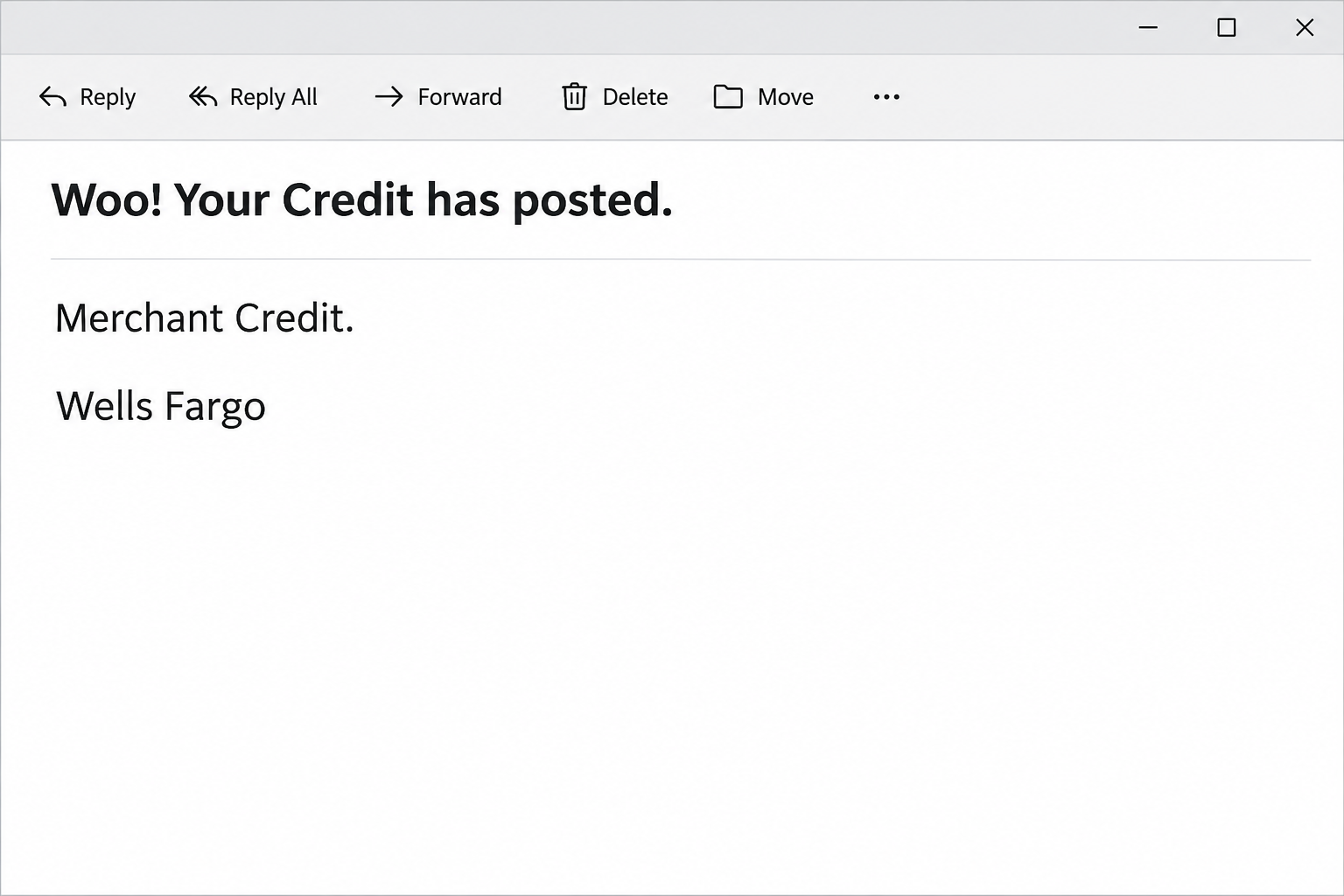
The Wells Fargo credit or refund email opens with an upbeat “Woo!” and says your credit has posted. The body labels it a merchant credit.
The message says money reached the recipient’s account and supplies a timestamp. It does not identify a verified merchant or a credit you can independently reconcile.
The offer is to view details, not to send a payment straight away. That can make the link feel less risky than an unexpected invoice or demand for a fee.
The image recreates the opening email without a transaction record. It does not depict a real credit in anyone’s account.
A copied Wells Fargo login is the actual destination
The reported details link went to a page resembling Wells Fargo’s sign-in. Instead of showing a verified merchant credit, the page sought a username and password.
Wells Fargo is the company being impersonated, not the source of the copied form. A name and a timestamp can make the message resemble something the bank normally sends.
The evidence shows an attempt to collect bank credentials. It does not establish a real refund, a successful sign-in or funds leaving any reader’s account.
Even if you have a genuine refund in progress, it does not authenticate an email that happens to mention the same topic. Check the bank’s transaction record independently.
The bank statement answers a different question from the email
A merchant might confirm it issued a refund before your bank posts the credit. A purchase can also be reversed without looking like a separate credit in every account view.
Ask the merchant what happened to the original purchase, then check the card or account that actually paid. You do not need the email’s link for either check.
- Look for the original charge and any related credit in the app you already use.
- Compare the merchant and amount with a return receipt or original order.
- Check whether the bank shows the item as pending, posted or not present.
- Call the bank promptly if you typed credentials or approved anything on the copied page.
The Wells Fargo fraud reporting page provides a verified route for suspicious activity. Use the actual account record when you speak to the bank.
How the Wells Fargo Merchant Credit Scam Works
Step 1: A credit is easier to welcome than a charge
An email announcing money back gives you a reason to expect a pleasant discovery. It does not need an unfamiliar purchase to make you anxious.
People who recently returned something may supply the connection themselves. The sample’s general language fits more than one type of account or purchase.
Before connecting it to an order, check the original retailer’s return record. The message does not gain credibility just because you remember a refund request.
If you do not have a Wells Fargo account, do not try to find out what account the notice means. An unexpected bank name does not require a response.
Step 2: A timestamp makes the claim feel settled
A precise time can look like it came from accounting software. It tells the reader that a supposedly specific financial event has already happened.
Look for a transaction in the bank rather than using the mailed timestamp as evidence. The reported example provides no independently verified transaction behind that precise time.
A posting date can differ from the date a merchant starts a refund. Having a mismatch does not by itself prove a genuine merchant did anything wrong.
If there is a real return receipt, compare what it says with the correct account. Keep that reconciliation separate from the effort to identify the sender.
Step 3: Viewing details turns into a sign-in request
The link sounds as if it only opens more information. The reported destination was a copy of the bank’s login, which asked for an account username and password.
It is normal for bank details to sit behind a login. The difference is that you can reach a legitimate one without asking this notice where to go.
Do not compare the page to a remembered color or logo and then type a password if it looks right. The actual destination matters more than visual familiarity.
If the page fails to show a credit after you type, do not enter your password again. Report the submission instead of waiting for the false receipt.
Step 4: Exposure creates a problem unrelated to the promised refund
A current bank password may let someone attempt sign-in through the real service. Whether that works can depend on additional verification and controls.
An unfamiliar approval or code requires particular care. If you accept a prompt you did not start, the bank needs to know which action it appeared to authorize.
The money someone promised does not limit the scope of the exposure. A bank may need to look at access, profile edits and transactions outside that merchant.
This does not mean a balance changed for everyone who received the notice. Act according to what you submitted and what the genuine account shows.
Step 5: A separate refund conversation can distract from recovery
If a legitimate refund really exists, ask the merchant and bank to resolve it directly. There is no need to return to the suspect login to find details.
If an unsolicited caller offers to process or reverse a credit, do not move funds on that instruction. Work from the bank’s verified record and normal support channel.
Do not assume a real credit is available to spend if the account still lists it as pending. Check how the bank describes the item you can actually see.
For a missing refund, preserve the merchant’s dates, order and confirmation. Those records can help independent support without exposing your bank login in a new conversation.
What to Do if You Have Fallen Victim to This Scam
-
Close the unfamiliar sign-in and stop the interaction.
Do not revisit the page to get proof of the credit. Open the bank app independently or call using the number on your card.
Record whether you viewed the page, typed a user ID, entered a password or approved something. Keep actual secrets out of the notes.
If you only read the message, confirm any refund independently if you need to. Seeing the subject does not show anybody accessed your account.
-
Tell the real bank about the disclosure promptly.
Explain that a fake refund notice sent you to a copied Wells Fargo login. State the type of information you supplied and when.
Ask what the bank recommends for the affected sign-in, devices or active sessions. If you approved a request, describe the prompt without repeating any code.
Change exposed credentials through the verified process. If you reused the same password on another service, replace it there through that provider’s own site.
-
Check account activity beyond the expected refund.
Look for unfamiliar charges, transfers, new recipients or profile changes. Ask the bank whether there were pending attempts that do not appear in your normal display.
Save transaction times and merchant information from trusted records. Ask how to report suspected unauthorized activity and keep the reference assigned by the bank.
If your statement shows nothing unfamiliar, continue the access review if a password was exposed. No visible charge does not certify that the password remained private.
-
Match the real purchase to the real credit.
Open your merchant’s order history or contact its verified customer service. Ask what payment method it refunded and when it submitted the refund.
Compare the merchant’s confirmation with the account that funded the purchase. If you used a different card or account, checking the wrong one can give a misleading result.
Ask your bank what it can confirm about an expected credit. Avoid sharing your online banking screen with a merchant or anybody offering to trace the refund.
-
Preserve the email without spreading the link.
Keep a private copy of the subject, arrival time and message if the bank asks for it. Leave personal account details out of public complaints or warnings.
Use the reporting process provided by the real bank or email provider. Do not forward the actionable link to a relative and ask whether it works for them.
If you downloaded something or noticed a device change, mention that separately. The reported form concerned credentials; your device activity requires its own factual account.
-
Protect yourself from a second refund story.
Be careful if an unsolicited caller appears to know that you expected money back. The caller still needs independent verification through a number you trust.
Refuse requests for an advance fee, a transfer or an unexpected code. Call the bank directly if the person claims there is already a case.
Keep your transaction records, merchant receipt and bank case reference together. That makes it easier to answer follow-up questions without trusting a new message.
When the Merchant Really Did Promise Money Back
A store can issue a refund without the bank showing an immediate posted credit. Ask the merchant how it processed the refund and which purchase it relates to.
If the original transaction disappeared instead of a credit appearing, ask the bank whether the transaction was reversed or a hold released. Those records look different in different services.
Do not confuse a reward, a chargeback and a merchant refund. A bank employee can help identify the kind of entry you are looking at.
If a legitimate credit later changes, ask the bank how to handle it. Do not send money to an outside account because someone says the amount was wrong.
Three records that may look different
A return confirmation is a merchant record. It can help identify the item and payment method, but it is not the same as an entry in your bank.
An account notification can describe a change without showing the complete transaction record. Reach the bank independently to see what it considers pending and what it considers posted.
A statement helps you see the credit in the context of the original purchase. Find the original charge first if you are unsure which card paid.
If the amounts do not match
Ask whether the return covered a single item, several items or only part of the original transaction. Keep the validated purchase and return dates together when you call.
If two purchases had the same total, use the order identifier from the original receipt. Do not make the timestamp in the suspect email the tie breaker.
A merchant can discuss what it owes without asking you to share your bank password. If the conversation moves to an unfamiliar banking form, pause the request.
If you have already submitted bank details, handle that with Wells Fargo first. Resolving an account exposure should not wait for the refund to arrive.
Frequently Asked Questions
Is the “Woo! Your Credit has posted” email genuine?
This version of the notice is phishing. Its details link led to a copied Wells Fargo login, not a trustworthy record of money returned.
Check for money back in the actual account. Contact the bank directly if the record is unclear or you submitted anything.
Does the timestamp mean the refund is already posted?
A time in an email does not establish that the bank posted a credit. Use the bank’s transaction list to check a genuine posting.
If you expected money back, confirm the original purchase and merchant. Timing is useful only after you have matched the actual records.
Can a real refund exist even if this message is fake?
Yes, the two events can happen separately. A refund expected from a real merchant does not make an unrelated message or its destination legitimate.
Use your merchant’s confirmation and the bank account that paid. An account password is not needed by the person who sent this notice.
What if I entered my password but see no credit?
Tell the bank and use its approved recovery route. The presence or absence of a credit is not the answer to whether your credentials were exposed.
Ask the bank to help review account access and recent activity. Mention any unexpectedly approved action in the same conversation.
Is simply opening the email enough to lose money?
Reading the message does not establish a transfer or disclosure. The exposure depends on whether you supplied information, approved an action or encountered something else.
Keep the record precise when you report it. Check the actual account from its genuine app instead of the email.
Should I contact the merchant or the bank first?
If you gave out banking credentials, contact the bank first. A merchant can explain a specific return but cannot secure your bank sign-in.
If you only need to verify a real refund, check both sides independently. Use the retailer’s order history and the account that funded the purchase.
The Bottom Line
Do not check a merchant credit through this email’s link. The reported page asks for credentials on a copied bank screen instead of verifying that money arrived.
Check the merchant and your genuine bank records separately. If you typed login information or approved a request, contact Wells Fargo through a trusted channel promptly.

Join the discussion
0 commentsShare your experience or ask a question about this article.
Community experiences
Did this happen to you?
Your experience could help someone recognize the same scam. Submit a private report for our team to review.
I experienced this tooReports are reviewed before publication. Sharing publicly is always your choice.
Discussion
Start the conversation
Have a question or something useful to share? Add the first comment.