


A bank alert can stop you halfway through an ordinary day. This one reads like a formal letter, complete with a date and a case number.
Then it gives you an instruction about your password that makes the rest of the message worth reading more carefully.
Overview
What the Truist verification alert claims
The Truist account verification email scam uses the subject “Truist security alert: Your Account Requires Verification.” It says unusual activity was detected and asks you to review the account.
The email warns that access could be permanently restricted if you don’t verify in time. It also tells you not to change your user ID or password during the process.
That instruction stands out because the email purports to help when there may be suspicious activity. It tries to control how you respond before you reach the bank.
The message isn’t proof of unusual activity, a restriction, or an actual fraud case. Those details need to come from your account or a verified conversation with Truist.
The security letter details worth checking
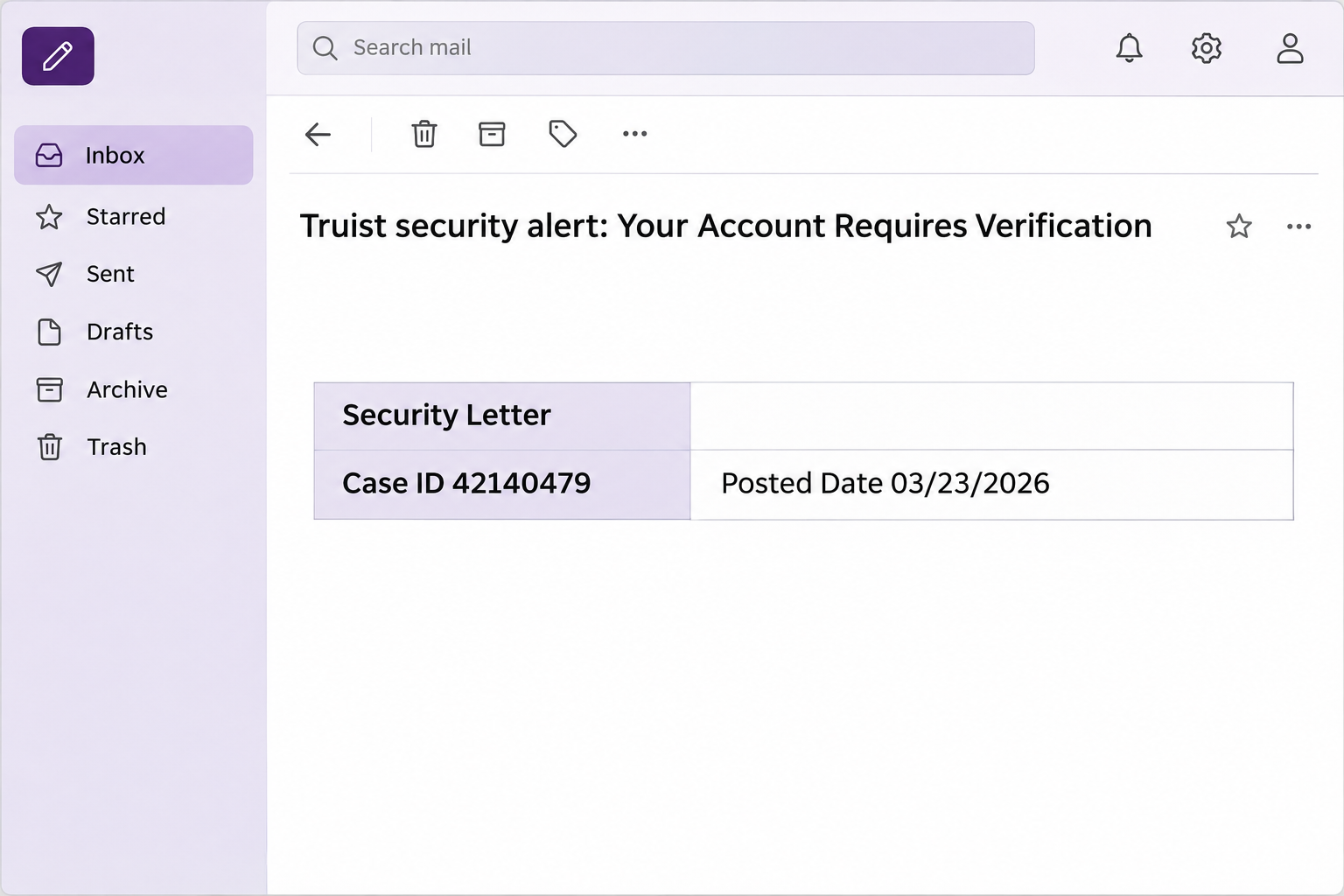
The email includes a compact section styled as a security letter. It aims to make the warning look like a record you could track, not just a generic notice.
- The case ID in the documented specimen was 42140479.
- The posted date in the same specimen was March 23, 2026.
- The request points to a link labeled “Review Account.”
- The email tries to discourage changes to your regular sign-in credentials.
- The threatened restriction is a claim within the message, not an independently confirmed action.
A later copy might use a different case number or date. If you get one, verify the request in your signed-in account or through a bank contact you establish independently.
What we know about the destination
The link supplied in the specimen was unavailable when examined. This means the exact form and any information it would have requested could not be confirmed.
The evidence points to a phishing attempt: a false bank warning asks you to review the account through its own unverified sign-in route. It doesn’t establish who ran it.
Truist is a real bank; the problem is the impersonation. An email carrying a bank name doesn’t give the sender any authority over your account or your password.
You don’t need to visit the disputed page to check whether the matter is urgent. If there is a real concern, bring it to the bank through its usual channels.
How the Truist Account Verification Email Scam Works
Step 1: A security warning creates a reason to stop everything
The message says someone spotted unusual activity and that you must act before it affects your access. It doesn’t give you a transaction you can verify independently.
That broad wording allows many readers to supply their own explanation. One may remember traveling, another may recall a late card notification, or both may simply fear losing access.
An actual unusual transaction and a suspicious email can arrive on the same day. A coincidence does not establish that the message came from the bank.
Start with account activity in the Truist app you already use. If you see an unfamiliar transaction there, use that genuine record to explain the problem.
Step 2: The case number gives the appearance of a bank investigation
“Security Letter,” a posted date, and a case ID make the note feel as if it belongs in an established investigation. All three are supplied by the sender.
Someone can create a case number without opening any case at the bank. The number is a detail you may mention during verification, not a credential the caller should request.
If a representative at the bank can’t identify it, don’t go back to the link to see more. Tell them you received an unverified security email.
The date adds context when comparing copies, especially if the same old case number resurfaces. A recent date would not tell you who created the message.
Step 3: The instruction about your password keeps you on the sender’s route
The email tells you not to change the account user ID or password during verification. It suggests doing so would slow down the review.
That makes the message sound protective while discouraging you from acting independently. It has no authority to tell you what to do with bank credentials.
If you suspect your password is exposed, use a verified device and contact the bank for next steps. Don’t wait for the suspicious message to give you permission.
It’s also okay to call the bank before changing anything if you see account changes or cannot get in. Don’t handle that uncertainty by trusting the link.
Step 4: The link asks you to review the account outside your normal routine
The “Review Account” prompt is where the security story asks you to leave your inbox and go to a destination selected by the sender.
Although the destination was unavailable when reported, the message frames the action as a sign-in. If another copy opens a form, don’t assume it is genuine.
Enter banking credentials only in an app or site you reached through a trusted route. A page can look like Truist without being operated by Truist.
If you have already opened the page, choose your response based on what happened there. An error message is different from a password submission or an approved code.
How to Check Your Truist Account Without the Email
Open the app you already use instead of tapping the alert. Look at account activity, messages, and any security information the app actually presents to you.
If you prefer to call, use the number on your card or the number on Truist’s fraud reporting page. Tell the bank you received an unsolicited verification notice.
Suppose your card shows a purchase you don’t recognize. Give the bank the transaction date and amount from your account, not a summary copied from the email.
If there is no transaction and your account works normally, you can still report the impersonation. You don’t need to submit anything through the message to close the issue.
If you manage a joint or business account, tell the other authorized user that you are checking it directly. Ask them not to follow the incoming link in the meantime.
If you’re locked out and worried that someone changed account information, use an official phone route from another device. An email’s promise to restore access isn’t a substitute.
Separate a rejected sign-in from a restricted account
A sign-in failure can happen without any fraud case. Check whether the bank’s known app offers ordinary account recovery, or call for help through the established contact.
If your debit card declines, ask the bank whether the issue concerns the card, the account, or a particular purchase. Don’t infer a permanent restriction from a single failure.
If an authorized user replaced a phone or changed security settings, that may explain an alert. Ask the person directly and still confirm the account details with the bank.
Keep an independent record as you verify
Write down the time of the email separately from the time of any actual bank event. They may have no connection even if the dates look close.
If your app already shows a security alert, handle it within the app. Opening an email to resolve a problem you can already see gives you nothing useful.
For a business account, record who at your company confirmed the matter and which contact route they used. Let that person handle the response rather than duplicating it.
Don’t publish the full alert if it shows your account information. A redacted copy for the bank or your own records can preserve the details you need.
If you get several copies, give the bank the suspicious subject and the earliest time you saw it. You don’t need to test every link to report them.
If your usual phone is unavailable, use another trusted device or visit an established branch. Do not ask the message sender for help finding support.
When a verified representative confirms a change, ask how you can recognize it independently. Continue to use the app and card contact routes you had before the warning.
What to Do if You Have Fallen Victim to This Scam
-
Report the email if you didn’t use the link.
Keep the subject, apparent sender, delivery time, and case number if your bank asks. Use the mail app’s phishing report or the bank’s established route.
You can ignore the email’s requested action without ignoring your bank account. Check through the app independently if something about the notice worries you.
-
If you clicked but didn’t give anything, close the page.
Don’t return to check whether a form now loads. Write down whether you saw an error, filled anything in, or received a prompt on a different device.
Opening a page doesn’t by itself show your bank account was accessed. For a work device, follow your team’s policy for reporting suspicious links.
-
If you entered bank credentials, call Truist using verified details.
Tell the bank which sign-in you exposed and when. Ask what steps to take to prevent further access and how to regain control if you’re locked out.
Follow the official instructions for replacing the password. If other services use that same password, switch them to different passwords through their own trusted routes.
-
If you supplied a code or approved a sign-in, say exactly what you did.
Don’t share another code to cancel a previous one. Tell the bank what the original prompt described and what you were doing when the prompt arrived.
Ask whether the bank can review new devices or profile changes. If a new contact method was set up, have the bank help you correct it.
-
If money moved, report the transaction instead of waiting for the email thread.
Give the bank the amount, date, reference, and payment method. Ask which steps can be taken now and what information they need from you.
Take notes during the verified call and keep a copy of your statement or transaction receipt. Do not assume any recovery is guaranteed.
-
Stay alert to follow-up contact that sounds like the original warning.
An unexpected caller may know the case number or say your account needs a final check. Hang up and use the bank’s own number again.
Where you shared financial or identifying information, ask about next steps suited to the information involved. Keep track of any instructions the bank confirms.
You don’t have to resolve every consequence at once. Start with verified access to the bank and any unauthorized activity that needs to be reported promptly.
Frequently Asked Questions
Is case ID 42140479 a legitimate Truist case number?
It is the number printed in the reported phishing message. The number itself is not confirmation that a Truist employee created or opened the case.
If you want to ask about it, go directly to the bank. Read the number to a verified representative rather than using it to choose a sign-in page.
Should I avoid changing my password because of the verification warning?
No, the message’s instruction about changing credentials isn’t authoritative. If you have exposed the password or see suspicious activity, ask Truist how to secure the account.
Use a password change route from the real bank and don’t read your current password or one-time code aloud to an unexpected caller.
Does the warning mean my account is permanently restricted?
The phishing email doesn’t establish any restriction. If the bank has actually placed a hold or limit, you need to confirm it through its official channels.
An ordinary sign-in problem can have more than one cause. Tell the verified representative what your account or app actually shows, not what the email predicts.
What if the link didn’t work when I opened it?
Close the page and don’t try again. The recorded version was also unavailable when examined, but that doesn’t make the unsolicited account request trustworthy.
If you did not submit details or approve a prompt, the response is different from an exposed sign-in. Report what happened and watch your account through trusted routes.
How can I tell whether a second call about the case is real?
Don’t rely on caller ID, the case number, or a familiar voice. End the call and ask the bank about it using a number you found independently.
If you’re asked to hold the line or avoid checking the bank’s app, don’t agree. A legitimate concern can be followed up through a separate call.
Should I cancel my card after reading the message?
Getting the email alone doesn’t mean your card is exposed. If you shared its details or see a charge you don’t recognize, tell the bank what occurred.
The bank can advise on securing the card and reviewing the affected activity. Don’t accept a replacement offered through the suspicious email or a related callback.
The Bottom Line
Don’t review your Truist account through this email or obey its instruction to leave your password alone. Start from the account you already know or call Truist independently.
If you entered credentials, shared a code, or saw an unfamiliar transaction, give the bank those details through a verified channel so it can act on the actual exposure.

Join the discussion
0 commentsShare your experience or ask a question about this article.
Community experiences
Did this happen to you?
Your experience could help someone recognize the same scam. Submit a private report for our team to review.
I experienced this tooReports are reviewed before publication. Sharing publicly is always your choice.
Discussion
Start the conversation
Have a question or something useful to share? Add the first comment.