


The CyberLeek lookalike advertised a free launcher for a leaked GTA 6 build, but full access was offered on very different terms.
Before paying for an unlock, check what the page is actually asking you to send and who can verify that it delivers anything.
Overview
The $100 charge was for a supposed unlock
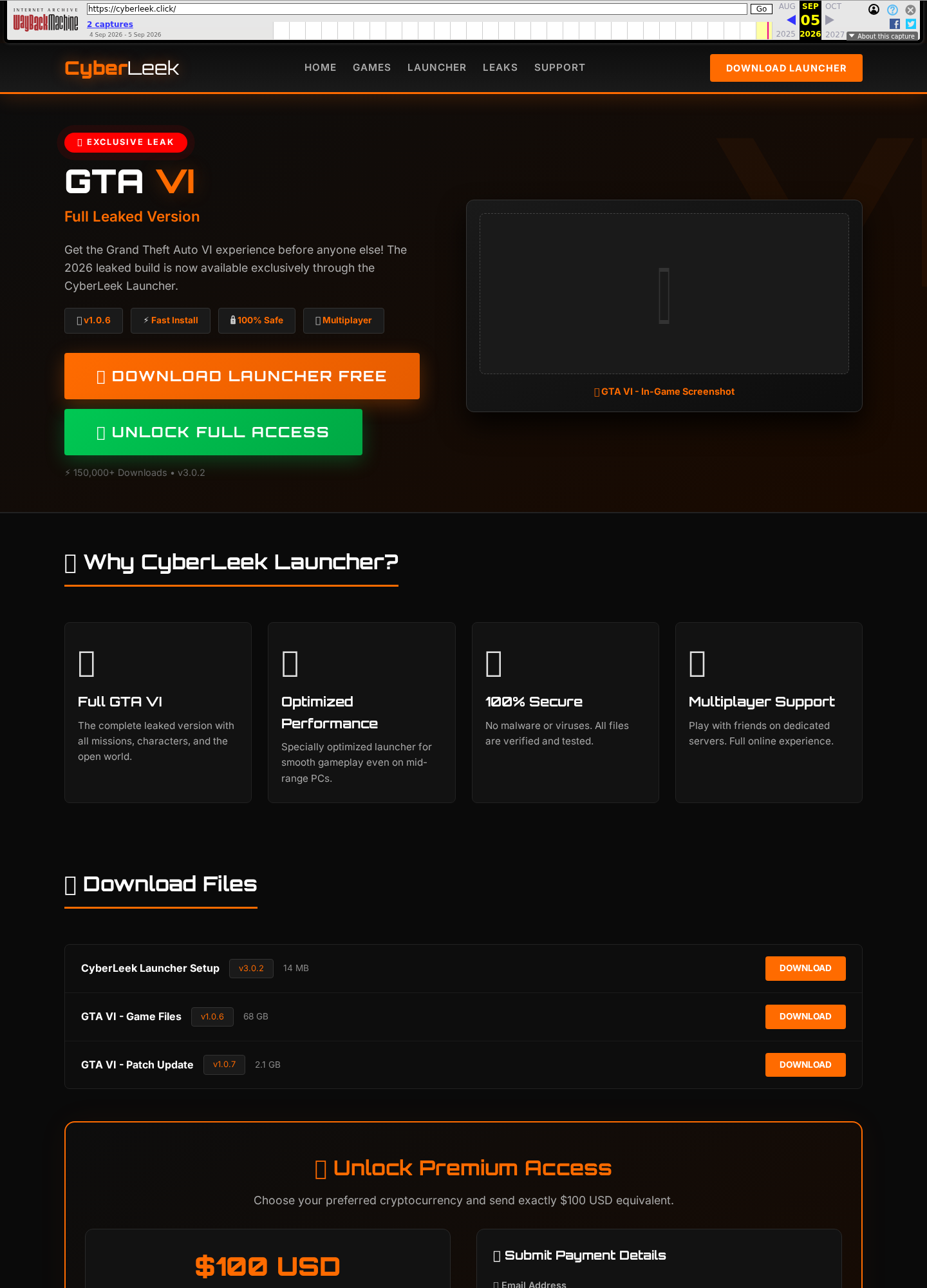
An archived copy of cyberleek[.]click offers a free launcher on the main page and asks for $100 in cryptocurrency for access below it.
The payment section promises permanent access for one payment, asks for a transaction reference, and says the sender will hear back within two hours.
Netcraft documented the same $100 demand before launch and did not send money, so its report does not establish that anyone received the promised game.
The name comes from a leak story, not an authorized store
The name CyberLeek was already associated with clips said to show the game, which gave a lookalike page a story readers had heard before.
Clips and screenshots circulating online do not authenticate a separate Windows launcher, a cryptocurrency recipient, or anyone who claims to speak for an uploader.
The official GTA VI page is where Rockstar lists supported platforms, while a lookalike site’s branding cannot turn its offer into a publisher release.
What to do depends on what you gave the page
- If you only viewed the offer, close it without downloading or contacting the seller to ask whether the full game will actually work.
- If you sent cryptocurrency, preserve the transfer record and contact the company you used to send it before engaging with anyone promising a refund.
- If you signed a wallet request or ran the launcher, go to the response for that action rather than treating it as a payment alone.
How the Fake CyberLeek GTA 6 Activation Scam Works
Step 1: The page sells the idea that a playable leak already exists
The archived landing page presents the offer as the full leaked version, with an unofficial launcher that supposedly gets you access before other players.
It puts a free download and an unlock option side by side, making the download sound like the first part of the same purchase.
It also displays a safety claim and a download counter, but neither tells you who supplied the file or whether anyone verified it independently.
The archived page was captured in September 2026, so it records a specific version of the offer rather than proving the live site still works.
Even the page footer describes the site as unaffiliated with Rockstar, despite the branding and the promise of access to the complete game.
Step 2: The free download is not the same as full access
A launcher is a program, while the promise of unlocked access is a separate claim made by the seller after you have encountered the offer.
The archived list labels three downloads as a launcher, game files, and a patch, but all three buttons point to the same archive.
That means the displayed sizes and version numbers do not establish three separate downloads, even though the page presents them as different files.
Netcraft reported that 18 of 62 scanning engines flagged the launcher it checked, so the site’s own reassurance is not enough to trust it.
That count concerns one file at one point in time, and it does not tell you whether a different copy behaved the same way.
The risk of running a flagged program does not disappear if you decline to pay, so handle installation and payment as two separate events.
Step 3: The unlock asks for a direct crypto payment
On the archived page, the unlock option leads to a payment section asking for exactly $100 worth of cryptocurrency for purported lifetime access.
It lists Tether on TRON, Bitcoin, and Ethereum as choices, and then asks for a transaction reference after money has already been sent.
The form also requests an email address and a Telegram or Discord contact, which would give the operator another way to approach the sender.
A transaction reference can show that money moved, but it cannot show that the recipient owns a copy of GTA 6 or will deliver one.
Step 4: The promise depends on the operator following through
After the form, access supposedly depends on the operator reviewing the payment and contacting you, rather than a code appearing in an official account.
An independent payment record might prove that you sent the money, but it would not verify what the person on the other end promised.
If a new message asks for a second fee to confirm the first one, preserve the message without sending anything else to the contact.
Netcraft found other pages borrowing the name, but those offers used different prices or claims, so do not treat them as one verified merchant.
What to Do If You Have Fallen Victim to This Scam
- Stop communicating with the operator, keep any payment requests or messages you already have, and do not reopen the launcher to collect more evidence.
- Use a device you trust to examine your exchange or wallet history, then save the exact record of any transaction you already authorized.
- If you sent crypto from an exchange or ATM, contact that provider through its normal support channel and explain that the seller misled you.
- If you interacted with a wallet request, check whether you only connected an account, signed an approval, or actually transferred funds from it.
- If you launched the program on Windows, disconnect that computer and use another device to secure the accounts you previously used on it.
If all you did was download the launcher, remove the known copy without opening it, and do not run another copy to compare results.
Downloading a file does not prove it ran, just as a link asking for a transfer does not prove your wallet approved anything.
Keep a short timeline of the page visit, download, payment, and later messages, so you can explain what happened without sharing unrelated private information.
If you shared only an email address or chat handle, watch for follow-up impersonation, but do not assume you also gave away your password.
If You Sent Cryptocurrency to Unlock the Game
Get the transaction record from the sender’s account
Open the exchange or wallet you used and select the specific withdrawal or payment in your history, rather than relying on the seller’s screenshot.
Record its status, transaction ID, asset, network, amount, recipient address, and time, including the time zone if the exchange displays it in your activity.
If you see a withdrawal reference but no blockchain transaction ID, save that reference and ask the provider whether the withdrawal was ever broadcast.
An exchange receipt and a message asking for $100 tell different parts of the story, so keep both instead of sending only one image.
Ask the provider what it can still do
Report the exact transaction through the provider’s official app or website, then ask whether a withdrawal still marked pending can be stopped before it goes out.
The FTC’s scam response guidance recommends contacting the exchange or ATM operator quickly, even though crypto payments lack the same protections as card payments.
If you sent funds directly from a self-custody wallet and the transfer confirmed, there may be no intermediary able to cancel what you authorized.
Do not confuse a reversal of a card purchase used to buy crypto with a reversal of the later blockchain transfer to the seller.
Report what happened without exposing wallet secrets
In the United States, follow the FBI’s crypto reporting guidance and include the transaction details along with the messages and the date when you found the offer.
Keep your reports private and never send a recovery phrase, private key, or login code to a person who approaches you about the transfer.
The FBI has warned about fake crypto recovery services that take an advance fee, so do not pay someone who offers a shortcut to recovering the money.
A report can give investigators useful information about the transfer, but a complaint number is not a promise that the money will be returned.
If You Connected a Wallet Instead of Sending a Payment
A connection, an approval, and a transfer need different responses
A connection can expose your public address without giving the site permission to move tokens, so check what you actually approved in the wallet.
If you only connected, use the wallet’s permissions menu to remove the site and review recent activity rather than reconnecting to the seller’s page.
In MetaMask, open the menu, choose Permissions, select the site, and confirm Disconnect to remove the connection from the account you used.
If you approved token spending, MetaMask explains how to revoke that approval from its supported tools, which is separate from disconnecting the site.
Check the correct account and network, review the app and token behind the approval, and use your provider’s trusted route to revoke suspicious permissions.
Revocation can stop future use of an allowance but cannot recover a transfer that already settled, and the network may charge for that action.
If you shared the secret recovery phrase, treat that wallet as compromised and use your provider’s official recovery guidance from a separate trusted device.
The documented $100 request was for a transfer, not proof of wallet draining; the separate GTA 6 wallet-drainer case explains why signed approvals matter.
How to Check Windows If You Ran the CyberLeek Launcher
Step 1: Isolate the computer before signing in again
Turn off Wi-Fi and unplug Ethernet on the affected PC, then review email and other important accounts from a separate device you trust.
Start with your main email account, since it can receive password resets for your exchange, gaming accounts, and other services you previously used there.
Change affected passwords, remove unfamiliar sessions, and enable two-step verification where available, because a password change alone may not close every session.
If the computer belongs to an employer or school, contact its support team before installing scanners or taking action that could remove useful evidence.
Step 2: Scan with Malwarebytes
MalwareTips may earn a commission if you buy a paid product through one of the links below.
Get the installer on a trusted computer while the affected PC remains isolated, and ask for support if you cannot transfer or install it safely.
Open the copy you obtained from Malwarebytes, check the publisher named in the Windows prompt, then follow the installer without adding optional software.
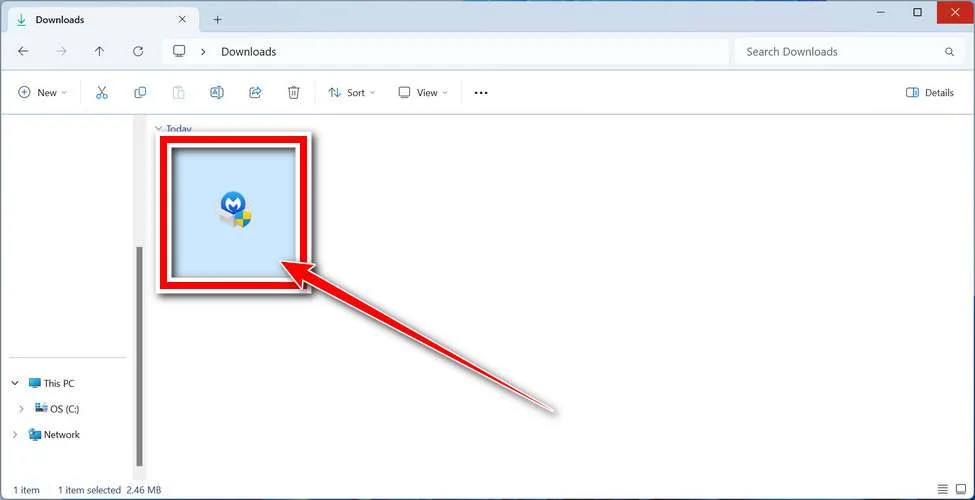
Choose Personal if asked about the device, skip optional offers, and open Malwarebytes when setup has finished on your personal Windows computer.
Choose Scan in the dashboard and leave the app open until you can read the results instead of treating an empty screen as success.
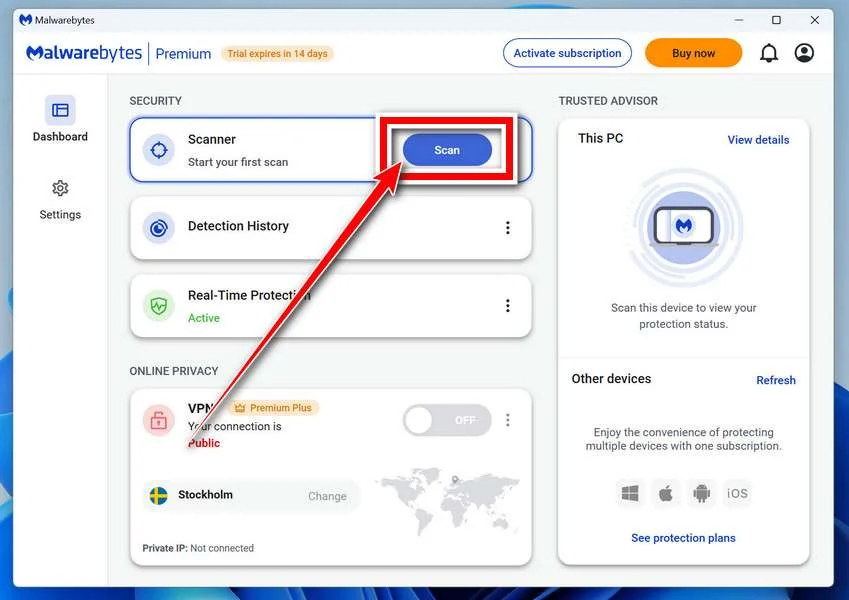
Move identified threats to Quarantine, save the report if a detection needs review, and restart only if Malwarebytes asks you to do so.
If the app cannot start or leaves an unresolved threat, leave the PC isolated and get help before opening any payment or account pages.
Step 3: Scan with HitmanPro as a second check
HitmanPro uses the internet for cloud checks, so do not reconnect an affected computer if the first scan could not contain a detection.
Use the HitmanPro download for your Windows system, and run the verified installer after confirming the name and publisher match the vendor you intended.
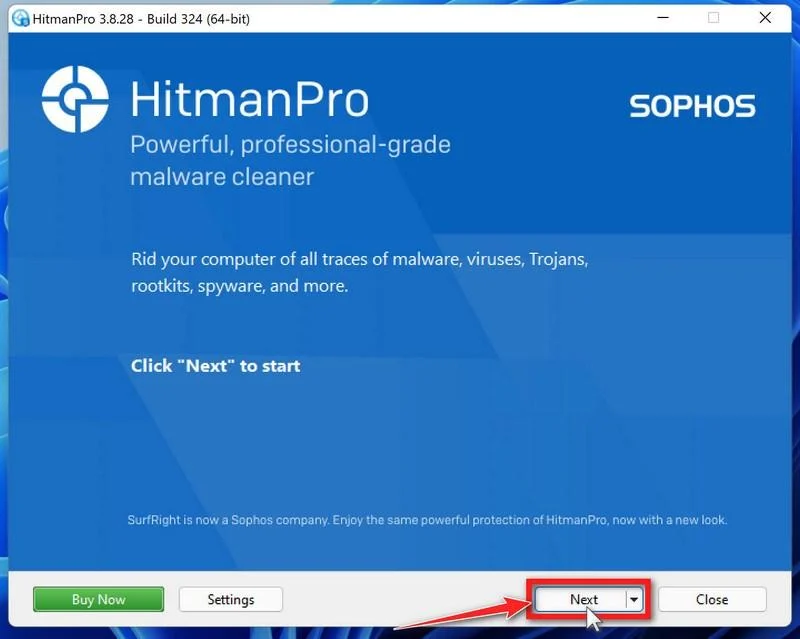
Choose Next, then select the one-time scan option if setup asks whether you want to keep a copy of the program.
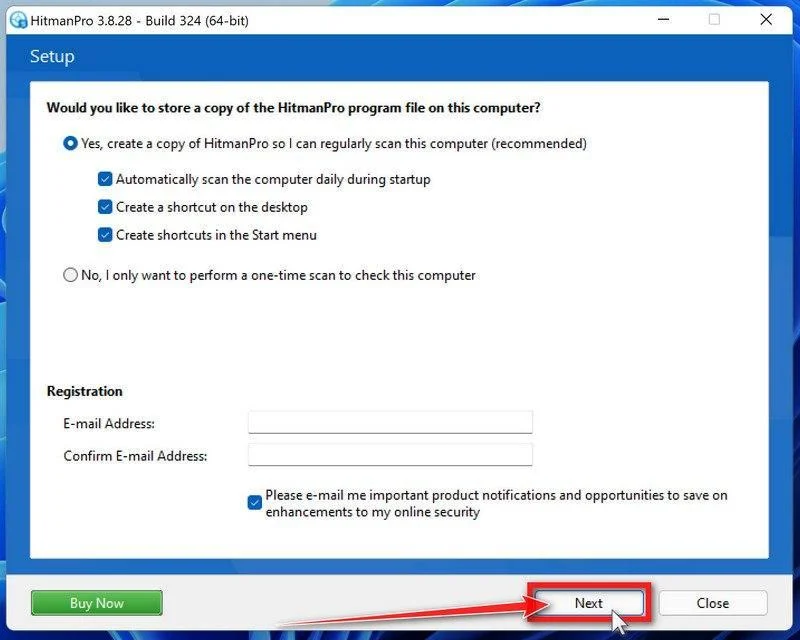
Read the completed results before using Next to remove identified threats, and choose Save Log when you need to keep the findings.
The scan is free, but removal requires a paid license or an eligible one-time 30-day trial, and you need not buy anything to compare reports.
If you qualify and want the scanner to remove confirmed threats, choose Activate free license when it appears, then review the cleanup summary.
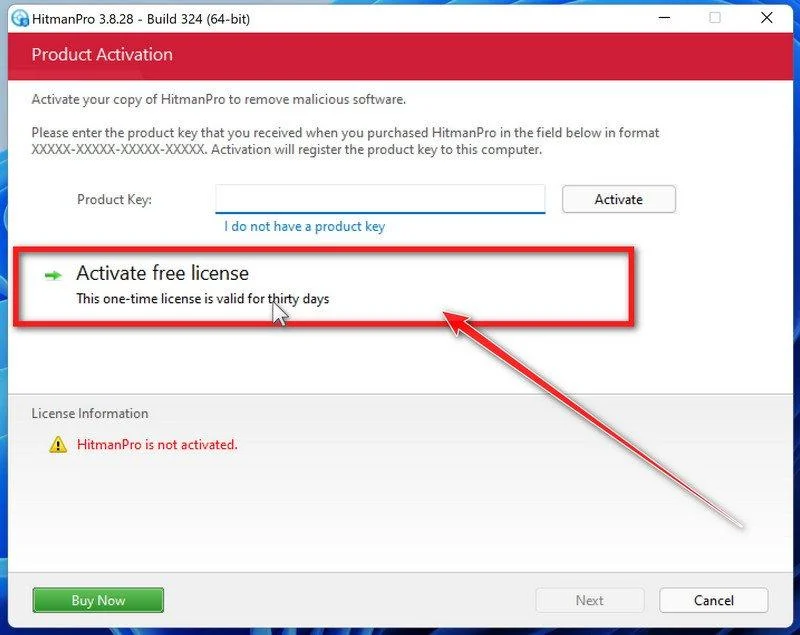
Restart only if requested, and get help through the MalwareTips Windows removal forum if detections remain or you cannot interpret the second report.
Treat account or payment problems separately after scanning, because removing malicious software cannot reverse a transaction or restore an account someone else already accessed.
Frequently Asked Questions
Does the $100 unlock come from Rockstar?
The $100 appeared on a CyberLeek-branded lookalike page, not on the official Rockstar product listing or inside a supported console store account.
Netcraft saw the instructions without paying, so the reported demand is verified separately from the unverified promise of access after a transfer.
Is this the same as the CyberLeek Discord verification scam?
The CyberLeek Discord verification scam used a different request, while this page asked for a cryptocurrency payment and a transaction reference for a supposed game unlock.
Seeing Discord named as a follow-up channel in this form does not show that both cases used the same operator or account-stealing method.
Why did a free download lead to a paid request?
The archived landing page called the launcher free, but the paid section below it advertised a separate step for using the alleged build.
Paying for that second step would not establish that the launcher was authorized or that the operator could deliver the game it advertised.
If I closed the wallet window, did I pay?
An open wallet prompt does not prove a transfer, so look for an actual outgoing entry in your wallet or exchange account history.
If you did sign something, determine whether it was a transfer or an approval before choosing the steps appropriate for the account you used.
Can the exchange return the $100 transfer?
Contact the provider promptly with the transaction details, especially if the service still lists the withdrawal as pending rather than sent to the network.
Once a transaction confirms, the exchange might not be able to reverse it, and a person who promises a guaranteed recovery should not be paid.
Should I scan my PC if I never ran the launcher?
You do not need to treat a page visit or an unopened download as proof of an infection from this specific Windows program.
Use the illustrated scan steps if you ran the file or cannot establish it was blocked, and keep payment and account checks on another device.
The Bottom Line
Do not pay the CyberLeek GTA 6 activation fee, because the archived offer shows a cryptocurrency demand but no verified way to get the game.
If you already paid, save the actual transaction record and contact the sending provider before responding to any request for further payment or proof.
If you opened a wallet request or ran the launcher, follow the matching response above without assuming that one action handles all three risks.

Join the discussion
0 commentsShare your experience or ask a question about this article.
Community experiences
Did this happen to you?
Your experience could help someone recognize the same scam. Submit a private report for our team to review.
I experienced this tooReports are reviewed before publication. Sharing publicly is always your choice.
Discussion
Start the conversation
Have a question or something useful to share? Add the first comment.