


Finding the name DeskPilot in a security alert can leave you wondering what happened while you were simply working, browsing, or copying a few notes.
Before you start deleting unfamiliar files, it helps to understand what the warning refers to and which parts of your digital life need attention.
Overview
DeskPilot is a Windows information thief with remote-access features
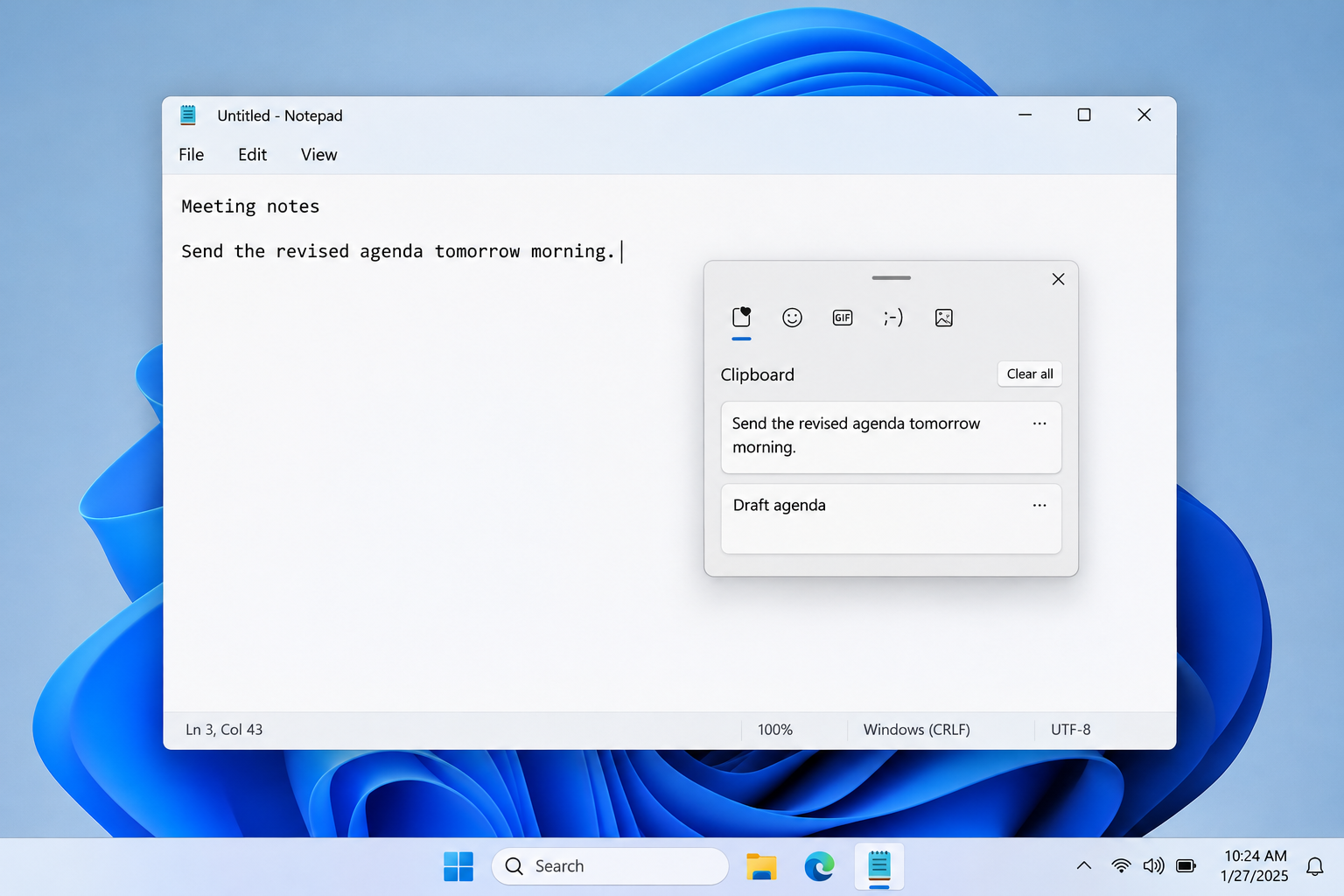
The DeskPilot malware described here records keystrokes, clipboard contents, and active window titles. It also supports remote desktop access, file operations, and hidden PowerShell execution.
This is not a verdict about every legitimate application sharing the DeskPilot name. Check the detection and file context, not the name alone.
What deserves your attention first
Its reported startup behavior includes gathering information before the first connection to its controller. Disconnecting limits further communication, but does not undo earlier collection.
- Stop entering sensitive information on the affected Windows computer.
- Keep the detection report and the suspicious file’s location.
- Use another trusted device for urgent account protection.
- Complete cleanup before treating the computer as trustworthy again.
Why removing one file may not be enough
Reported persistence methods include scheduled tasks, a Windows Run key, and WMI. These can restart the malware, so deleting a download alone is insufficient.
The particular delivery campaign has not been established. Do not assume an email, a coworker, or a download caused the infection without supporting evidence.
How to Remove the Malware From Windows
For an employer’s computer, contact the security team before scanning, restarting, or deleting files. Their investigation may need evidence that cleanup would change.
Keep the initial security alert available during cleanup. Its affected path helps distinguish the detected components from unrelated software that shares the DeskPilot name.
Step 1: Disconnect the affected computer
Turn off Wi-Fi and unplug Ethernet. Stop using the computer for email, banking, shopping, password changes, or accessing your other devices.
Write down the alert’s detection name, file location, and time. Keep the antivirus report without reopening the suspect file or forwarding its attachment.
If you have already installed an updated scanner, use it offline first. Otherwise, obtain its installer on a clean device where practical.
Some installers require internet access to finish setup or obtain updates. If reconnecting is necessary, keep it brief and avoid signing into anything.
Step 2: Obtain the Windows scanner
Use the direct Windows installer link below. If your browser cannot retrieve it, use the separate free-scanner page to obtain the official download.
Download the Windows Malwarebytes Installer Directly
Open the Malwarebytes Free Scanner Download Page
The free version provides on-demand scanning and removal. Paid real-time protection is optional, and buying a subscription is not required to follow these cleanup instructions.
See optional Malwarebytes Premium protection for Windows
The linked Malwarebytes pages may support MalwareTips through affiliate commissions. This does not change which detected items you should review or quarantine.
Open File Explorer, select Downloads, and locate the Malwarebytes installer you obtained. Do not substitute the original suspicious installer or a similarly named attachment.

Step 3: Install and open Malwarebytes
Double-click MBSetup.exe and confirm the Windows permission prompt only when it identifies the expected Malwarebytes installer. Select Install to continue through setup.
Choose Personal for your own computer, then continue. Skip optional product offers if you do not want them, and select Open Malwarebytes when installation finishes.
You can run an on-demand scan without activating a paid subscription. Dismiss optional subscription offers and continue to the scanner rather than entering payment information.
Let the application retrieve available updates before scanning. If setup fails, save its exact error instead of disabling security features or trying unofficial download mirrors.
Step 4: Run the recommended Threat Scan
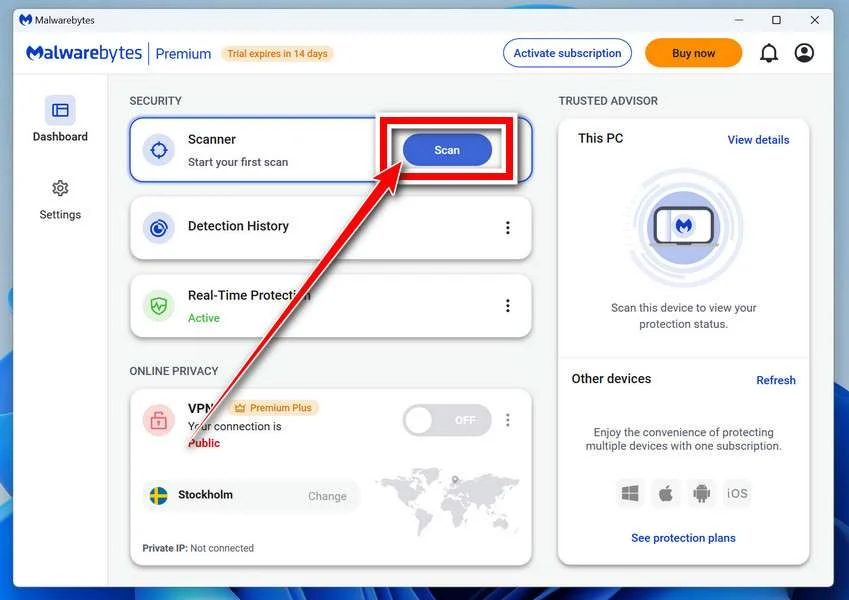
Open the dashboard and select Scan. Choose Threat Scan if your version presents several scan types, then allow the check to finish.
Threat Scan checks common infection locations. Use a Custom Scan afterward when a specific download folder, additional drive, or reported path needs separate examination.
Keep the results screen open after scanning finishes. You will need the detection names and affected paths when deciding which items to quarantine.
Step 5: Review findings and quarantine threats
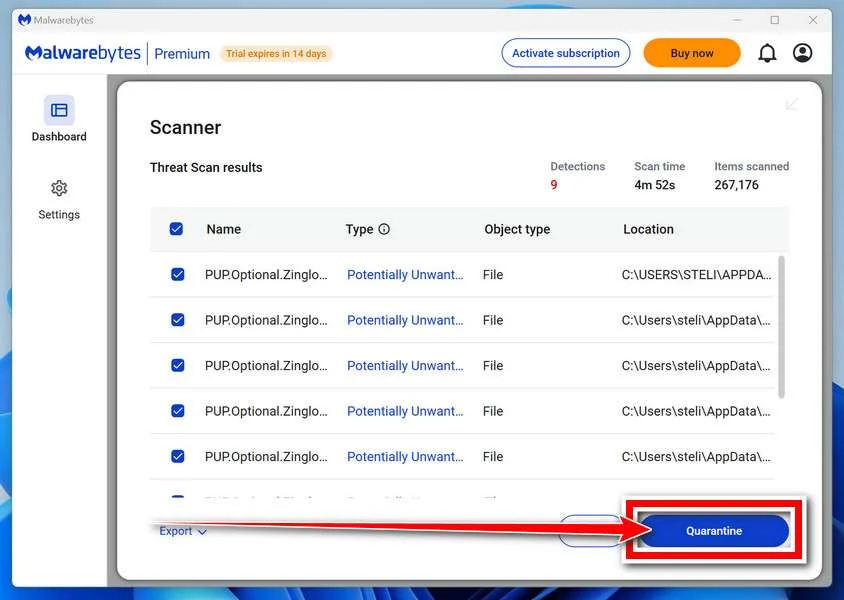
Read the detection names and affected paths when scanning completes. Keep confirmed threats selected and use Quarantine to isolate the detected components.
A scanner may use a generic Trojan label instead of the family name. Save its report so a helper can examine the actual files involved.
Do not restore quarantined files simply because an application stops working. Ask the vendor or a trusted removal specialist to investigate a possible false positive.
Step 6: Restart when requested and scan again
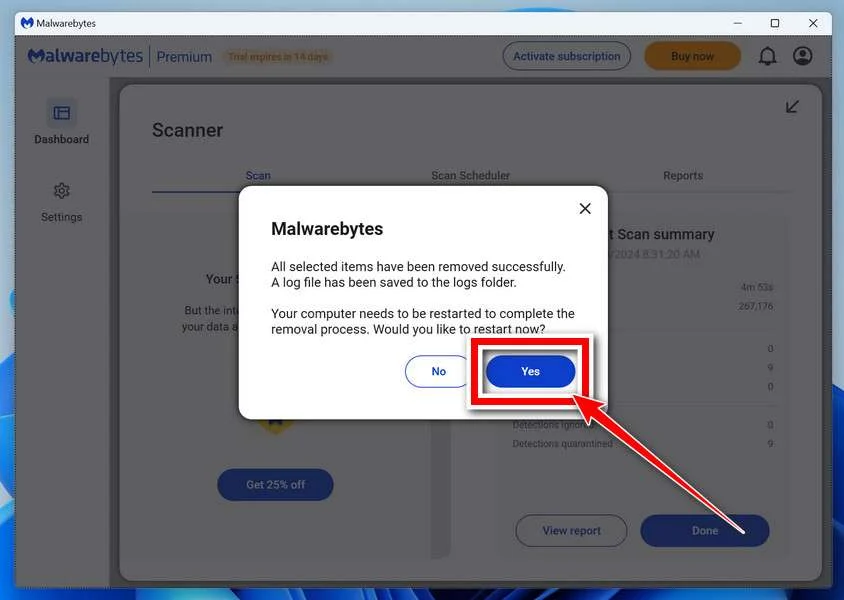
Save any open work, then accept a requested restart. Reopen Malwarebytes afterward and review whether removal completed or any items still require attention.
Run another Threat Scan with current updates. Compare new findings with the earlier report rather than assuming a disappearing warning means everything is resolved.
A clean result is useful, but cannot guarantee that an attacker left no other software behind. Continue with the case-specific checks below.
Step 7: Get help if cleanup will not hold
Repeated detections, returning startup entries, blocked security tools, or fresh unauthorized activity require further investigation. Keep the computer isolated while deciding the next step.
Post the detection report and a description of the symptoms in the MalwareTips malware removal assistance forum, without passwords or private documents.
For confirmed remote control, professional assessment or a planned clean Windows installation may be safer than repeated manual deletion. Preserve documents carefully before any reset.
Rebuilding removes local software only when performed correctly. Account access, stolen information, and unauthorized payments still need their own response.
After Scanning: Check Whether DeskPilot Can Restart
Keep the detection history instead of guessing at filenames
A useful removal report tells you which file was detected, where it lived, and what action the scanner took. Those details matter more than a nickname.
For example, a quarantined download and a repeatedly detected component in a startup location describe different cleanup problems. Give your removal helper both reports.
Do not search the drive for every occurrence of DeskPilot and erase the results. A matching word could belong to unrelated software or documentation.
Likewise, an unfamiliar process name is a reason to investigate, not an instruction to terminate Windows services. Removing legitimate components can make recovery harder.
Look at startup entries without deleting them blindly
Press Ctrl + Shift + Esc to open Task Manager, then select Startup apps. Note unexpected entries and their publishers without assuming every enabled item is malicious.
In Task Scheduler, examine a suspicious task’s Actions tab and the file it launches. Save those details for comparison with the security report.
A harmless-looking task name does not clear its target, and a random-looking name does not establish malware. The launch path and investigation context are essential.
WMI persistence is less suitable for casual manual cleanup. If the scanner reports it or detections return, seek guided assistance rather than pasting deletion commands.
Do not copy registry cleanup instructions from an unrelated infection. A Run entry can start legitimate software, and this case does not supply a universal deletion name.
Decide when rebuilding makes more sense
If someone had remote access, the remaining uncertainty may extend beyond DeskPilot itself. You cannot reconstruct every action simply by watching the screen afterward.
A clean installation is worth discussing when findings recur, security tools cannot run reliably, or the computer handles sensitive business records or financial access.
Plan that work before resetting anything. Identify the documents you need, check whether recovery keys are available, and obtain installation media through a trusted source.
Save personal documents separately from applications and installers. Restoring the same untrusted software immediately after rebuilding can bring the original problem straight back.
What a Keylogger Changes About Account Recovery
Think about what you typed, not just what you saved
Many people check only their browser’s saved passwords after a malware alert. With keystroke recording, information entered into ordinary applications may also deserve attention.
Consider the period when the malware could have been running. Which accounts did you sign into, and which sensitive documents did you edit?
You do not need to remember every keystroke to start responding. Prioritize the accounts that could let someone recover or take over the others.
Primary email usually belongs near the top because it receives password-reset links. A compromised mailbox can turn a single incident into several account takeovers.
If you entered a password manager’s master password on the affected PC, follow that provider’s compromise guidance. Changing one website password may not address that exposure.
Copied information also needs consideration
Clipboard exposure can include more than passwords. Think about recovery codes, private notes, customer information, payment details, or a cryptocurrency recovery phrase copied between applications.
Clearing clipboard history is sensible housekeeping after cleanup, but it cannot retrieve information already collected elsewhere. The response depends on what the copied material could unlock.
A copied recovery code may need replacing through its account’s security settings. A copied document may instead require a workplace privacy or data-incident report.
If a wallet recovery phrase or private key was exposed, changing the wallet application’s password is not enough. Seek wallet-specific instructions from a clean device.
Where funds remain at risk, a new wallet must use newly generated secrets. Never send an old recovery phrase to someone promising to secure it.
A password change and a session reset do different jobs
Start with a unique replacement password, then review the provider’s active sessions or devices. Sign out unfamiliar sessions and use a broader sign-out option when warranted.
Check recovery email addresses, phone numbers, authentication methods, and connected applications. Otherwise, an unauthorized change could give the intruder another route back inside.
In email accounts, inspect forwarding rules and filters as well. A hidden forwarding destination could keep receiving messages after the password has been replaced.
Enable stronger authentication where available, but remember that account recovery still matters. An attacker-controlled recovery address can undermine an otherwise strong sign-in setup.
Signs Worth Investigating, and Things That Prove Very Little
A security detection is a more useful starting point than a slow computer. Performance changes have many causes and cannot identify DeskPilot by themselves.
The same applies to a spinning fan, a brief command window, or an unfamiliar connection. Record the observation without treating it as a diagnosis.
More concerning developments include repeated malware findings, unexpected account-security changes, or activity you cannot explain. Investigate those through the relevant service’s own security history.
For work accounts, tell your administrator which computer was involved and when you last used it. That helps them look for related activity.
Do not visit suspected control servers to see whether they respond. That is unnecessary for cleanup and can expose your connection to hostile infrastructure.
There is also no reason to download a sample of the malware to compare it with your file. Give the existing report to a trusted analyst.
What to Do If DeskPilot Was Found on Your Computer
-
Separate urgent account protection from device cleanup. Use a known-clean phone or computer for security settings while keeping the affected PC disconnected.
Do not sign back into everything to see whether it still works. That creates fresh sensitive activity before the infection is resolved.
-
Secure your primary email and other recovery accounts first. Replace reused passwords, inspect recovery details, and review connected devices for entries you cannot explain.
Keep confirmation messages documenting your changes. If access has already been lost, use the provider’s official recovery process rather than a social-media helper.
-
List sensitive information entered or copied during the suspected exposure period. Tell an employer if business credentials, customer records, or internal documents were involved.
You can report uncertainty honestly, including an approximate timeframe. Waiting for perfect certainty may leave important accounts or records unprotected.
-
Contact a bank or payment provider through an independently obtained number if financial activity looks wrong. Ask it to investigate the particular transaction or account change.
A malware scan cannot cancel a transfer. Keep payment references, the discovery time, and any relevant bank messages for that separate investigation.
-
Finish the Windows removal process and keep its results. If findings return, arrange qualified help or a planned rebuild before resuming sensitive activity.
After recovery, update supported Windows software and reinstall applications from trusted sources. Avoid restoring old installers merely because they were already on the computer.
-
Watch for follow-up impersonation using details from your email or documents. Someone who knows a genuine account name may still be a scammer.
Refuse unsolicited remote-support offers and guaranteed recovery services. Verify any claimed technician through a contact route you already trust.
Frequently Asked Questions
Is every program named DeskPilot malicious software?
No, a shared name does not establish the same software. This guide concerns the Windows malware identified by security detections and its associated behavior.
Before removing unrelated applications, compare the flagged file and location with the antivirus report. Ask for assistance if that connection remains unclear.
Can DeskPilot record information without obvious symptoms?
Reported capabilities include recording keystrokes and clipboard data. A computer that appears normal can still require investigation after a credible malware detection.
Conversely, ordinary slowness does not confirm this infection. Use security findings and account evidence rather than appearance alone.
Will clearing the clipboard protect information already copied?
Clearing it removes local clipboard contents, not copies that may already have left the computer. Replace exposed credentials or recovery codes through the appropriate service.
Should I change passwords before or after scanning?
Protect urgent accounts immediately from a different trusted device. Do not type replacement passwords into the affected Windows installation while you are still cleaning it.
Does one clean scan mean the incident is finished?
No single result resolves every part of remote-access exposure. Check recurring findings and startup concerns, then separately review accounts, payments, and potentially exposed information.
Do I have to buy software to remove DeskPilot?
The Malwarebytes procedure includes a free on-demand scanning and removal option. Professional help or rebuilding may still be appropriate when compromise persists or evidence is unclear.
The Bottom Line
Treat a confirmed DeskPilot detection as an information-exposure problem, not simply a file to delete. Isolate Windows, complete cleanup, and investigate anything that returns.
Protect important accounts from another trusted device now. Removing the malware cannot retrieve captured information or reverse changes an intruder already made.

Join the discussion
0 commentsShare your experience or ask a question about this article.
Your progress
Did these steps help?
Let us know how the guide worked for you.
Describe what you see and the step you reached. Keep passwords and other private information out.
Discussion
Start the conversation
Have a question or something useful to share? Add the first comment.