


A message carrying DUO’s name asks you to sign in. If you receive student finance or repay a study loan, it can look like ordinary administration.
You may be expecting news about your account anyway. Before turning the email’s button into your next task, check how the real service handles access.
Overview
A Student-Finance Message Becomes an Unverified Login Request
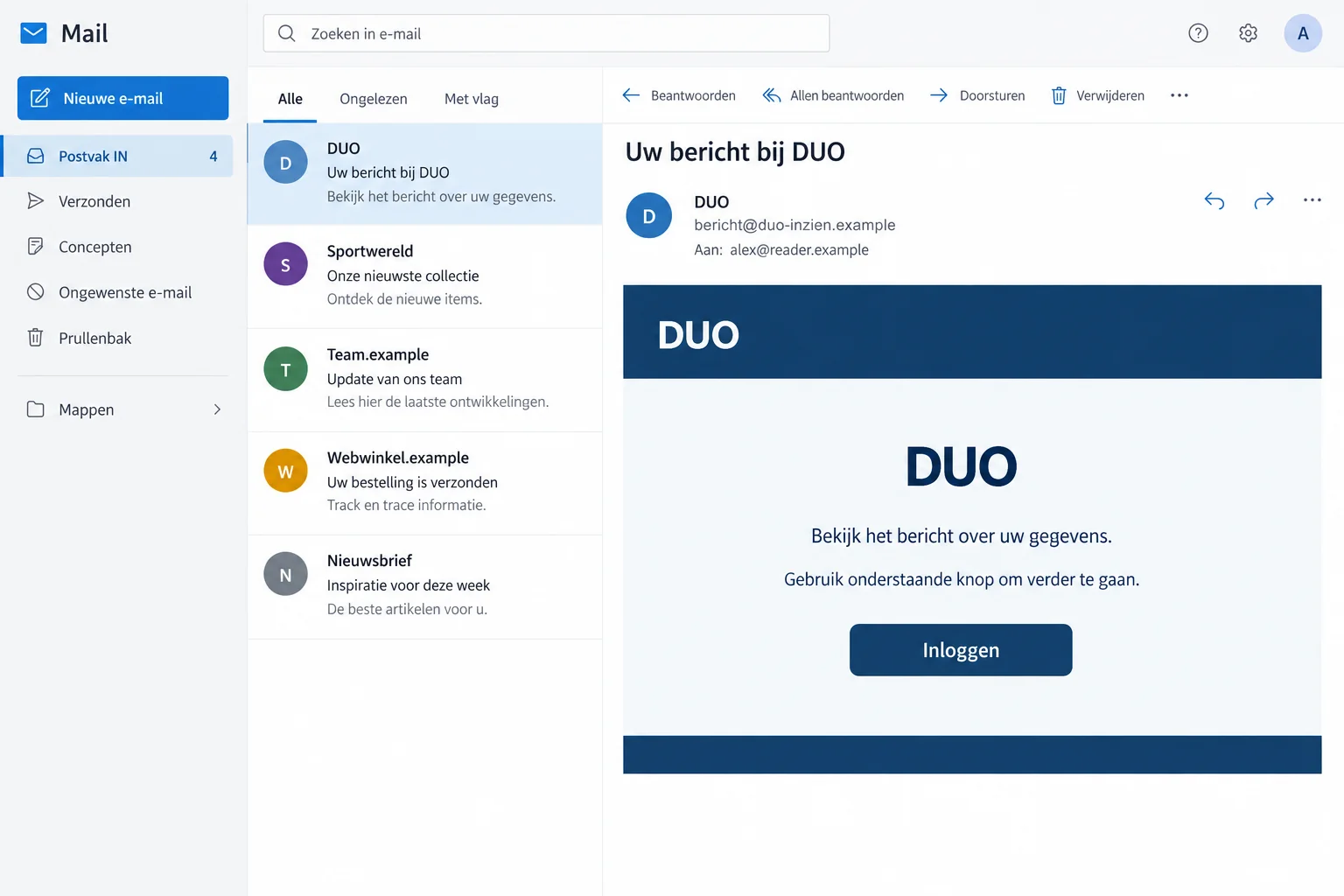
The DUO email scam impersonates Dienst Uitvoering Onderwijs, the Dutch education agency. It uses a familiar financial relationship to make an outside sign-in route look routine.
The organization publishes a particularly useful distinction: it doesn’t put a link to its login page in its emails. Genuine access starts from its homepage.
This warning concerns false messages, not DUO or student finance itself. Real account notices, obligations, and changes still need attention through the proper service.
The Agency Gives a Clear Rule for Checking the Route
DUO’s fraud guidance says to sign in from the homepage using your own DigiD or European login. It also rejects Gmail or Hotmail sending addresses.
The purpose of checking isn’t to find every possible design error. It’s to avoid handing identity credentials to a page selected by an unexpected sender.
The illustration uses generic fictional wording and addresses. It doesn’t reproduce an original campaign subject, promise a refund, or document a particular student’s account.
Read the Real Account Before Acting on the Email’s Story
Type duo.nl yourself and use the genuine login option. Check actual messages and records rather than following the route supplied by the questionable email.
- A real relationship with DUO doesn’t authenticate every message naming it.
- Don’t enter DigiD credentials just to see whether a linked page works.
- An unexpected message doesn’t establish a change to your loan, grant, or repayment.
- If identity access was exposed, secure it and have the relevant account records checked.
Why Students and Borrowers Might Not Pause
Student finance involves genuine administrative tasks. Changes in study, income, contact details, or repayments can make an account message seem relevant before you’ve inspected its sender.
A student may be waiting for information needed for the next month. A former student may worry about a balance or repayment they haven’t checked recently.
Neither concern is unreasonable. The problem begins when that concern supplies trust the message itself hasn’t earned.
You may recognize the organization’s name but not its normal email practice. That makes a convenient login button feel like assistance rather than a change of destination.
DUO’s rule gives you a simpler decision. You don’t have to guess whether a convincing button is safe; open the agency’s real homepage instead.
If an actual task exists, handle it there. If you can’t find or understand it, contact the genuine service without returning to the email.
If your account confirms an outstanding task, deal with it there. Refusing the email’s shortcut doesn’t prevent you from handling genuine student-finance administration.
How the DUO Email Scam Works
Step 1: The Sender Presents the Contact as DUO Business
The name creates an immediate connection with education funding or debt. A recipient who uses the service may read the message as expected correspondence.
But a display name is just a label. It doesn’t demonstrate that the agency sent the email or knows anything about your account.
DUO says it doesn’t send its emails from services such as Gmail or Hotmail. An ordinary webmail address claiming government authority deserves rejection.
A more official-looking address still isn’t the whole check. Use the actual agency route, rather than trusting appearance alone.
Step 2: The Message Offers Its Own Entrance to the Account
The login button makes the requested action easy. That convenience can prevent you from noticing that the message is choosing the destination receiving your credentials.
DUO explicitly says its emails don’t include a login-page link. That is more useful than trying to recognize every imitation design.
If a link appears to lead to an identity screen, stop before typing. Open the genuine homepage in a separate visit.
You don’t need to test the form with an old password or invented details. An untrusted page isn’t needed to establish your real student-finance status.
Don’t forward the button to a parent or classmate as a task to finish for you. That spreads the same unverified instruction without adding confirmation.
Step 3: A False Sign-In Can Expose More Than a Finance Question
DigiD warns about false messages and websites seeking login credentials. Copying an identity service’s appearance doesn’t make a page part of it.
A password or approval supplied on the wrong route can affect identity access. The email’s original topic doesn’t limit where that credential may be useful.
This report doesn’t assign every false DUO message a fixed form, payout, debt, or deadline. The public guidance establishes the unauthorized login route.
If you already submitted information, don’t repeat it because the screen appeared blank or rejected the attempt. Move to genuine account protection.
Likewise, don’t approve an unexpected request merely to complete what the sender calls verification. Understand the action through the real service first.
Find the Real Message in Mijn DUO
For borrowers, DUO explains where genuine debt information appears: balances under Mijn schulden and relevant correspondence under Mijn berichten.
That gives you something concrete to check outside the email. You don’t have to accept the sender’s description of an outstanding amount or account change.
If the real record raises a question, ask DUO through its official contact options. Keep the question attached to your actual account.
Don’t let a suspicious message persuade you to make an extra loan repayment. Establish any genuine obligation and payment instructions independently.
Likewise, don’t assume a refund is available merely because a message promises one. Eligibility needs confirmation from the real service.
If you don’t currently use DUO, receiving an email doesn’t prove that someone applied in your name. Report the suspicious approach and investigate concrete evidence of misuse.
A genuine account question may need your attention even after the false message is deleted. Keep those two pieces of work separate.
A Real Email-Address Confirmation Can Exist
DUO describes genuine notifications after an email address is changed in Mijn DUO. A confirmation can go to both the old and new addresses.
That exception matters. The warning isn’t that DUO never sends email; it’s that an unexpected message shouldn’t become your login route.
If you recognize a change you made, check it through the actual account as needed. Don’t classify every routine confirmation as account theft.
If you didn’t make the change, verify what happened with DUO. Don’t reply to an unverified sender with more personal information to reverse it.
Keep genuine change notices if they help explain an incident. Their time and subject can assist support without exposing the credential itself.
If your contact details changed recently, check which address DUO actually holds. A message reaching an old inbox can otherwise make a genuine update confusing.
Ask the agency about an unexplained discrepancy through its real service. Don’t send identification to the email’s reply address merely to reconnect the account.
When support confirms the correct details, record the outcome privately. That gives you a stable reference instead of repeatedly checking against the suspicious message.
Identity Recovery and Student-Finance Recovery Aren’t the Same Task
DigiD is used across services. DUO holds a particular education-finance record. An incident may therefore involve more than one organization without proving every service was accessed.
DigiD’s recovery guidance covers protecting the login and reviewing usage history. The organization concerned must help assess changes to its own records.
If an identity credential was exposed, secure it through its actual provider. Then ask DUO about unfamiliar applications, contact details, or account activity where relevant.
If another European login was used, contact that provider instead of assuming a DigiD reset will address it. Tell support which access method was involved.
If only a name or phone number was entered, the immediate response differs. Be ready for informed follow-up contact, but don’t assume an identity login was stolen.
And if banking information was supplied, the bank needs its own report. Neither an identity-provider reset nor a message to DUO blocks every financial risk.
What to Do if You Have Fallen Victim to This Scam
Stop using the false route and prioritize the information or approvals actually exposed. Don’t wait for the sender to explain an error or unfinished verification.
-
Leave the imitation login. Close the page, stop replying, and reject follow-up instructions tied to the same request.
Keep the email and a short record of what happened. Record account names and information categories, not passwords or full identity documents.
-
Secure the identity account used. Follow the genuine DigiD process after DigiD disclosure, or the relevant European provider’s security guidance.
If you can’t sign in, seek the provider’s real recovery support. Don’t take reset instructions from the person who directed you to the false page.
-
Review available access history. Identify unfamiliar activity and keep the service and time details for support.
Ask the identity provider and affected organization about suspicious entries. A login-history review helps target the investigation rather than assuming every public service is compromised.
-
Contact DUO about account concerns. Use duo.nl and explain the false message, any exposed details, and actual changes you don’t recognize.
Ask what needs verifying or correcting in your own record. Reporting the email doesn’t automatically cancel an application, extend a deadline, or settle a balance.
-
Involve the financial provider when needed. Tell the bank about disclosed financial access, payment details, or an approval you completed.
Provide transaction evidence if money moved and ask what protection or recovery may apply. Don’t pay another amount to qualify for a supposed reversal.
-
Send the suspicious email to DUO’s real reporting address. Its published contact is meldingfraude@duo.nl. Follow the genuine reporting page’s identification instructions.
Don’t send sensitive details to a reply address merely because the false email calls it fraud support. Preserve evidence for official assistance if actual misuse occurred.
-
Address device exposure separately. An email or login disclosure doesn’t automatically mean software was installed. Check what you downloaded, opened, or permitted.
Malwarebytes can help assess suspected infection. If unwanted ads or browser redirections started, AdGuard may help block that unwanted content.
Neither tool revokes a stolen identity login or corrects a finance record. Continue the appropriate provider and banking actions even after a clean scan.
Don’t Neglect a Genuine Repayment Problem
A phishing warning isn’t advice to ignore real correspondence. If you’re behind on payments, use DUO’s actual account and assistance process.
Its arrears guidance describes checking messages in Mijn DUO and contacting the service about your situation. Verify the real matter there.
Don’t assume that deleting the scam email changes an official deadline. Ask the genuine agency what applies to your account if you need help.
Keep any genuine payment arrangement apart from the impersonation report. A transfer to a scammer shouldn’t be assumed to reduce your actual debt.
Someone helping you should work from verified records rather than the amount printed in an unfamiliar email. That avoids turning a false demand into family payment advice.
Once the real issue is understood, save the confirmed next action. You shouldn’t have to return to the suspicious message to remember what to do.
Helping a Student Without Sharing Their Identity Login
A parent, partner, or adviser can help read correspondence and find official support. They don’t need the student’s permanent identity password to offer that help.
If ongoing representation is needed, ask DUO about its proper authorization options. Don’t treat a shared password as the default arrangement.
Let the account holder enter sensitive information privately through the genuine service. Avoid sending screenshots that expose codes, identity numbers, or full banking details.
If several people are assisting, agree who is contacting support. Duplicate recovery attempts can make it harder to know which notices reflect genuine actions.
Keep blame out of the conversation. A clear account of what was submitted is more useful than making someone reluctant to admit a mistaken click.
Afterward, check unfamiliar requests together through the real homepage. The goal is a repeatable safe habit, not memorizing every false sender name.
Frequently Asked Questions
Does DUO Put Its Login Link in Emails?
DUO says it doesn’t include a login-page link in its emails. Start from the genuine homepage with your own identity method.
Can a DUO Email Come From Gmail or Hotmail?
The agency says it doesn’t send from those platforms. Don’t trust an ordinary webmail address claiming to manage your student-finance account.
Does the Message Prove My Loan or Grant Changed?
No. Check actual account information and correspondence through Mijn DUO. The sender’s claim doesn’t establish a real decision.
Are All DUO Emails Fake?
No. Genuine notifications exist, including confirmations after an email-address change. Check their meaning without accepting an unsolicited login route.
What if I Typed DigiD Details on the Page?
Protect the identity account promptly through genuine recovery and review activity. Contact DUO separately about relevant account records or changes.
Should I Ignore a Real Payment Deadline After Reporting Phishing?
No. Handle genuine obligations with DUO through verified channels. A phishing report doesn’t automatically change your repayment position.
The Bottom Line
Don’t sign in through the DUO email scam’s button. The agency directs users to its homepage, where genuine account information can be checked safely.
If you entered identity credentials, secure them now and contact DUO about relevant records. Involve your bank after any financial disclosure or payment.

Join the discussion
0 commentsShare your experience or ask a question about this article.
Discussion
Start the conversation
Have a question or something useful to share? Add the first comment.