


You open what looks like Rarible and land on a screen asking which wallet you use. It looks like a normal first step before you list or buy something.
The wallet menu can look right even when nothing else is. Check where you landed before you decide which account to connect.
Overview
The clone starts at sign-in rather than showing a fake sale
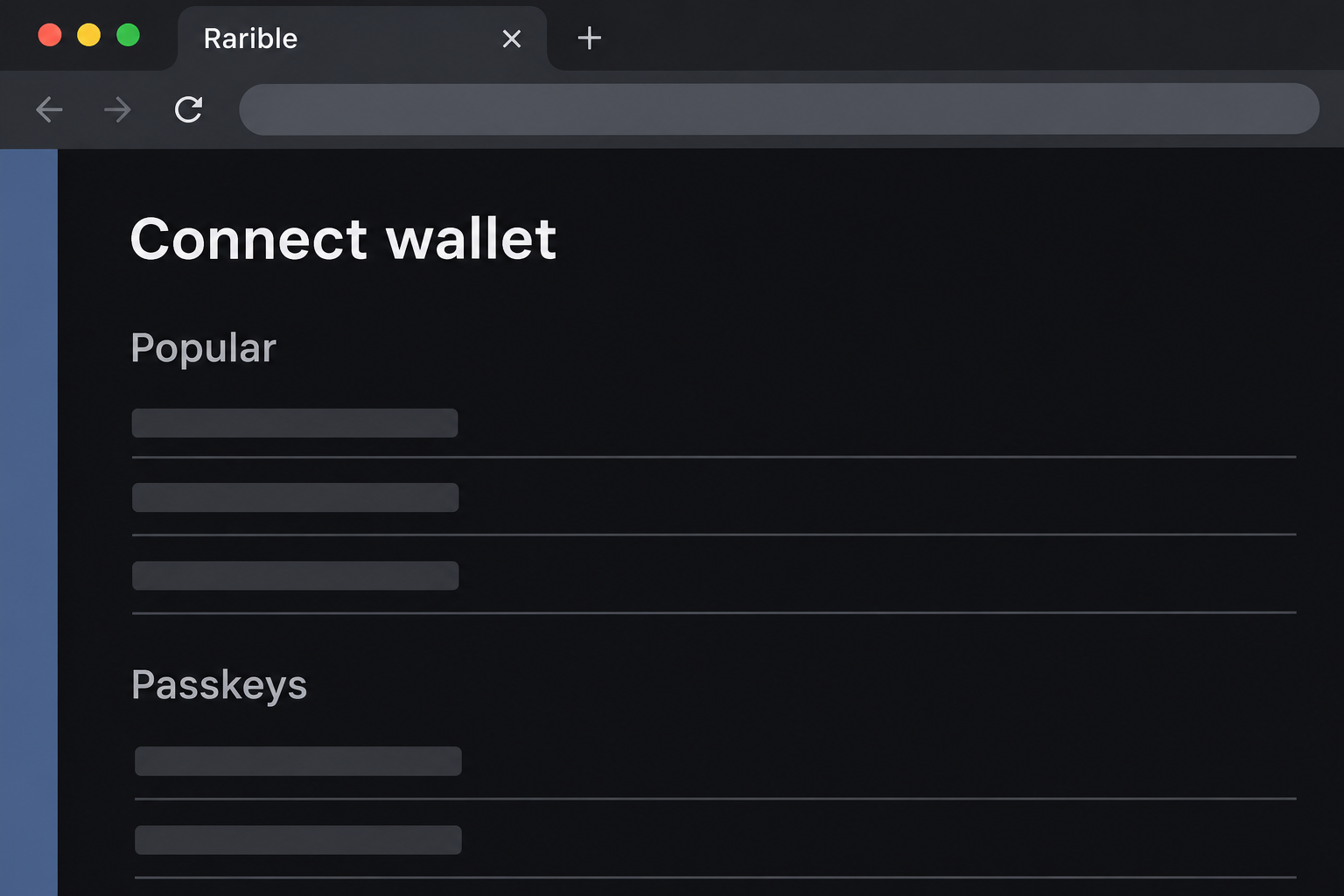
The fake Rarible wallet page copies the marketplace’s login screen. It presents network choices and wallet names, including options you may recognize from the genuine service.
The documented page was hosted on a separate web address, not rarible.com. It opened directly to a wallet sign-in view rather than establishing an actual listing or trade.
The image recreates the sign-in panel while omitting active choices, the site’s address, and the artwork that appeared beside it. It isn’t a screenshot of the genuine marketplace.
The point where you land tells you something. You don’t need to believe a particular NFT is valuable or that the seller is trustworthy before it asks for access.
Real wallet sign-in explains why the screen looks credible
Rarible’s official account instructions explain that users can connect a wallet to sign in through the genuine site. The feature itself isn’t a warning sign.
Rarible’s supported wallets guide also explains that choices can vary by network. An imitation can copy that variety and include familiar providers.
A copied selector is still only a graphical list. It cannot prove that the marketplace or wallet provider controls the page behind it.
The documented sequence ended at a list of wallet choices. It supports a warning about the impersonation, not a claim that every visitor signed something or lost an NFT.
A login, a listing, and a transfer are different actions
A marketplace may ask you to sign in before you work with a listing. That is different from granting ongoing access to a token or approving a sale or transfer.
Before interacting, make sure you can answer the questions that matter for that particular action:
- Did you reach the sign-in from Rarible itself or from a different address that copied it?
- Did you intend to browse, sign in, list something, or accept a particular offer?
- Which wallet account and network belong to the collectible you’re working with?
- Does the genuine wallet describe the action you intended or an unexpected permission?
- Can you confirm any sale or payment from your profile and wallet records instead of a message?
Why a Bare Wallet Screen Can Be More Convincing Than a Fake Listing
The imitation doesn’t need to show a rare collectible or an exaggerated offer. On an ordinary day, signing in can be the moment a user pays the least attention.
The page shows an option labeled “Passkeys” among familiar names. That label can look reassuring, but it supplies no evidence about the site or the origin of a later prompt.
If you use different wallet profiles, choosing the usual icon may feel automatic. The same icon can sit on a page that has no relationship to the wallet provider.
A genuine marketplace gets more specific once you choose what to do. You can see the collection, the network, and the operation you actually initiated.
Those details are what give a wallet prompt context. If you didn’t start a sale, permission to move your NFTs is out of place.
How the Fake Rarible Wallet Login Scam Works
Step 1: A familiar brand appears before there is a verified transaction
The reader sees Rarible branding beside a screen asking how to log in. It looks like a shortcut to a screen you might reach through the real site.
What is missing is the route you used to get there. A logo and a familiar-looking menu show what the page copies, not where it came from.
If someone sent you the screen as part of a transaction, start from the marketplace independently. See whether any authentic listing or offer is actually there.
Step 2: Wallet choices make the sign-in feel ordinary
The captured panel shows multiple networks and recognizable wallet options. That level of detail can make the screen feel as if it belongs to the official service.
A list of familiar wallets is easy to imitate. Seeing an option you normally use does not prove that the wallet app has verified the page.
You can verify the published sign-in procedure without choosing any of the options on the imitation. Read the real provider’s documentation or begin at your own established route.
Step 3: A routine connection creates an opportunity for a different request
The lookalike encourages the user to begin wallet interaction. A site that can prompt a connected wallet may then try to obtain a signature or authorization the user didn’t intend.
That possibility does not make the connection itself evidence of theft. If you proceeded, review what the wallet actually displayed, what you approved, and what it recorded.
A request that applies to a whole collection or permits an unexpected transfer should stop the process. The heading on the originating page does not define the wallet operation.
Step 4: The site’s sign-in story no longer answers the security question
If a wallet prompt goes through, use the wallet’s activity and permission records. A spinning icon or welcome screen tells you less about your exposure than those records.
A seller might be particularly concerned about collectibles held under the same address. Identify the applicable network and collection before drawing conclusions from changes on a different chain.
If the browser window closes before you understand what occurred, don’t repeat the action to make the prompt reappear. Investigate through your wallet provider without reopening the imitation.
How to Verify an NFT Listing or Sale Separately
Get the details from the marketplace, not whoever sent a link
Open the real marketplace through an address you’ve independently confirmed. Look up the collection or offer there instead of letting a private message tell you which screen is genuine.
If a buyer says they completed a purchase, compare the report with your profile and wallet. Rarible’s fraud prevention guidance explains why unexpected sale messages should be checked independently.
A real offer does not justify a separate payment to a stranger to enable sales. If the transaction isn’t in the official record, treat the payment story as unverified.
A listing can have a similar name or image across collections. Confirm the actual collection and network rather than relying on the artwork in a message.
Separate fees from payment requests that arrive outside the marketplace
A blockchain transaction can have a fee. That is not the same as being told to transfer funds to an unofficial account to activate a marketplace profile.
A real wallet should show what you’re authorizing. If a buyer or purported support agent says not to read it because the wallet always shows a warning, stop.
Someone who claims a payment is waiting may show a receipt. A receipt sent in a message cannot substitute for your own marketplace or wallet record.
If a fee or permission isn’t clear, ask the actual marketplace or wallet provider to explain it. You don’t have to approve the action to get an explanation.
What to Do if You Have Fallen Victim to This Scam
-
If you only saw the fake sign-in screen, close it. Leave any wallet choices unselected and verify the original reason you were visiting through Rarible itself.
You can report the imitation with the details you already have. Don’t open it again merely to create a better screenshot.
-
If a wallet connected, review the connected site in that wallet. Use the same wallet profile and device that were open at the time.
Remove the unfamiliar connection if it appears. A different device or browser profile may not show the same list of sites.
-
If you authorized something, identify the affected asset and network. Check whether it was a sign-in message, a token or collection approval, or a transfer.
MetaMask’s approval guidance explains why disconnecting doesn’t undo spending permissions. Use the comparable help for your actual wallet and network.
-
If a collectible is missing, preserve the transfer details. Save the relevant collection, token identifier, wallet address and any transaction ID in your own records.
Tell the real marketplace what you see and how it differs from an intended listing or sale. Don’t ask a person from the original chat to check the wallet.
-
If you supplied recovery material or installed software, explain that separately. A secret on a form and a genuine installation are different from a marketplace session.
Follow the wallet provider’s compromise guidance and arrange device checks if something was installed. Use a trusted device for sensitive recovery work when device exposure is possible.
-
Report any suspected theft through the proper channel. For US readers, the FBI’s cryptocurrency reporting guidance lists details that can help document the case.
A direct message offering to buy back or unlock the NFT is not verified help. Don’t pay a fee or disclose private keys to such a sender.
How to Reduce the Chance of Approving the Wrong Thing
A practical habit is to name the action before opening your wallet. “I’m signing into the marketplace” is a different goal from “I’m authorizing a listing for this collection.”
If the wallet asks for an action you cannot describe, cancel it. Start over from the listing or profile you already located through the real site.
People who use more than one address can keep a private note about which account manages a collection. That makes it easier to spot the wrong chain or account.
A hardware signer may show details on its own screen. Read those details rather than relying on an instruction in your browser to approve whatever appears.
Someone may urge you to hurry because a sale is about to expire. Losing an unverified buyer is preferable to approving a request you don’t understand.
If you report the event to an administrator, distinguish the copied login from a later direct message. Those are separate evidence, even when they concern the same collectible.
When a Sign-In Looks Right but Feels Out of Place
Compare the conversation with the wallet prompt
Suppose you’re discussing an NFT with a buyer and a sign-in screen appears, but you haven’t decided to sell. Ask what action the other person claims has already happened.
Genuine account access can be useful, but it doesn’t answer whether an item sold. Find the item from your own profile and check its status without following the buyer’s link.
Keep the order of events in mind. Being asked to open a site first makes it harder to check the buyer’s story independently.
A transaction identifier can be copied from unrelated activity. Compare the network, item and accounts with the listing you’re actually discussing before using it as proof of a purchase.
Go back to the marketplace you already know
If a message says a sale is pending on Rarible but sends you elsewhere to finish it, return to the known marketplace. Navigate to the transaction from your profile.
Opening the verified site also gives you a useful comparison. A generic sign-in screen can look close to the brand without showing any relationship to your listing at all.
If someone tells you to skip a warning because the buyer already paid, stop. They don’t need your permission to show you a public transaction record.
For a collection you administer, compare the activity with the address that manages it. An unexpected request might name an asset you weren’t planning to touch.
If the unfamiliar prompt is the only way someone can show you the purchase, let them wait. You do not owe them a signature to help them explain their story.
Frequently Asked Questions
Is the real Rarible marketplace a scam?
Rarible is a real marketplace with documented wallet sign-in. This warning is about a separate page borrowing the appearance of its connection screen.
Does an option called Passkeys make the page legitimate?
The word can be displayed by any page. Verify where you are and which application actually asks for authentication, rather than trusting a label.
Will a wallet connection list my NFT for sale?
A basic connection doesn’t establish a listing or transfer. Look for the operation you authorized and verify whether it appears in your real account.
Can I verify a sale without opening a link in a message?
Use Rarible’s own profile notifications and your wallet activity. A message claiming that a sale needs an extra action should not be the source of proof.
What if my wallet shows an unfamiliar collection approval?
Check which collection and network it concerns, then use first-party wallet guidance to review and revoke unrecognized permissions where appropriate.
Did the captured imitation download a wallet app?
The documented evidence shows a cloned sign-in panel and wallet menu, not a verified installation. Treat any software you actually added as a separate device issue.
The Bottom Line
Do not connect through the fake Rarible wallet screen. Start with the real marketplace and verify the listing or sale there before accepting any wallet request.
If you already interacted, check whether you connected, approved a permission, or transferred an asset. Use the wallet’s records rather than the lookalike to determine the next step.

Join the discussion
0 commentsShare your experience or ask a question about this article.
Community experiences
Did this happen to you?
Your experience could help someone recognize the same scam. Submit a private report for our team to review.
I experienced this tooReports are reviewed before publication. Sharing publicly is always your choice.
Discussion
Start the conversation
Have a question or something useful to share? Add the first comment.