

Giftclick.org keeps appearing behind websites promising unusually large gift card rewards from brands such as Costco, Walmart, Target, Chipotle, Olive Garden, Wingstop, and others.
The front-end websites change constantly, but clicking their reward buttons often leads to the same place: Giftclick.org, usually through an affiliate-tracked URL.
That connection deserves a much closer look.
Overview
Giftclick.org is not a typical gift card website.
It does not operate like an official retailer promotion where customers visit a known brand, enter a clearly defined contest, or purchase a legitimate gift card.
Instead, Giftclick.org appears repeatedly as the middle layer behind a large collection of third-party reward websites.
These websites tend to follow an almost identical formula. A visitor is shown a high-value gift card, told that qualifying is quick and easy, and encouraged to click a large button such as Claim Now, Start Now, or Get Rewarded.
The reward could be $250, $500, $700, $750, or even $1,000.
The brand attached to that reward varies.
What is far more interesting is where the button goes next.
Giftclick.org Keeps Appearing Behind Unrelated Reward Websites
Our investigation found multiple independent landing pages that reference or route users toward Giftclick.org.
Examples include sites promoting:
- A $750 Costco gift card
- A $750 Target gift card
- A $750 Walmart reward
- A $500 Wingstop gift card
- A $500 Spirit Halloween gift card
- Student reward programs
- Product testing rewards
- Other high-value retail gift cards
One security analysis of PerkRoute.com, for example, recorded a page titled “Costco $750 Gift Card Reward” that referenced Giftclick.org. Another page, Oflivo.com, promoted a $750 Target gift card and also referenced Giftclick.org.
A separate site called Wswin.online promoted a $500 Wingstop gift card and listed Giftclick.org among the external hosts used by the page.
More recently, Gargifted.com advertised a $500 Spirit Halloween gift card and told visitors they would be redirected to complete “standard verification tasks.” Giftclick.org again appeared among the hosts associated with the page.
There are many more.
Security scans have connected Giftclick.org with sites including:
- PerkSavings.com
- PerkRoute.com
- PerkSaved.com
- CartCleared.com
- FeedbackCart.com
- MemberHaul.com
- MartVouch.com
- BoxGifted.com
- TapGiftCard.com
- DNKDeals.online
- JellyPerks.store
- TarVouch sites
- AppleHauls.com
Several of these websites have been classified by automated reputation systems as suspicious or high-risk. (Gridinsoft LLC)
The individual sites are different, but their connection to Giftclick.org makes the overall picture much more interesting.
FoodiePerk Shows Exactly How The Funnel Works
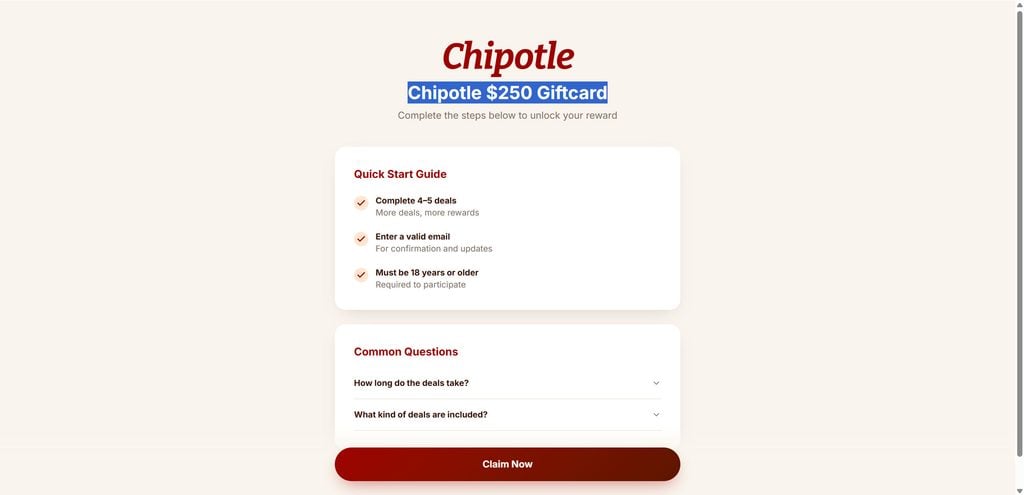
FoodiePerk.com provides a particularly clear example.
When we first examined FoodiePerk, it advertised an:
Olive Garden $750 Giftcard
The page told users to complete 4 to 5 deals, enter a valid email address, confirm that they were at least 18 years old, and click Claim Now. Search indexing captured that version of the page. (foodieperk.com)
The site then switched the promotion to a $250 Chipotle gift card, while retaining the same basic reward structure.
During our live review, clicking FoodiePerk’s Claim Now button pointed toward Giftclick.org through an affiliate-style tracking URL.
That distinction matters.
FoodiePerk was not sending people to Olive Garden.
It was not sending them to Chipotle.
It was sending them into Giftclick.
The restaurant brand attracted the visitor, but the actual conversion funnel existed somewhere else.
Giftclick.org Appears To Be The Affiliate Engine
The outgoing Giftclick links we examined contained parameters such as:
aff_id=16148
and:
offer_id=1725
Those parameters are highly significant.
An aff_id normally identifies the affiliate or publisher responsible for referring a visitor.
An offer_id identifies the specific advertising campaign or offer being promoted.
This allows an affiliate platform to know exactly where a user came from and which campaign generated the traffic.
For example, if someone arrives through FoodiePerk and later completes an advertiser’s required action, that conversion can potentially be attributed to the affiliate who sent the visitor.
That reveals the economic logic behind the entire funnel.
The gift card gets attention.
The affiliate system tracks the visitor.
The downstream deals create monetizable actions.
This Is Very Different From A Normal Gift Card Promotion
Suppose Chipotle genuinely runs a promotion.
You would expect to find clear details explaining:
- Who sponsors the promotion
- Who is eligible
- What the exact prize is
- How winners are selected
- Whether a purchase is required
- When the promotion ends
- What official company handles fulfillment
- How personal information is used
The same applies to Costco, Walmart, Target, or any other major retailer.
With these Giftclick-connected funnels, the journey is different.
You may begin on an obscure website carrying the retailer’s branding, then click a button that redirects to Giftclick.org, then continue into third-party offers from companies unrelated to the gift card being advertised.
The retail brand may have very little to do with the activities that follow.
That is one of the biggest warning signs.
Giftclick.org Is A Very New Domain
Giftclick.org itself does not have a long history.
Available domain records show that Giftclick.org was registered on January 23, 2026 through Cloudflare. Ownership information is privacy protected, and the registration currently expires in January 2027.
A new domain is not automatically fraudulent.
Plenty of legitimate businesses launch new websites.
However, domain age becomes more important when the site is connected to an ecosystem of newly created reward pages using major corporate brands to advertise hundreds of dollars in gift cards.
Consumers would normally expect a company operating a large reward network to have:
- A recognizable corporate identity
- Clear ownership information
- An established reputation
- Detailed program rules
- Accessible customer support
- A long track record of successful reward fulfillment
Giftclick.org currently has very limited independent reputation history.
Security Services Have Raised Concerns
Gridinsoft currently gives Giftclick.org a 26/100 trust score and classifies it as suspicious.
Its report states that Giftclick.org has limited independent reputation information, is relatively new, and had one external security-provider warning. According to the report’s VirusTotal data, Fortinet classified the domain as phishing at the time of its check. (Gridinsoft LLC)
This needs to be interpreted carefully.
Automated security classifications are not perfect. A single security-vendor warning does not, by itself, prove that every page or redirect involving a domain is fraudulent.
But consumers should not evaluate that warning in isolation.
The warning exists alongside a much broader pattern involving high-value gift cards, newly created promotional domains, affiliate tracking, unrelated brand names, and offer-completion funnels.
Taken together, those factors justify significant caution.
How The Giftclick.org Scam Works
The Giftclick.org setup becomes easier to understand when you stop looking at it as a single website.
It is better understood as a multi-stage affiliate funnel.
Giftclick often sits between the attractive advertisement and the offers that eventually generate money.
Here is how the process typically works.
Step 1: A Separate Website Advertises A Huge Gift Card
Most consumers will probably never type “Giftclick.org” directly into their browser.
Instead, they encounter another website first.
The page may promise:
- $750 from Costco
- $750 from Walmart
- $750 from Target
- $500 from Wingstop
- $250 from Chipotle
- $750 from Olive Garden
- $500 from Spirit Halloween
The brand makes the advertisement familiar.
The dollar amount makes it exciting.
A person scrolling through social media or browsing quickly on a phone may not immediately notice that the website domain has nothing to do with the company whose gift card is being promoted.
Step 2: The Landing Page Makes Qualification Look Easy
These sites frequently reduce the process to several simple-looking steps.
You might see instructions such as:
- Take a short survey.
- Enter your email.
- Complete 4 to 5 deals.
- Claim your reward.
The phrasing makes the process sound manageable.
“Complete a few deals” sounds much less serious than explaining that the visitor may be entering an advertising ecosystem involving subscriptions, app installs, purchases, registrations, lead forms, or other advertiser-funded conversions.
The landing page focuses attention on the reward.
The complexity comes later.
Step 3: The User Clicks Claim Now
This is where Giftclick.org enters the picture.
The button on the original site sends the visitor away from the branded landing page.
Instead of arriving at Costco.com, Walmart.com, Target.com, Chipotle.com, or another official retailer website, the user is routed toward Giftclick.org.
That should immediately change how the offer is viewed.
You are no longer dealing with a straightforward promotion from the brand advertised on the first page.
You are entering an affiliate-controlled flow.
Step 4: The Affiliate Referral Is Tracked
Giftclick URLs can include an affiliate ID and offer ID.
This allows the system to record information such as:
- Which affiliate referred the visitor
- Which offer they clicked
- Which campaign is being promoted
- Whether the visitor later completes a qualifying action
This is standard technology in legitimate affiliate marketing.
Affiliate tracking itself is not a scam.
The problem appears when affiliate technology is combined with misleading advertising that makes consumers believe they are receiving a simple high-value reward from a recognizable retailer.
The issue is the gap between the headline impression and the actual transaction.
Step 5: The Visitor Enters The Offer Wall
After the redirect, the consumer can be asked to complete outside offers.
This is where the $750 gift card becomes much more complicated.
Depending on the campaign, deals can potentially involve:
- Downloading apps
- Completing surveys
- Creating accounts
- Starting free trials
- Purchasing products
- Joining subscription services
- Applying for offers
- Giving advertisers personal information
- Keeping a service active for a required period
Not every offer necessarily costs money.
But some reward funnels make particular deals conditional on spending, providing payment information, or remaining subscribed.
That changes the value calculation dramatically.
Step 6: Advertisers Pay For Conversions
Why would anyone offer hundreds of dollars in rewards?
Because consumer actions have value.
An advertiser may pay for a qualified lead.
Another might pay for a new subscriber.
A mobile app company may pay for an installation.
A subscription company may pay for a trial registration.
A retailer may pay a commission after a purchase.
This creates a performance marketing chain.
The visitor completes an action.
The advertiser pays for that action.
The affiliate ecosystem receives revenue.
Part of that economic structure can theoretically fund rewards.
The key point is that your participation generates commercial value.
You are not simply receiving free money.
Step 7: Some Offers May Require Credit Card Information
This is where consumers need to be especially careful.
The FTC has documented previous affiliate gift-card schemes where people were attracted by supposedly free $1,000 rewards and then required to complete numerous offers.
Those offers sometimes included paid subscriptions, credit applications, and trial services requiring credit card information. (Federal Trade Commission)
Those historical FTC cases are not cases against Giftclick.org.
However, they show that this exact reward-funnel structure has been abused before.
In one FTC case, consumers were promised $1,000 gift cards from retailers such as Walmart. After entering the funnel, they had to complete multiple outside offers before they could supposedly receive the prize. (Federal Trade Commission)
That history is why phrases such as “complete deals to unlock your gift card” deserve careful attention.
Step 8: Free Trials Can Turn Into Paid Subscriptions
One of the most expensive mistakes in these funnels can involve trials.
A user may start a trial purely because it counts toward a reward requirement.
They may have little interest in the actual service.
The trial then expires and converts into monthly billing.
The FTC warns that free trials can automatically renew and that affiliate marketers sometimes use exaggerated or misleading advertising to generate clicks and signups. (Consumer Advice)
If several offers are completed, the consumer may end up managing multiple cancellation deadlines.
Missing even one can result in recurring charges.
Step 9: Tracking Problems Can Stop Deals From Crediting
There is another problem that is easy to overlook.
Affiliate offers depend on tracking.
The system has to connect your original Giftclick referral with whatever action you completed on the advertiser’s site.
That can fail.
Potential problems include:
- Cookies being blocked
- Switching devices
- Using another browser
- Using a different email address
- Leaving the page during signup
- Previously completing the same offer
- Not meeting advertiser eligibility requirements
- Canceling before the required period
- Technical attribution failures
A user may believe they completed everything correctly while the system shows that the deal was never credited.
Now they have spent time, and possibly money, but still have not progressed toward the reward.
Step 10: The Sunk Cost Effect Encourages More Completions
These funnels can become psychologically powerful.
Imagine that you have completed three deals.
You have already spent an hour signing up for services and submitting information.
Then you discover that another deal is required.
Walking away now feels painful because all the previous effort seems wasted.
That is the sunk cost effect.
The person continues not because the next deal is attractive, but because they want to justify everything they already completed.
The original gift card remains the reason to keep going.
Is Your Device Infected? Run a Free Malware Scan
Slow performance, constant pop-ups, or strange behavior? These are classic signs of a malware infection. The fastest way to find out is to scan your device with Malwarebytes Free — one of the most trusted malware removal tools available.
The free version detects and removes the most common threats, including:
- Adware — the cause of those annoying pop-ups
- Browser hijackers — unwanted redirects and changed homepages
- Trojans and spyware — hidden programs stealing your data
- Potentially unwanted programs (PUPs) — software you never asked for
👉 Select your device below — Windows, Mac, or Android — then follow the simple steps to download Malwarebytes, scan your system, and remove any threats it finds. The scan usually takes 5 to 20 minutes.
Run a Malware Scan with Malwarebytes for Windows
Malwarebytes is one of the most popular and trusted anti-malware tools for Windows — and it’s completely free for removing infections. It catches threats that many antivirus programs miss, including adware, browser hijackers, and trojans. Follow the steps below to scan and clean your PC in just a few minutes.
Download Malwarebytes
Click the button below to download the latest version of Malwarebytes for Windows from the official source. The free version is all you need — it will scan your computer and remove adware, browser hijackers, and other malicious software at no cost.
Download MalwarebytesOfficial installer for Windows 11 and 10. Your download starts right away.Want real-time protection? See Malwarebytes Premium Malwarebytes Free for WindowsScans and removes malware at no cost
-
Install Malwarebytes
When the download finishes, open your Downloads folder and double-click the MBSetup file. If Windows shows a User Account Control pop-up, click “Yes” to allow the installation.

Follow the On-Screen Prompts to Install Malwarebytes
The setup wizard will walk you through a few quick screens:
-
Choose where you’re installing the program — “Personal Computer” or “Work Computer” — then click Next.

-
Malwarebytes will now install on your device. This usually takes under a minute.

-
When installation is complete, the “Welcome to Malwarebytes” screen will open automatically.

-
On the final screen, click Open Malwarebytes to launch the program.

-
Enable “Scan for Rootkits”
Before scanning, turn on rootkit detection so Malwarebytes can find even the most hidden threats. Click the Settings gear icon on the left side of the screen.

In the settings menu, find “Scan for rootkits” and click the toggle so it turns blue.

Done? Click “Dashboard” in the left pane to return to the main screen.
Start the Scan
Click the blue Scan button. Malwarebytes will automatically update its virus database and start checking your computer for malware.

-
Wait for the Scan to Finish
The scan checks your entire system for browser hijackers and other malicious programs, so it can take 5 to 20 minutes depending on your computer. Feel free to do something else — just check back occasionally to see the progress.

-
Quarantine the Detected Threats
When the scan is done, you’ll see a list of everything Malwarebytes found — malware, adware, and potentially unwanted programs. Click the “Quarantine” button to remove all of them at once.

Malwarebytes will now remove the malicious files and registry entries and move them safely into quarantine.

-
Restart Your Computer
Some threats can only be fully removed after a reboot. If Malwarebytes asks you to restart, click Yes. Once you’re logged back in, Malwarebytes has finished removing the threats it found.

That’s it — your Windows PC is now clean of trojans, adware, and other malware, and should be back to running smoothly.
If you are still having problems with your computer after completing these instructions, then please follow one of the steps:
- Run a computer scan with ESET Online Scanner
- Ask for help in our Windows Malware Removal Help & Support forum.
Run a Malware Scan with Malwarebytes for Mac
Malwarebytes for Mac is a free on-demand scanner that removes the malware other security software tends to miss — adware, browser hijackers, and unwanted programs included. Cleaning an infected Mac with Malwarebytes has always been completely free, and it’s our go-to recommendation. Follow the steps below to scan and clean your Mac in just a few minutes.
-
Download Malwarebytes for Mac
Click the button below to download the latest version of Malwarebytes for Mac.
Download MalwarebytesOfficial installer for macOS. Your download starts right away.Want real-time protection? See Malwarebytes PremiumMalwarebytes Free for MacScans and removes malware at no cost -
Open the Malwarebytes setup file
When the download finishes, open your Downloads folder and double-click the setup file to begin the installation.

-
Follow the On-Screen Prompts to Install Malwarebytes
The Malwarebytes for Mac Installer will guide you through a few quick screens. Click “Continue” and keep following the prompts until the installation completes.



When the installation is complete, Malwarebytes opens to the Welcome to Malwarebytes screen. Click “Get started“.
-
Select “Personal Computer” or “Work Computer”
Malwarebytes will ask what type of computer you’re installing it on. Click either Personal Computer or Work Computer, whichever applies.

-
Start the Scan
Click the “Scan” button. Malwarebytes will automatically update its detection database and begin checking your Mac for malware.

-
Wait for the Scan to Finish
Malwarebytes will scan your Mac for adware, browser hijackers, and other malicious programs. This can take a few minutes, so feel free to do something else — just check back occasionally to see the progress.

-
Quarantine the Detected Threats
When the scan is done, you’ll see a list of everything Malwarebytes found. Click the “Quarantine” button to remove all the threats at once.

-
Restart Your Mac
Malwarebytes will now remove all the malicious files it found. Some threats can only be fully removed after a reboot — if Malwarebytes asks you to restart, allow it. Once you’re logged back in, your Mac is clean.

That’s it — your Mac is now free of adware, rogue browser extensions, and other potentially harmful software.
If you are still experiencing problems while trying to remove a malicious program from your computer, please ask for help in our Mac Malware Removal Help & Support forum.
Run a Malware Scan with Malwarebytes for Android
Malwarebytes for Android automatically detects and removes dangerous threats like malware and ransomware so you don’t have to worry about your most-used device being compromised. Aggressive detection of adware and potentially unwanted programs keeps your Android phone or tablet running smooth.
-
Download Malwarebytes for Android.
You can download Malwarebytes for Android by clicking the link below.
Get Malwarebytes for AndroidOpens Google Play in a new tab.Want real-time protection? See Malwarebytes Premium for AndroidMalwarebytes for AndroidScans your phone and removes malware at no cost -
Install Malwarebytes for Android on your phone.
In the Google Play Store, tap “Install” to install Malwarebytes for Android on your device.

When the installation process has finished, tap “Open” to begin using Malwarebytes for Android. You can also open Malwarebytes by tapping on its icon in your phone menu or home screen.

-
Follow the on-screen prompts to complete the setup process
When Malwarebytes will open, you will see the Malwarebytes Setup Wizard which will guide you through a series of permissions and other setup options.
This is the first of two screens that explain the difference between the Premium and Free versions. Swipe this screen to continue.
Tap on “Got it” to proceed to the next step.
Malwarebytes for Android will now ask for a set of permissions that are required to scan your device and protect it from malware. Tap on “Give permission” to continue.
Tap on “Allow” to permit Malwarebytes to access the files on your phone.
-
Update database and run a scan with Malwarebytes for Android
You will now be prompted to update the Malwarebytes database and run a full system scan.

Click on “Update database” to update the Malwarebytes for Android definitions to the latest version, then click on “Run full scan” to perform a system scan.

-
Wait for the Malwarebytes scan to complete.
Malwarebytes will now start scanning your phone for adware and other malicious apps. This process can take a few minutes, so we suggest you do something else and periodically check on the status of the scan to see when it is finished.

-
Click on “Remove Selected”.
When the scan has been completed, you will be presented with a screen showing the malware infections that Malwarebytes for Android has detected. To remove the malicious apps that Malwarebytes has found, tap on the “Remove Selected” button.

-
Restart your phone.
Malwarebytes for Android will now remove all the malicious apps that it has found. To complete the malware removal process, Malwarebytes may ask you to restart your device.
That’s it — your Android phone is now clean — no more malicious apps, adware, or browser redirects.
If you are still having problems with your phone after completing these instructions, then please follow one of the steps:
- Restore your phone to factory settings by going to Settings > General management > Reset > Factory data reset.
- Ask for help in our Mobile Malware Removal Help & Support forum.
Stay Protected: Block Ads and Malicious Sites
Now that your device is clean, keep it that way. Most infections start with a malicious ad or a fake download button — so blocking them at the source is your best defense.
We recommend AdGuard, which blocks malicious ads, phishing pages, and dangerous redirects before they can reach you.
👉 Download AdGuard and browse safely
Giftclick.org Appears Across A Network Of Reward Sites
This is arguably the strongest reason Giftclick deserves its own investigation.
It is not connected to just one questionable promotion.
It appears across many.
Costco Reward Pages
Multiple domains advertising Costco rewards have been observed referencing Giftclick.org.
PerkRoute.com promoted a Costco $750 Gift Card Reward and told visitors to complete partner deals. Giftclick.org appeared as an associated host.
PerkSavings.com displayed essentially the same Costco $750 reward language and also referenced Giftclick.org.
PerkSaved.com repeated the Costco $750 promotion and again pointed into the same ecosystem.
DNKDeals.online was analyzed as a Costco Reward Program, with Giftclick.org appearing among its referenced hosts.
FeedbackCart.com went even further, displaying a page titled:
Claim your $700 Costco Gift Card
Giftclick.org was again part of the page’s external infrastructure.
Target Reward Pages
Oflivo.com advertised:
Get your $750 Target Gift Card
Giftclick.org appeared as one of only two mentioned hosts in the security analysis.
TarVouch-related domains have also advertised a $750 student reward towards Target while referencing Giftclick.org.
Walmart Reward Pages
AppleHauls.com has been documented promoting a $750 Walmart credit while sending its Start Now button toward Giftclick.org.
The site mixed Apple-themed “student credit” language with the Walmart reward, another example of unrelated brands being used to drive consumers toward a third-party offer system.
Wingstop, Spirit Halloween And Other Brands
The ecosystem is not limited to giant retailers.
Wswin.online promoted a $500 Wingstop gift card.
Gargifted.com advertised a $500 Spirit Halloween gift card and referenced Giftclick.org.
BoxGifted.com and MemberHaul.com describe themselves as product testing or rewards websites involving high-value gift card incentives, and both have been found referencing Giftclick.org.
This breadth matters.
It suggests that Giftclick is not tied to one retailer’s loyalty program.
It functions across numerous reward themes and brands.
Why So Many Different Front-End Websites?
There are several advantages to separating the promotional landing page from the affiliate system.
Different Pages Can Target Different Audiences
A Costco reward may attract families.
A Sephora-style promotion might attract beauty shoppers.
A Walmart reward appeals to an enormous demographic.
A restaurant gift card can work well on social media.
Creating separate landing pages allows marketers to tailor the hook without rebuilding the underlying conversion system.
Domains Can Be Replaced Quickly
Many of the domains associated with these offers are relatively new.
If one page develops a bad reputation, loses advertising access, gets reported, or stops converting effectively, another domain can replace it.
The affiliate destination can remain the same.
Ads Can Be Tested Aggressively
Marketers can test different combinations:
- Different brands
- Different reward amounts
- Different headlines
- Different age groups
- Different landing page designs
- Different traffic sources
Whichever combination generates the highest click-through rate can receive more traffic.
This is basic performance marketing.
The problem is when consumers are given an unrealistic or misleading impression of what they are actually signing up for.
Why Giftclick.org Raises Serious Red Flags
No single factor proves that a website is fraudulent.
Giftclick becomes concerning because several factors appear together.
1. The Domain Is New
Giftclick.org was registered in January 2026.
That provides very little long-term reputation history.
2. Ownership Is Hidden
The domain’s public registration information does not identify an obvious consumer-facing company behind the service.
Privacy protection is common and not inherently suspicious, but transparency matters more when a platform is involved in high-value consumer rewards.
3. It Is Connected To Numerous Questionable Reward Pages
This is the strongest red flag.
Giftclick appears repeatedly behind pages promising hundreds of dollars from major brands.
Many of those pages are hosted on recently created domains with little reputation history.
4. Affiliate Tracking Is Built Into The Flow
The Giftclick links we observed include affiliate and offer IDs.
That confirms the commercial referral structure behind what consumers may initially perceive as a simple brand reward.
5. The Brand In The Advertisement Is Often Not The Destination
A Costco promotion takes you to Giftclick.
A Target promotion takes you to Giftclick.
A restaurant promotion takes you to Giftclick.
That disconnect should make consumers stop and investigate before entering information.
This Business Model Has Been Targeted By The FTC Before
Perhaps the most useful context comes from the Federal Trade Commission.
More than a decade ago, the FTC pursued affiliate marketers and reward-site operators using strikingly similar tactics.
Consumers were promised supposedly free $1,000 gift cards from companies such as Walmart, Target, and Best Buy.
After clicking, they entered websites where they were asked for personal information and then required to complete numerous advertiser offers.
Some involved paid subscriptions.
Some required credit card details.
Others involved credit applications
In 2014, operators of websites advertising phony “free $1,000 gift cards” agreed to settlements totaling $2.5 million after an FTC case. The FTC alleged that the operation used affiliates to attract consumers and that the promised gift cards were not delivered as advertised.
Another FTC action involved affiliate marketers accused of directing consumers toward websites using false promises of $1,000 gift cards to retailers including Walmart, Target, and Best Buy.
This does not mean the companies in those cases are connected to Giftclick.
There is no evidence in our research establishing that connection.
What it does show is that the large gift card + affiliate traffic + offer completion formula is well known to regulators.
Consumers should recognize the pattern.
Is Giftclick.org Legit?
Based on the evidence available, we do not recommend using Giftclick.org or completing offers solely to obtain one of the high-value gift cards promoted through its affiliate network.
The concern is not simply that Giftclick uses affiliate marketing.
Legitimate companies use affiliate marketing every day.
The concern is how Giftclick appears in practice.
Consumers can arrive through obscure websites using recognizable brands and enormous gift card amounts, only to be redirected into an affiliate offer system that is not operated by the advertised retailer.
Giftclick.org is also very new, has hidden ownership information, limited independent reputation history, and at least one reported phishing classification from a security vendor.
More importantly, it appears across a remarkably broad collection of reward sites.
That combination makes the risk difficult to ignore.
What To Do If You Already Used Giftclick.org
If you clicked a Giftclick link or completed several offers, do not panic.
Focus on what information you provided and what services you joined.
1. Stop Completing Deals You Do Not Actually Want
Do not continue spending money simply because you have already completed several steps.
Evaluate each remaining offer independently.
A promised gift card should not pressure you into buying services you would otherwise ignore.
2. Make A List Of Everything You Signed Up For
Record every:
- Trial
- Subscription
- App
- Website account
- Purchase
- Survey
- Service
- Credit application
Include the date and any amount charged.
3. Check For Automatic Renewals
Review the terms of every trial.
Find out:
- When billing starts
- How much the renewal costs
- How frequently you will be charged
- How to cancel
Do not rely on memory.
4. Cancel Anything You Do Not Want
Use the official website of each company.
Deleting an app is usually not the same as canceling a subscription.
Keep cancellation confirmation emails and screenshots.
5. Review Your Bank And Credit Card Statements
Watch for unfamiliar charges.
Pay particular attention to:
- Small trial charges
- Monthly memberships
- Duplicate charges
- Unexpected renewals
- Merchants you do not recognize
If something is unauthorized, contact your bank or card issuer promptly.
6. Protect Your Email Account
Reward funnels often begin with an email address.
If you notice a sudden increase in promotional or suspicious messages, be cautious.
Do not click follow-up messages simply because they reference a reward you recently attempted to claim.
7. Change Reused Passwords
If you created accounts during the offer process using a password that you also use elsewhere, change it.
Use unique passwords and enable two-factor authentication on important accounts.
8. Be Careful With Future Gift Card Offers
Once you interact with one reward campaign, you may encounter others.
A different brand does not necessarily mean a different operation.
Always inspect the actual domain and destination before clicking.
9. Report Misleading Ads
If you reached the offer through Facebook, Instagram, TikTok, Google, or another advertising platform, report the advertisement if you believe it misrepresented the reward.
You can also report suspected deceptive marketing to the Federal Trade Commission.
How To Spot Another Giftclick-Style Reward Funnel
You do not need to memorize every domain.
Look for the pattern.
Be cautious when a website:
- Promises $250, $500, $750, or $1,000 in gift cards
- Uses a famous brand but is hosted on an unrelated domain
- Says you must “complete deals”
- Requires several partner offers
- Sends Claim Now to another website
- Uses affiliate tracking parameters
- Has been registered only recently
- Provides little information about the actual company running the promotion
- Makes the reward prominent while burying qualification requirements
- Encourages you to start before clearly explaining every condition
If several of those warning signs appear together, there is little reason to continue.
FAQ
What is Giftclick.org?
Giftclick.org appears to operate as an affiliate or offer-tracking destination used by numerous third-party reward websites. These sites often promote high-value gift cards and then redirect users through Giftclick to complete additional offers.
Is Giftclick.org a scam?
Giftclick.org raises serious red flags. It is a relatively new domain, has limited public ownership information, appears behind many questionable high-value gift card promotions, and Gridinsoft reports that Fortinet classified the domain as phishing during one security check. (Gridinsoft LLC)
Does Giftclick.org actually give you a $750 gift card?
Giftclick is associated with websites advertising gift cards worth as much as $750, but these are generally not simple giveaways. Users are commonly told they must complete multiple advertiser deals before becoming eligible for a reward.
Why does Giftclick.org use affiliate IDs?
Affiliate IDs allow referrals and conversions to be tracked. This can determine which affiliate sent a visitor and potentially who receives credit or compensation when the visitor completes an advertiser’s required action.
Is Giftclick.org connected to Costco, Walmart, Target, or Chipotle?
We found no evidence that Giftclick.org itself is an official website operated by those brands. Instead, third-party landing pages using those brand names have been observed directing visitors toward Giftclick.
Why do so many different gift card websites link to Giftclick.org?
The evidence suggests that Giftclick functions as a common affiliate destination behind multiple promotional landing pages. Different websites can advertise different brands while sending visitors into the same broader offer ecosystem.
What should I do if I entered my credit card information?
Review every service you joined, cancel unwanted subscriptions, monitor your card statements, and contact your bank immediately if you notice unauthorized transactions.
The Bottom Line
Giftclick.org is more significant than any single fake gift card page because it repeatedly appears behind the scenes of numerous high-value reward promotions.
A consumer might begin on a page advertising Costco, Target, Walmart, Chipotle, Olive Garden, Wingstop, or another recognizable brand. The initial website makes the reward look simple, but the Claim Now button can lead away from that brand and into a Giftclick affiliate funnel where additional advertiser deals must be completed.
That structure is the real story.
Giftclick.org was registered only in January 2026, its ownership is privacy protected, and independent reputation data remains limited.
At the same time, Giftclick has been identified across an expanding collection of gift card and reward websites promoting different companies, different dollar amounts, and different stories.
That is more than enough reason to be cautious.
If a website promises hundreds of dollars from a famous retailer but sends you to Giftclick.org and asks you to complete unrelated offers, do not focus only on the gift card in the headline. Read the full requirements, identify who is actually operating the promotion, understand what every deal costs, and consider whether you would complete those offers if there were no $750 reward dangling at the end.
For most consumers, the safest choice is much simpler: close the page and walk away.

Reviews & discussion
0 commentsShare a firsthand experience, or ask a question.
Community reviews
giftclick.org
Moderated reader experiences, not an editorial verdict.
Start the conversation
Have a question or something useful to share? Add the first comment.