

You found seats for a concert that looked sold out everywhere else. The countdown to the show is on, and GoTickets says tickets are available.
Before clicking buy, there is one question worth asking: what exactly are you purchasing, and when will those tickets arrive?

Overview
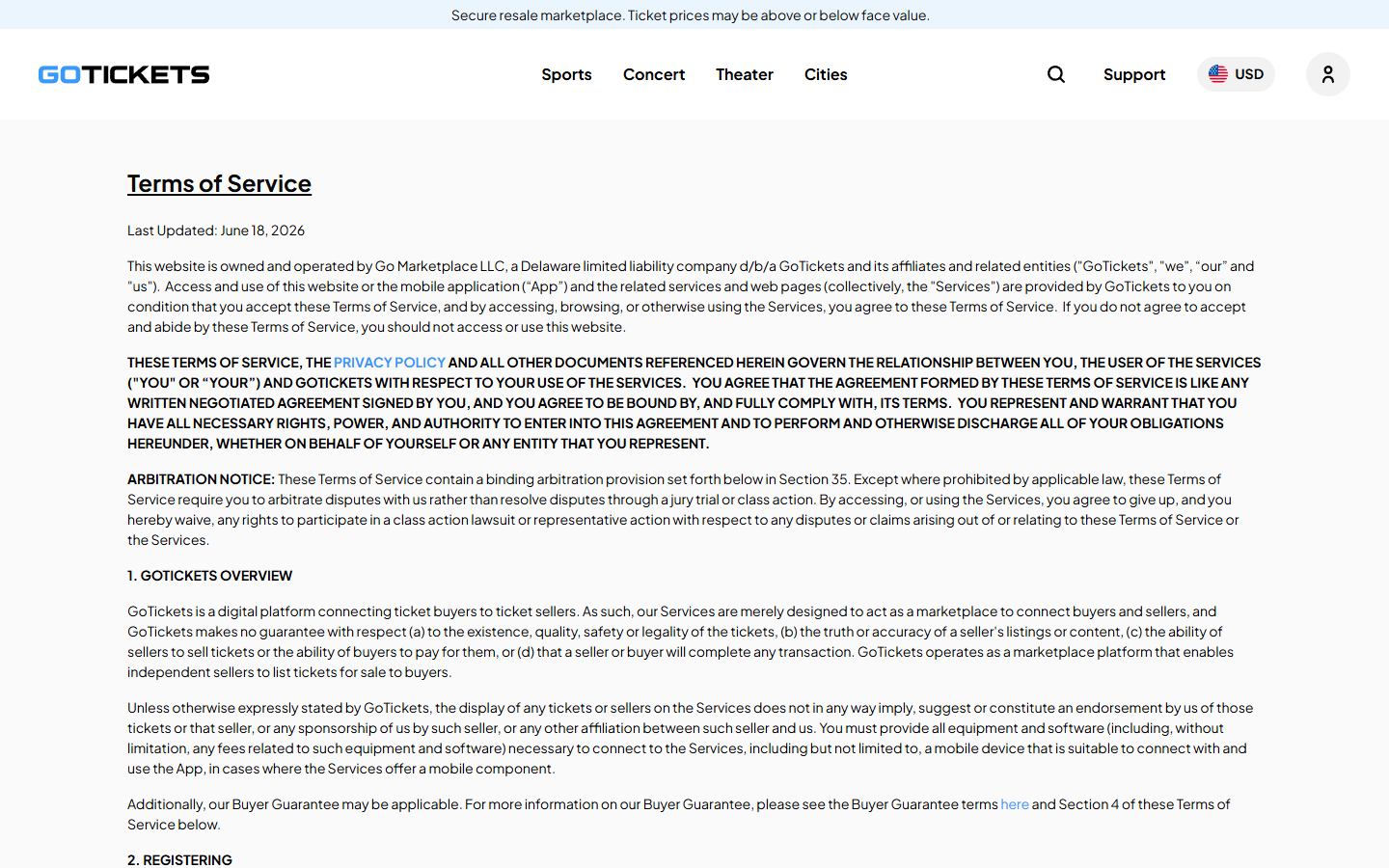
GoTickets is a resale marketplace, not the venue box office
GoTickets connects ticket buyers with independent sellers. Its own help center says the company is not directly affiliated with venues, teams, or performers.
That distinction matters more than the familiar event artwork. A listing can look like an ordinary ticket offer while following secondary-market pricing and delivery rules.
The company openly says prices may be above or below face value. A buyer can therefore pay more than the original ticket price without realizing it.
This does not make GoTickets a fake ticket site. It means the purchase should be judged as a resale transaction, not a box-office reservation.
The ticket may not exist in the seller’s account yet
Some GoTickets listings have a future “In Hand Date.” According to its terms, the seller does not possess those tickets when the buyer orders.
Other listings identify a seating zone without a specific row or seat assignment. GoTickets describes these as seller allocations rather than speculative listings.
Both arrangements may be allowed under the marketplace’s rules. Neither offers the certainty of receiving a specific ticket immediately after checkout.
For a buyer arranging flights, hotels, child care, or accessibility accommodations, the timing and exact seat location can be material.
The main buyer risk is the gap between expectation and policy
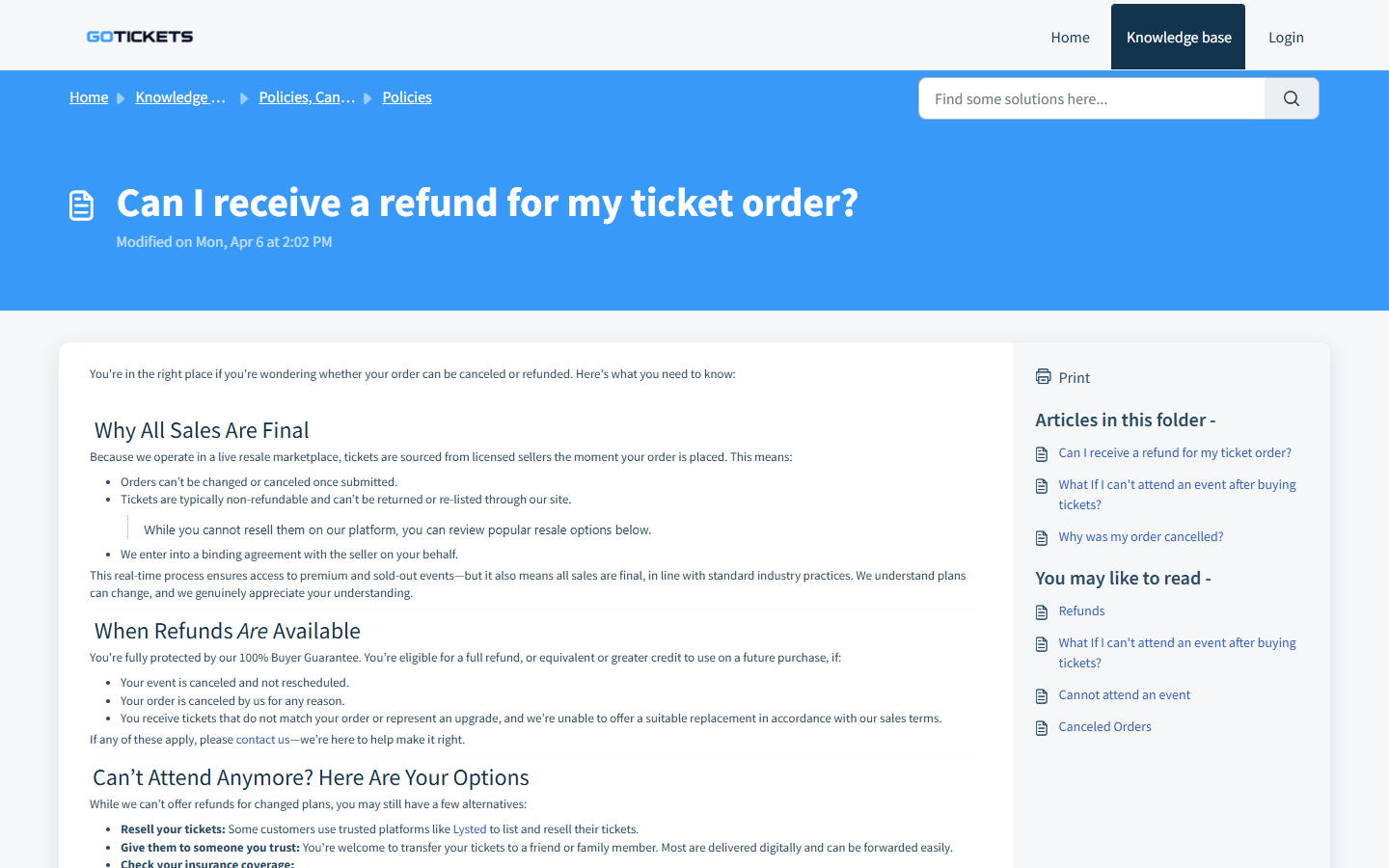
GoTickets advertises a Buyer Guarantee. At the same time, its refund guidance says orders generally cannot be changed or canceled after submission.
The guarantee addresses defined problems, such as an event cancellation or failure to provide acceptable tickets. It is not a free cancellation window.
Our assessment is a commercial-risk warning, not a finding that GoTickets itself is a scam. The key questions are:
- Is this a resale listing rather than an official box-office sale?
- What is the full checkout total after service and delivery fees?
- Does the listing show an In Hand Date or a seating zone?
- When will the buyer know the exact seats and receive transferable tickets?
- What remedy applies if the event changes or the seller cannot deliver?
Why the Resale Distinction Changes the Purchase
Imagine finding two listings for the same game. One is on the venue’s official ticketing page; the other appears on GoTickets with familiar team branding.
Those pages can lead to very different contractual relationships. In one case, the venue or its primary ticketing agent controls the sale.
In the other, an independent seller sets an asking price and GoTickets provides the marketplace and buyer protections described in its policies.
GoTickets explains this arrangement on its own help page. Reading that page before payment is more useful than relying on a search snippet.
Resale can be valuable when primary tickets have sold out. It can also introduce fees, seller confirmation, transfer delays, and different remedies.
The question is not whether resale is inherently wrong. It is whether the listing’s price and uncertainty match the trip you are planning.
How a GoTickets Purchase Works
Step 1: A search result leads to the event page
Buyers often start with a team name or artist rather than a seller name. That makes a secondary-market result easy to mistake for official inventory.
GoTickets does identify itself as a resale marketplace. The disclosure sits above the main navigation on the homepage we reviewed.
Still, the first screen emphasizes the event and the opportunity to buy. A hurried reader may move straight to seats without comparing primary listings.
Before selecting anything, open the venue’s own website in a separate tab. Look for its official ticketing partner and compare the same event date.
Step 2: A seller lists tickets at a market price
The seller, not the event organizer, may determine the ticket price. That price can rise or fall with demand, timing, and available inventory.
A resale listing’s price should never be compared only with another resale listing. Compare it with the face value when that information is available.
Ask what you are paying for: a specific seat, a section and row, or a broader seating zone that will be assigned later.
If an exact location affects visibility or accessibility, a zone listing may be too uncertain even if it meets GoTickets’ stated guarantee.
Step 3: Checkout adds the final cost
Ticket marketplaces commonly display service and delivery charges as the buyer moves toward payment. GoTickets’ terms describe a total incorporating those fees.
The final amount, not the first price on an event tile, is the figure that belongs in your comparison with other sellers.
Take a screenshot of the item description and total before authorizing payment. Save the event date, seat details, delivery type, and any In Hand Date.
Do not rely on memory if a dispute arises weeks later. A changed listing or event page may be difficult to reconstruct afterward.
Step 4: The seller confirms the order
GoTickets says it places an authorization for the full order amount when a buyer orders or bids. The seller must then confirm the sale.
If the seller cannot confirm, the marketplace may look for similar seats. Its terms also acknowledge that equivalent seats at the same price may not exist.
An authorization is not always a completed charge, but a debit-card hold can temporarily tie up money. That matters near a travel deadline.
Check your card account and order status separately. A pending bank hold alone does not prove that tickets have been secured.
Step 5: Delivery can occur close to the event
A future In Hand Date means the seller expects to receive the tickets later. GoTickets explicitly says delivery can occur nearer the event.
The marketplace says confirmed tickets remain covered by its Buyer Guarantee. It does not guarantee the method of delivery for every sale.
Plan accordingly. A buyer traveling across the country should not treat an estimated transfer as a ticket already sitting in a wallet app.
Watch the email address used at checkout, including spam and promotions folders. Some tickets require accepting a transfer from another platform.
Step 6: Problems are handled under defined remedies
GoTickets’ refund explanation says sales are generally final. A simple change of plans does not create a refund right under its policy.
Its guarantee addresses events that are canceled without rescheduling, tickets that do not arrive, or material mismatches it cannot adequately resolve.
The exact remedy can depend on the situation. Keep the order record and contact support promptly if a transfer is missing or seats differ.
Do not wait until the venue doors open to report a discrepancy you noticed earlier. Delays can make practical resolution much harder.
Company, Seller, and Fulfillment Checks
The brand on the page is not the event organizer
GoTickets’ terms identify Go Marketplace LLC as the operator. The company describes its role as connecting buyers and ticket sellers.
That relationship is different from buying directly from a box office. A venue may be able to verify its own orders but not resolve every resale-platform dispute.
Keep the exact marketplace order number. Calling the venue about a delayed GoTickets transfer may confirm entry rules, but not necessarily release the ticket.
A ticket transfer is the real fulfillment event
For electronic tickets, an order confirmation and a valid transferable ticket are different things. The confirmation documents a purchase request or completed marketplace sale.
The usable ticket may arrive later through a different account. Check whether that transfer is accepted and whether the barcode appears when expected.
A screenshot of a barcode is not always equivalent to an official transfer. Some venues use changing codes that cannot be scanned from a static image.
Support is most useful before the deadline
If the seller has not delivered by the stated time, contact GoTickets through its website, not a phone number in an unsolicited message.
Give support the order number, event start time, ticket description, and relevant screenshots. Ask for a clear resolution deadline in writing.
For a seat mismatch, do the same before using the tickets when possible. The terms place responsibility on buyers to flag discrepancies promptly.
The guarantee has boundaries worth reading
Buyer protection is meaningful, but it is not identical to having a free option to cancel. The company distinguishes covered ticket problems from ordinary buyer regret.
Its rules also separate a canceled event from a postponed one. If the show moves to another date, the ticket may remain valid rather than refundable.
Read the current terms for the precise event and order. Policies can change, and a screenshot from another buyer may be outdated.
What to Check Before Buying Resale Tickets
Start at the event organizer’s official page. That simple step tells you the primary seller, current event details, and whether face-value inventory remains.
Then compare the complete amounts. A cheaper-looking resale seat may not remain cheaper once service and delivery charges are included.
Read the precise seat description rather than judging the colored map alone. Section, row, quantity, obstruction notes, and accessibility details all matter.
Look for a future In Hand Date. If you need tickets immediately for travel certainty, choose a listing whose timing fits that need.
Check the event’s transfer policy. Some tickets are released close to showtime by the primary issuer, regardless of which resale marketplace sold them.
Pay with a method that provides a clear transaction record. Avoid taking a purchase conversation to text, wire transfer, or cryptocurrency.
A travel budget needs more than the ticket price
People sometimes buy resale tickets before booking transportation. That reverses the safest order of decisions when the seller has not transferred the tickets yet.
Write down every nonrefundable expense connected to the event. Flights, rooms, parking, and time off work may exceed the face value of the seats.
A marketplace guarantee may address the ticket order without automatically covering those separate losses. Check the actual guarantee rather than assuming a broader travel policy.
If the event is important enough to justify travel, consider listings with faster delivery and clearer seat assignments, even when their displayed price is higher.
Likewise, a local event with flexible plans may justify more patience. Your risk tolerance should follow the total trip, not the urgency of the sales page.
Set your own decision deadline before ordering. If transfer has not occurred by that point, know whom you will contact and what alternative remains available.
This planning cannot remove every resale uncertainty. It can prevent a delayed transfer from becoming a surprise only hours before the show.
Finally, read the cancellation and guarantee terms while you are calm. They become much harder to digest when a delayed ticket has you standing outside.
What to Do If You Bought Tickets and Something Seems Wrong
- Check the actual order state. Find the confirmation, seller acceptance, In Hand Date, and delivery instructions. A pending authorization alone is not proof of delivery.
- Verify the transfer account. Search your email for invitations from the named ticket issuer. Open that issuer independently and confirm the tickets appear in your account.
- Document the mismatch. Save the listing, final price, promised section or row, messages, and the ticket actually received. Record dates without altering screenshots.
- Contact marketplace support immediately. Use the contact path on GoTickets’ site. Explain the specific failure and ask which Buyer Guarantee remedy applies.
- Ask the venue about entry rules. The box office may clarify accepted transfer formats or event changes. Do not assume it can refund a separate resale order.
- Escalate a genuine unresolved payment issue. If the seller never delivers or the platform does not honor a covered remedy, ask your card issuer about dispute rights and deadlines.
- Watch for follow-up impersonators. Someone offering to “release” a ticket for an extra fee through an unrelated link is a separate warning sign. Verify every request through the platform.
Keep your language factual when seeking help. “The ticket was promised by this date and has not arrived” is stronger than a broad accusation.
If the event is hours away, state that urgency plainly. Ask support what it can deliver now, not only whether an agent will review the case later.
Frequently Asked Questions
Is GoTickets the official ticket seller for the event?
Usually not. GoTickets describes itself as a resale marketplace rather than the venue, team, or performer’s primary box office.
Are GoTickets prices the same as face value?
Not necessarily. Sellers set resale prices that may be above or below the original price, and the final checkout may include additional fees.
Why have my tickets not arrived yet?
The seller may have a future In Hand Date or the primary issuer may release transfers later. Check the listing deadline and contact support if it passes.
Can I cancel because I found a cheaper seat?
GoTickets says orders generally cannot be canceled after submission. Its Buyer Guarantee covers defined problems, not a later price comparison.
What if the event is postponed?
A postponed event is treated differently from a cancellation. Check the updated event details and the current marketplace terms before expecting a refund.
Is GoTickets itself a scam?
Our review found an operating resale marketplace with published terms and support policies. The concern is understanding pricing, seller confirmation, late transfer, and refund limits.
The Bottom Line
GoTickets can offer access to events that are hard to find elsewhere. It also asks buyers to accept the normal uncertainties of resale.
Compare the official seller first, review the complete price and delivery date, and save the listing before paying. The guarantee helps with defined failures, not every disappointment.

Join the discussion
0 commentsShare your experience or ask a question about this article.
Discussion
Start the conversation
Have a question or something useful to share? Add the first comment.