


A news-style post says a former NASA engineer finally discovered the pattern hidden inside winning lottery numbers.
The software looks sophisticated and surprisingly affordable. Its own fine print tells a quieter, very different story.

Overview
What LottoTracer promises in its advertising
LottoTracer is sold as an AI-powered number-analysis system that studies historical lottery results and produces supposedly smarter selections.
The surrounding campaign uses fake news styling, an invented former NASA engineer, winner stories, checks, and television-like segments to build authority.
Terms such as neural networks, quantum-inspired processing, predictive intelligence, and pattern detection make the product sound technically advanced.
The offer asks $147 for lifetime access, reduced from a displayed $497 reference price.
What the official page admits
The current LottoTracer website says lottery outcomes remain governed by chance and that its information is for entertainment purposes.
Its terms provide no guarantee of winnings, profitability, or successful results.
Those statements directly limit the certainty implied by advertisements about hidden structures and repeatable winning opportunities.
A user may receive functioning software, but receiving an interface does not validate its ability to predict independently drawn numbers.
Why we classify the funnel as deceptive
The strongest problem is not merely that lottery prediction is unreliable. It is the manufactured evidence used to sell that hope.
The campaign appears to imitate a trusted news report and presents a fictional expert as though his credentials and success were independently verified.
Official Powerball odds place the jackpot chance at 1 in 292,201,338 for a $2 play.
No evidence found in the promotion demonstrates that LottoTracer changes the underlying drawing or those published odds.
Warning signs include:
- A fake television-news presentation.
- An unverifiable former NASA engineer.
- AI and quantum language without transparent validation.
- Winner stories that cannot be independently confirmed.
- A very recent domain and policy history.
- A large crossed-out reference price.
- A short 14-day refund window.
- Different guarantee periods mentioned across the funnel.
A Lottery Drawing Does Not Remember Previous Numbers
Historical results are real data, and software can sort them into frequent numbers, gaps, clusters, and visually interesting combinations.
That analysis can be entertaining. It does not automatically reveal a predictive signal for the next properly conducted random drawing.
In an independent drawing, a number appearing often in the past does not become “due” to disappear.
A number absent for months does not become more likely merely because its gap looks unusual.
This misunderstanding is commonly called the gambler’s fallacy. Human minds naturally search for balance and patterns inside randomness.
An attractive dashboard can intensify that tendency by turning ordinary counts into colorful indicators and confident recommendations.
Powerball’s official prize chart lists jackpot odds of 1 in 292,201,338.
It also states that official winning numbers are selected in drawings observed by an independent accounting firm.
LottoTracer does not control the drawing machine, ball set, security process, or official random selection.
Therefore, an algorithm examining public history cannot promise access to the physical uncertainty that determines the next result.
How the LottoTracer AI Lottery Prediction Scam Works
Step 1: A fake news post announces an improbable breakthrough
The campaign begins with what resembles a Fox News story shared through social media.
It claims an engineer named Ryan Briggs used experience from NASA to decode patterns that lottery operators overlooked.
The presentation borrows familiar broadcast colors, headline structure, presenters, and urgency without establishing that a real newsroom produced it.
Viewers may process those visual cues before checking the address bar or source ownership.
Step 2: Technical language turns chance into a solvable system
The story introduces artificial intelligence, neural networks, advanced statistics, and quantum-inspired processing.
These are real technical concepts, but naming them does not establish that the implementation predicts random lottery outcomes.
No transparent model card, source code, independent audit, preregistered test, or complete prediction history supports the promotional confidence.
Complex vocabulary can make an ordinary frequency analyzer feel like classified aerospace technology.
Step 3: Winner stories create emotional proof
Advertisements show large checks, delighted users, rising bank balances, or screenshots of supposed winning combinations.
Individual examples do not reveal how many people lost, how many combinations were purchased, or whether the results were documented beforehand.
A prediction made after numbers are known proves nothing, while one lucky match among many attempts may reflect chance.
Useful evidence would publish every prediction in advance and compare performance against random selection over a meaningful sample.
Step 4: The sales page softens the claim without changing the dream
After the dramatic advertisement, the official page uses more careful language about analysis, insights, informed choices, and entertainment.
It acknowledges that results remain based on chance, protecting the seller from the strongest interpretation of the earlier story.
The emotional promise and legal promise therefore operate at different volumes.
Large headlines invite possibility, while important limitations sit inside ordinary paragraphs and policy pages.
Step 5: A discounted lifetime price lowers resistance
The offer displays $497 as the regular value and $147 as the temporary lifetime price.
Because the product is digital, the crossed-out number does not reveal a manufacturing cost or stable historical retail market.
The discount works mainly as an anchor. It encourages buyers to compare $147 with $497 instead of comparing software with free lottery statistics.
The current page explicitly says the payment is one-time and that no subscription is required.
Step 6: A short guarantee keeps the decision urgent
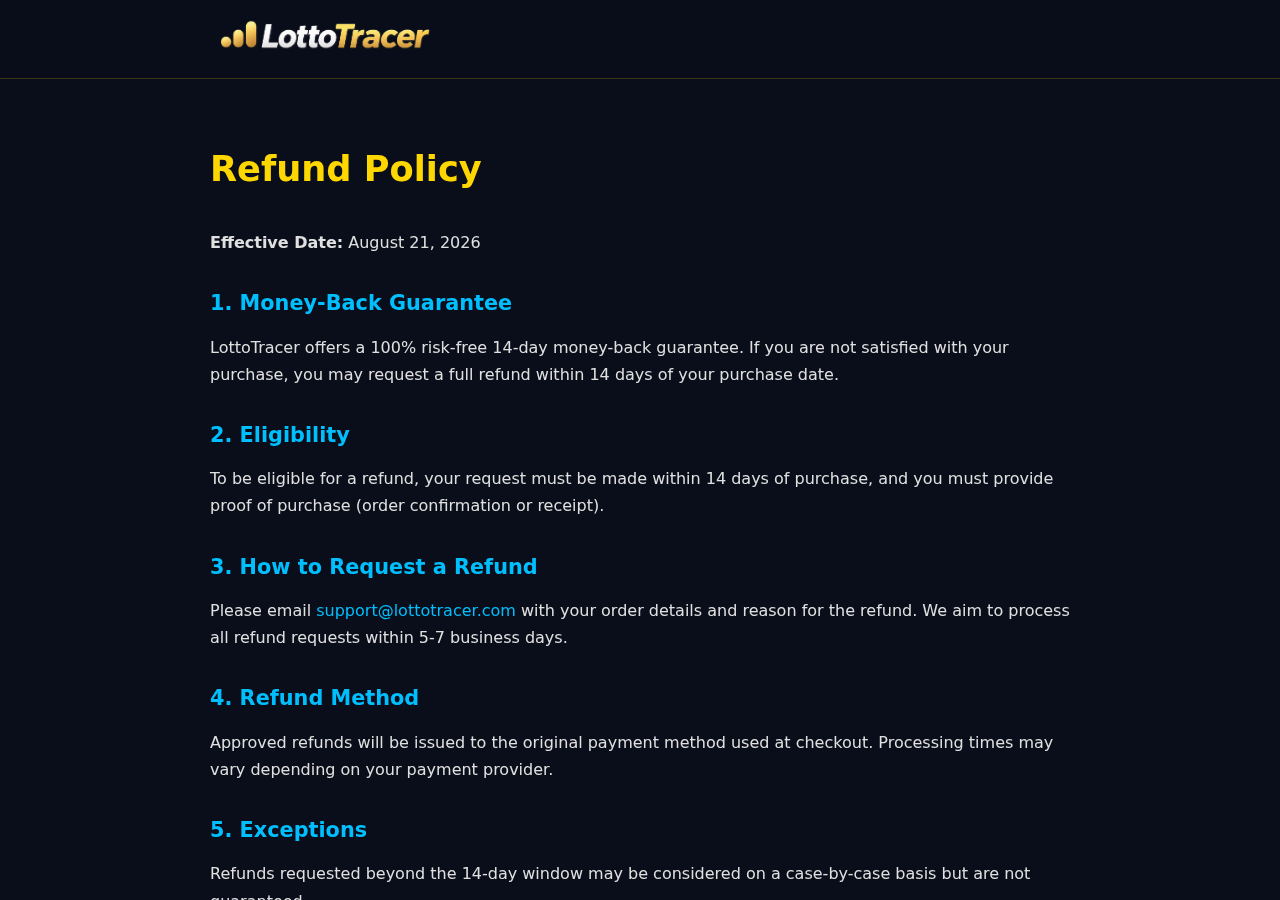
LottoTracer’s posted refund policy provides 14 days from purchase and requires proof of purchase by email.
The sales presentation reviewed elsewhere in the funnel reportedly mentioned 60 days, creating a significant inconsistency.
When policy periods conflict, the safest assumption is that the written checkout terms will control.
Buyers should preserve whichever promise appeared before payment and request clarification immediately.
Step 7: Continued play can cost far more than the software
The $147 purchase is only the first potential loss. Belief in a predictive edge may encourage repeated or larger ticket spending.
Small wins can strengthen confidence even when overall results remain negative.
The dashboard may then become a ritual that makes each new drawing feel less random.
No software refund can recover lottery tickets purchased because a user trusted unproven predictions.
What LottoTracer Actually Appears to Sell
The website describes a digital system that organizes historical lottery data and provides suggested number combinations.
Such a tool can exist and perform those functions exactly as designed.
The important question is whether organization should be confused with prediction.
A frequency table correctly reports the past. A gap chart correctly reports how long a number has been absent.
Neither observation demonstrates that the next drawing becomes forecastable.
Even a sophisticated machine-learning model needs a stable relationship between inputs and future outcomes.
Proper lottery systems are designed to prevent exploitable relationships from persisting.
If a genuine mechanical bias appeared, operators and auditors could investigate equipment rather than assuming public history permanently exposes future results.
The site uses phrases such as “make more informed choices,” which can mean selecting numbers through a preferred method.
It cannot mean changing the mathematical odds unless the company supplies extraordinary independent evidence.
The Fake NASA Expert and News Format Matter
Aerospace credentials imply precision, security, mathematics, and access to technology beyond ordinary consumer software.
The advertisement needs that symbolism because a generic marketer claiming to predict Powerball would receive immediate skepticism.
We could not verify the campaign’s engineer story through NASA records or credible independent reporting.
The apparent expert also resembles imagery associated with an unrelated marketing professional, raising further identity questions.
Even if the person were a real engineer, employment history would not prove a lottery-prediction model works.
Credentials support expertise only within a relevant field and only when the person genuinely made the statement.
A newsroom would normally identify sources, show documentation, request responses from lottery officials, and disclose commercial relationships.
The promotional page instead directs attention toward one paid product.
The FTC advises consumers to verify suspicious endorsements independently and resist pressure to commit quickly.
Those checks apply equally to invented specialists and impersonated media outlets.
The Guarantee Conflict Should Be Resolved Before Payment
The current LottoTracer refund page clearly displays a 14-day money-back period effective August 21, 2026.
It instructs customers to email support@lottotracer.com with order details, reason, and proof of purchase.
Approved refunds are described as returning to the original payment method, with processing estimated at five to seven business days.
Requests beyond 14 days may be considered individually but are not guaranteed.
If a video promises 60 days, capture that statement before ordering.
A guarantee cannot be evaluated by its largest number alone. Consumers need the correct start date, submission method, exclusions, and governing seller.
Test support before purchasing by asking which policy applies and requesting a direct written answer.
If the response avoids the conflict, the guarantee should not reduce perceived risk.
Company, Address, and Fulfillment Checks
The LottoTracer operator is not clearly identified
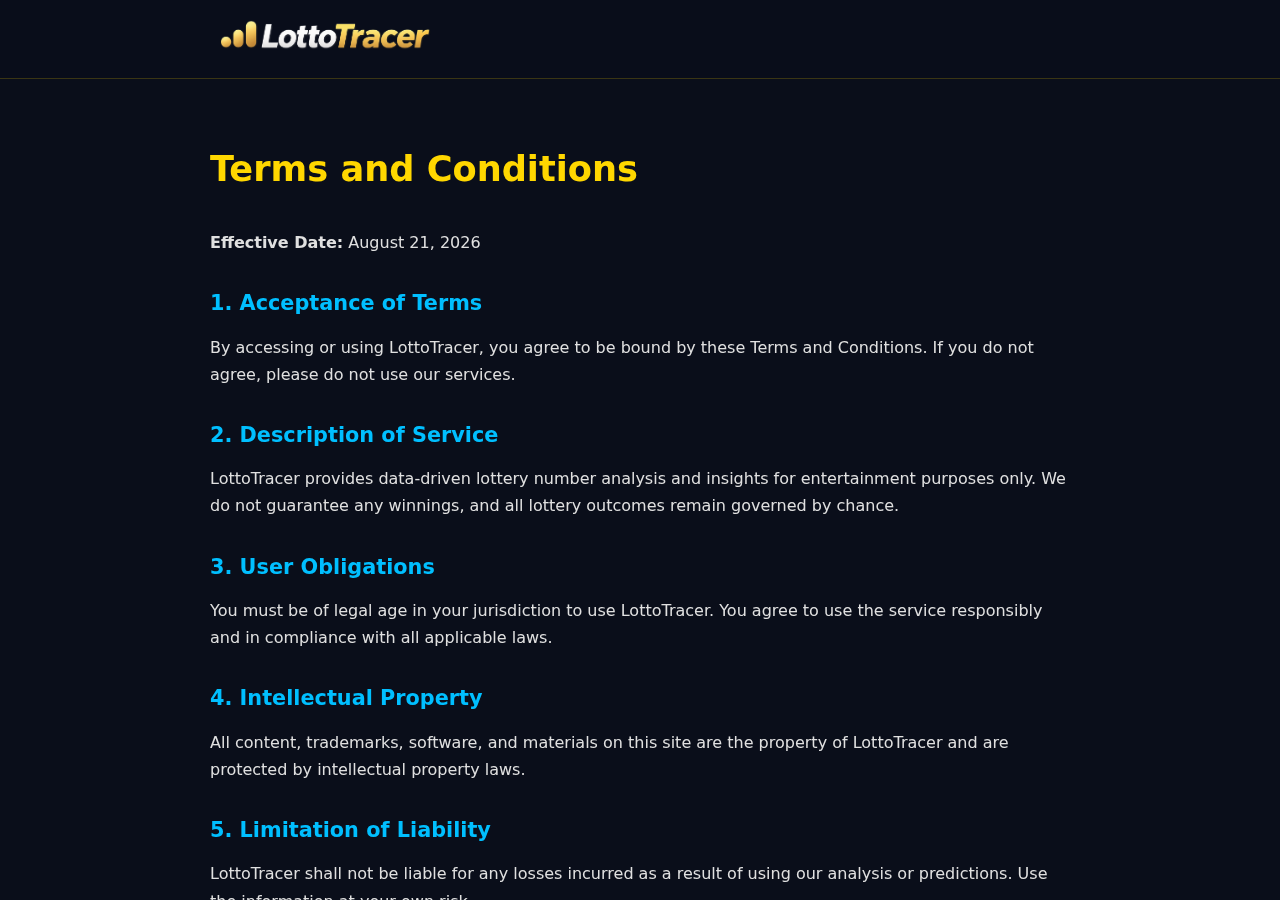
The terms repeatedly refer to LottoTracer but do not prominently provide a complete registered legal company and operating address.
The contact route we found is support@lottotracer.com, with an expected response within 24 to 48 business hours.
A product name and inbox are thinner accountability than a verifiable contracting entity.
JVZoo is the checkout retailer, not an endorser
The purchase link routes through JVZoo, whose footer identifies BBC Systems Inc. at an Oviedo, Florida address.
The same language says JVZoo serves as retailer and does not endorse the product’s statements, opinions, or claims.
Payment processing therefore should not be mistaken for independent validation of prediction performance.
The domain and terms are extremely recent
Lottotracer.com was registered on August 20, 2026, and its posted policies became effective the following day.
A recent domain is not automatically fraudulent, but it cannot demonstrate years of results or long-term customer support.
Extraordinary historical performance claims deserve dated, independently archived evidence rather than testimonials on a new website.
Digital delivery eliminates manufacturing questions, not accountability
There is no supplement factory or shipping warehouse to inspect, but consumers still need an operator, support process, privacy policy, and reliable refund route.
They also need clarity about data collection, account access, software updates, and what “lifetime” means if the service closes.
A lifetime license cannot outlive infrastructure that no longer operates.
How to Evaluate Any Lottery Prediction App
Ask the seller to publish every prediction before each drawing through a tamper-evident, independently archived channel.
Count all predictions and ticket combinations, not only wins selected for advertisements.
Compare results with randomly generated picks using the same number of tickets and drawings.
Require a large enough sample to distinguish performance from ordinary chance.
Check whether prizes are reported before subtracting ticket spending, software cost, taxes, and unsuccessful combinations.
Look for external statisticians who received raw data and disclosed their methodology.
Ignore screenshots that cannot prove when a number was generated or whether thousands of alternatives were hidden.
Set a fixed entertainment budget. Never increase spending because an algorithm says a drawing is unusually favorable.
Why a Few Correct Numbers Do Not Validate the System
Lottery tickets frequently match one or two numbers, and smaller prizes occur far more often than jackpots.
An advertisement can display those partial successes while hiding the total number of losing combinations purchased.
Suppose software generates hundreds of combinations across many drawings. Some visually impressive matches should occur through chance alone.
The relevant measure is net performance across every recommendation, after ticket costs, software cost, taxes, and unclaimed losses.
A credible test would lock predictions before sales close, preserve timestamps, and prevent unsuccessful outputs from being removed later.
It would also compare the same budget against Quick Pick tickets and other random baselines.
Cherry-picked winners cannot provide that comparison.
Neither can a photograph of a ticket, because it does not reveal when the ticket was bought or how many losing tickets surrounded it.
Ask for a complete, downloadable performance ledger covering every supported lottery and every generated selection.
What to Do if You Have Fallen Victim to This Scam
- Save the full promotion. Capture the fake news post, expert identity, promises, checkout, price, guarantee, receipt, and account dashboard.
- Stop additional lottery spending. Do not chase losses or buy more combinations to prove the software works.
- Request a refund immediately. Email the listed support address within 14 days and include your order number and proof of purchase.
- Preserve the longer promise. If the advertisement stated 60 days, save that evidence and include it with your request.
- Contact the payment retailer. Use JVZoo’s official customer route if the seller does not respond or the product differs materially from its promotion.
- Speak with the card issuer. Explain any unauthorized charge, non-delivery, false guarantee, or refusal to provide the purchased service.
- Secure your account. Change any reused password and remove browser extensions or software installed outside trusted application stores.
- Run Malwarebytes. Scan the device after suspicious downloads, redirects, pop-ups, or requests to disable security tools.
- Use AdGuard cautiously. It can reduce malicious advertisements and tracking, but it cannot turn prediction software into a mathematical advantage.
- Report deceptive advertising. Notify the platform and FTC, especially when a fake news organization or fabricated expert was used.
Is Your Device Infected? Run a Free Malware Scan
Slow performance, constant pop-ups, or strange behavior? These are classic signs of a malware infection. A quick way to check is to scan your device with Malwarebytes Free, one of the most trusted malware removal tools available. If you only visited a scam page and didn’t download or install anything, this scan is optional.
The free version detects and removes the most common threats, including:
- Adware — the cause of those annoying pop-ups
- Browser hijackers — unwanted redirects and changed homepages
- Trojans and spyware — hidden programs stealing your data
- Potentially unwanted programs (PUPs) — software you never asked for
👉 Select your device below — Windows, Mac, or Android — then follow the simple steps to download Malwarebytes, scan your system, and remove any threats it finds. The scan usually takes 5 to 20 minutes.
Run a Malware Scan with Malwarebytes for Windows
Malwarebytes is one of the most popular and trusted anti-malware tools for Windows — and it’s completely free for removing infections. It catches threats that many antivirus programs miss, including adware, browser hijackers, and trojans. Follow the steps below to scan your PC and remove what Malwarebytes finds.
Download Malwarebytes
Click the button below to download the latest version of Malwarebytes for Windows from the official source. The free version is all you need — it will scan your computer and remove adware, browser hijackers, and other malicious software at no cost.
Download MalwarebytesOfficial installer for Windows 11 and 10. Your download starts right away.Want real-time protection? See Malwarebytes Premium Malwarebytes Free for WindowsScans and removes malware at no cost
-
Install Malwarebytes
When the download finishes, open your Downloads folder and double-click the MBSetup file. If Windows shows a User Account Control pop-up, click “Yes” to allow the installation.

Follow the On-Screen Prompts to Install Malwarebytes
The setup wizard will walk you through a few quick screens:
-
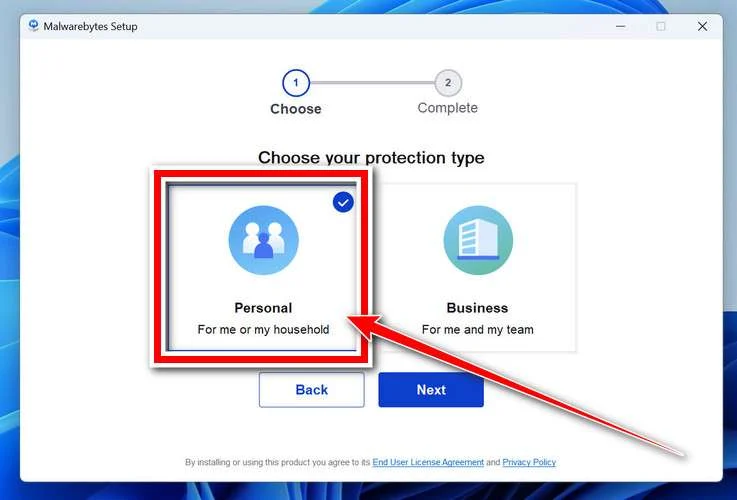
Choose where you’re installing the program — “Personal Computer” or “Work Computer” — then click Next.
-
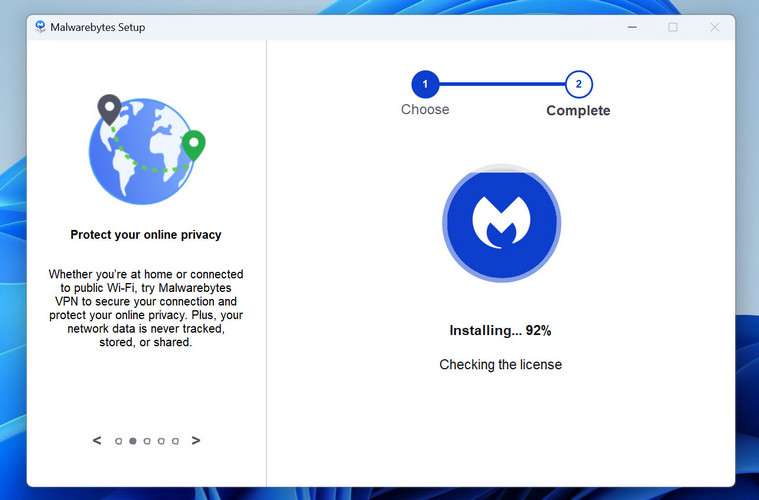
Malwarebytes will now install on your device. This usually takes under a minute.
-
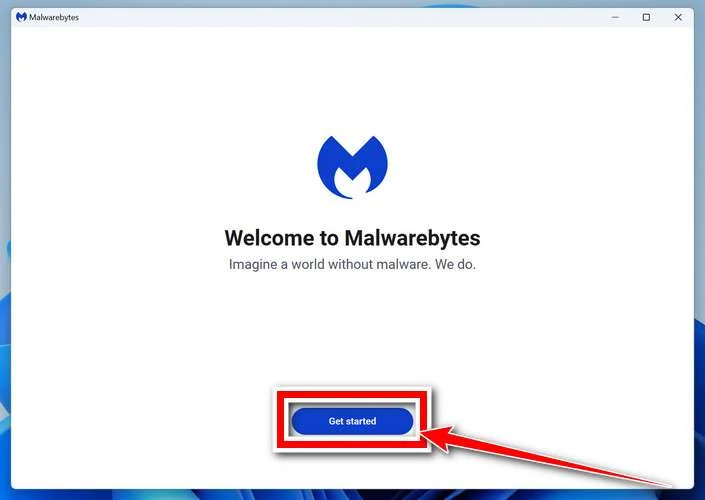
When installation is complete, the “Welcome to Malwarebytes” screen will open automatically.
-
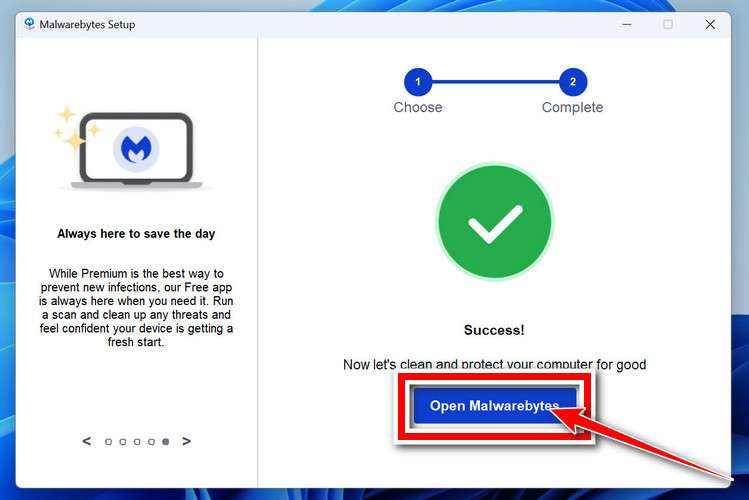
On the final screen, click Open Malwarebytes to launch the program.
-
Optional: Check for rootkits with a Custom Scan
You don’t need to change any settings for a normal scan. The standard Threat Scan in the next step is enough for most problems, so you can go straight to it.
If you also want to check for rootkits, use a Custom Scan. In current versions of Malwarebytes, rootkit scanning is only available there:
- On the Scanner tile, click the three-dot menu and select Advanced Scan.
- Choose Custom Scan. In its options, check Scan for rootkits.
- Select your system drive (usually C:\) as the location to scan, then start the scan. It takes longer than a Threat Scan.
- When it finishes, review and quarantine the results as described in the steps below.
Rootkit scanning isn’t available on Windows devices with ARM processors.
Start the Scan
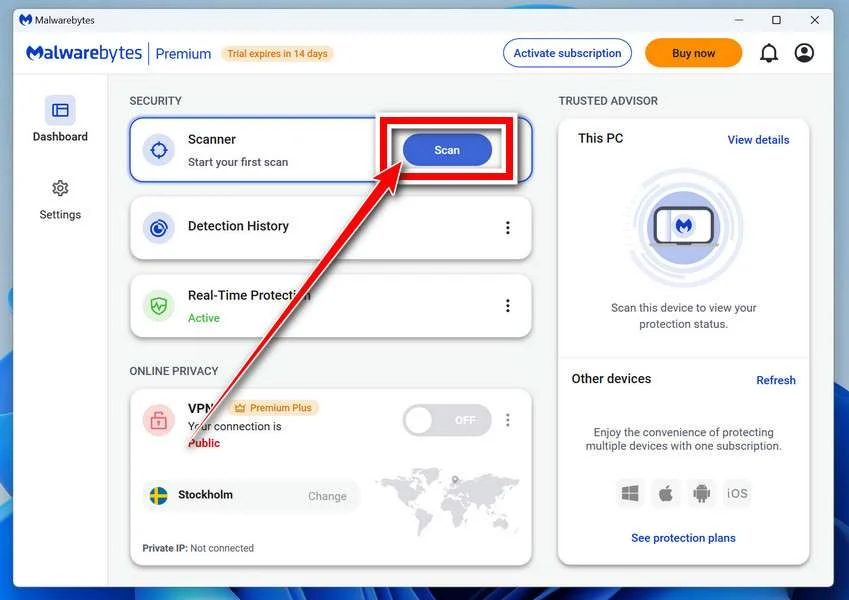
Click the blue Scan button. Malwarebytes will automatically update its virus database and start checking your computer for malware.
-
Wait for the Scan to Finish
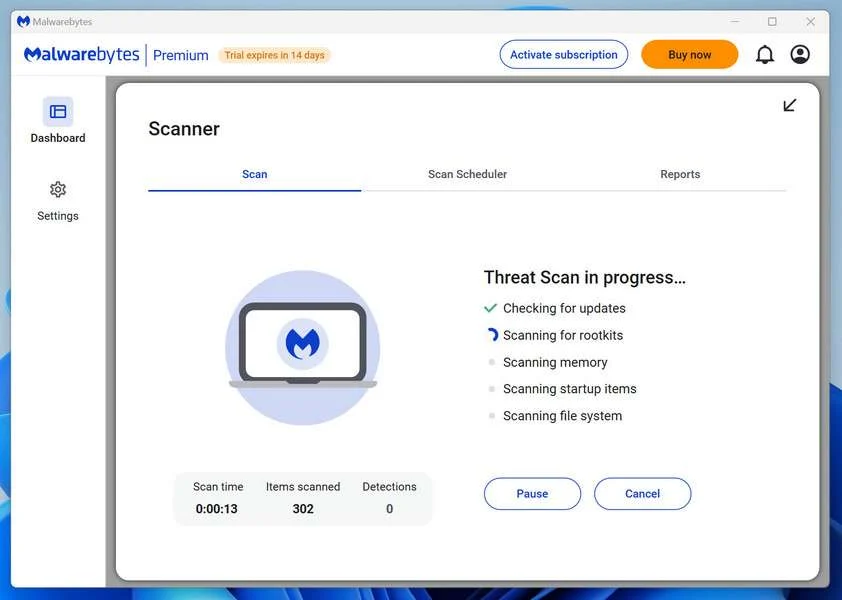
The scan checks your entire system for browser hijackers and other malicious programs, so it can take 5 to 20 minutes depending on your computer. Feel free to do something else — just check back occasionally to see the progress.
-
Quarantine the Detected Threats
When the scan is done, you’ll see a list of everything Malwarebytes found — malware, adware, and potentially unwanted programs. Click the “Quarantine” button to remove all of them at once.
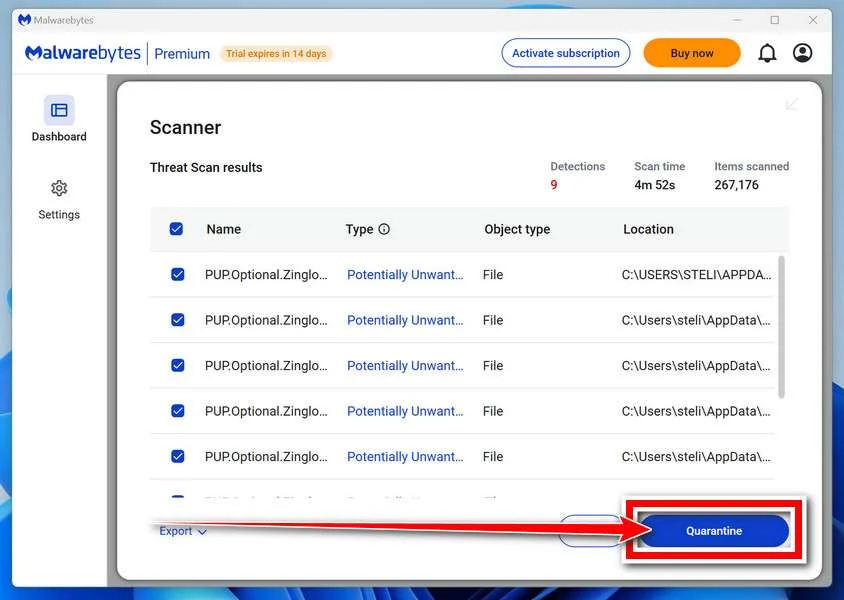
Malwarebytes will now remove the malicious files and registry entries and move them safely into quarantine.
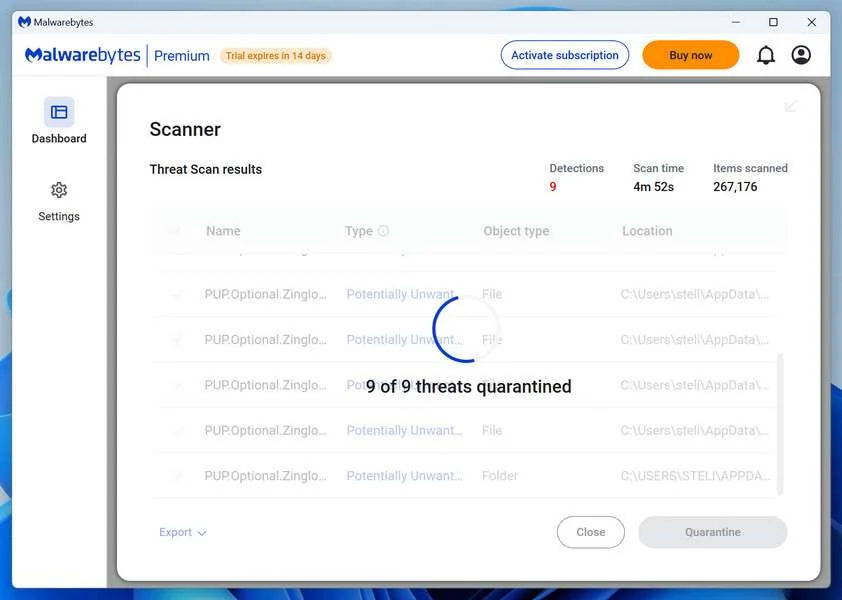
-
Restart Your Computer
Some threats can only be fully removed after a reboot. If Malwarebytes asks you to restart, click Yes. Once you’re logged back in, Malwarebytes has finished removing the threats it found.
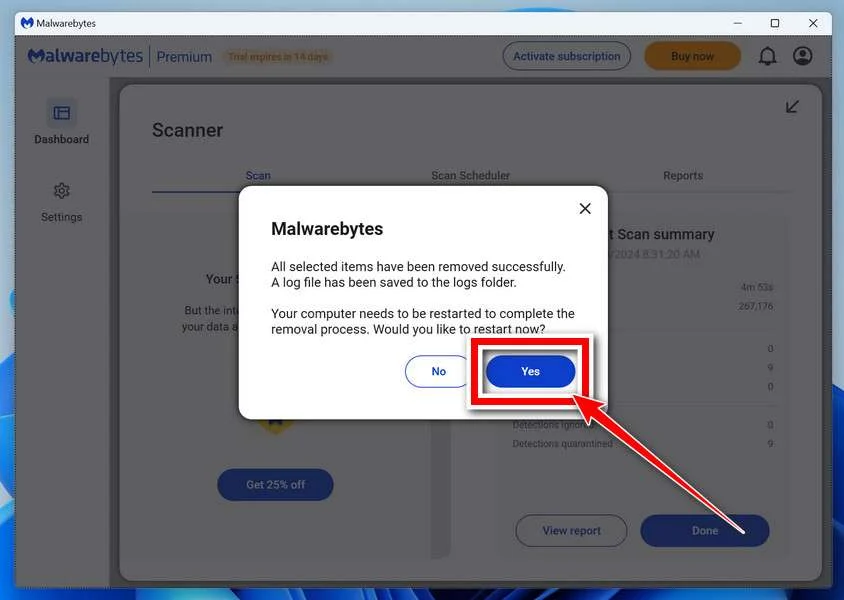
When the scan is done, check whether the problems you noticed have stopped. If they continue, see the options below.
If you are still having problems with your computer after completing these instructions, then please follow one of the steps:
- Run a computer scan with ESET Online Scanner
- Ask for help in our Windows Malware Removal Help & Support forum.
Run a Malware Scan with Malwarebytes for Mac
Malwarebytes for Mac is a free on-demand scanner that removes the malware other security software tends to miss — adware, browser hijackers, and unwanted programs included. Cleaning an infected Mac with Malwarebytes has always been completely free, and it’s our go-to recommendation. Follow the steps below to scan your Mac and remove what Malwarebytes finds.
-
Download Malwarebytes for Mac
Click the button below to download the latest version of Malwarebytes for Mac.
Download MalwarebytesOfficial installer for macOS. Your download starts right away.Want real-time protection? See Malwarebytes PremiumMalwarebytes Free for MacScans and removes malware at no cost -
Open the Malwarebytes setup file
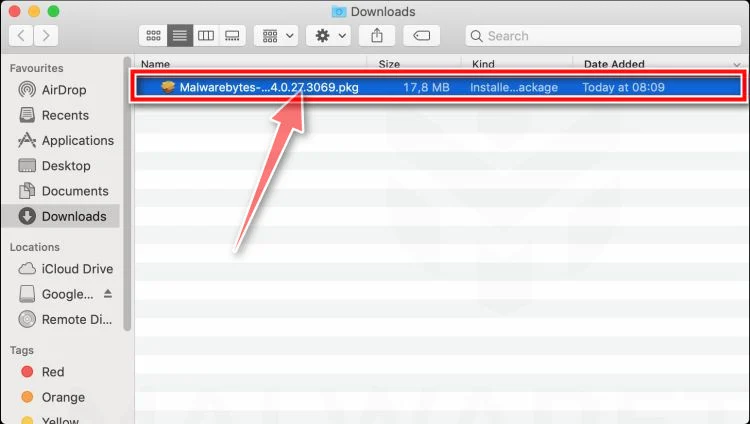
When the download finishes, open your Downloads folder and double-click the setup file to begin the installation.
-
Follow the On-Screen Prompts to Install Malwarebytes
The Malwarebytes for Mac Installer will guide you through a few quick screens. Click “Continue” and keep following the prompts until the installation completes.
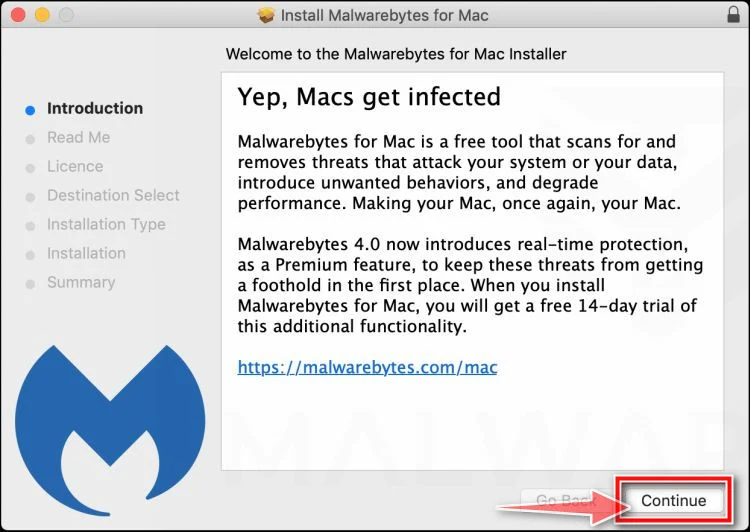
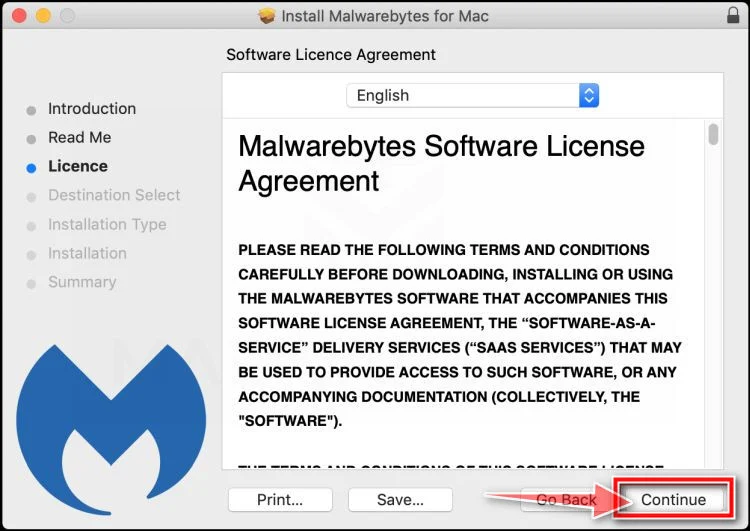
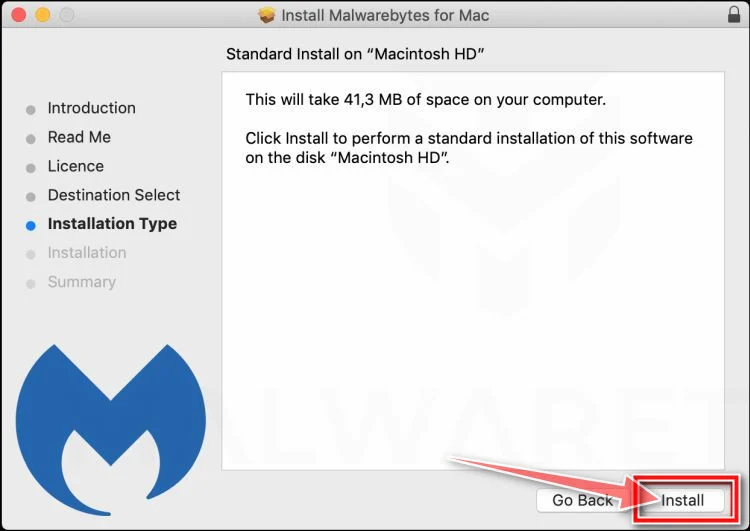
When the installation is complete, Malwarebytes opens to the Welcome to Malwarebytes screen. Click “Get started“.
Malwarebytes needs Full Disk Access to check your whole Mac. When it asks, open System Settings > Privacy & Security > Full Disk Access, turn on Malwarebytes (it may be listed as Malwarebytes Protection), and confirm with your password or Touch ID. Then return to Malwarebytes. On macOS Monterey and earlier, this setting is in System Preferences > Security & Privacy > Privacy.
-
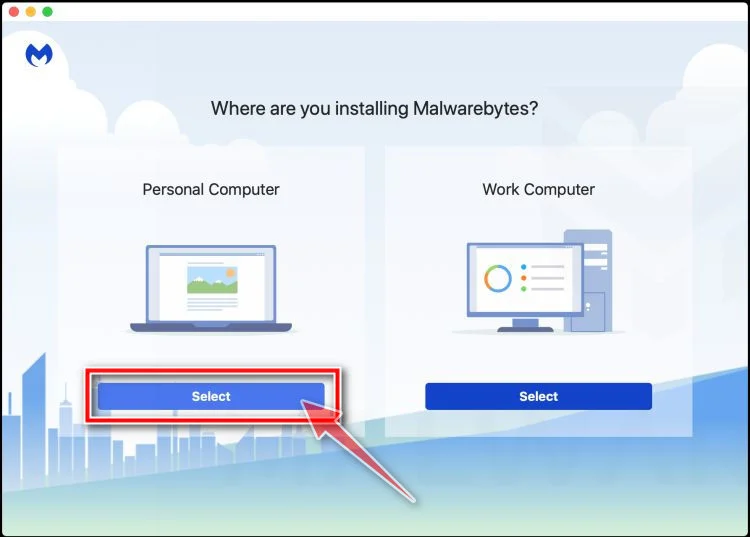
Select “Personal Computer” or “Work Computer”
Malwarebytes will ask what type of computer you’re installing it on. Click either Personal Computer or Work Computer, whichever applies.
-
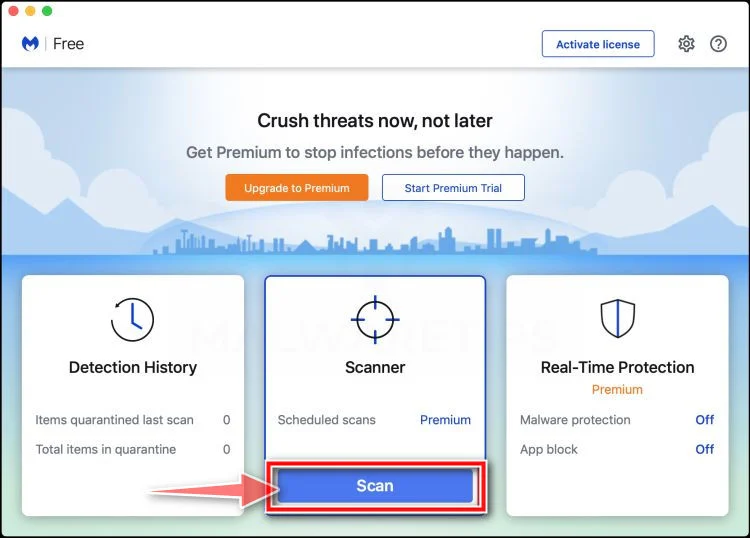
Start the Scan
Click the “Scan” button. Malwarebytes will automatically update its detection database and begin checking your Mac for malware.
-
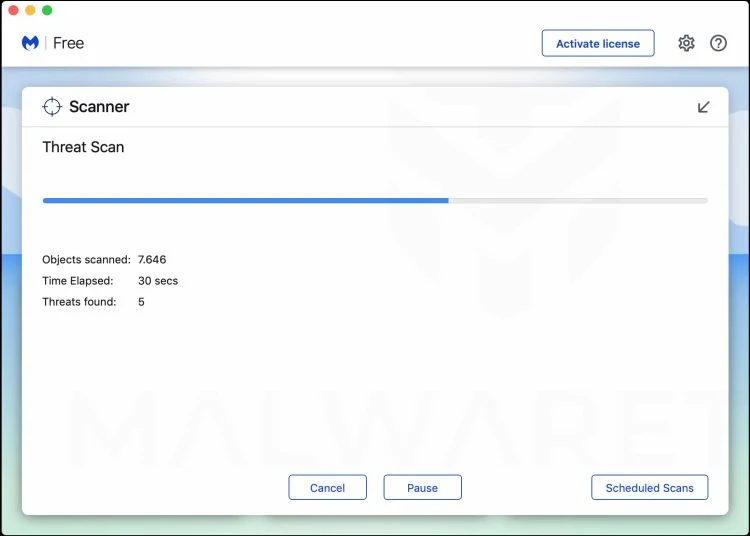
Wait for the Scan to Finish
Malwarebytes will scan your Mac for adware, browser hijackers, and other malicious programs. This can take a few minutes, so feel free to do something else — just check back occasionally to see the progress.
-
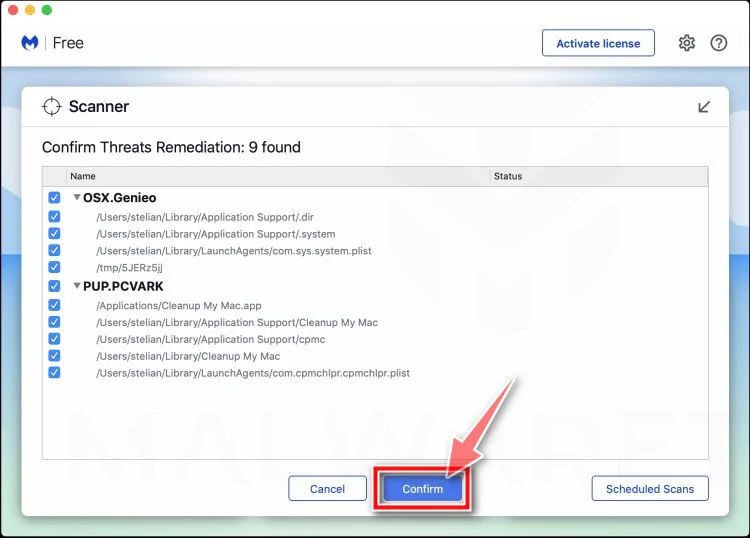
Quarantine the Detected Threats
When the scan is done, you’ll see a list of everything Malwarebytes found. Click the “Quarantine” button to remove all the threats at once.
-
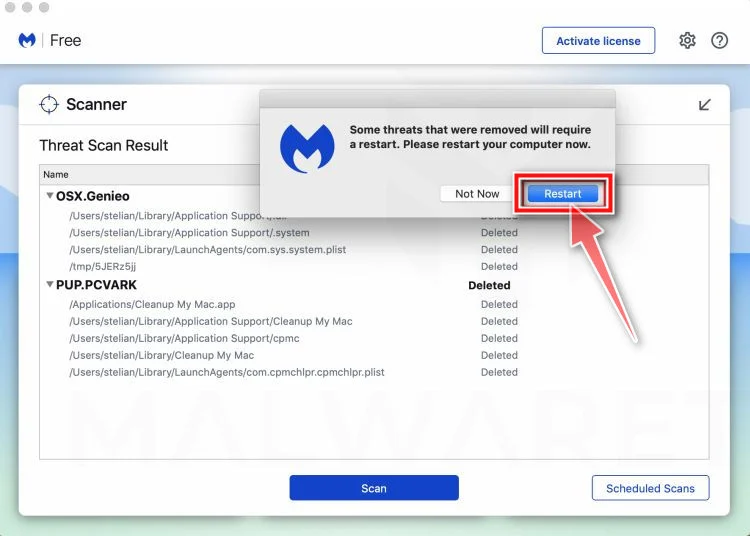
Restart Your Mac
Malwarebytes will now remove all the malicious files it found. Some threats can only be fully removed after a reboot — if Malwarebytes asks you to restart, allow it. Once you’re logged back in, check whether the problems you noticed have stopped. If they come back, save the scan report and ask for help in our forum.
If the problems you noticed continue after the scan, see the options below.
If you are still experiencing problems while trying to remove a malicious program from your computer, please ask for help in our Mac Malware Removal Help & Support forum.
Run a Malware Scan with Malwarebytes for Android
Malwarebytes for Android scans your phone or tablet for malware, adware, and potentially unwanted apps. The free version scans only when you start a scan. Real-time protection, which checks apps automatically, is part of the paid Premium version.
-
Download Malwarebytes for Android.
You can download Malwarebytes for Android by clicking the link below.
Get Malwarebytes for AndroidOpens Google Play in a new tab.Want real-time protection? See Malwarebytes Premium for AndroidMalwarebytes for AndroidScans your phone and removes malware at no cost -
Install Malwarebytes for Android on your phone.
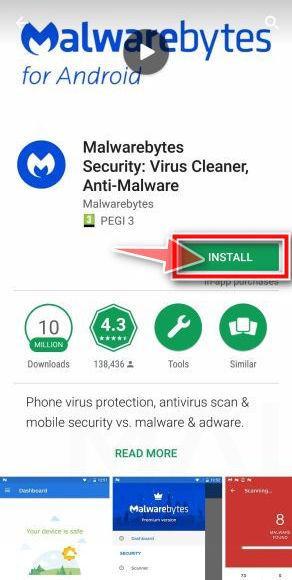
In the Google Play Store, tap “Install” to install Malwarebytes for Android on your device.
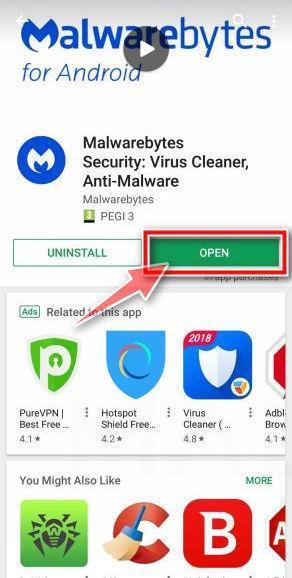
When the installation process has finished, tap “Open” to begin using Malwarebytes for Android. You can also open Malwarebytes by tapping on its icon in your phone menu or home screen.
-
Follow the on-screen prompts to complete the setup process
When Malwarebytes opens, it walks you through a short setup. Tap Get started and follow the prompts. If you see an offer for a trial or a paid plan, read it before you accept. You can skip it and keep using the free scanner.
Malwarebytes will ask for permission to access the files on your phone so it can scan them. Tap Allow, or turn on the permission in the Android screen that opens, then return to Malwarebytes.
-
Run a scan with Malwarebytes for Android
On the main screen, tap Scan now. In some versions, you open the menu, tap Scanner, and then tap Run a scan.
-
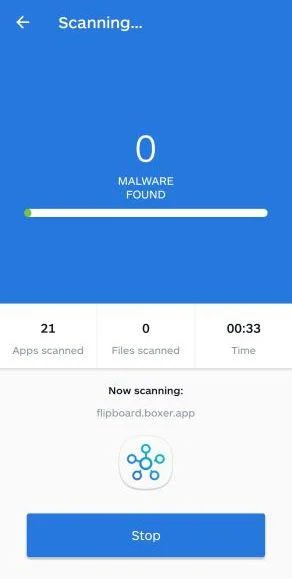
Wait for the Malwarebytes scan to complete.
Malwarebytes will now start scanning your phone for adware and other malicious apps. This process can take a few minutes, so we suggest you do something else and periodically check on the status of the scan to see when it is finished.
-
Remove the detected apps.
When the scan has been completed, you will see a list of the threats that Malwarebytes for Android has detected. Next to each detected item, tap the menu icon (three dots), then choose to uninstall the app or delete the file. Android then asks you to confirm. Tap OK or Uninstall to remove the app.
-
Restart your phone.
When the detected apps are removed, restart your phone if Malwarebytes asks you to. Then check whether the problems you noticed have stopped.
If the problems you noticed continue after the scan, see the options below.
If you are still having problems with your phone after completing these instructions, then please follow one of the steps:
- Ask for help in our Mobile Malware Removal Help & Support forum.
- Only as a last resort, reset your phone to factory settings. Read the warning below first.
- Back up your photos, videos, files, and messages, for example to your Google account or a computer.
- Make sure you know your Google account email and password. The phone asks for them after the reset. If you changed the password recently, Google recommends waiting 24 hours before you reset.
- On a Samsung phone, also make sure you know your Samsung account password.
- If you use an authenticator app for two-step verification, move your accounts to another device or save your backup codes first.
Stay Protected: Block Ads and Malicious Sites
No scan can prove a device is completely clean, so it helps to block threats before they reach you. Most infections start with a malicious ad or a fake download button — so blocking them at the source is your best defense.
We recommend AdGuard, which blocks malicious ads, phishing pages, and dangerous redirects before they can reach you.
👉 Download AdGuard and browse safely
Frequently Asked Questions
Is LottoTracer a real website?
Yes. The website and checkout existed during our review, but existence does not validate the advertising or prove predictive performance.
Can LottoTracer predict winning lottery numbers?
No credible independent evidence we found demonstrates that it changes the published odds or reliably forecasts properly conducted random drawings.
Is LottoTracer a subscription?
The current site explicitly advertises a one-time $147 payment and says no subscription is required. Verify that wording at your checkout.
Does LottoTracer have a money-back guarantee?
Its current refund page provides 14 days. Any advertisement promising 60 days conflicts with that policy and should be preserved.
Was LottoTracer created by a former NASA engineer?
We could not independently verify the promotional engineer, his claimed history, or the breakthrough attributed to him.
Can frequent or overdue numbers improve my chances?
They describe past results. In an independent random drawing, those patterns do not make a particular number due to appear next.
The Bottom Line
LottoTracer may deliver a functioning data dashboard, but its fake news framing and unverifiable NASA story create a misleading impression of proven predictive power.
The official terms acknowledge chance and guarantee no winnings. That admission deserves more weight than testimonials, technical buzzwords, or winner imagery.
If you play, treat every ticket as entertainment with fixed odds. Do not pay for certainty that neither the software nor its seller can provide.

Join the discussion
0 commentsShare your experience or ask a question about this article.
Community experiences
Did this happen to you?
Your experience could help someone recognize the same scam. Submit a private report for our team to review.
I experienced this tooReports are reviewed before publication. Sharing publicly is always your choice.
Discussion
Start the conversation
Have a question or something useful to share? Add the first comment.