


An invoice says a Microsoft 365 Protection plan renewed for $411.99 and the charge will reach your statement within hours. You do not remember buying it, but a support number promises an immediate cancellation.
The Microsoft 365 Protection scam is built around that telephone number, not the invented subscription. Calling 865-385-6811 can place you directly into a rehearsed refund and remote-access operation.
Overview
The $411.99 renewal is a false reason to make you call
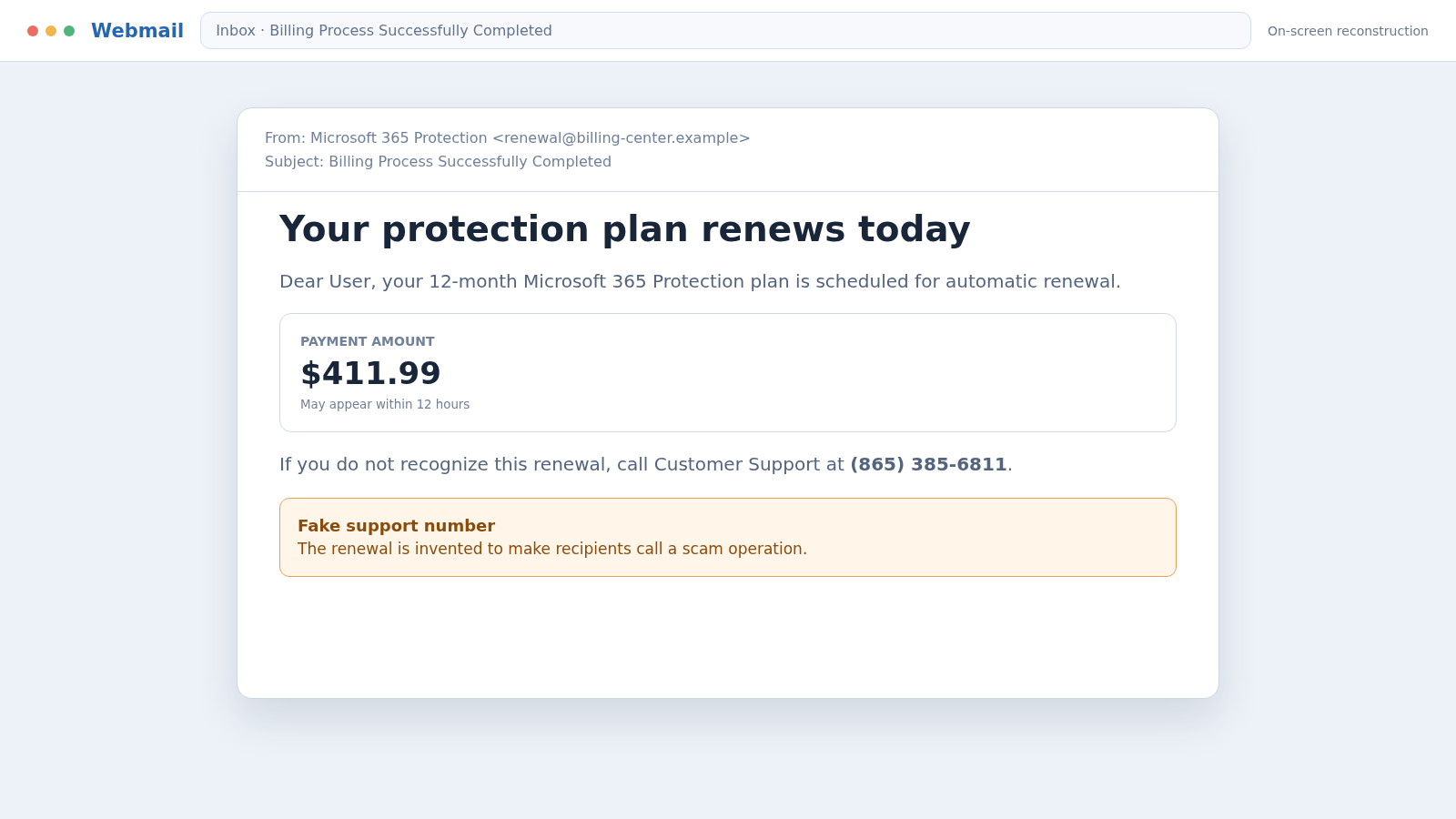
Reported emails use subjects such as “Billing Process Successfully Completed” and claim a Microsoft 365 Protection plan will renew for 12 months. The recipient is told to call 865-385-6811 within a short window if the payment is not recognized.
The message is not a genuine Microsoft invoice. Its purpose is to create enough alarm that the recipient calls the number before checking a bank statement or Microsoft account.
The person answering controls the next stage
A fake support agent may request a name, email address, card number, Microsoft password, one-time code, or access to the computer. The caller is told these steps are required to locate and reverse the charge.
Microsoft states that it does not send unsolicited messages or place unsolicited calls asking for personal or financial information to provide support. A support number inside a surprise billing scare should never be treated as verified.
No real charge is needed for the scam to work
Many recipients will find no $411.99 transaction because the invoice is only bait. The criminal needs the victim to believe a payment is pending long enough to surrender something valuable.
Possible targets include:
- Credit and debit card details
- Microsoft, email, and online banking passwords
- One-time authentication or account recovery codes
- Remote control through legitimate support software
- Gift cards, cryptocurrency, wire transfers, or cash
- Identity details used in later impersonation
- Access to business email and company documents
The safest response is quiet verification. Do not reply or call 865-385-6811. Open the real Microsoft account and bank account independently, then use support options reached through Microsoft’s official website if necessary.
What the Fake Renewal Email Says
The wording is intentionally simple. It addresses a “Dear User,” says a subscription is scheduled to renew today, and warns that the payment may appear within 12 hours.
A product label such as Microsoft 365 Protection sounds plausible without matching a subscription the recipient clearly remembers. The amount is high enough to cause concern but believable enough that many people will not immediately dismiss it.
The message often avoids a clickable cancellation link. That can make it look safer than ordinary phishing, yet the telephone number performs the same role. It moves the victim into an environment controlled by the scammer.
There may be a reference number, coverage period, automated-notification statement, or support-team signature. These are visual props, not evidence that an order exists.
A genuine invoice should correspond to a purchase visible in the customer’s actual account and a payment visible through the card issuer. An email cannot create a debt merely by announcing one.
How the Microsoft 365 Protection Scam Works
Step 1: A fake billing notice reaches a broad audience
The email is sent to many addresses without knowing who owns Microsoft 365. Because Microsoft products are widely used at home and work, a significant share of recipients recognize the brand.
The message may come from an unrelated address, a compromised mailbox, or a display name containing Microsoft. Display names are easy to copy and do not prove the sender controls a Microsoft domain.
Step 2: A deadline creates an urgent cancellation problem
The invoice says $411.99 will be processed today or appear within 12 hours. That short window encourages the recipient to call before reviewing real records.
The fear is carefully chosen: doing nothing appears more dangerous than contacting the number. In reality, calling is what creates exposure.
Step 3: The fake agent asks to verify the account
The person answering 865-385-6811 may introduce themselves as Microsoft Billing, Customer Help Center, or the Subscription Department. A case number and employee ID can be invented on the spot.
The agent requests information supposedly needed to find the order. Every answer helps build a profile, even when the victim never allows remote access or sends money.
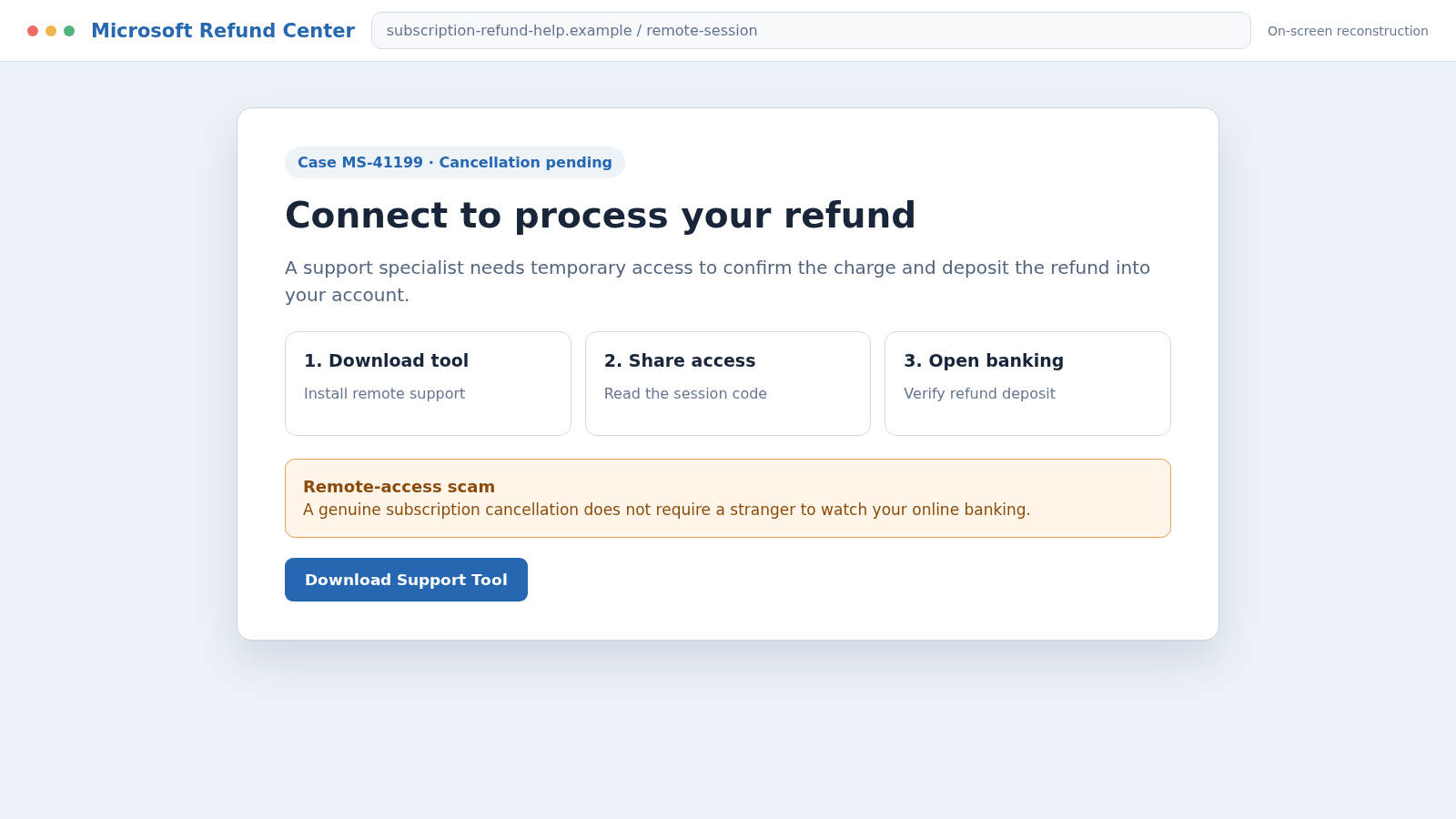
Step 4: A cancellation form or remote tool is introduced
The victim may be directed to a website, asked to install remote-support software, or told to press a key combination that opens a system utility. Legitimate tools are frequently misused because their screens appear professional.
Once remote access is active, the scammer can see files, watch passwords being typed, alter what is displayed, or install additional software. The agent may ask the victim to sign into online banking to receive a refund.
Step 5: Normal computer information becomes fake evidence
The scammer opens logs, command windows, or services and describes routine entries as hackers, expired licenses, or foreign connections. Technical language keeps the victim dependent on the person controlling the screen.
Microsoft warnings do not require a stranger to interpret random system entries during an unsolicited support session. The invented diagnosis simply justifies deeper access.
Step 6: The refund is deliberately made to look too large
In one common version, the victim enters a refund amount while the scammer hides or alters the screen. The bank page then appears to show that $4,119.90 or another larger amount arrived by mistake.
No excess refund occurred. The display may be edited locally, or money may have been moved between the victim’s own accounts. The criminal claims their job is at risk unless the difference is returned.
Step 7: Real money is sent through a hard-to-reverse method
The victim is told to buy gift cards, send cryptocurrency, make a wire, use a payment app, or withdraw cash for courier pickup. The unusual method is explained as a limitation of the refund system.
A real company does not correct an over-refund with gift cards or cash hidden in a parcel. These methods are chosen because the criminal can collect value quickly and disputes are difficult.
Step 8: More errors or security problems extend the theft
If the first payment succeeds, the agent finds another accounting mismatch, blocked transfer, or compromised account. The victim may be kept on the telephone while additional transactions are attempted.
The operation ends when the victim disconnects, the bank intervenes, or no more money is available. Remote access, stolen passwords, and copied files can support later attacks unless they are addressed immediately.
Why Calling the Number Is More Dangerous Than Replying
A telephone conversation lets a trained scammer adapt. If the victim says there is no Microsoft account, the story can change to identity theft. If the bank shows no charge, the agent can claim the transaction is still pending.
The caller may hear age, stress, family circumstances, and technical confidence. Those clues determine whether the next request involves remote access, a card, a bank login, or a transfer.
Staying on the line also prevents independent verification. The agent may warn that hanging up will cancel the refund, complete the charge, or allow hackers to enter the computer.
Do not call merely to confront the sender or ask to be removed. Engagement confirms that the address reaches a person who reacts to billing scares.
Delete the message after saving evidence if needed. If you already called but shared nothing, block the number and remain cautious of follow-up contacts that reference the same invoice.
Warning Signs in the $411.99 Invoice
- You did not buy the named subscription.
- The greeting is generic rather than account-specific.
- The sender address does not use a verified Microsoft domain.
- The message provides a telephone number as the urgent solution.
- The alleged order is absent from the real Microsoft account.
- No matching charge appears in the bank or card account.
- The agent requests remote access to process a cancellation.
- You must sign into online banking while the agent watches.
- A refund appears larger than the supposed purchase.
- Repayment is demanded through gift cards, crypto, wire, or cash.
A polished layout, copyright notice, or product logo does not fix these problems. Criminals can copy Microsoft’s visual identity while directing every response to their own telephone operation.
How to Check a Microsoft Charge Safely
Open a fresh browser tab and type Microsoft’s official account address yourself. Review order history, subscriptions, services, devices, and billing methods without using anything in the email.
Check the card or bank account independently. Look at both posted and pending transactions, but remember that a message claiming a future charge does not require immediate contact with an unknown number.
If a real Microsoft charge exists, use support reached from the authenticated account. If the payment belongs to a card issuer or app store, contact that provider through its official route.
Do not search only for “Microsoft support phone number” and call the first advertisement. Fraudsters can buy search ads and create pages designed to appear above genuine support results.
For a business account, send the email to the internal IT or security team. Do not forward an attachment casually to colleagues; preserve the original message with headers so investigators can review it safely.
Company, Address, and Fulfillment Checks
Find the subscription inside the authenticated account
A genuine Microsoft purchase should connect to an account, tenant, reseller, or app-store record. An email with no matching transaction does not establish a subscription.
Compare the complete sender and reply path
Inspect the actual email address, reply-to value, and linked domains rather than the display name. Lookalike spelling and unrelated consumer mail accounts are strong warnings.
Reach support through Microsoft’s own website
Do not use 865-385-6811 or any number in the suspicious email. Begin inside the official account or Microsoft’s verified support pages and describe the message without granting remote access.
Confirm where the product was supposedly delivered
A real software purchase identifies the account, license, seats, renewal date, and payment record. Vague protection coverage with no accessible service is not meaningful fulfillment.
What to Do if You Have Fallen Victim to This Scam
- Disconnect the call and remote session. Turn off internet access if the scammer still controls the device. Do not warn them before ending access or send a final payment.
- Contact your bank and card issuers. Use numbers printed on cards or official statements. Report the support scam, review transactions, and ask about recalls, disputes, card replacement, and account restrictions.
- Remove remote-access software. From a trusted device, identify programs installed during the call. Then scan the affected computer with Malwarebytes and remove anything suspicious.
- Change passwords from a clean device. Secure email first, then Microsoft, banking, payment, shopping, and other accounts visible during the session. End all active sessions and enable multifactor authentication.
- Review the Microsoft account. Check recovery methods, forwarding rules, devices, app passwords, security events, billing information, and any business tenant access for unauthorized changes.
- Protect exposed identity information. If an SSN or identity document was shared, create a recovery plan through IdentityTheft.gov and consider credit freezes.
- Block malicious follow-up sites. AdGuard can help reduce access to known phishing pages and deceptive advertisements, but it cannot make an unsolicited support call trustworthy.
- Preserve evidence. Save the original email with headers, invoice, telephone number, remote tool name, chat logs, payment receipts, beneficiary details, gift-card codes, and timeline.
- Report the fraud. Notify Microsoft through its scam-reporting route, file at ReportFraud.ftc.gov, and contact local police when money or sensitive business information was lost.
- Watch for recovery scams. A caller claiming to recover the $411.99 or money already sent may be part of the same operation. Never pay an upfront recovery fee.
Frequently Asked Questions
Is 865-385-6811 a Microsoft support number?
Do not use it. The number has been reported in a fake Microsoft 365 Protection renewal email. Reach Microsoft through the official website or authenticated account instead.
Did Microsoft really charge me $411.99?
The email alone does not prove a charge. Check the real Microsoft order history and your bank or card account independently, without calling the number in the message.
Why does the email contain no suspicious link?
The telephone number is the malicious destination. Phone-led scams can steal information, gain remote access, and pressure victims into payments without using a phishing link.
What if I called but did not share information?
End contact, block the number, and watch for tailored follow-up attempts. If you installed nothing, disclosed nothing, and made no payment, the immediate risk is lower.
Can a real Microsoft agent remotely access my computer?
Remote assistance can exist after a customer independently contacts verified support and knowingly starts a session. It should never begin from an unsolicited renewal scare or unknown telephone number.
Should I reply to cancel the subscription?
No. There may be no subscription to cancel. Check the authenticated account, report the message if appropriate, and delete it after preserving any evidence you need.
The Bottom Line
The Microsoft 365 Protection scam uses a fake $411.99 renewal to make 865-385-6811 feel like a rescue line. The invoice is bait; the call creates the opportunity for credential theft, remote access, and a refund story.
Do not call the number or let a stranger control your screen. Verify subscriptions and transactions inside accounts you open independently, and contact the bank quickly if the fake support agent obtained information or money.

Join the discussion
0 commentsShare your experience or ask a question about this article.
Discussion
Start the conversation
Have a question or something useful to share? Add the first comment.